
- OpenDeck empowers users on Linux, macOS, and Windows to fully utilize Elgato Stream Decks with extensive plugin support and customization.
- As an open-source MIDI controller platform, OpenDeck simplifies DIY hardware creation with plug-and-play architecture and web-based configuration.
- The project boasts robust cross-platform compatibility, regular updates, and an active support community.
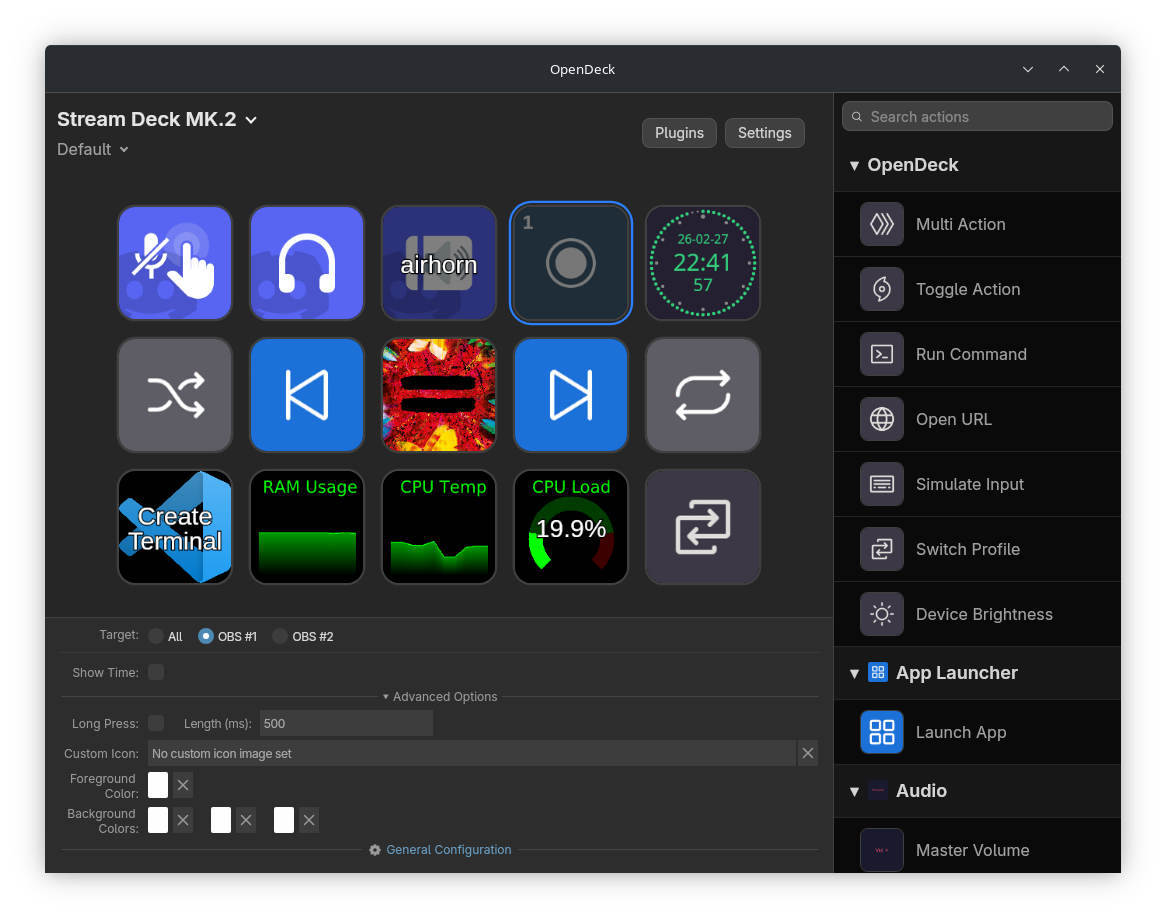
If you’ve ever tinkered with stream controllers or built your own MIDI gear, chances are that names like Elgato Stream Deck or custom MIDI controllers have popped up in your search results. While exploring ways to unlock advanced controls and personalized workflows — especially on Linux or as an open-source enthusiast — you’ve probably come across the term ‘OpenDeck.’ But what is OpenDeck, why is there so much buzz about it in the streaming, Linux, and MIDI-building communities, and what makes it stand out in a sea of software and hardware tools?
This detailed guide breaks down everything you need to know about OpenDeck, showcasing both its identity as an advanced software solution for Elgato stream decks on Linux (and beyond) and as an open hardware/microcontroller platform for MIDI controllers. By the end, you’ll understand not only what OpenDeck is and how it works, but also how it empowers creators, gamers, musicians, and anyone who loves automating tasks or building custom hardware.
Exploring OpenDeck: Dual Faces, Endless Possibilities
OpenDeck is a name that echoes in two major worlds: the streaming community (as advanced cross-platform software for the Elgato Stream Deck) and among DIY MIDI hardware builders (as an open-source platform for assembling custom MIDI controllers). Despite sharing a name, both contexts have unique features and user bases—but they share a philosophy: empowering users through flexibility, open software, and community-driven development.
OpenDeck for Elgato Stream Deck: A New Era for Linux, Windows, and macOS Users
Elgato Stream Decks have revolutionized how creators and streamers manage their setups, scenes, and macros, but there’s long been a problem—especially for Linux users. Elgato’s official software is robust, but it’s primarily built for Windows, leaving Linux and even some macOS users underserved or reliant on limited third-party alternatives. That’s where the OpenDeck application comes in, offering a comprehensive, cross-platform solution that bridges the gap and extends what devices like the Stream Deck Mini or Stream Deck Plus can do.
Key Features of the OpenDeck Application
- Plugin Compatibility: OpenDeck supports hundreds of plugins originally made for Elgato’s native Windows software, significantly expanding possibilities for Linux users who previously had limited actions available.
- Cross-Platform Dynamics: Compatible with all major desktop OSes, with configuration files easily transferable. Through Wine support, plugins designed for Windows can run on Linux or macOS.
- Feature-Rich Control: Provides multi-actions, toggles, profile switching based on active application, and brightness controls, delivering a comprehensive toolkit for streaming workflows.
- Open Source DNA: Licensed under the GNU General Public License (GPL), allowing users to inspect, modify, and contribute to the software and most supported plugins.
- Modern Technology: Built mainly in Rust and TypeScript, offering excellent performance, security, and developer support for critical streaming tasks.
Real-World Benefits: Why OpenDeck Outshines Other Tools
Linux and macOS users often encounter limitations with solutions that only support Windows. Alternatives like streamdeck-ui, Boatswain, or StreamController are either abandoned or offer only basic macro functions. OpenDeck enhances these capabilities with extensive plugin support, including integrations with Discord, OBS remote, HomeAssistant, and Visual Studio Code. Some notable features include:
- Automatic profile switching based on application creates smooth, adaptive workflows for streaming, editing, or productivity tasks.
- Support for multi-actions and toggle actions enables complex, multi-step sequences with a single button press.
- Built-in input simulation and shell command execution allow automation of desktop tasks effortlessly.
- Full customization of icons and labels offers aesthetic and functional personalization.
- Compatibility with Stream Deck Plus dials and brightness dimming enhances device versatility.
- Active community support and development channels via Discord and Matrix foster collaboration and troubleshooting.
OpenDeck is positioned as the only solution that combines advanced plugin support, cross-platform compatibility, and a polished user experience. Unlike other tools stuck in development or with limited action sets, OpenDeck evolves with user feedback and community contributions, ensuring continuous improvement.
Getting Started with OpenDeck for Stream Decks
Installation varies depending on your operating system: Linux users can choose between DEB, RPM, AUR, or Flatpak packages, with the latter being less tested. On Windows and macOS, executable installers in .exe, .msi, .dmg, or .tar.gz are available. It’s recommended to avoid AppImages due to known compatibility issues.
Device detection on Linux may require additional steps. Installing udev rules ensures proper recognition of Elgato devices—often handled automatically by package managers, but sometimes needing manual configuration. Running plugins designed for Windows typically requires Wine, which may also need configuration.
If you want desktop-wide control and plugin support on Linux, OpenDeck is the go-to option. Its open-source foundation provides confidence for tinkerers and power users looking to customize their setup. For the latest updates and more details, visit the official OpenDeck GitHub repository.
OpenDeck as a Platform for Custom MIDI Controllers
Besides streaming management, ‘OpenDeck’ also refers to a respected open-source hardware and firmware platform designed for creating custom MIDI controllers. Created by Shantea Controls, this platform is ideal for DIY enthusiasts and small manufacturers aiming to develop MIDI gear without low-level coding or complex circuit design.
What Makes the OpenDeck MIDI Platform Special?
- Plug-and-Play Hardware: The typical OpenDeck board (~10x10cm) offers connections for up to 64 buttons, 32 encoders, 32 potentiometers or FSRs, and RGB or single-color LEDs, allowing flexible layouts.
- No Programming Required: Uses pre-configured firmware that recognizes controls via USB MIDI without coding—compatible with Windows, macOS, and Linux.
- Web-Based Configuration: Setup and remapping are done through an online interface—this configurator—making customization accessible even for non-technical users. Web MIDI support is necessary.
- Multiple Use Cases: Can function as a MIDI interface, control lighting via MIDI feedback, or handle multiple presets for live and studio environments.
Hardware Details and Board Architecture
The OpenDeck board integrates robust features to ensure reliable control:
- Core Microcontroller: An Atmel ATmega 32u4 (similar to Arduino Leonardo) provides native USB functionality.
- MIDI ports: Equipped with both DIN and USB MIDI connections for versatile hardware compatibility.
- Input Matrix: Uses shift registers and multiplexers for flexible control layouts; analog sensors and LEDs are managed with dedicated circuitry.
- Power: Supplied via USB, with protections against voltage and static discharge.
- Status Indicators: Embedded LEDs display operational states and firmware status.
Developers and hardware builders can also load the open-source firmware onto other compatible microcontrollers, broadening customization options with existing hardware. Further details, schematics, and support are available on the official site.
OpenDeck Workflow: Bringing Hardware and Software Together
OpenDeck excels in unifying custom hardware with advanced configuration while maintaining ease of use.
- Configuration and firmware updates are managed via web interfaces or dedicated apps, enabling quick adjustments—no soldering or firmware flashing needed.
- Building complex controllers is straightforward, supporting applications from large MIDI rigs to portable DJ controllers. Assign different MIDI channels, switch presets, and map controls with ease.
- Community and documentation provide support, with resources for troubleshooting, configuration sharing, and creative projects.
Comparing OpenDeck with Other Solutions
Both the software application for Stream Decks and the hardware platform for MIDI controllers offer superior flexibility compared to most alternatives:
- streamdeck-ui and streamdeck-linux-gui: Simpler, less feature-rich, often outdated or limited to basic macros.
- StreamController: Beta software with limited plugin support, mainly Linux-only.
- Boatswain and Deckmaster: Minimal actions and customization, lacking the extensive community or plugin ecosystem.
- Proprietary MIDI solutions: Frequently closed-source, less open for customization or community-driven development.
Troubleshooting and Community Support
Users facing recognition or plugin issues can rely on comprehensive support channels:
- GitHub issue tracker for bugs and feature requests
- Official docs and setup guides (pay attention to device permissions on Linux)
- Active Discord and Matrix communities for tips, logs, and advice
- Well-documented log files for diagnostics
[relacionado url=”https://www.ikkaro.net/what-is-flipper-zero/”]
Success Stories and Use Cases
OpenDeck’s community demonstrates a wide range of applications—from home studios to live performance installations. Whether creating shortcut decks for editing, custom MIDI drums for shows, or offering fully customizable products, it provides a flexible platform. Small manufacturers leverage it to deliver bespoke, reliable gear paired with community support.
Supporting ongoing development via GitHub Sponsors helps sustain and grow the project.
OpenDeck stands out as a versatile, open, and community-driven alternative for streaming controls and MIDI hardware, embodying the spirit of innovation and customization for creators and enthusiasts alike.