
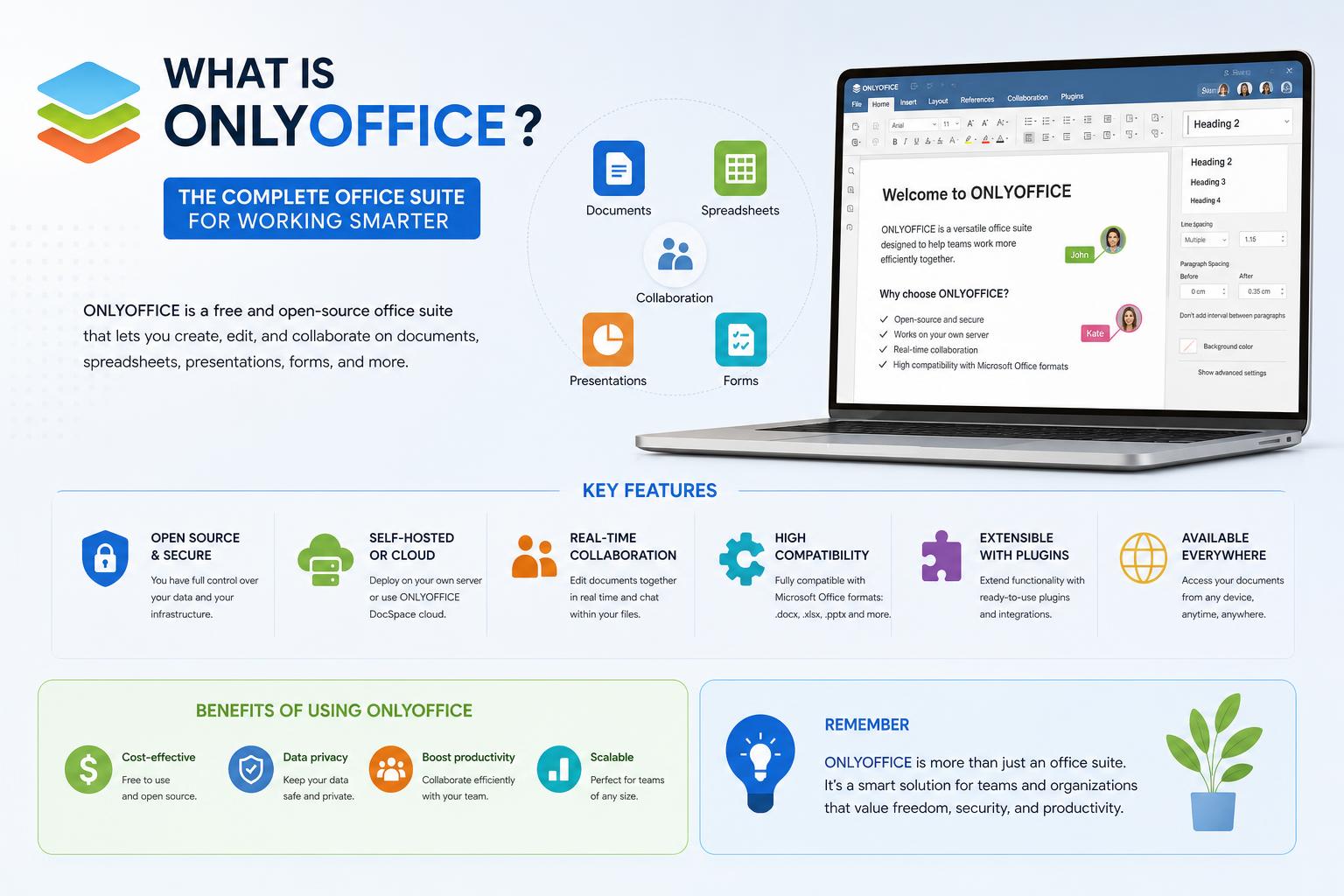
- OnlyOffice offers a powerful suite for editing and collaborating on documents, spreadsheets, presentations, and PDFs across web, desktop, and mobile platforms.
- Its core technology delivers robust compatibility with Microsoft Office formats and enables real-time collaboration features like co-authoring, comments, version tracking, and granular access controls.
- OnlyOffice provides open-source and commercial licensing, and supports integration into enterprise workflows via APIs, connectors, and compatibility with major cloud platforms.
In today’s fast-evolving digital workspace, finding a reliable and versatile office suite that fits all your needs—whether you’re a casual user or a large enterprise—can feel overwhelming. That’s where OnlyOffice steps into the spotlight, bringing together an impressive array of document, spreadsheet, presentation, and PDF editing capabilities across virtually any device you use.
But what exactly is OnlyOffice and why has it grown so popular among individuals, organizations, governments, and IT professionals worldwide? This guide dives deep into what makes OnlyOffice unique, covering its main features, applications, integrations, history, licensing, and even the technical architecture that powers its collaborative engine.
What is OnlyOffice?
OnlyOffice is a full-featured office suite and collaborative platform that enables users to create, edit, and securely share documents, spreadsheets, presentations, fillable forms, and PDFs. It functions across multiple environments—via web browsers, desktop applications for Windows, macOS, Linux, and highly capable mobile apps for Android and iOS.
Thanks to this cross-platform flexibility and its powerful co-authoring tools, OnlyOffice is ideal not just for individual productivity, but also for teams that need to collaborate seamlessly from anywhere. Its design places a strong emphasis on real-time control over your data, letting organizations deploy their own private document infrastructure at scale. Learn more at the official OnlyOffice website.
The Evolution of OnlyOffice: From TeamLab to a Global Suite
Originally known as TeamLab, OnlyOffice began in 2009 under that name, created by Ascensio System SIA. TeamLab was initially an internal team collaboration tool that included social features like blogs, forums, wikis, and a project management module, aimed at boosting internal productivity and communication.
In 2012, the OnlyOffice developers introduced web-based document editors built with HTML5 technology, drawing attention at tech trade shows like CeBIT in Germany. In 2014, the suite was officially renamed OnlyOffice, releasing its source code on platforms like GitHub and SourceForge under the AGPL-3.0 license, cementing its position as both a commercial and open-source alternative to proprietary solutions.
Since then, OnlyOffice has continued expanding, introducing modular components such as OnlyOffice Docs, OnlyOffice Workspace, and OnlyOffice DocSpace, while also integrating WOPI (Web Application Open Platform Interface) to broaden its compatibility. Notably, in 2023 its team reorganized its corporate structure in Singapore, while keeping global development operations running.
Core Components of OnlyOffice
OnlyOffice’s strength lies in its modular architecture—organizations and individuals can pick the tools they need or combine multiple modules for a unified work experience. Here’s an overview of the main components:
- OnlyOffice Docs – The backbone of the suite, providing online editors for documents (DOCX, ODT, RTF, TXT), spreadsheets (XLSX, ODS, CSV), presentations (PPTX, ODP), PDFs, and fillable forms. Its focus is on robust compatibility with MS Office and real-time collaborative editing, with features like track changes, comments, version history, and built-in chat. It can be deployed on private servers or as a cloud service, adapting to the organization’s needs.
- OnlyOffice Desktop Editors – A cross-platform desktop application for Windows, macOS, and Linux, offering offline access to all editing and collaboration features. Thanks to deep integration, users can collaborate in real time on documents when connected to solutions like Nextcloud, ownCloud, Seafile, or DocSpace. Download here.
- OnlyOffice DocSpace – A next-generation collaboration hub introduced in 2023, which creates document rooms and workspaces with configurable permissions for team members, clients, and external partners. It supports deployments both on self-hosted servers and in the cloud, making it easy to adapt to different business contexts. Discover it at OnlyOffice.
- OnlyOffice Workspace – This integrated productivity environment combines document editing, project management, CRM, email, calendars, and a corporate social network—creating an all-in-one digital space for organizations.
- OnlyOffice Document Builder – Built for developers, this tool lets you create and modify documents programmatically using JavaScript scripting, removing the need for manual editing or using the main editors for batch operations.
- Mobile Apps – Available for Android and iOS (download the Android app), these apps let you view, edit, and collaborate from mobile devices, anywhere. They include features for organizing, annotating, password-protecting, scanning, and accessing cloud services and file storage platforms (Nextcloud, Dropbox, OneDrive, kDrive, ownCloud, WebDAV, and more).
Key Features and Capabilities
OnlyOffice isn’t just built for individual users—it’s also designed for teams that demand robust collaboration and compatibility. Here are some of its standout features:
- Real-Time Collaboration – Multiple co-authors can simultaneously edit the same document with features like comments, track changes, chat, and document comparison, while keeping a version history. This streamlines workflows and reduces bottlenecks.
- Granular Access Control – Share documents with specific permissions for editing, review, form-filling, commenting, or read-only access. External links can have expiration dates and restrictions on how the content is accessed.
- Broad format support – Lets you open and edit formats like Microsoft Office’s DOCX, XLSX, PPTX, as well as OpenDocument (ODT, ODS, ODP), PDFs, and others. It also works with Apple files (Pages, Numbers, Keynote), HWP, ODG, Markdown, TXT, HTML, and exports to common formats.
- Advanced editing tools – The desktop and mobile editors offer spell-checking, footnotes, headers, page numbers, charts, tables, images, autoshapes, theme customization, transitions (for presentations), password protection, hyperlinks, and collaborative features across all file types.
- Offline and online access – Edit, view, or organize documents both online in the browser and locally on your device, syncing changes once you reconnect to the internet. Ideal for those on the move or working with intermittent connectivity.
- Integration and workflow flexibility – Connect OnlyOffice directly with existing platforms through REST APIs, pre-built connectors, or the WOPI protocol. Supported integrations include Nextcloud, ownCloud, Seafile, kDrive, Moodle, WordPress, and other document and content management systems.
- Mobile productivity – Scan documents, extract text, edit on the go, and organize files using a familiar interface on mobile devices. The mobile app supports core editing, viewing, and collaboration tasks, from annotations to secure sharing and version control.
Licensing: Open Source Meets Enterprise
One of OnlyOffice’s standout features is its dual licensing structure. Here’s how it works:
- Community Edition (Open Source): The core components are open source, licensed under AGPL-3.0. This ensures maximum transparency, security, and the ability for organizations or individuals to customize it. The source code is available on its GitHub repository.
- Enterprise Edition: For organizations that need advanced features, priority support, management dashboards, additional connectors, or robust deployments, OnlyOffice offers a commercial license.
- Developer Edition: Lets software vendors integrate OnlyOffice’s editors into their own applications with greater flexibility and commercial support.
The desktop and mobile editors are free for personal and collaborative use, but enterprise features and large-scale deployments usually require the appropriate commercial license.
Integrations and API Connectivity
OnlyOffice recognizes that no organization works in a vacuum, which is why integration is essential. Its open architecture supports:
- Connectors for major platforms: Let you integrate OnlyOffice into Nextcloud, ownCloud, Moodle, WordPress, kDrive, Seafile, and others, bringing advanced editing into existing workflows without switching platforms.
- APIs and protocols: Uses the REST API for deep integration, automation, and customization, along with WOPI support for interoperability with other web systems.
Cloud file management, enterprise content, and document handling become easier when OnlyOffice sits at the core of your digital operations.
Artificial Intelligence Features
AI is a booming trend, and OnlyOffice taps into it with real practical value. Through an optional plugin system, users can connect external or locally hosted AI models to improve text generation, summarization, translation, and grammar correction directly within the editors. This feature is configurable—AI capability isn’t enabled by default, but can be turned on to boost both individual and team efficiency.
Contextual AI assistants and automation tools in DocSpace help teams eliminate repetitive tasks, while maintaining security and regulatory compliance.
Security and Data Sovereignty
With growing concerns around privacy, OnlyOffice prioritizes data sovereignty. Organizations can host OnlyOffice on their own infrastructure, ensuring full control over sensitive files. Permission systems, document encryption, and strict access controls provide robust protection, making it trusted by several government agencies (including French public bodies) and privacy-conscious businesses.
Supported Platforms & Technical Foundation
OnlyOffice’s editors are built mainly with HTML, JavaScript, and C++, using the Chromium Embedded Framework (CEF) on desktop, ensuring a consistent experience both online and offline. Here’s a breakdown:
- Desktop editors for Windows, macOS, and Linux
- Web editors accessible from any browser
- Mobile apps for Android and iOS, offering uninterrupted editing and collaboration
Multilingual support extends to more than 45 languages, broadening global accessibility.
Who Develops OnlyOffice?
The project is developed and maintained by Ascensio System SIA, a company founded in Latvia, which now has operations in multiple countries worldwide. Its open-source philosophy, licensing transparency, and global community of contributors keep OnlyOffice up to date, secure, and tailored to its users’ needs.
The Ecosystem: OnlyOffice vs. the Competition
OnlyOffice isn’t the only office suite on the market, but it stands out for its hybrid mix of open-source and commercial licensing, its modular approach, and full collaboration features. Compared to other suites:
- Open-source competitors like LibreOffice, Collabora Online, and Apache OpenOffice focus on local or online document editing, but OnlyOffice prioritizes browser-based collaborative editing, real-time syncing, and broad integration without sacrificing offline capability.
- Proprietary suites like Microsoft 365, Google Workspace, and iWork often restrict code availability and flexibility, while OnlyOffice offers full self-hosting and a free version for those seeking independence and budget control.
Unique Advantages of OnlyOffice
- A truly cross-platform experience – Consistent interface and features across web, desktop, and mobile mean users don’t have to relearn the tools when switching devices.
- Adaptable for every user – Whether you’re a freelancer, a small or medium business, an educational institution, or a government agency, OnlyOffice can be adjusted and scaled to your specific requirements.
- Active community and rapid innovation – Open-source participation and commercial backing ensure frequent updates, security patches, and new features.
- Advanced document collaboration – Beyond simple file sharing, OnlyOffice supports real-time reviews, role-based permissions, sharing via controlled links, and full document lifecycle management.
Licensing Details and Community
The licenses are designed for a wide variety of users and scenarios:
- AGPL-3.0 open-source license: For those who value transparency and control
- Commercial licenses: For enterprise projects that need specialized features, customization, administrative support, or dedicated integration
- Developer licenses: For ISVs integrating OnlyOffice into their own products or platforms
You can explore or contribute to it on its GitHub repository.
Forks, Variants, and Community Projects
OnlyOffice’s open-source nature has led to forks such as R7-Office for the Russian market and Euro-Office for organizations seeking digital sovereignty within the EU. It’s worth noting that since 2019, OnlyOffice in Russia has been managed by a separate entity, and since 2023, there has been no shared code or collaboration with R7-Office. Regulatory changes in Europe and the push toward digital sovereignty have also driven the emergence of Euro-Office, thanks to the compatibility of OnlyOffice’s GPL licensing.
Everyday Uses: What You Can Really Do with OnlyOffice
It’s not just a word processor: OnlyOffice is a complete digital workspace that brings office productivity wherever you need it. It lets you draft and format rich documents, professional spreadsheets, and impactful presentations—online and offline.
- Fill out and distribute PDF forms, create custom templates, and manage document approvals
- Collaborate in real time with distributed teams, track every change, and revert to earlier versions
- Protect sensitive information with role-based permissions, password protection, and local hosting
- Organize projects, client communications, and knowledge management directly from OnlyOffice Workspace
Where to Get OnlyOffice
OnlyOffice is available for download and installation on desktop, as a web app, or through its official mobile apps:
- Visit the official OnlyOffice website for core modules, downloads, and documentation
- Install the Android app here
- More information about OnlyOffice Desktop Editors
Whether you’re looking for transparent open-source tools or enterprise-grade deployments, OnlyOffice’s blend of flexibility, modern design, security, and collaborative power positions it as one of the best solutions for managing, editing, and working on documents as a team.