
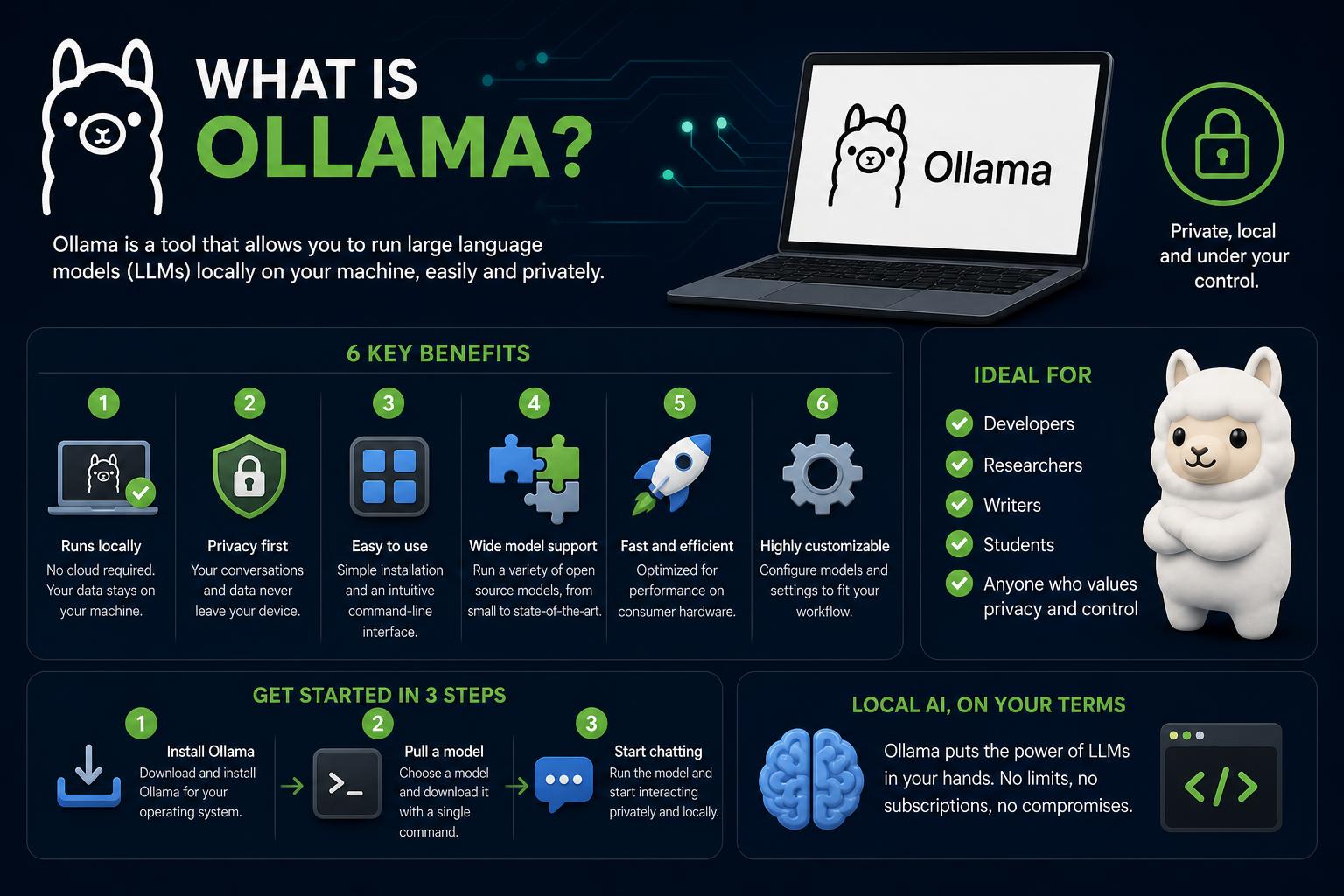
- Ollama enables private, offline AI by running LLMs locally.
- It supports a vast library of open-source models and offers both CLI and GUI tools.
- Key strengths include enhanced data privacy, lower costs, and full customization for developers and businesses.
If you’ve been watching the explosion of AI tools and wondering how you can run powerful language models on your own machine, with true privacy and control, there’s one name that keeps popping up: Ollama. This platform offers a bold shift from the cloud-first world, putting generative AI and language models directly in your hands—no internet or third parties required.
Whether you’re a developer, researcher, or privacy-conscious business, Ollama promises a new way to harness state-of-the-art large language models (LLMs) locally. In this detailed guide, you’ll discover exactly what Ollama does, how it works, its main benefits, real-world applications, and where it fits in the crowded landscape of AI software. Plus, we’ll walk through supported models, platform features, setup steps, and honest comparisons to its top competitors. Ready to find out what makes Ollama such a game-changer?
Ollama in a Nutshell: Local AI for Everyone
Ollama is an open-source, cross-platform tool that lets you download, manage, and run large language models on your own hardware, with total control over your data. Unlike most online AI services, which rely on remote servers and send your inputs to the cloud, Ollama allows you to keep everything—models, prompts, outputs—right on your laptop, workstation, or local network (official website).
This has big implications for privacy, security, speed, and cost. By bringing AI models down to your desktop or server, companies avoid exposing sensitive data to third parties, researchers work without an internet connection, and developers can customize their AI workflows more deeply than ever before.
Ultimate WSL2 Tutorial: Full Guide to Setup, Usage and Best Practices
How Ollama Changes the Game
The motivation behind Ollama is simple: democratize access to heavyweight AI, while making local deployment easier, faster, and more versatile. Instead of wrangling complex installations or getting stuck with cloud paywalls, you can use Ollama to:
- Pull powerful, open-source models like Llama, Mistral, Qwen, Gemma, and DeepSeek schema directly to your device
- Interact with them via a fast, native command-line interface (CLI), desktop app, HTTP REST API, or third-party GUIs
- Run and manage models offline—no data leaves your environment
- Enjoy seamless integration with programming languages (Python, JavaScript, etc.), local tools, and even enterprise usages
The end result? A truly private, flexible AI environment under your full control, capable of everything from crafting content and code to analyzing data—all without sending a single prompt to a cloud provider.
Who Created Ollama and How Does It Work?
Ollama was developed by Jeffrey Morgan and Michael Chiang in 2023 and has quickly become associated with the rise of local LLM software. Its core value is a unified, lightweight runtime that runs on macOS, Linux, and Windows—with support for Apple Silicon now available. The software is primarily written in Go, C, and TypeScript, and it’s distributed under the permissive MIT license, making it both open and extensible. For those interested in peeking under the hood, the source code is on GitHub.
At the technical level, Ollama uses the llama.cpp backend to power local model inference, meaning efficient model execution even on consumer-grade hardware. It supports models through the pull-and-run workflow—you simply fetch a model and start chatting, coding, or analyzing with it using your preferred interface.
Advanced users and teams can leverage Ollama’s native REST API, which follows OpenAI-compatible endpoints. This allows codebases, bots, and applications that use OpenAI’s SDK to instantly switch to a local Ollama model just by changing the base URL. No retraining required, no code rewrite necessary.
The Ultimate Guide to Mastering Windows 11: Hidden Features, Essential Tips, and Advanced Tricks
Main Features of Ollama: What Sets It Apart?
- Run LLMs locally or in private clouds: Say goodbye to cloud dependency and keep your data in-house.
- Full privacy + offline/air-gapped support: Everything—prompts, models, responses—stays on your hardware, crucial for compliance-heavy industries or sensitive research.
- Massive model library support: Ollama provides access to over 4,500 open-weight models, including Llama 3, Qwen, DeepSeek, Gemma, Mistral, Phi, LLaVA, Starling, NeuralChat, Code Llama, and beyond.
- CLI and GUI options: Use the terminal for fine-grained control, or the desktop GUI for a more user-friendly, point-and-click experience (available on macOS and Windows; Linux via CLI and Open WebUI).
- Version management: Track, update, or revert to different model versions—crucial for research, testing, and production deployments.
- Cross-platform performance: Compatible with Windows (preview), Linux, macOS, Apple Silicon, and even virtual private servers/clouds with local access.
- Integration and API flexibility: Works smoothly with automation tools, agents, REST APIs, and programming languages—making it ideal for prototyping or production deployment.
- Cost savings: Local hosting means no per-token API costs—just a one-time hardware investment.
- Direct control and customization: You choose which models to run, update, delete, or tune, adjusting their settings for specific use cases.
Supported Models: Which LLMs Can You Run?
One of the standout features of Ollama is its extensive pre-trained model library. Some of the most notable and widely used models include:
- Llama 3.3 – The flexible, general-purpose assistant, perfect for conversations, summarization, content generation, and Q&A. Available from 8B to 70B parameters.
- Qwen3 – The go-to open LLM for coding tasks, strong on both code generation and general reasoning (Qwen2.5-Coder 32B excels in coding benchmarks).
- DeepSeek-R1 – Specializes in logical reasoning, research workflows, multi-step analysis, and problem-solving.
- Llama 4 Scout – A leading multimodal model, supports text+image, context window up to 10 million tokens (great for document analysis and vision tasks).
- Phi-4 – Compact, research-focused, delivers high math/science reasoning per GB of VRAM—good for medicine, biology, and literature analysis.
- Gemma 3 – Google’s efficient text+image model for vision tasks and language tasks on low-resource machines.
In practice, Ollama’s library offers thousands of open-weight models to choose from based on size, purpose (chat, code, vision), and hardware capacity. Advanced users can even fine-tune models or add new ones as the library grows. The official Ollama library always lists the latest additions, supported sizes, and usage recommendations for each model.
Model Management and Customization
Ollama offers a complete set of model management commands through its CLI or API:
- Create: Design your own models with ollama create.
- Pull: Download pre-trained models from the Ollama library with ollama pull.
- Run: Start a model and chat with it using ollama run {model_name}.
- Remove: Free up space by deleting unwanted models with ollama rm.
- Copy: Clone models for experimentation using ollama cp.
Advanced users can also perform fine-tuning, prompt engineering, and adapt model behavior to fit their specific workflows. For example, adapting a code model to reflect internal standards, or improving a research assistant to summarize specific types of documents.
Privacy, Security, and Cost: Why Teams Love Ollama
Ollama is designed to address some of the main concerns organizations have when adopting AI:
- Unmatched privacy: Data never leaves your ecosystem, which is crucial for regulatory compliance (GDPR, HIPAA, etc.).
- No recurring API or token fees: You pay once for your hardware and can use it as much as you want, ideal for heavy workloads.
- Offline and air-gapped deployments: Suited for secure development, remote research, or internet-free environments.
- Full transparency: The open-source license lets you audit the entire stack. No shadow hosting or hidden costs.
Security considerations: By default, Ollama is set up for local use, but it’s important not to expose servers to the public internet without secure endpoints, since open REST APIs could pose risks. Make sure to use localhost or private networks, especially in multi-user environments.
How to Set Up and Use Ollama
Installation is simple and cross-platform:
- Visit the website and download the installer for macOS, Linux, or Windows (preview version).
- On Linux or Mac, make the script executable (chmod +x) and run it in the terminal. On Windows, double-click it and follow the installation instructions.
- Once installed, download your first model from the Ollama library (for example,
ollama pull llama3, replacing it with any supported model). - Use
ollama run {model_name}to interact with the model via the command line. The desktop GUI (macOS/Windows) or browser-based tools offer a more user-friendly visual environment.
If you need to call the model programmatically, Ollama’s OpenAI-compatible API lets you send POST requests for chat or completion tasks—ideal for integrating into applications, scripts, or bots.
Command-Line and GUI Interfaces: Best of Both Worlds
Ollama is geared toward the command line: developers who prefer using the terminal get full management—downloading, running, updating, deleting, and copying models—right at their fingertips. For those who prefer a visual interface, the desktop GUI (currently on macOS and Windows) offers:
- Visual model management (add/remove/update/view versions)
- Direct chat interfaces
- Drag-and-drop text and images (on supported multimodal models)
Linux users without a native graphical interface can take advantage of browser-based GUIs like Open WebUI, or manage Ollama purely via CLI or third-party integrations.
WSL2 Virtualization Won’t Start? Complete Troubleshooting and Solutions Guide
Comparisons: Ollama vs. LM Studio, GPT4All, and vLLM
Wondering how Ollama compares to other popular tools for running local LLMs? Here’s an honest comparison:
- LM Studio: A polished experience with a graphical interface, Hugging Face integration, and easier for non-programmers. However, it’s proprietary and doesn’t share Ollama’s transparency. Great for those who want visual tuning and easy exploration.
- GPT4All: Simple, fast, beginner-friendly; offers a clean chat interface and a curated model library, though with less variety than Ollama. Lacks Ollama’s advanced model management and GPU performance.
- vLLM: Built for high performance in enterprise environments. Offers OpenAI-compatible APIs and is perfect for serving many users in production. Many teams use Ollama for development and vLLM for deployment, since both are compatible and can be combined.
In short, if you value flexibility, open-source security, full control over your models, and advanced CLI or API access, Ollama stands out. Visually oriented users might prefer LM Studio, while beginners looking for simplicity might go for GPT4All.
Real-World Applications: How Is Ollama Used?
Ollama has a wide range of use cases thanks to its flexibility:
- Building private chatbots and assistants for customer support or internal use, ensuring sensitive data stays within the organization (legal, healthcare, finance).
- Developing coding assistants and automation tools—ideal for generating, explaining, or reviewing code snippets without sending proprietary logic to the cloud.
- Offline research and analysis—perfect for academic projects or secure industries, keeping all computation local and intellectual property protected.
- Integrating local AI into enterprise platforms—such as CMS or CRM systems, for recommendations and advanced analysis, without disrupting existing infrastructure.
- Processing documents, images, or multimodal data—especially with models like Llama 4 Scout or Gemma 3, which understand both text and images.
Even in remote or internet-free environments, Ollama makes it possible to carry out tasks entirely offline.
Advantages Over Cloud-Based AI
- Maximum privacy: Your data stays under your control, with no risk of cloud leaks.
- Independence from external services: No recurring costs, full control over spending.
- Freedom to customize: Adjust models to your needs without waiting for provider approval.
- Long-term savings: No monthly fees, just an investment in hardware.
- Offline accessibility: Work without interruptions, even without a connection.
Where Ollama Might Miss for Teams
Ollama works well for individual or local use, but some organizational needs require additional tools:
- No built-in access or permissions management: any user with access can use the endpoint.
- No per-team usage tracking or prompt limits; this can be managed with gateways or external tools.
- Each Ollama instance is independent, so syncing across large teams requires additional infrastructure.
Tools like TrueFoundry make it easier to integrate Ollama into corporate environments, adding authentication, auditing, and traffic management for larger-scale deployments.
Are There Any Limitations or Challenges?
There’s no perfect tool. Ollama depends on your local hardware resources (CPU, GPU, RAM), which limits model size and speed. Large models can be slow or too demanding on consumer-grade machines.
Its scalability is focused on local experimentation, not on deployments handling many simultaneous requests—for that, tools like vLLM are better suited. Also, Ollama only supports open-weight models; proprietary models (like GPT-4) aren’t directly available, but can be accessed through their separate APIs.
Popular Use Cases: Where Ollama Excels
- Privacy-focused enterprise workflows (legal, healthcare, finance, research)
- Education and academia (affordable, secure AI labs)
- Agile AI development (prototyping, experimentation, and tuning)
- Low-connectivity or internet-restricted environments (military, NGOs, rural areas)
- Entrepreneurs and creators looking to avoid data and API costs
What is the International Asteroid Warning Network (IAWN)? Complete Guide
Ollama’s Growing Ecosystem
Ollama’s community is dynamic and rapidly growing. With millions of monthly installs, there’s a wealth of documentation, tutorials, community guides, and integrations with other tools—from Open WebUI on Linux to Python libraries for AI automation. The official Ollama documentation is a key resource for getting started or troubleshooting.
Recent improvements include:
- Support for modern hardware (Apple Silicon, Nvidia/AMD GPUs)
- An expanded model catalog with more multimodal and vision options
- Improvements in integration with AI agents, coding assistants, and enterprise platforms
- Security hardening to prevent unintended exposure
Ollama offers an open, customizable, and private way to run high-level AI models without giving up control or paying steep fees. Those who value security, flexibility, and cost savings will likely find Ollama to be the local AI solution they’ve been looking for.