
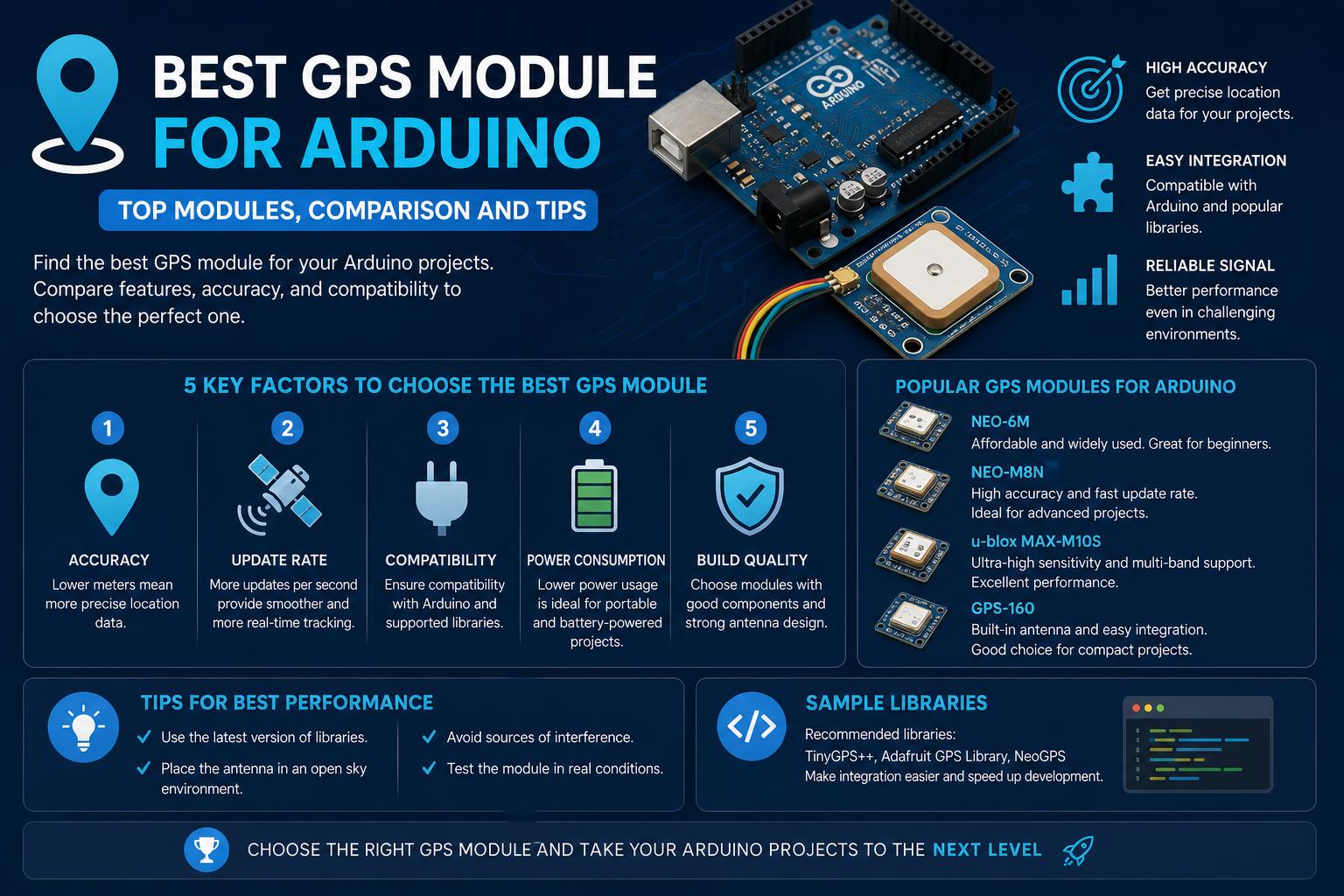
- Explore a detailed comparison of the most popular GPS modules for Arduino, including real implementation notes.
- Understand essential buying criteria such as accuracy, update rate, antenna type, and module size.
- Get clarity on practical integration tips for seamless Arduino compatibility and reliable GPS performance.
Arduino projects with GPS functionality are becoming increasingly popular among hobbyists, educators, and makers who want to empower their devices with accurate positioning data. From simple location trackers to advanced navigation and timing applications, reliable GPS modules have never been more accessible or versatile. But with so many options on the market, picking the best GPS module for your project can be overwhelming.
This guide brings together hands-on feedback, expert advice, and the latest module comparisons from top sources and active communities. Whether you’re a newcomer to GPS for Arduino or a seasoned developer seeking the latest technology, you’ll find all the information you need right here to make a smart, informed decision for your next build.
What Makes a Great Arduino GPS Module?
Choosing the right GPS module for your Arduino project depends on several core factors: signal sensitivity, update rate, form factor, power requirements, satellite channel support, and of course, ease of integration. It’s not just about picking a brand—different modules excel in different environments or applications. If you want your GPS setup to lock onto signals quickly, run for hours on a battery, and give you precision fit for scientific measurements, you need to dig into the details.
Popular GPS Modules for Arduino: Real User Experiences
One of the most frequently referenced modules in the Arduino community is the NEO-6M, often found on a breakout board like the GY-NEO6MV2. Users highlight its fast time to first fix and impressive sensitivity, even indoors. For instance, a user reports on the Arduino Community Forum that the NEO-6M started picking up valid NMEA sentences within minutes—even from inside a house. This level of performance is exceptional for a budget-friendly GPS module, making it a staple for beginner projects and affordable prototypes.
Compatibility and wiring are straightforward, especially with popular microcontrollers like the ESP32 and Arduino Uno. A sample setup involves connecting the GPS’s VCC and GND to the board, and its RX/TX pins to digital pins on the microcontroller—plus, you’ll find plenty of documented code snippets and working examples directly shared by the Arduino community.
Expert Comparison: Best GPS Modules on the Market (2024)
When it comes to advanced modules, several options stand out thanks to their high update rates, sensitivity, multi-GNSS support, and extra features. Let’s break down some of the most popular and capable models, with data curated and summarized from user feedback, leading electronics retailers, and expert resources:
- u-blox NEO-6M: Works extremely well for basic GPS tracking with Arduino. It’s affordable, reliable, and boasts community-tested code. Usually comes with its own ceramic antenna, runs on 3.3V or 5V, and offers a 1Hz update rate (can be customized with advanced commands).
- u-blox NEO-M8N/M8Q: These newer versions support both GPS and GLONASS (multi-GNSS) and support 10Hz update rates. The M8Q variant in particular is valued for its small size and high efficiency. These are a solid upgrade for when you need faster positioning or are in challenging environments.
- SAM-M8Q/SAM-M10Q: These variants offer very compact designs with integrated chip antennas. The SAM-M10Q brings additional features for next-gen performance, further shrinking the hardware footprint while boosting power efficiency.
- MAX-M10S: This breakout emphasizes speedy locking and low power—ideal for mobile or wearable applications, according to the SparkFun GPS/GNSS Guide.
- ZED-F9P/ZED-F9R: Geared towards high-precision timing and Real-Time Kinematic (RTK) tasks, these modules offer accuracy down to the centimeter level (ideal for robotics, precision agriculture, or survey work). It comes at a cost and with more challenging integration, but nothing else beats them for absolute accuracy. RTK-ready modules require external antennae and extra setup.
- XA1110: Known for its versatility and compatibility with Qwiic systems (I2C-based plug-and-play for SparkFun’s ecosystem), this one is compact and efficient.
Understanding Key Specs: What Matters When Buying
Let’s unpack the technical jargon to help you identify what really makes a difference for your Arduino project:
Update Rate
The update rate is how often the module recalculates your position. The industry standard is 1Hz (once per second), perfectly fine for most stationary projects or slow-moving applications. If you’re making a tracker for a car, drone, or fast-moving object, consider getting a module that supports 5Hz or even 10Hz, as these keep up with rapid movement and ensure near-instant feedback. However, remember: higher update rates flood your Arduino with more NMEA sentences—which can overwhelm older, less powerful boards. Most fast modules can be dialed down to a slower rate if your code can’t keep up.
Sensitivity and Antenna Quality
Module sensitivity (measured in dBm) determines how well it can pick up signals from weak, far-off satellites. Top-performing modules advertise chipsets with -165 dBm sensitivity or better. But even the best chip needs a solid antenna. Most low-cost breakouts (such as the NEO-6M) include a pre-matched ceramic patch antenna—trimmed precisely for the GPS L1 frequency of 1.57542 GHz. Compact modules may offer chip antennas (smaller physical size), but these often trade range and reliability for miniaturization.
For best results, always point the antenna skyward or near a window in urban areas. Getting a lock indoors is possible, but not guaranteed—especially in buildings with lots of metal or concrete. Some modules, like the NEO-6M, can surprise you with their ability to get a fix inside, but this is the exception, not the rule.
Power Consumption
On average, GPS modules draw around 30mA at 3.3V or 5V, plus extra if the antenna has an integrated amplifier. This is important if you’re running your project on batteries. If you see extremely low power consumption advertised, make sure it accounts for both the chipset and antenna—sometimes a low number means no antenna, which is not realistic for real use.
Number of Channels
More channels mean the module can try to lock onto more satellites simultaneously. Typical modules provide around 12-14 channels. Advanced chipsets (like the latest multi-GNSS types) can support dozens of satellite channels at once, reducing the time to first fix and improving signal reliability in tough environments. After the first lock, some modules actively manage channels to save power.
Form Factor and Integration
If your project needs to be pocket-sized, consider modules with a small PCB footprint and integrated chip antennas. Compact modules like the GY-NEO6MV2 or SAM-M10Q offer a lot of flexibility for tight builds, but always make sure your antenna isn’t so tiny that it compromises lock time or overall accuracy.
GPS vs GNSS: What’s the Difference?
In technical lingo, GPS refers to the United States’ GNSS (Global Navigation Satellite System), while GNSS covers all satellite positioning systems worldwide, including GLONASS, Galileo, and BeiDou. Newer modules can access multiple networks for faster and more reliable fixes. If you work in areas with stubborn satellite reception or travel globally with your projects, opt for a multi-GNSS module like the NEO-M8N or M10Q. For most hobbyist builds, classic GPS-only units like the NEO-6M are adequate and often less expensive.
Shopper’s Corner: Notable GPS Modules for Arduino
Not all modules are created equal, and some brands stand out in terms of user support, documentation, and project friendliness. Here are a few product highlights from key vendors:
- SparkFun: Offers a full lineup—everything from entry-level breakouts to RTK surveyor kits. Their GPS/GNSS Buying Guide is a must-read for a detailed technical breakdown.
- Adafruit: Renowned for their ‘Ultimate GPS’ series, which, while tailored for Raspberry Pi in some cases, works equally well with Arduino and ESP32 boards. Product ID 2324, for example, claims -165 dBm sensitivity and 10Hz updates, plus loads of channels for fast, reliable fixes. Ideal for projects where positioning and timing really matter. Check out their product category directly.
- Generic NEO-6M GPS Modules: Widespread, low-cost, and come with easy Arduino compatibility. Widely used in drones, location trackers, and IoT sensors. Accessible through multiple electronics vendors and marketplaces (Amazon link).
Hints and Gotchas from the Community
One key insight from experienced makers: GPS modules solely receive signals; they don’t communicate between each other. If you need to track two separate Arduino devices and share positioning, each will require its own GPS module and some kind of RF transceiver/communication channel (e.g., LoRa, WiFi, Bluetooth). This came up in a lively discussion on the Arduino Product Design forum.
For code integration, basic Serial monitoring is usually enough for beginner examples, but libraries like TinyGPS++ or Adafruit_GPS make parsing NMEA data much easier. These libraries handle the tricky work of extracting coordinates, managing update intervals, and error checking. Open-source code is everywhere—in fact, real-world setups frequently share Serial and wiring examples, including pin definitions and loop logic to read GPS data right into your Sketch.
Advanced Features: Dead Reckoning, RTK, and Beyond
For power users, features like Dead Reckoning (using on-board sensors to estimate your position between satellite fixes) and RTK (Real-Time Kinematic corrections for centimeter-level accuracy) are becoming more available and affordable. These are overkill for most hobbyist projects but can be crucial for robots, autonomous vehicles, or agricultural surveying.
Manufacturers like u-blox and SparkFun offer RTK-ready modules (such as the ZED-F9P and ZED-F9R) and dead reckoning boards that can also integrate with external IMUs. RTK requires an external correction signal—usually via radio or internet—and a compatible base station, so don’t dive in unless your app truly needs pinpoint accuracy.
Indoor vs Outdoor Use: Setting Expectations
The practical range of a GPS module is worldwide, but performance varies dramatically between outdoor and indoor settings. Thick walls, metal, and urban canyons can disrupt satellite signals, leading to longer fix times or unreliable readings. The best modules can sometimes get a valid location indoors, but for mission-critical data, always try to test and deploy your module outdoors or with a clear view of the sky.
Integration Examples: ESP32, Arduino Uno & More
Setting up a GPS module with Arduino is often as simple as connecting VCC/GND and RX/TX to your chosen board. For the ESP32 and GY-NEO6MV2, for example, connect the GPS VCC to the 3.3V pin, GND to ground, and cross-wire TX to RX and vice versa for communication. Then use any serial monitor to read the $GPGGA, $GPRMC, and related NMEA sentences, or decode them using a library for user-friendly output.
Many modules can be reconfigured with custom baud rates, update intervals, and GNSS modes, generally via a simple configuration command sent over serial before entering your main loop.
Price Considerations & Vendor Differences
GPS modules range in price from under $10 (for basic NEO-6M clones) to over $100 for advanced RTK-capable units. Higher prices usually bring extra features: more satellite channels, faster fix times, multi-GNSS compatibility, and improved accuracy. Take care when shopping at online marketplaces—always look for clear product documentation, a reputable seller, and ideally some community reviews to ensure compatibility with Arduino boards.
Final Thoughts
Modern GPS modules for Arduino have come a long way—offering hobbyists and professionals alike a variety of reliable options at every price point. For most makers, the affordable NEO-6M (and its growing list of variants) provides excellent results with minimal fuss. Those needing extra speed, precision, or compact form factors can safely hunt for newer models like the NEO-M8, ZOE-M8Q, or specialized RTK-ready units. Proper antenna placement and wiring practices are just as crucial as chipset specs for achieving accurate positioning. With the range of modules and tools now available, integrating GPS functionality into your Arduino project is more accessible—and accurate—than ever before.