
- Ubuntu 25.10 introduces major security, accessibility, and hardware support upgrades, including a full switch to Wayland, a new kernel, and memory-safe system tools.
- GNOME 49 powers the desktop experience with new applications, improved accessibility, modern design tweaks, and enhanced performance tailored for diverse hardware.
- Developers benefit from refreshed toolchains, Dracut-based boot processes, and pioneering Rust-based implementations of crucial command-line utilities for added resilience and reliability.

Ubuntu 25.10, affectionately dubbed “Questing Quokka,” ushers in a new chapter for one of the world’s most beloved Linux distributions. Released as the final interim milestone before the much-anticipated Ubuntu 26.04 LTS, this version delivers a wealth of improvements that span security, hardware compatibility, usability, and the overall user experience. Whether you’re a casual desktop user, a developer, or a system administrator handling enterprise-scale deployments, Ubuntu 25.10 sets a high bar for what’s possible in modern open-source operating systems.
This complete walkthrough blends all the standout information from official announcements, Linux news outlets, and technical deep-dives into one seamless resource. Here, you’ll get a fresh, natural perspective on everything Ubuntu 25.10 brings to the table—what’s new, what’s changing, and what it means for you—without recycled phrasing or dry rehashes of press releases. Ready to get up to speed on the Questing Quokka? Let’s dive in.
Ubuntu 25.10 “Questing Quokka” at a Glance
Ubuntu 25.10, launched on October 9, 2025, is packed with fresh features, foundational changes, and a forward-looking philosophy. This is not a long-term support (LTS) release but an interim version, which means you’ll get nine months of updates and maintenance—enough to bridge the gap until the next LTS but also a perfect opportunity to experience cutting-edge enhancements ahead of mainstream adoption.
As the code name suggests, “Questing Quokka” embodies a spirit of exploration and optimism. This small marsupial, native to Australia, is famed for its cheerful disposition. Ubuntu’s latest release channels this energy into an OS that’s increasingly user-friendly, reliable, and, most importantly, fun to use.
Key details:
- Release date: October 9, 2025
- Support window: 9 months (ends July 2026)
- Codename: Questing Quokka
- Kernel: Linux 6.17
- Default desktop: GNOME 49 (Wayland-only)
- Major focus: Security hardening, accessibility, upgraded toolchains, modernized core utilities, and broader hardware support
For more, see the official release announcement by Canonical.
Major Features and Improvements in Ubuntu 25.10
Ubuntu 25.10 is jam-packed with both visible and under-the-hood changes. The development team at Canonical made sure this release sets the foundation for Ubuntu’s next big leap with 26.04 LTS in April 2026. Let’s break down the areas that received the biggest attention.
GNOME 49 Desktop: A More Refined, Accessible Experience
The heart of the Ubuntu desktop is GNOME, and the upgrade to GNOME 49 brings a wave of genuinely helpful enhancements:
- Lock screen media controls: Play, pause, or skip tracks right from the lock screen, with album art and track info visible for a smoother multimedia experience.
- Per-monitor brightness: In the Quick Settings menu, you can now adjust brightness levels for each screen individually—essential for multi-monitor setups.
- Improved accessibility: Ubuntu aligns with the European Accessibility Act by enhancing high-contrast support, keyboard navigation, and introducing screen reader improvements. The login screen also features a prominent accessibility menu in the lower right, giving you instant access to tools like the on-screen keyboard and screen magnification before logging in.
- User interface (UI) polish: GNOME 49 introduces smoother shell animations (using new “scale” and “quad” effects), subtle tweaks to icon sets (like a refreshed trash can), and a new loading spinner that appears during boot and loading operations. The result is a desktop that not only feels faster but also looks more modern and cohesive.
- File manager (Nautilus) updates: There’s a redesigned search popover with pill-shaped buttons, a handy calendar widget for filtering files by modification date, and clearer indicators when files are cut and moved. Hidden content is rendered with partial transparency for easy differentiation. A new keyboard shortcut (Ctrl + .) quickly opens the current folder in the terminal.
- Startup Applications migration: The classic Startup Applications panel is gone. Now, you manage autostart programs via the Settings > Applications section, toggling individual apps as needed. While less flexible for scripting than the old tool, it keeps things streamlined (though power users might miss the ability to run custom commands at login).
- Notification and Do Not Disturb controls relocated: The “Do Not Disturb” setting is now in Quick Settings, making it easier to silence notifications alongside other system toggles.
If you’re interested in even more details, check out the GNOME project’s official release notes.
Wayland-Only Desktop Environment: X11 is Officially Out
Ubuntu 25.10 moves boldly into the future by dropping support for running GNOME on X11/Xorg. This change, initiated upstream by GNOME, means the Wayland display server is now the only option for GNOME sessions.
- You can still run X11 applications via XWayland compatibility.
- Xorg server packages remain in the repositories for users who need them for other desktop environments (like Xfce, MATE, etc.).
- Kubuntu 25.10, the KDE-based official flavor, also defaults to Wayland for new installs.
- If your workflow absolutely depends on a full X11 session for GNOME, it’s best to stick with Ubuntu 24.04 LTS or switch to a different flavor.
For the vast majority of users, this change will go unnoticed and means greater security, smoother graphics, and better touch/trackpad support.
Brand New Default Applications
Ubuntu 25.10 swaps out core desktop apps for modern, security-focused replacements:
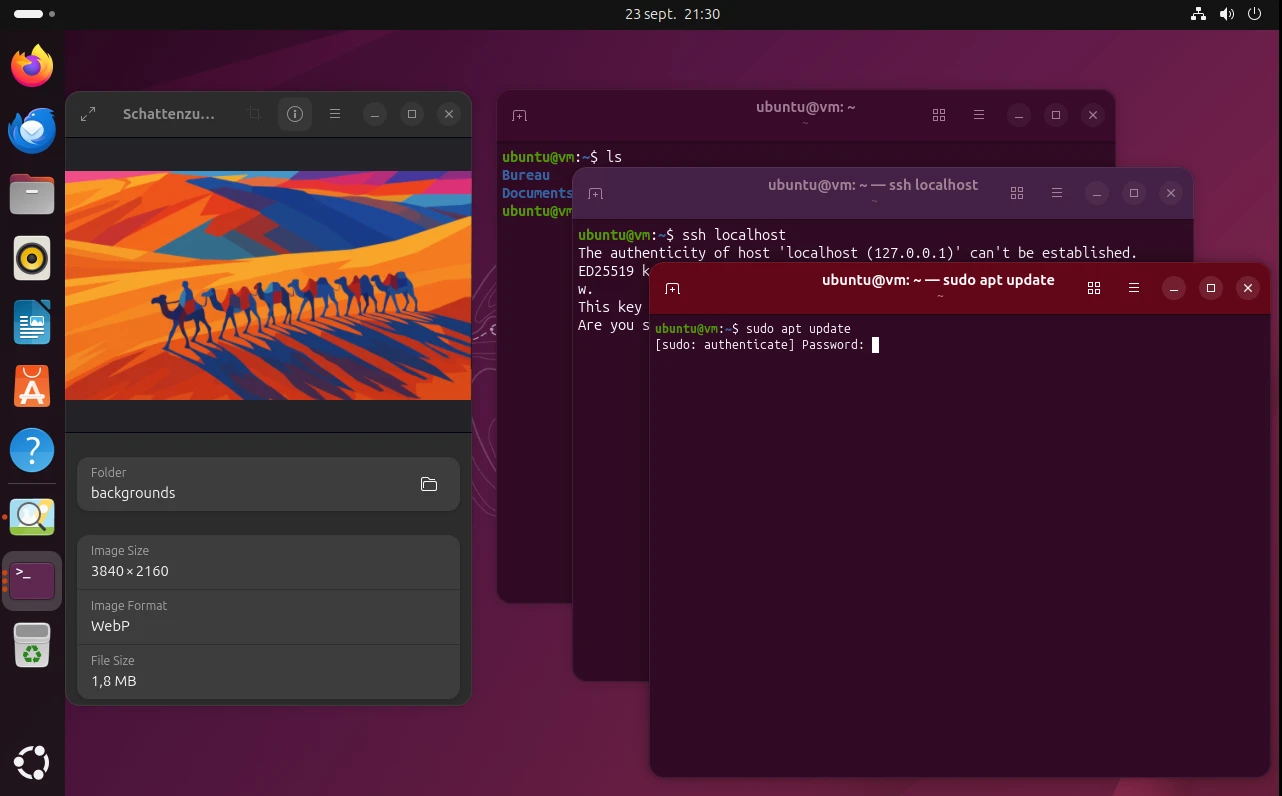
- Ptyxis as terminal emulator: Replacing GNOME Terminal, Ptyxis is a sleek GTK4/libAdwaita terminal built for today’s container-based workflows. It integrates seamlessly with Podman, Distrobox, and Toolbx, and even includes a built-in inspector for debugging terminal apps. A neat touch: when you run a command with
sudo, the terminal’s header bar turns red, signaling elevated privileges. - Loupe as default image viewer: Taking over from Eye of GNOME, Loupe offers GPU-accelerated rendering, intuitive multi-touch gestures, and enhanced sandboxing for security. This means images open faster and you’re less exposed when handling files from unknown sources.
- Simplified update notifications: The update manager is less intrusive—when updates are ready, you receive a desktop notification with direct options to review or install. Ignore it, and a tray applet shows pending updates, letting you handle them on your terms.
Modernizing the Core: Rust-based sudo and Coreutils
One of the standout changes under the hood is Ubuntu’s adoption of Rust-based system tools:
- sudo-rs: Ubuntu 25.10 replaces the classic sudo command with sudo-rs, a Rust implementation focusing on memory safety. This reduces the attack surface for privilege escalation—one of the most critical security concerns on any Unix-like system. The original sudo is still available in the repositories for compatibility, but new installs will default to sudo-rs.
- rust-coreutils: The suite of fundamental command-line tools (like
ls,cp,mv, andcat) is now provided by rust-coreutils for memory safety and future-proofing. Performance quirks in previous development cycles have been addressed, and the GNU versions remain available for those who need them.
These changes demonstrate Canonical’s commitment to building a more resilient, secure foundation for both desktop and enterprise environments. For system administrators or developers keen on security, this move is a dream come true.
TPM-backed Full Disk Encryption: Hardware-Level Protection
Ubuntu brings experimental support for full-disk encryption tied to the Trusted Platform Module (TPM) found in most modern computers. Here’s why this matters:
- A TPM stores cryptographic keys securely in hardware, making it much harder for attackers to gain access to disk contents if the device is lost or stolen.
- You can unlock your disk automatically using TPM or add a passphrase for even more protection.
- The installer now gives clear guidance on when TPM-based encryption can or cannot be used, and helps you set up and manage recovery keys.
- Firmware updates will warn you if changes might affect the TPM state and your ability to access your data.
- This feature is not yet recommended for production systems, but security-conscious users can start experimenting today, shaping its maturity for future LTS releases.
Network Time Security (NTS) by Default
Ubuntu 25.10 uses Chrony como daemon de sincronización de tiempo, con NTS habilitado por defecto. NTS ofrece autenticación criptográfica para las fuentes de tiempo, abordando vulnerabilidades en el protocolo NTP tradicional. La precisión y confiabilidad del tiempo son clave para certificados seguros, comunicaciones cifradas y operaciones criptográficas robustas.
Developer Toolchains & Underlying Technologies
Ubuntu 25.10 es un entorno ideal para desarrolladores, con actualizaciones en las cadenas de herramientas y bibliotecas principales:
- Compiladores y toolchains: GCC 15, OpenJDK 25, Rust 1.85 (con 1.88 disponible), Python 3.14 (RC3), Go 1.25, .NET 10 (preview), Zig (versión previa).
- Actualizaciones en bibliotecas y sistemas: GNU C Library 2.42, LLVM 20, Boost 1.88, GNU Binutils 2.45, OpenSSL 3.5.3, systemd 257.9, BlueZ 5.83, PipeWire 1.4.7, Mesa 25.2.
Refined User Experience and Visual Tweaks
Ubuntu 25.10 sports a fresh visual identity—think new wallpapers from community competitions, improved icon consistency, and subtle design polishing throughout the GNOME Shell theme. A smaller monospace font (now 11pt, down from 13pt) is more harmonious with the rest of the UI, especialmente cuando utilizas el nuevo terminal predeterminado.
Desktop icons are now more accessible, supporting keyboard navigation and proper screen reader cues. The Yaru icon set, central to Ubuntu’s distinctive look, gains new artwork for a more unified and modern feel.
Update Notifications and System Management
Ever been interrupted mid-task by a random Update Manager popup? That’s less likely now: Ubuntu 25.10 makes update notifications less intrusive and more actionable. Notifications pop up with options to either open the Update Manager or install updates directly. If you miss these, a discreet system tray applet will quietly track outstanding updates so you can act when you’re ready.