
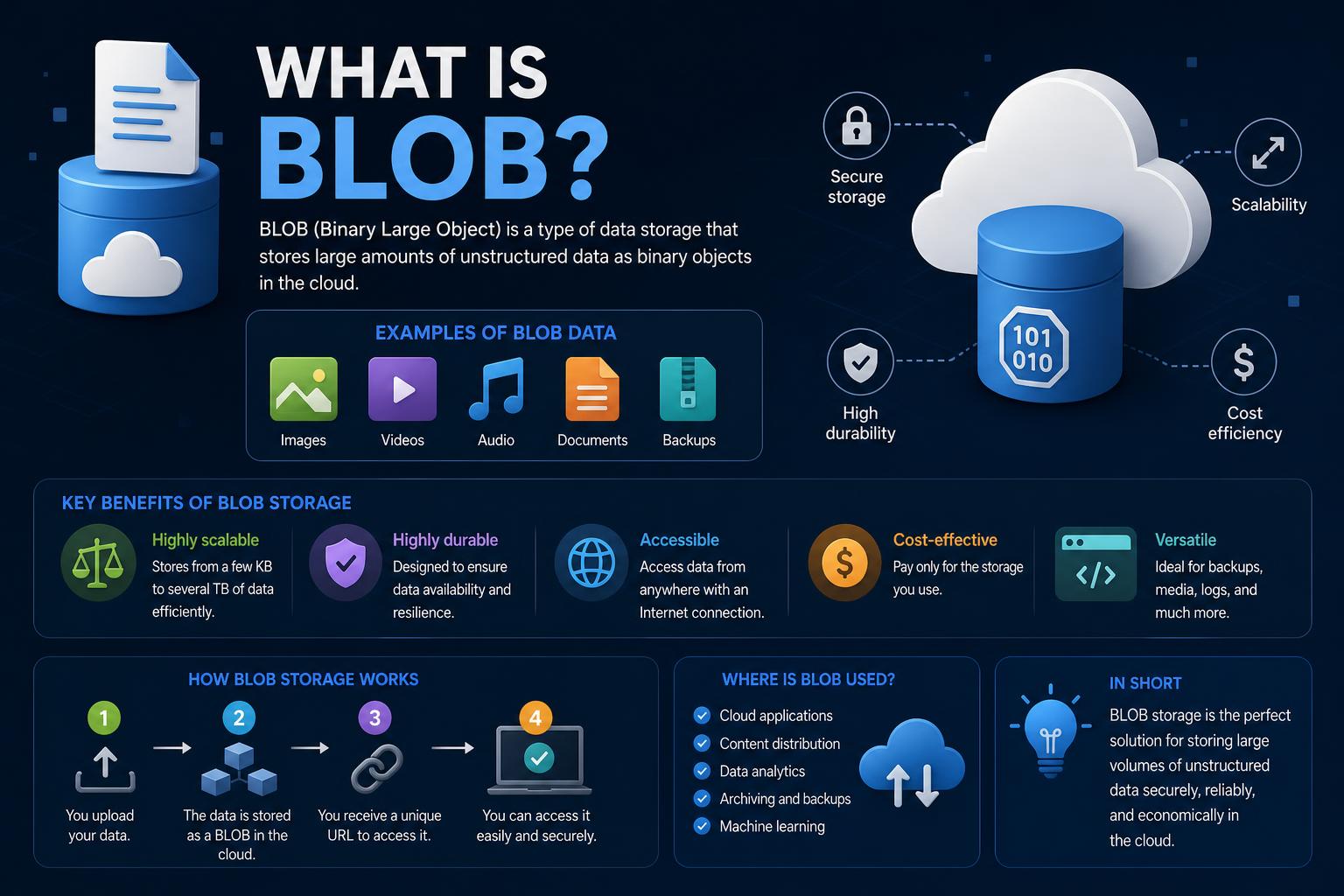
- BLOBs (Binary Large Objects) enable efficient storage and retrieval of large, unstructured data in databases and cloud platforms.
- They are essential for managing multimedia files, documents, and backups, providing flexibility beyond traditional data fields.
- Modern cloud storage services, like Azure and AWS, offer specialized BLOB storage types—Block, Append, and Page—for various use cases.
- Effective security, access controls, and tiered storage options are crucial for maximizing both the utility and protection of BLOB data.
If you’ve ever encountered the term BLOB while working with databases, cloud storage, or web APIs, you might have wondered what it really represents and why it’s so omnipresent in software documentation. While it might sound technical or intimidating at first, getting to know BLOBs—and how they’re used across different platforms—is one of the stepping stones to understanding modern data management. Let’s break it down in a friendly, natural way and explore everything that makes BLOBs crucial in data storage, web development, and cloud computing.
Across databases, programming environments, and cloud storage platforms, the idea behind BLOBs is refreshingly simple: they let you store big chunks of data—like images, videos, or entire documents—in an efficient and flexible way. But there’s a world of detail under that surface definition. By exploring practical examples, cloud services, their characteristics, and best-use scenarios, you’ll get a clear picture of how BLOBs fit into the landscape of data-driven technology today.
What Exactly is a BLOB?
The acronym BLOB stands for Binary Large Object, a term coined in the 1970s by database pioneer Jim Starkey. BLOBs represent containers for storing large, often unstructured, chunks of binary data as a single entity within a database or cloud storage system. Unlike simple text or numerical fields, BLOBs can accommodate complex files—such as high-resolution images, media files, PDFs, and even software executables—allowing these binary files to be stored alongside traditional tabular data.
BLOBs are not just limited to databases: the concept has evolved to underpin modern cloud storage (like Azure Blob Storage), web APIs, and frontend technology. The central idea is always the same: enable applications to read, write, and manage huge pieces of data that are too big or complex for standard fields.
History of the BLOB
The term BLOB emerged in the world of databases over 50 years ago. Jim Starkey first introduced the concept in the 1970s, envisioning it as a flexible way to manage largescale binary data within relational systems. Curiously, the name “BLOB” came before the acronym “Binary Large Object” was ever formalized. What started as a quirky term now stands as an industry standard, referenced everywhere from technical blogs to major cloud provider documentation.
How BLOBs Are Used
At their core, BLOBs are used to store data that doesn’t fit neatly into traditional text or number columns. This includes every kind of media or structured file that enterprises generate: videos, sound recordings, high-resolution images, graphics, PDFs, and raw data dumps. While some structured data models can support these formats directly, BLOBs allow even highly varied or unique file types to integrate into databases without special treatment.
Modern use cases for BLOBs go beyond just archiving large files. Here are some everyday examples of BLOB application:
- Multimedia storage: Databases use BLOBs to store and retrieve images, audio, and video clips associated with web applications.
- Document management: Document-centric systems rely on BLOBs for PDFs, Word files, and scanned records that aren’t suitable for plain-text storage.
- Cloud storage: Services like Azure, Amazon S3, and Google Cloud Storage build on the BLOB principle to efficiently store any binary data, supporting extensive metadata and scalable access.
- Software distribution: Some software repositories manage executable binaries or installation files as BLOBs, simplifying distribution and backups.
BLOBs in Web APIs and Frontend Development
Within web development—especially in the browser—BLOB functionality is surfaced by the Blob interface provided by modern Web APIs. Here, a Blob is an immutable, file-like object containing raw data that JavaScript apps can process as either text or binary.
Blob functionality in web APIs includes:
- Constructing new BLOBs from other objects using the Blob() constructor
- Extracting a subset of data from a BLOB with slice()
- Retrieving BLOBs from files using the File interface
- Manipulating BLOB content as ArrayBuffers (binary), ReadableStreams (chunked streaming), or as UTF-8 text
This flexibility enables web apps to, for example, capture images from user uploads, manipulate them, and then upload them directly to cloud storage, all while treating the file as a BLOB throughout the process.
How to Create and Access a BLOB
In both web APIs and databases, creating a BLOB is straightforward:
- Use the Blob() constructor in JavaScript to combine arrays or objects into a binary mass—handy for dynamically generating images or files on the client side.
- In databases, simply insert binary data into a BLOB column. Common database environments like MySQL, PostgreSQL, Oracle, and SQL Server support this operation.
To access or read BLOBs:
- With web APIs, use methods such as arrayBuffer() for raw binary access, text() for UTF-8 strings, or stream() for continuous reading of large files.
- In database applications, use standard SQL queries to fetch BLOB data, which your application can then display or process as needed (for example, rendering images in a frontend UI).
Types of BLOBs
As technology and cloud platforms have evolved, the term BLOB has expanded to include several sub-types, particularly in cloud storage systems like Microsoft Azure. Let’s look into the three core types:
- Block BLOBs: Designed for storing text or binary files (such as documents, images, and videos) efficiently. Each Block BLOB is made up of blocks (up to 50,000 per blob), and these blocks can be managed individually. This structure facilitates high-performance uploads and scalable storage, allowing for multi-terabyte objects.
- Append BLOBs: Optimized for scenarios where you continuously add new data to an existing object—think log files or append-only backups. Instead of modifying existing blocks, new data is appended to the end. Great for applications where you need to keep writing data without rewriting or changing existing content.
- Page BLOBs: Geared towards Input/Output operations and virtual hard drive (VHD) storage for virtual machines. With their fixed 512-byte pages, Page BLOBs are ideal for storing disk images or any application that requires fast, random access to large data blocks. These can store several terabytes efficiently.
BLOBs in Modern Cloud Storage
Today’s cloud storage solutions have embraced the BLOB model as their backbone, particularly for unstructured data. Azure Blob Storage, Amazon S3, and Google Cloud Storage all base their object storage mechanisms on the BLOB concept.
Key characteristics of cloud-based BLOB storage:
- Scalability: Store petabytes (or even exabytes!) across clusters—perfect for backups, big data analytics, and media streaming.
- Durability: Data is replicated across regions for resilience against hardware failure and disasters.
- Cost-Efficiency: Multiple pricing tiers (for frequent, infrequent, or archival data) allow businesses to optimize costs.
- Global Accessibility: REST APIs, SDKs, and CLI tools make it easy for apps to interact with BLOB data anywhere in the world.
- Security: Encryption, fine-grained access control, and identity-based security are built in.
Blob Storage Architecture: Containers and Namespaces
Cloud BLOB storage is based on a flat namespace of containers and objects:
- Storage Account: The main gateway or root container for all your objects—think of it as your own isolated, highly scalable database in the cloud.
- Container: Logical groupings of blobs (akin to folders but without strict hierarchy). Each container can hold an unlimited number of BLOB objects.
- BLOB (Object): The actual file, document, or unstructured data entity you store.
For example, if you upload a profile image named “myphoto.jpg” into Azure Blob Storage, it could be accessed through a URL like https://storageaccount.blob.core.windows.net/photos/myphoto.jpg.
Common BLOB Storage Tiers
Cloud platforms usually offer several storage classes or “tiers” aligned with how frequently you plan to access your BLOB data:
- Hot Tier: Optimized for data that’s accessed often (e.g., user profile pictures, app data used every day).
- Cool Tier: Lower cost but designed for files accessed less frequently—such as backups or compliances that are infrequently reviewed but need to be available quickly if needed.
- Archive Tier: The most affordable, but with the slowest retrieval times; perfect for storing long-term backups, logs, or compliance data you rarely touch.
Typical Real-World BLOB Storage Use Cases
BLOBs are everywhere, even if you don’t always spot them directly:
- Serving static files for websites: Images, JavaScript, and style sheets are often delivered to users as BLOBs stored in cloud storage platforms.
- Streaming media: Audio and video files for streaming apps make use of BLOB storage for quick, scalable deliveries around the globe.
- Enterprise backups and recovery: BLOBs make it trivial to store massive periodic backups or system logs, making disaster recovery streamlined and robust.
- Big data analytics: BLOB storage is the ideal place to dump logs, sensor data, and IoT device output for later analysis by data scientists.
- AI and ML datasets: Machine learning models rely on massive, diverse datasets (such as images or text files) that suit BLOB storage perfectly.
Advantages of BLOBs
BLOBs aren’t just a technical curiosity—they offer real advantages over traditional storage methods:
- Handles large files with ease: Whether it’s a 5MB image or a 5GB video, BLOB fields and cloud storage containers are purpose-built to handle them.
- Universal compatibility: Cloud APIs, storage tools, and database drivers in practically every language support BLOB manipulation.
- Integrated backups: Storing large files as BLOBs means your database or cloud backup routines cover everything in one step.
- Cost-efficiency: Modern BLOB storage is cheaper and more scalable for large data than trying to use classic file systems for the same tasks.
Challenges and Limitations of BLOBs
It isn’t all sunshine. Storing data in BLOBs sometimes introduces trade-offs:
- Not all database systems support BLOBs, which can limit cross-platform compatibility.
- Performance can suffer: Larger files mean more disk space and longer response times for read/write operations.
- Monitoring and management are trickier: Once data is stored as a BLOB, standard query tools can’t easily inspect or report on it—sometimes requiring additional tools or workflows.
- Security overhead: With BLOBs potentially holding sensitive information, access control and encryption mechanisms become crucial.
Securing BLOB Storage
Because BLOBs often include sensitive or valuable information, securing BLOB data is a priority. Key approaches include:
- Encryption: Encrypt data at rest and in transit to protect against unauthorized access.
- Access controls: Only allow approved users or applications to read/write specific BLOBs, using strict policies and identity management.
- Audit and logging: Track and log every access or modification to ensure you can trace the who, when, and how behind every data operation.
Cloud providers like Azure offer built-in solutions for all of the above, streamlining compliance and regulatory requirements for organizations with sensitive data needs.
BLOB Example in Cloud Storage and Web Applications
Say you want to store a user profile image in cloud storage. The system:
- Receives the binary image from the frontend (as a file or BLOB)
- Attaches metadata like creation date, file type, and owner
- Uploads it as a BLOB object to a container
- Your app then references the BLOB by its unique URL or identifier, accessing it whenever the user profile loads
On the front-end, developers can manipulate files in the browser as BLOBs via JavaScript, then transfer those blobs to backends or cloud platforms—making the storage of user-generated media easy and seamless.
Access Methods and APIs
BLOB storage is flexible; you can work with it using a variety of programming languages and tools:
- REST APIs for direct HTTP(S) access from any compatible tool
- Official SDKs for Java, Python, .NET, and JavaScript (including Node.js)
- Graphical tools like Azure Storage Explorer make browsing and managing BLOB containers a breeze
- Command-line interfaces such as Azure CLI, AWS CLI, and “gsutil” for Google Cloud Storage
Developers value this flexibility, as it supports everything from simple file uploads to large-scale automated data pipelines connecting on-premises applications to the cloud.
BLOB Properties and Methods (in Web APIs)
The Blob object in JavaScript is rich with handy properties and methods:
- size: Reflects the blob’s data size, in bytes (read-only)
- type: MIME type of the data (read-only, empty if unknown)
- arrayBuffer(): Returns a promise resolving with the blob’s ArrayBuffer (binary format)
- slice(): Produces a new Blob containing bytes from a specified range
- stream(): Returns a ReadableStream for chunked access
- text(): Resolves as a string (interpreted as UTF-8)
- textStream(): Experimental, returns a ReadableStream for reading UTF-8 text in chunks
Best Practices for Working with BLOBs
- Choose the right storage type: Understand whether your use case fits Block, Append, or Page BLOBs, and select the most cost-effective tier.
- Secure sensitive data: Always encrypt and use strict access controls, especially for personal or confidential files.
- Optimize performance: For frequent reads, use the Hot tier; for less access, Cool or Archive saves costs.
- Leverage metadata: Attach helpful metadata fields to each blob for easier management and retrieval in complex systems.
For modern developers, businesses, and anyone dealing with large volumes of diverse data, BLOBs and BLOB storage provide a reliable, scalable, and flexible approach. Whether powering multimedia-rich applications, archiving terabytes for later analysis, or delivering content across the globe, understanding BLOBs unlocks new efficiency and control over your digital assets. Making the most of their capabilities—from choosing the right storage class to following security and performance best practices—is essential as data requirements continue to outpace traditional models.