
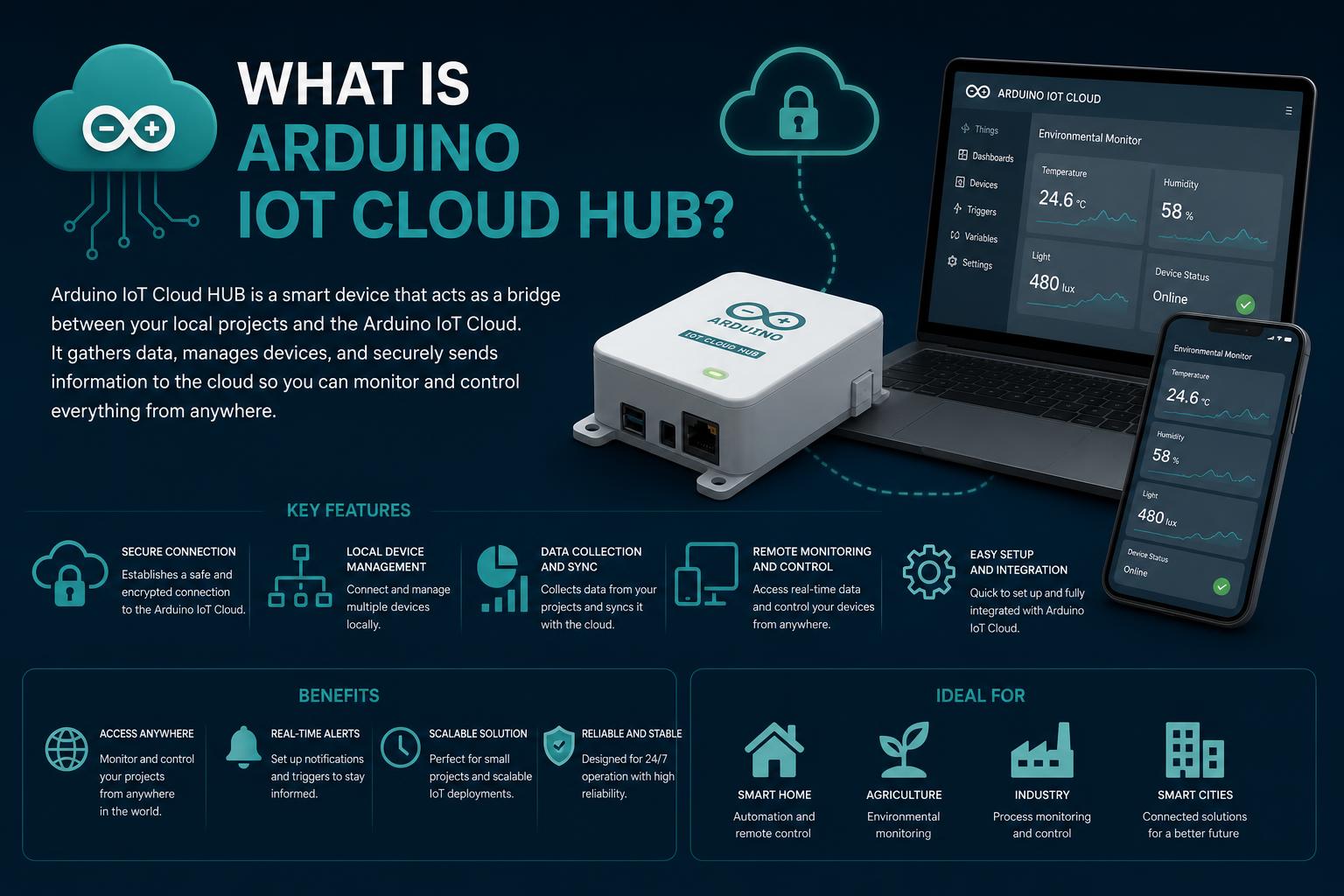
- The Arduino IoT Cloud HUB unifies, monitors, and controls all your Arduino-connected devices through a centralized dashboard.
- It supports advanced integrations, including mobile access with the IoT Cloud Remote App and seamless connectivity with Azure IoT Hub for scalable analytics.
- Security, scalability, and real-time control make the Arduino IoT Cloud HUB suitable for everything from DIY home automation to academic group research and industrial applications.
- With extensive support for devices like ESP32 and collaboration tools, the platform is constantly evolving to meet the needs of IoT developers and enthusiasts.
Arduino IoT Cloud HUB has become a hot topic in recent years, as more DIY enthusiasts, students, and even professionals are exploring ways to connect physical devices and control them remotely. The idea of managing an entire network of sensors, actuators, and smart devices from a single, accessible dashboard sounds like pure science fiction, yet it’s not only possible—it’s easier than ever. With numerous solutions sprawling across the internet, understanding what the Arduino IoT Cloud HUB actually is and what it can do for you is essential if you’re planning to dive into modern connected projects.
The concept of a cloud hub may sound complex, but the Arduino IoT Cloud HUB simplifies things dramatically. Whether you’re prototyping at home, hoping to automate your living space, or running a larger academic or group project, harnessing the full capability of this platform brings the power of real-time control, detailed data analytics, and cross-device collaboration right to your fingertips. In this article, we will explain what the Arduino IoT Cloud HUB offers, how it integrates into broader IoT ecosystems like Azure, and what makes it a unique choice for both hobbyists and professionals.
What is Arduino IoT Cloud HUB?
The Arduino IoT Cloud HUB is essentially a bridge that unifies your Arduino-connected “Things”—from sensor-based gadgets to complex automation suites—under an online dashboard accessible from anywhere. This solution, closely linked to the official Arduino Cloud platform, allows you to develop, manage, and monitor your network of connected devices with remarkable ease and reliability.
With the Arduino IoT Cloud HUB, you don’t just create isolated projects; you build a cohesive ecosystem of interconnected devices that can be controlled, visualized, and analyzed as a single entity. Think of it as a command center for your digital world, whether it’s smart home lighting or an environmental sensor network in a classroom.
Main Features and Use Cases
- Physical Dashboard Functionality: The hub acts as a central interface, displaying real-time status and data for all your connected Arduino devices. If something requires attention, you’ll be notified via LED indicators or status alerts, simplifying management.
- Basic and Advanced Interaction: Interact directly with any “Thing” registered in the cloud. Need to adjust temperature, turn on a light, or analyze motion data? The Arduino IoT Cloud HUB facilitates that interaction, making the experience seamless.
- Remote Access and Management: Thanks to integration with cloud dashboards and the Arduino IoT Cloud Remote app, you can manage your devices from your desktop or smartphone—no physical presence required. This is ideal for home automation, academic projects, or small businesses seeking scalable IoT solutions.
- Real-Time Control and Historical Data: The platform not only allows changing states in real time, but also offers historical device data tracking, which is key for detecting trends, diagnosing issues, or optimizing systems over time.
For those considering smart home setups, the Home Automation Use Cases with Arduino Cloud page highlights the HUB’s utility as a single point of control for all your residential automation projects. The ease of updating and reorganizing your network as your needs grow is one of its greatest advantages.
Arduino App Lab: The Definitive Guide for Developers, Educators, and Makers
The Role of the Arduino IoT Cloud Remote App
The Arduino IoT Cloud Remote app is designed as a natural extension of the HUB. It provides remote access to dashboards optimized for mobile devices, allowing you to monitor and control all your connected Things in real time from virtually anywhere. With its intuitive design, you get immediate insight into device status, sensor values, and even historical data analytics.
- Intuitive widgets allow granular control of devices: trigger relays, set actuator values, and view multi-channel sensor feedback on the go.
- Turn your smartphone into an IoT device itself by integrating phone sensors into your project network using the “Phone Device” feature for bidirectional data flow and added versatility.
This app is particularly powerful for developers and hobbyists who need to stay synced with their IoT installations wherever they are.
Working with Azure IoT Hub and Arduino
For those seeking more advanced integration, connecting Arduino devices to Azure’s IoT Hub is a logical step. Azure IoT Hub, offered by Microsoft, brings enterprise-grade cloud capabilities to your IoT projects. Integrating with Azure allows you to:
- Securely send data from your sensors and Arduino boards to the cloud for further analysis or control logic.
- Leverage advanced services such as Power BI for big data analytics, Stream Analytics for real-time transformation, and cloud-hosted SQL databases for structured storage.
- Implement bidirectional communication, enabling cloud applications to send commands back to physical devices.
The integration process includes:
- Configuring an IoT Hub in Azure via the Azure portal. The free tier supports up to 8,000 messages/day, sufficient for most small-to-medium projects.
- Registering your Arduino device as a “device twin” within the Azure ecosystem. This virtual entity represents the physical device and handles cloud communication.
- Flashing your Arduino with an SSL certificate for encrypted connections, using tools like WiFi101 Firmware Updater or directly through the Arduino IDE and specific libraries.
- Using SDKs and the Arduino Library for Azure IoT to send and receive messages via MQTT or HTTP.
- Storing sensor data in cloud databases and visualizing it with Power BI, creating easily accessible interactive charts.
This method enables highly scalable, secure, and flexible projects, ideal for research, industrial monitoring, or distributed collaboration.
Step-by-Step Connection of Arduino Devices to the Cloud
Hardware and Preparation
- Compatible Arduino Board (such as Genuino MKR1000, with built-in Wi-Fi)
- Various sensors (photoresistors, temperature, humidity, etc.) and actuators (LEDs, relays)
- Optional: Breadboard and additional IoT shields
For Wi-Fi boards, make sure to install the required libraries (like WiFi101 for certain models) and keep the firmware updated.
Cloud Account Setup
- Sign up for a free account on or Microsoft Azure, as applicable.
- Follow guided procedures to create and name your IoT Hubs and provision virtual devices or their equivalents.
It is essential to accurately copy connection strings and access tokens, as they will be required for authentication between your device and the cloud service.
Firmware Customization and Device Registration
- Update your Arduino IDE with the relevant libraries: AzureIoTHub, AzureIoTUtility, AzureIoTProtocol_MQTT, WiFi101, etc.
- Customize code examples with your Wi-Fi SSID/password and your device’s unique connection string.
- Flash the board, check the Wi-Fi connection, and monitor serial output to troubleshoot issues.
At this point, your device will begin sending sensor data at defined intervals to the IoT Hub, where it can be processed, visualized, or used for automated cloud actions.
Expanding the Ecosystem: Analytics and Visualization
One of the biggest advantages of using cloud infrastructure is the ability to perform robust analytics and advanced visualization:
- Big Data Integrations: With support for tools like Power BI, you can store and visualize extensive sensor histories, spotting trends or exceptions that are usually hard to perceive.
- Stream Analytics: Process real-time data by filtering, aggregating, and routing as needed for deeper insights or rapid responses.
- Automated Alerts: Set up triggers to automatically notify you of anomalous readings via dashboards or cloud alerts.
This workflow, from device to actionable insight, is achieved with simple, guided setups across both platforms, Arduino and Azure.
Team Collaboration and Multi-User Projects
IoT development in academic or group settings requires collaboration, project sharing, and permission management. Arduino IoT Cloud HUB facilitates shared dashboards and integration with version control systems like Git.
- Share dashboards with colleagues or external users using restricted accounts and permissions.
- Track changes, manage configurations, and update firmware as a group—key features for research projects or distributed teams.
Need to grant temporary access or manage dozens of devices? Centralized, role-based management makes these tasks seamless and scalable.
Compatibility with ESP32 and Cameras
The Arduino IoT Cloud HUB is not limited to traditional Arduino boards; platforms like ESP32 are fully compatible, enabling advanced communications, video streaming, and image capture. For instance, the ESP32 Cam module can stream live video, send snapshots, and even save footage to cloud storage, all controllable from the Arduino dashboard or integrated with Azure.
This is particularly useful for surveillance, environmental monitoring, and smart agriculture, where visual evidence and sensory data need to be managed and analyzed centrally.
Best Practices, Security, and Practical Considerations
Security is paramount in IoT deployments. It is best practice to use SSL certificates, enforce strong passwords, and regularly update device firmware to prevent vulnerabilities.
- Use the latest SSL/TLS protocols offered by Arduino and Azure.
- Periodically rotate API keys, passwords, and connection strings to prevent unauthorized access.
- Monitor device logs through cloud dashboards and local serial outputs to catch potential vulnerabilities or anomalies.
Even in small or non-commercial setups, a compromised device can impact your home network or expose private data.
Scalability and Real-World Applications
The strength of the Arduino IoT Cloud HUB lies in its scalability. From single-sensor prototypes to mass monitoring hardware, the infrastructure is built to grow with your projects.
- Smart Homes: Seamless integration of HVAC, lighting, alarms, and environmental sensors.
- Educational Labs: Management of collaborative robotics projects, sensor suites, and group experiments.
- Industrial Monitoring: Deploying hundreds of units to oversee machinery, environmental safety, and logistics.
Expand your prototype with more sensors, actuators, cameras, and remote access, all managed from a single dashboard—reducing administrative overhead and maximizing control.
Common Pitfalls and Troubleshooting
Deploying IoT on a larger scale, even with robust platforms like Arduino IoT Cloud and Azure, comes with challenges:
- Firmware Issues: Ensure your microcontroller has compatible libraries and updated firmware; incompatibilities are a frequent cause of connectivity failures.
- Network Configuration: Firewalls, NAT, and Wi-Fi issues are critical hurdles, especially when adding new devices to corporate or university networks. Always test basic setups before full deployment.
- Data Limits: Free cloud tiers offer generous yet finite limits; monitor usage to avoid service interruptions and scale as necessary.
- Security Configurations: Overly restrictive settings can block communication. IP whitelisting and implementing access controls in Azure or Arduino are recommended options.
The Future of Arduino IoT Cloud HUB
With cloud integration, mobile app connectivity, and cross-platform support (including third-party boards like ESP32), the Arduino IoT Cloud HUB sits at the center of the expanding IoT universe. As more developers, educators, and companies onboard, the platform’s ability to offer custom dashboards, historical trend analysis, and rapid device deployment will only increase.
Expect tighter integrations with analytics platforms, automation engines, and edge computing chips as the ecosystem evolves. If you’re already experimenting with connected devices—or dreaming of a fully automated home or workspace—now is the time to explore the potential of the Arduino IoT Cloud HUB.
Today, anyone can create highly interconnected device networks, monitor them in real time, and harness advanced analytics—all without needing enterprise-level knowledge or multi-million dollar investments. Whether managing a small prototype, a classroom with multiple sensors, or piping data into Azure for global analytics, the combination of Arduino IoT Cloud HUB and its associated tools offers a solid, flexible, and surprisingly simple foundation for modern IoT projects.
A Deep Dive into Arduino AI Assistants: Smarter Coding with AI for Makers and Innovators