
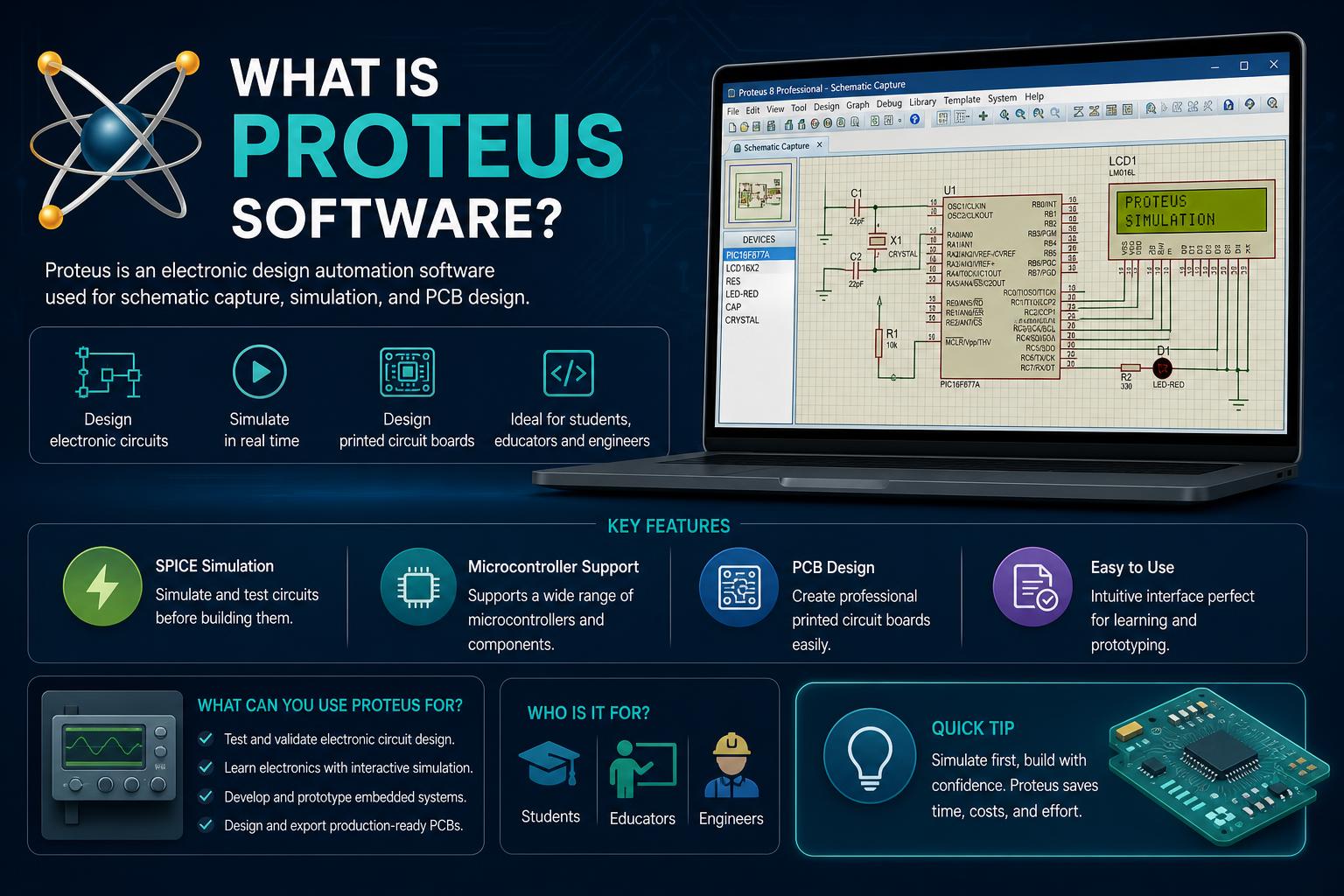
- Proteus integrates schematic capture, simulation, and PCB design in one solution
- Unique microcontroller co-simulation capability empowers prototyping and embedded development
- Adopted by universities, hobbyists, and professionals for learning and product design
Proteus software has become a staple tool within the world of electronics engineering and education, finding fans among professionals and students alike. Known for its ability to streamline the journey from drawing a basic schematic to executing complex circuit simulations and designing cutting-edge PCBs, Proteus has steadily grown in both feature set and reputation since its origin decades ago. Many engineering departments and hobbyists cite Proteus as their preferred simulation and design package, with its unique strengths in co-simulating both analog and digital components, even at the microcontroller instruction level.
Understanding exactly what Proteus brings to the table is crucial if you want to choose your electronics design software wisely. While markets are crowded with EDA (Electronic Design Automation) tools, Proteus stands out with its strong mix of circuit simulation, PCB layout, microcontroller support, and educational capabilities. Explore how this software has evolved, what features set it apart, and why educational institutions and engineers continue to adopt it for real-world applications.
What Is Proteus Software?
Proteus Design Suite is a comprehensive proprietary software solution crafted by Labcenter Electronics Ltd—originally established in Yorkshire, England, in the late 1980s. Released first for DOS as “PC-B” back in 1988 and soon gaining Windows compatibility, Proteus has since undergone a host of upgrades, evolutions, and new module launches that have made it one of the most feature-rich EDA platforms in the market.
The suite provides tools for three major aspects of electronics design: schematic capture, real-time simulation (including SPICE and microcontroller co-simulation), and PCB layout and visualization. Essentially, with Proteus, you can sketch out electronic circuits, simulate how they work—including embedded software running on microcontrollers—and then progress directly to designing the physical PCB, all within the same environment.
A Brief History and Evolution
Tracing the development of Proteus reveals a story of consistent innovation in response to industry needs. Here’s a quick timeline of some landmark features:
- 1988: Initial DOS tool released by John Jameson, Labcenter’s founder.
- 1990: Schematic Capture support added.
- 1996: Mixed-mode SPICE simulation integrated for the first time, bridging analog and digital design.
- 1998: Microcontroller simulation introduced, enabling true hardware-software co-simulation at the circuit level.
- 2002: Shape-based autorouting arrives, automating PCB trace placement.
- 2006: Major upgrade brings 3D board visualization, enhancing the design review process.
- 2011: A dedicated IDE for simulation is launched, deepening the ease of software development and debugging within Proteus.
- 2015: MCAD (Mechanical CAD) import/export support added—vital for collaborating with mechanical design teams.
- 2017: High-speed design features allow for the creation of more advanced, modern electronics.
Proteus thrives on regular updates, with major feature releases usually twice a year and service packs issued as required for maintenance, ensuring users always have access to the latest tools and standards in the field.
Core Modules and Features of Proteus Suite
Proteus is not just one tool, but a suite of integrated modules that address all core phases of electronics design. Here’s what you get inside this digital toolbox:
Schematic Capture
The heart of any EDA workflow is schematic capture, and Proteus delivers here as the foundational step in both simulation and PCB design. Whether you’re prototyping or preparing to manufacture, every project begins with building accurate electrical schematics to outline your system architecture.
The schematic tool is intuitive yet powerful, offering:
- Vast libraries of components, from analog basics to advanced digital ICs.
- Drag-and-drop placement and interconnection with real-time validation of connectivity and design rules.
- Ability to embed or link firmware files for immediate microcontroller simulation.
No matter the complexity, Proteus ensures schematics are clear and ready for the next stage—be it simulation or direct PCB layout.
Simulation Engine: From SPICE to Co-Simulation
Simulation is where Proteus truly stands out, offering unique strengths that many competitors simply can’t match. At its core is a robust, mixed-mode simulation engine, meaning you can simulate circuits that blend analog and digital behavior simultaneously.
What really raises eyebrows is Proteus’ legendary microcontroller co-simulation:
- Drop a microcontroller onto your schematic—such as a PIC, AVR, ARM Cortex, Arduino, or many others.
- Attach your code in the form of a HEX or debug file, just as you would flash an actual chip in the real world.
- Simulate not just the microcontroller, but its interactions with the rest of your circuit—motors, displays, sensors, user interfaces—bridging embedded software and discrete hardware in a single run.
This distinctive feature allows engineers to iron out firmware-electronics interaction bugs before ever assembling a breadboard or PCB. It’s a game-changer for prototyping, learning, teaching, or even troubleshooting production systems after deployment.
Supported Microcontroller Families
The list of microcontroller families supported by Proteus is comprehensive and regularly updated to reflect market trends. Engineers can run detailed co-simulations for:
- Microchip Technologies: PIC10, PIC12, PIC16, PIC18, PIC24, dsPIC33
- Atmel: AVR (including Arduino ecosystem), 8051 series, ARM Cortex-M3
- NXP: 8051, ARM7, ARM Cortex-M0/M3
- Texas Instruments: MSP430, PICCOLO DSP, ARM Cortex-M3
- Parallax: Basic Stamp
- Freescale: HC11
- Intel: 8086
Academic users and hobbyists value this wide support, especially for educational prototyping and learning embedded design without requiring actual hardware.
PCB Layout and Autorouting
After a simulated design proves robust, Proteus makes it easy to progress to the physical PCB design stage. Its layout module leverages the connectivity data from schematics, producing accurate netlists and guiding you through trace and layer placement.
- Circuit boards with up to 16 copper layers can be crafted, suitable for even advanced commercial designs.
- Design rules are fully customizable, allowing users to set trace widths, clearances, and other manufacturing constraints.
- A built-in autorouter automates trace placement, saving time while following your project’s priorities.
Proteus helps minimize errors, providing rule-based checks and visualizations before the manufacturing process begins.
3D Visualization and MCAD Integration
Modern design demands don’t stop at 2D layouts—your board needs to fit real-world enclosures seamlessly. Proteus answers with a highly effective 3D Viewer module:
- Inspect your PCB in three dimensions, checking for fit, connector alignments, and physical obstacles.
- Overlay your board within a semi-transparent model of its intended case or enclosure, ensuring all clearances and mounting points align.
- Export your designs in STEP format, compatible with industry-leading MCAD tools like SolidWorks and Autodesk, for advanced collaboration with mechanical engineers.
This integration prevents design mishaps that can cost time and money late in the development cycle.
Who Uses Proteus (and Why)?
Proteus has won loyalty from a diverse set of users, from university students to commercial engineers and even maker communities. It’s a favorite for several reasons:
- Education: Many universities integrate Proteus into their core electronics courses, citing both the richness of simulation and the accessibility of its interface. Students can learn, experiment, and troubleshoot without expensive labs.
- Hobby and Maker Communities: Enthusiasts appreciate the ability to test embedded projects virtually before purchasing or soldering a single component.
- Professional Engineering Teams: Companies trust Proteus for developing prototypes, running virtual proof-of-concept experiments, and preparing files for mass PCB manufacturing.
- Training and Teaching: The cost-effectiveness and broad device support make it ideal for group instruction or remote learning environments where hardware access may be limited.
Proteus’s capacity to enable project development without requiring physical hardware lowers barriers to entry, fostering experimentation and innovation.
How Does Proteus Compare to Other EDA Tools?
While Proteus shares the EDA stage with many other software packages, it offers distinct advantages:
- Integrated Simulation and PCB Workflow: Many traditional EDA tools segment the workflow (simulation only, layout only), but Proteus unifies everything from design to test to prototype.
- Microcontroller Co-Simulation: Few platforms provide the depth of interactive, real-time firmware/hardware simulation found here.
- Ease of Use for Beginners: While powerful, the user interface remains approachable, making it possible for both novice students and seasoned engineers to be productive quickly.
- Rich Component Libraries: Proteus is packed with passive, active, programmable, and virtual components, accelerating design and simulation alike.
- Cross-Disciplinary MCAD Integration: 3D and STEP export features mean designs don’t end with the PCB—they’re ready for product manufacturing with mechanical teams.
Alternatives like Altium Designer, Eagle, or KiCad offer their own distinct strengths, but the end-to-end integration and ease of embedded simulation make Proteus particularly suited for educational and prototyping scenarios.
What Licensing Options Are Available?
Proteus offers flexible licensing to fit the needs of individuals, startups, and major organizations alike. You can find options tailored to:
- Project size—supporting anything from small, single-board hobby work to industrial-scale, multi-layer commercial designs.
- Simulation intensity—selecting between configurations that focus on schematic, simulation, or PCB layout priorities.
- Budget requirements—so students and institutions don’t face prohibitive costs.
For a detailed breakdown, official pricing and edition comparisons are available directly at Labcenter’s website.
Proteus in Education and the Maker Community
Proteus is a frequent choice as a teaching aid in electronics, embedded systems, and PCB design courses at universities worldwide. There are stories of departments where every electronics student learns simulation, coding, and hardware design basics through Proteus before ever touching a soldering iron. This helps to cement theory into practical know-how while avoiding the cost and time required to assemble and troubleshoot real circuits early on.
Outside the classroom, Proteus has built a following among amateur electronics hobbyists. Arduino tinkerers, Raspberry Pi fans, and home automation enthusiasts all benefit from virtual prototyping capabilities that mirror real-world hardware—safe, affordable, and endlessly repeatable. Online communities and circuit-sharing libraries continue to grow as users seek to exchange designs, tips, and creative project ideas.
Limitations and Considerations
While the benefits are numerous, it’s important to know where Proteus may not be the perfect fit. Here are some factors to bear in mind:
- Proprietary Licensing: Unlike open-source EDA tools, Proteus comes with licensing fees. For some, especially open hardware advocates, this might be a drawback.
- Platform Compatibility: Proteus is primarily designed for Windows environments. Those using Mac or Linux will need emulation or dedicated setups.
- Industry Penetration: In certain regions and industries, tools like Altium, Eagle, or KiCad may be more widely referenced in corporate hiring or collaboration settings. Assess these norms when making decisions for commercial projects.
- Updates and Support: Proteus’s frequent update cycle ensures modern features—but staying current with licenses and support is vital for ongoing compatibility.
Reddit discussions and AskElectronics forums highlight both strengths and these potential reservations, with most users agreeing that for simulation and PCB learning, few tools are as accessible and powerful as Proteus.
Proteus in Context: A Glance at the EDA Landscape
To really appreciate Proteus, consider the broader family of EDA and CAD software. Platforms fall into two broad types:
- Open-source/free tools: Examples include KiCad, Fritzing, LibreCAD, and others. Ideal for hobby and community projects, but sometimes lacking in advanced features or integrated simulation depth.
- Commercial/proprietary solutions: Tools like Altium Designer, Eagle, Multisim, and of course, Proteus, offer end-to-end flows and specialized support—often for a fee. Proteus is distinctive here for its balance of education usage, simulation versatility, and PCB design capabilities.
To compare their feature sets, Wikipedia and EDA expert articles are a great resource, but real-world experience often finds Proteus among the easiest to learn and most fun to explore for embedded developers and electronics educators alike.
Getting Started with Proteus
Diving into Proteus is often surprisingly straightforward, thanks to an intuitive interface and deep documentation. Resources are available for both self-learners and educators, including:
- Official user manuals and tutorials from Labcenter Electronics, covering everything from first schematic to advanced simulation tricks.
- Online community forums—while not as massive as some software communities, they’re active, engaged, and responsive for most questions.
- Pre-built example circuits for learning and hacking—saving time for those who want to get hands-on immediately.
The latest stable release as of October 2025 is version 9.1, reinforcing Proteus’s ongoing commitment to meeting current and future engineering needs.
If you are planning a career (or course) in electronics, need to teach embedded or digital systems, or just want to experiment safely and affordably, Proteus offers a versatile, all-in-one platform for innovation.