
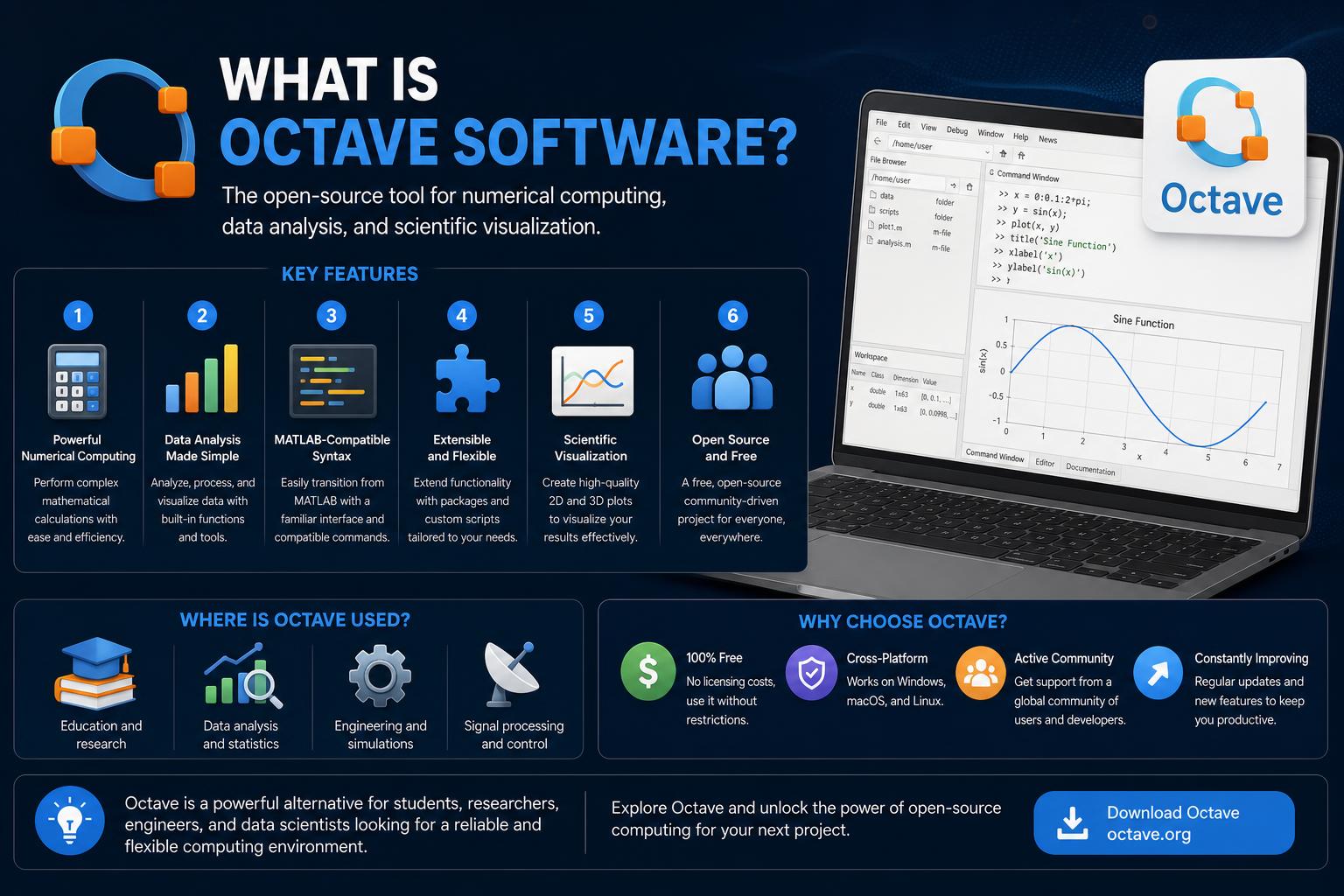
- GNU Octave is a free, open-source programming language and environment for numerical and scientific computing.
- It offers widespread compatibility with MATLAB, making it a popular choice for academia and industry.
- Octave includes both command-line and graphical interfaces, supports extensibility through packages, and is available on Windows, macOS, Linux, and BSD.
Are you curious about Octave software and how it compares to industry giants like MATLAB? Whether you are new to scientific computing or an experienced programmer looking for a cost-effective alternative, you have probably heard the name “Octave” mentioned in tech circles or academic environments.
This article is your comprehensive, simple, and straightforward guide to GNU Octave, a powerful open-source tool for numerical analysis, data visualization, and advanced simulations. Forget the technical jargon as we break down what Octave really is, why it matters, and how it could become your go-to choice for everything from basic calculations to intensive data processing, all without breaking the bank.
Understanding Octave: More Than Just a Free MATLAB Alternative
GNU Octave, often simply called Octave, is a high-level programming language designed primarily for numerical computing. It is a feature-rich environment that empowers engineers, scientists, mathematicians, and anyone interested in crunching numbers. Developed as part of the GNU Project, Octave is powerful for calculations, simulations, and visualizations, and it has a huge plus: it is completely free and open-source under the GNU General Public License. If you want to understand the advantages in terms of advanced analysis, you can check out this resource on GNU Octave and JupyterLite.
What makes Octave unique is not just its price (zero, forever), but its high compatibility with MATLAB syntax and workflows. That means if you already know MATLAB, you will feel right at home in Octave. Scripts, functions, and algorithms written for MATLAB usually work seamlessly, making it a simple and effective alternative for many users.
A Brief History: The Origins and Evolution of Octave
Octave’s journey began in the late 1980s when it was conceived as a companion tool for chemical reactor design courses. John W. Eaton led its development, with the first alpha version in 1993 and version 1.0 in 1994. The program’s name pays homage to Octave Levenspiel, a former professor of Eaton’s known for his talent with quick mathematical calculations.
Since then, the project has advanced significantly. New features, improved compatibility, a graphical user interface, cross-platform support, and many other enhancements have been added. Major versions have marked milestones such as the introduction of a GUI (first in version 4.0.0), improved graphics engines, and expanded package support.
What Can You Do With Octave?
Octave is designed for scientific computing. It is capable of solving linear and nonlinear mathematical problems, performing iterative data analysis, visualizing results with plots, automating batch tasks, and much more.
- Matrix and vector calculations: Octave excels at working with these data types, which are fundamental and closely resemble MATLAB.
- Complex numbers and advanced functions: It supports complex numbers natively and offers a vast library of mathematical routines, from basic trigonometry to advanced statistical operations and calculus.
- Scientific simulations: Model physical, chemical, financial, or biological systems, run “what-if” experiments, and process real-world data without hassle.
- Visualization: It includes plotting tools (using OpenGL or gnuplot) capable of generating publication-quality graphs, surfaces, and other graphical elements.
- Automation and scripting: Automate repetitive tasks with its scripting language or run batch processes for intensive data processing sessions.
But that’s not all. Octave’s extensibility allows you to add new functions, interfaces, or even create custom toolboxes, which is highly useful if your project requires specific algorithms or if you simply enjoy experimenting.
Octave’s Syntax: Familiar Territory for MATLAB Users
If you’ve ever worked with MATLAB, you’ll be glad to know that Octave has a comfortable and familiar programming environment. The syntax, operators, and core commands are designed to closely resemble MATLAB. You will find:
- Matrix-based language: Most calculations revolve around arrays, with intuitive operators for slicing, manipulating, and analyzing data.
- Support for structured programming: C-like variables, loops, functions, and conditions, plus support for object-oriented programming and custom structures.
- User-defined functions: Extend Octave with your own algorithms and logic using scripts and custom functions.
- Flexible commenting style: You can use # or the standard MATLAB % symbol to comment out code.
- Flexible block termination: Use end, or explicit terminations like endif, endfor, etc.
It also introduces some additional syntax, such as C-style operators (++, —, +=), string delimiters (single or double quotes), and support for do-until loops.
Features That Make GNU Octave Stand Out
Let’s look at what makes Octave so useful for technical computing:
- Cross-platform support: It runs natively on Windows, macOS, Linux, and BSD. Just pick your OS and you’re ready to go.
- Two modes of operation: Choose between a modern graphical user interface (GUI) or the command-line interface (CLI), which is ideal for headless servers or users who prefer the terminal.
- Integrated Development Environment (IDE): Since version 3.8, it offers a Qt-based IDE with tools like editors, a workspace browser, a debugger, and command history, streamlining your workflow.
- Advanced graphics engine: With OpenGL-based rendering, it can generate complex plots, 3D surfaces, and save them in various formats. It also supports gnuplot for those who prefer that tool.
- Extensibility via packages: The Octave-Forge repository is packed with community-created packages. Do you need statistics, signal processing, control systems, or more? There’s likely a package for it, and if not, you can create your own.
- Acceleration with OpenCL and CUDA: To boost performance, Octave supports optional GPU acceleration for heavy calculations.
- Batch processing and scripting: Automate processes, manage large datasets, or perform complex calculations without manual intervention.
Technical Aspects and Supported Integrations
Octave is primarily developed in C++, with components in C, Fortran (for linear algebra), and its own scripting language. Its flexible interpreter allows you to load modules dynamically and easily integrate with C++ or C code for maximum speed.
- Technical details: The scripting language is interpreted at runtime, allowing you to test and debug code interactively.
- Graphics and interfaces: The GUI is robust, but if you prefer console mode or work in a headless environment, you can always use the CLI flawlessly.
- Integration: Need to call custom C++ code or external functions from Octave? Oct and MEX files are supported and make this extension easy.
MATLAB Compatibility: How Close Is It Really?
MATLAB compatibility is a primary goal of Octave. The developers treat most incompatibilities as bugs, so Octave strives to behave like MATLAB whenever possible. Here is what you should know:
- Shared syntax: Most MATLAB scripts and algorithms should work in Octave with little to no modification.
- Function libraries: Many libraries are built-in or available in Octave through Octave-Forge, replicating nearly all MATLAB functions. Some advanced or rarely used functions might be missing or not completely identical, but the trend is towards rapid improvement.
- Repository compatibility: In theory, the vast MATLAB repositories on FileExchange can be used in Octave, though it is not always recommended due to proprietary restrictions.
- Minor syntax differences: Some additions made by Octave, such as double-quoted strings or do-until loops, can affect portability. However, if you stick primarily to the MATLAB DNA, compatibility will be near perfect.
Highlight Features to Make Users’ Lives Easier
The Octave environment is not just about numbers. Several useful features make it efficient and a pleasure to use:
- Tab auto-completion: Just press TAB and Octave completes variables, functions, or files, much like Bash.
- Command history: It remembers what you typed, allowing you to recall and edit past commands.
- Data structures and organization: Support for structs, cell arrays, and object-oriented programming lets you keep your data organized, ranging from a simple vector to complex datasets.
- Error handling: It includes robust exception handling with blocks like unwind_protect and try/catch for writing fail-safe code.
- Increment and decrement operators: For C or JavaScript programmers, the ++ and — operators make rapid variable changes a breeze, along with augmented assignments like x += 1.
Developing with Octave: User Interfaces and GUI Applications
Octave isn’t just for terminal enthusiasts; it also offers:
- Official GUI and IDE: A full graphical environment complete with code highlighting, plot windows, workspace browser, and built-in help.
- Creating GUI apps: It allows you to design simple interfaces with buttons, text boxes, list boxes, and checkboxes using scripts, which are ideal for teaching, prototyping, or building small applications.
- Third-party add-ons: Specialized front-ends like ToolboX provide even more specific environments, especially tailored for educational use.
Packages and Community Contributions
Octave’s power is multiplied by its package ecosystem. On Octave-Forge, there are thousands of community-created packages covering:
- Statistics and data analysis
- Signal and image processing
- Control systems
- Communications
- Optimization and machine learning
- Symbolic mathematics
If you need something that doesn’t exist yet, you can easily create and publish your own packages, making Octave a flexible platform for research, education, or niche uses. You can also learn how to use this platform through community tutorials.
Beyond MATLAB: How Does Octave Compare to Other Tools?
Proprietary MATLAB is not the only alternative for open numerical computing. Let’s see where Octave fits in:
- Scilab and FreeMat: Both offer open alternatives, but Octave’s close compatibility with MATLAB makes it the preferred choice for porting code or collaborating. Scilab has different syntax, and FreeMat hasn’t seen recent updates.
- Python (NumPy/SciPy), Julia: Popular languages for science and visualization. Python has a larger community and more libraries; Julia excels in speed. However, for MATLAB-like environments, Octave stands out due to its familiarity and script portability.
- Ease of migration: For educators, students, and organizations with existing MATLAB code, Octave provides an easy transition without the need to rewrite code or retrain from scratch.
Platforms: How to Get Octave on Your Device
Regardless of your operating system, there are few hurdles to get started with Octave:
- GNU/Linux: Most distributions offer Octave in their repositories. The version may vary, but there are guides on the Octave wiki for installing updated versions.
- Windows: Download the official 64-bit binaries from the downloads page. It supports large amounts of memory, and there are options for data-heavy systems. The 32-bit binaries are archived but no longer actively updated.
- macOS: Use package managers like Homebrew or MacPorts, or follow the instructions on the Octave wiki.
- BSD: FreeBSD and OpenBSD maintain Octave in their package collections, managed by their communities.
Always download from official sites or trusted mirrors and verify integrity using digital signatures to avoid corrupted or malicious files.
Life in the Cloud: Octave Online
If you prefer not to work on your local machine or want to collaborate online, Octave Online offers a cloud-based programming platform. It allows you to:
- Organize files into “projects” or share “buckets”.
- Share URL links for collaboration or presentations.
- Choose a “main file” for auto-execution.
- Copy files, manage custom URLs, and manage projects digitally without any complicated installations.
Who Uses Octave in Academia and Industry?
Octave’s broad appeal is reflected across various sectors:
- Academia: Many universities use Octave in math, physics, engineering, and computer science courses. Its accessibility and MATLAB compatibility make it highly popular.
- Research: It is ideal for prototyping, quick simulations, and complex data analysis where reproducibility and openness are key.
- Industry: Companies looking to avoid licensing costs use Octave for process control, algorithm development, and applications leveraging GPU processing.
- Supercomputing: It has been used on supercomputers for shared tasks like research into numerical vulnerabilities, for instance at the Pittsburgh Supercomputing Center.
How to Download and Verify Your Octave Installation
Ready to get started? The process is simple:
- Visit the official site or one of the reliable mirrors, such as this mirror.
- Choose your operating system and the binary or source code version.
- For added security, download the corresponding signature file (.sig) and verify it using the recommended instructions, ensuring it is genuine and unaltered.
For Windows, there are options for different memory needs. The standard 64-bit version serves most users. If you handle data that requires more than 32GB or billions of elements, there is a large memory version, although the older 32-bit versions are no longer actively supported.
It is recommended to always use the current 64-bit versions and verify your downloads to maintain security and integrity.
Octave’s Role in the Free Software World
Octave is not just an isolated project; it is part of a larger family of numerical analysis software and computer algebra systems. It sits alongside Python, R, Julia, Scilab, FreeMat, and SageMath. Its open development process, backed by the GNU Project, guarantees transparency, frequent updates, and an active community driving its evolution.
The combination of freedom, power, cross-platform reach, and compatibility with professional tools makes Octave a major player in the arsenal of open-source computational tools.
Octave for the Community: Licensing and Contributions
Octave is licensed under the GPL (GPL-3.0 or later since 2007). This means you can use it, modify it, and also contribute: the community is open to code, packages, bug reports, documentation, and new features. If you find a bug or want to add something, you can do so seamlessly, as its open nature encourages collaboration.
Companies and universities can also extend Octave in private environments or fork it, provided they respect the license.
Resources and Communities to Master Octave
After installing Octave, a recommended first step is exploring Octave-Forge, which offers thousands of community packages. If you are learning or teaching, resources like the Octave Programming Tutorial or the GNU Octave Beginner’s Guide by Jesper Schmidt Hansen are excellent. The complete documentation is available online and in the program’s built-in help. To solve advanced problems or interact with others, explore mailing lists, forums, and issue trackers.
Octave vs. Proprietary Competitors
While MATLAB is a standard in many industries and academic environments, its cost and closed nature represent a barrier. Octave’s open-source model, compatibility, and strong package ecosystem offer a practical, reliable, and free alternative.
Some proprietary options like Mathematica, Maple, or LabVIEW have specific features, but they are generally less compatible with MATLAB and lack Octave’s active community.
Potential Limitations and Things to Consider
No software is perfect. A few things to consider:
- Certain advanced MATLAB functions: The gap is closing, but some specific functions might be missing or not fully implemented in Octave or its packages.
- Performance differences: For highly technical tasks, MATLAB or Julia might be faster, especially with proprietary libraries. However, with GPU acceleration and efficient code, Octave usually performs well in real-world scenarios.
- Compatibility gaps: New MATLAB features may take some time to reach Octave, but the community is continuously working on it.
For most students, researchers, and professionals, these limitations are minor compared to the flexibility and zero cost that Octave offers.
When considering your next data or simulation project, GNU Octave offers a powerful, adaptable, and open-source solution for scientific programming and numerical computing. With cross-platform support, constant updates, and a commitment to maintaining MATLAB compatibility, Octave is the smart choice for those who want to escape expensive licenses without sacrificing capability or compatibility.
GNU Octave and JupyterLite: Computing Anywhere, Anytime with Xeus-Octave