
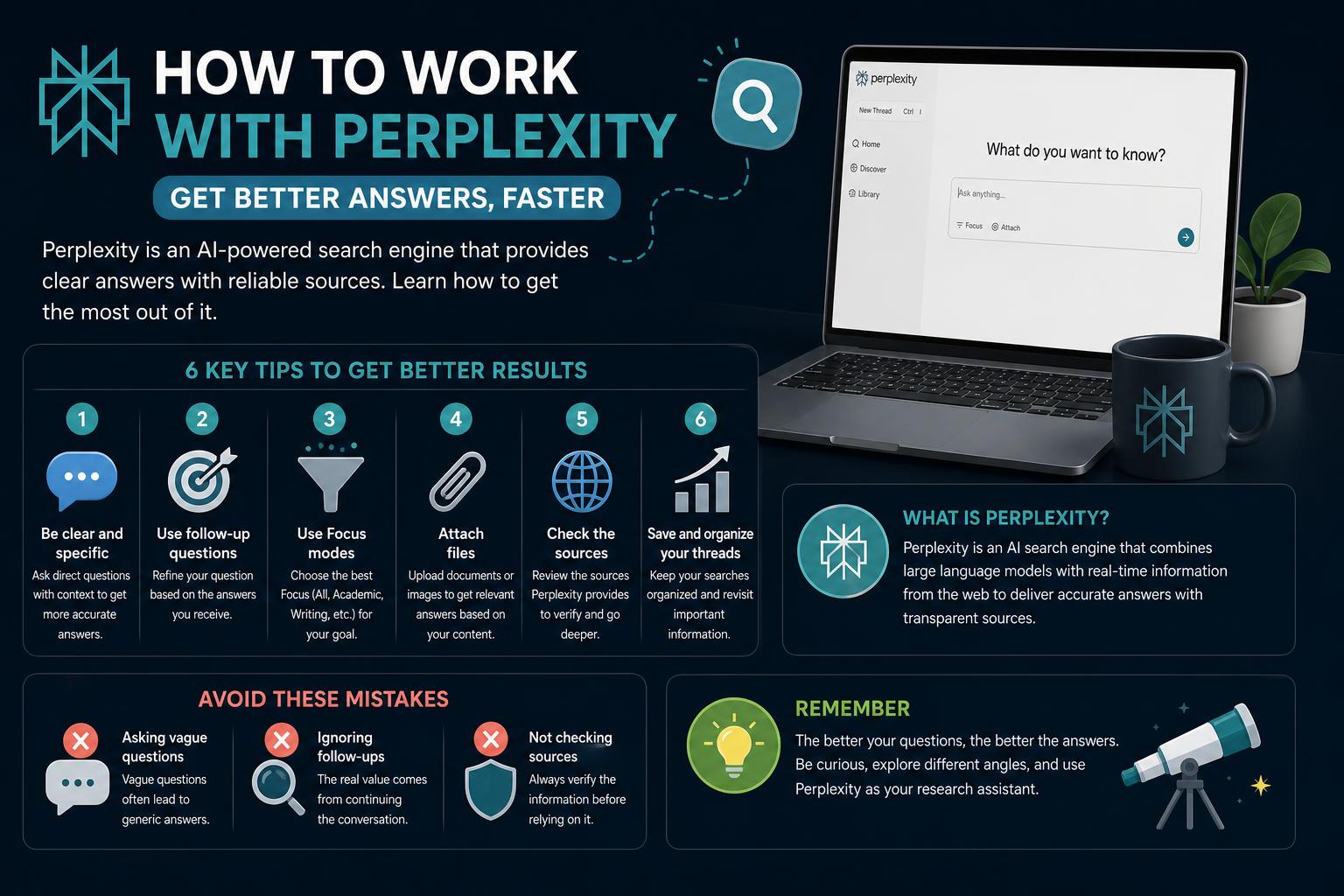
- Perplexity AI streamlines information discovery using advanced AI models and real-time web search
- Users can choose between multiple search modes, attach their own data, and personalize research
- Productivity features like scheduling, connectors, and Model Council amplify research and automation possibilities
- Despite its strengths, responsible fact-checking and understanding its limits are crucial
Tired of sifting through endless search results that never quite answer your original question? You’re not alone. Many users have turned to Perplexity AI, an AI-powered research assistant designed to give you concise, well-sourced answers to any question—whether you’re looking for product reviews, tackling research projects, or just curious about the world. But there’s much more to this tool than meets the eye.
In this comprehensive guide, you will discover everything you need to know about how to work efficiently with Perplexity AI. From basic queries to advanced research workflows, collaborative features, customization, automation, and the latest tricks for power users, you will find practical insights and tips that will transform the way you search, analyze, and use information. Whether you are a beginner or looking to boost your workflow, this article covers all the up-to-date knowledge through 2025.
What Is Perplexity AI, and Why Should You Care?
Perplexity AI is a modern AI investigation and knowledge discovery tool often dubbed the “Swiss Army Knife for information discovery and curiosity.” At its core, it combines the conversational capabilities of advanced large language models (LLMs) with powerful real-time web and database searches. Imagine it as a hybrid between ChatGPT and Google Search, but tailored to not only answer your questions, but cite the exact sources behind every fact, allowing for rapid verification and further exploration.
The engine under the hood includes several leading-edge AI models—such as GPT-5, Claude 4, Google’s Gemini 2.5 Pro, xAI’s Grok 4, and bespoke Perplexity models. When you query Perplexity, it interprets your question, scans vast pools of data (via APIs, its web crawlers, and attached sources), and returns consolidated answers with transparent citations. Learning how to work with Perplexity on different browsers can further ease your experience and improve your productivity.
Unlike a traditional search engine, Perplexity strives to give you a complete, instant answer on one page—not a scattered list of blue links. That’s why many users, from business professionals to students and researchers, are swapping out Google for it in their daily workflows.
Perplexity AI offers cross-platform support for maximum convenience. You can use it via a web browser, dedicated desktop applications (Windows and macOS), and mobile apps for iOS and Android. For those who spend most of their day online, the Chrome extension makes it easy to set Perplexity as your default search engine or use the tool while browsing any page.
Account creation is quick and optional. While you can begin right away as a guest, signing up allows you to access personalized features, like customized search suggestions and saved research history.
When you open Perplexity’s interface, you’ll notice an intuitive structure:
- Navigation Bar: Place for main actions such as Home, Discover (trending topics), Spaces (for team/collaborative projects), Library (search history), and starting new threads.
- Settings Panel: Found in the lower left, it’s where you manage your account, switch between personal and incognito modes, or tweak app preferences.
- Main Search Area: This central workspace is where you submit questions, customize search settings, attach files, swap AI models, and view responses in real-time.
The learning curve is low—even for first-timers—with features surfaced only when you’re ready to dig deeper.
How Perplexity AI Works: A Deep Dive into Its Core Functions
At the foundational level, Perplexity takes your natural language queries and uses AI to interpret your intent. It then scours both current and historical web content via connections to search engines (Google, Bing, etc.), as well as its own crawling and indexing capabilities. To stay up to date on how to learn to work with Perplexity whenever new updates arise, check the advanced features and tricks section in its documentation.
Key Search Modes:
- Quick Search: Fast, succinct answers—perfect for rapid-fire questions. Available for all users.
- Pro Search: Ideal for digging deeper; it asks follow-up questions to refine results. Free users have a limited daily quota, while paid users can utilize this feature without restrictions.
- Research and Labs: Allow you to delve even deeper—producing multi-source reports or finished assets (documents, dashboards, slides). These modes synthesize web and specialized resources.
- Specialized Domains: Specific portals—Finance, Travel, Academic—that access relevant databases (SEC filings for Finance, academic papers for Academic, etc.).
Two presentation styles:
- “Threads” allow for conversational, chatbot-like interaction, facilitating a dynamic dialogue.
- “Pages” function as polished, shareable research reports.
Focus Modes: Sharpening Your Search
Not all information needs are equal—and Perplexity knows it. Through its powerful Focus Modes, you can fine-tune where your answers are drawn from. Here you can consider their use to further facilitate how to learn to work with Perplexity according to the context and need.
- Web Focus: The generalist setting—searches the entire internet for breadth.
- Academic Focus: Targets respected research databases—ideal for peer-reviewed articles and scientific papers.
- Social Focus: Mines forums, social media, and discussion boards for public sentiment and trending conversations.
- Video Focus: Parses YouTube and similar platforms for video answers, summaries, and key moments.
- Writing Focus: Handles creative and technical writing; ideal for brainstorming, coding help, or content drafting.
- Math Focus: Uses Wolfram Alpha to perform calculations and interpret complex math problems or data analysis.
Activating Focus Mode is straightforward: Simply tap the Focus button and select the most relevant source type for your question. This functionality can be key for specialized research or specific analyses.
The Ultimate Guide to the Best Microsoft Edge Extensions
Advanced Features for Power Users
Model Selection and the Model Council
One of Perplexity’s standout features is its support for multiple AI models. If you are a Pro or Max subscriber, you can access the “Model Council” feature. This allows you to run your query through several leading models—like Claude, GPT-5, Gemini—and then a special model synthesizes their answers. Doing so reduces errors and provides different perspectives, which is fundamental to learning how to work with Perplexity in critical research.
Scheduled Tasks and Automation
Forget repetitive research: Perplexity’s Tasks feature can schedule regular reports for you. Simply set up daily reports, weekly summaries, or trending resources using natural language commands like “Send me a morning summary of the latest AI news.” This helps you stay up to date and automate your research or constant analysis processes.
Connecting External Accounts
Integrate Perplexity with your favorite tools to base your answers on your own data. It adds connectors for Gmail, Google Drive, Notion, and Slack, allowing you to access and analyze relevant files and conversations in one place. To learn more about how to work with Perplexity in different environments, explore the integration features in the official documentation.
Slashing Repetition: The Slash Command and Skills
Save time on recurring queries by turning them into shortcuts. Creating custom skills (/monthly_fin_report) or slash commands in Perplexity will make it easier for you to perform repetitive tasks in your workflow. Ideal for those who manage frequent reports or analyses.
Research Collaboration with Spaces
Spaces transform Perplexity into a collaborative knowledge hub. Invite members, organize content, and share files and tasks, facilitating collaboration on research projects or content development. This feature can be very useful for learning how to work with Perplexity in team environments.
Transparency, Source Verification, and Data Privacy
Perplexity’s commitment to transparency sets it apart. Every AI-generated answer comes with interactive citations, showing exactly which source supports each claim. This helps in understanding how to learn to work with Perplexity by verifying every piece of data before using it.
If privacy is your priority, Incognito Mode is your ally. When activated, Perplexity will not save your queries, protecting sensitive information; additionally, you can adjust your preferences so that data is not stored and your privacy is respected.
Special Pro Features, Pricing, and Plan Details
Perplexity offers a tiered structure to meet all needs:
- Free Plan: Generous for occasional needs—unlimited quick searches and a few daily Pro searches, plus up to two file uploads. Incognito and web focus enabled.
- Pro Plan ($20/month): Unlocks most advanced features—model selection (including the latest GPT and Claude), over 300 daily Pro searches, unlimited uploads, connectors, image generation (DALL-E, Playground AI), and advanced API access.
- Enterprise Plan ($40/month or custom): Designed for large teams and organizations—offers unlimited Pro searches, knowledge base integration, advanced collaboration, and security features like SSO.
- Max Plan ($200/month): For power users looking for unlimited access—includes exclusive features like the Comet AI browser and unlimited Research and Labs projects.
Each tier upgrades your options, allowing you to customize the AI’s research power for any need, from personal productivity to organizational research and automation.
Trending Features: Comet AI Browser and Visual Finance Analysis
Perplexity is investing in its new AI browser, Comet. Comet offers direct integration of the Perplexity assistant with your browsing experience, leveraging a persistent context across multiple tabs. This means you can ask Comet to compare specs or aggregate data from multiple web pages simultaneously—ideal for shopping, competitive analysis, or parallel research.
Visual data analysis is another game-changing feature, especially for financial professionals. Access a specialized Finance tab, which not only provides live financial data and company reports, but can also generate interactive charts, graphs, and comparisons on demand. You just need to request a visual financial analysis, and Perplexity will render the information in a visually understandable way.
Search Operators and Advanced Query Techniques
For those who want precise search results, Perplexity supports advanced operators. Use site:example.com to filter answers to a specific website, or enclose phrases in quotes for exact searches. Date filters (like “Last Week” or “This Year”) help highlight the most current sources. These techniques can significantly improve answer accuracy, especially in targeted research, troubleshooting, or academic work.
User Perspectives: Who Benefits Most from Perplexity AI?
The versatility of Perplexity means that different users will appreciate different aspects. Here are a few typical use cases:
- Casual users: Enjoy direct answers without having to scour search pages. Just keep in mind that, while answers are fast, it can be helpful to verify important information to avoid errors.
- Researchers and students: Citation and academic focus are advantages, but always verify sources on highly important or highly complex topics, as the depth of the summary may vary.
- Professionals: Code snippets, legal advice, and business intelligence save hours—but answers in sensitive fields like finance or law should always be validated by experts.
- Educators and business owners: Lesson planning, content creation, and market research are now faster. However, regular fact-checking maintains the reliability of your results.
Ultimately, Perplexity works best as a highly efficient research assistant, not as a direct replacement for expert human analysis or traditional exhaustive research.
Strengths and Limitations: A Balanced View
Its main advantages include real-time source retrieval, variety of AI models, and multiple integration options. Follow-up questions allow you to maintain context, making research feel like a natural conversation. Features like file uploads, collaborative spaces, and financial visualization provide unprecedented control over the flow of information.
The frequently reported limitations are: inconsistent quality in some answers, depth limitations for specialized topics, and some typical generative AI inaccuracies. Because the scope of web searches can vary with updates and licensing changes, it is advisable to carefully review the data before acting on it.
Expert Tips for Maximizing Perplexity AI
- Max out your Pro search: Even free users can request deeper analysis—just remember that your daily quota refreshes every 24 hours.
- Attach contextualized files: For personalized insights, always use the file attachment feature. Uploaded documents can be referenced and cited directly in the AI’s responses.
- Switch Focus Modes according to your need: Don’t limit your searches only to Web mode; switch to Academic, Math, or Social as your question requires.
- Set up scheduled tasks for constant updates: Set daily/weekly summaries to automate your periodic information needs.
- Explore the Model Council for critical research: Synthesizing multiple models reduces the risk of “hallucinations” on sensitive questions.
- Use Spaces and collaborative features: Major projects and teamwork are much easier when everyone works on the same platform.
- Prioritize privacy: Use Incognito Mode for sensitive research, and review data usage settings in Preferences.
Whether you use Perplexity as a casual alternative to search engines, a business aid, or a collaborative knowledge platform, thoroughly understanding its features will allow you to work with greater power and efficiency. By understanding its multiple AI models, source provenance, focus modes, automation, and data connectors, you ensure your research is faster, more reliable, transparent, and actionable. With the continuous evolution of AI platforms, staying informed about new features, like the Comet AI browser and advanced scheduled tasks, will be key to maintaining your edge in research and productivity.
The Complete Guide to Choosing and Optimizing the Best Browser for Windows 11 in 2026