
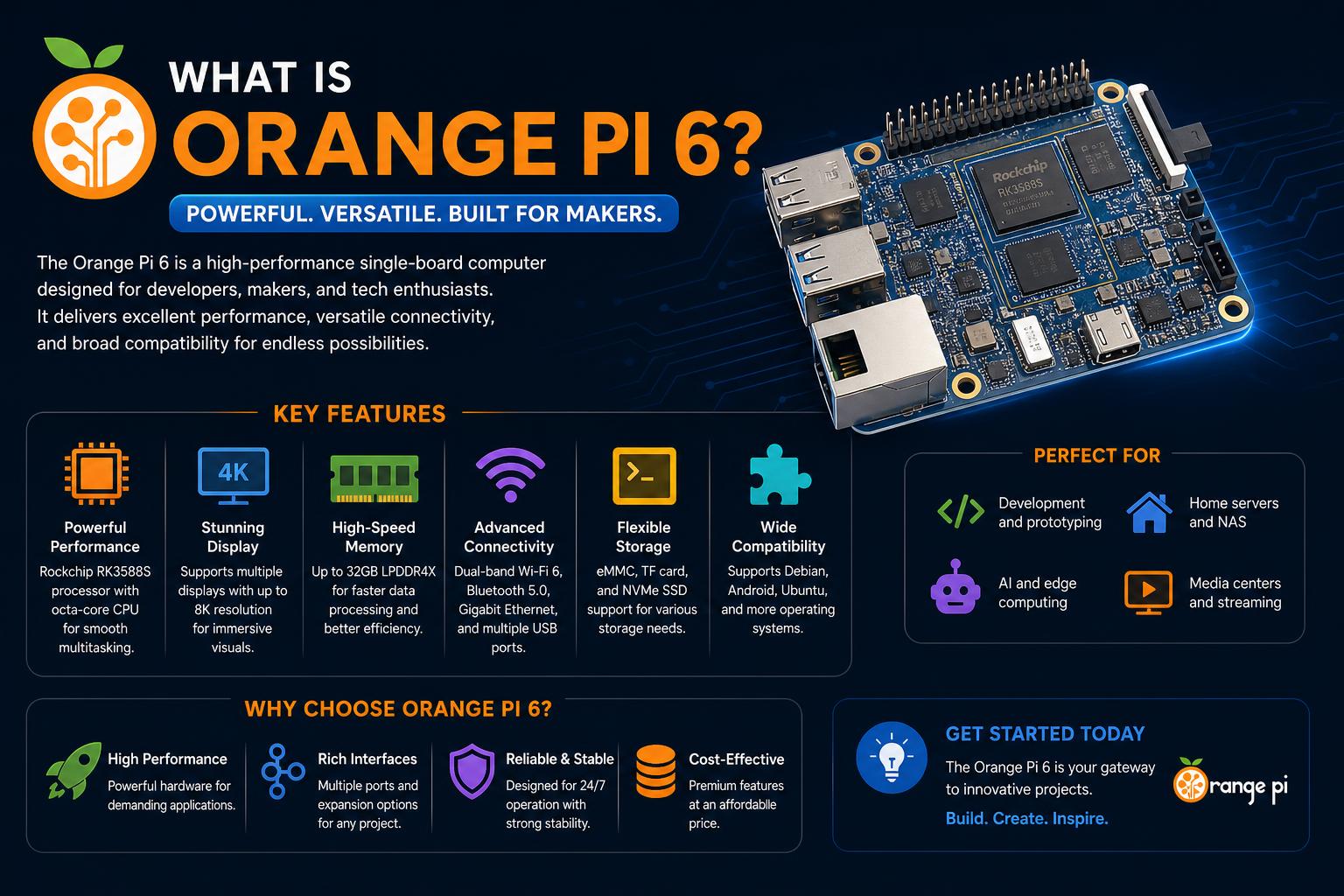
- The Orange Pi 6 lineup introduces exceptional AI, GPU, and network performance in a compact SBC.
- Dual NVMe storage, dual multi-gig Ethernet, and up to 64GB RAM position it above mainstream competitors.
- Real-world reviews highlight stability, robust Linux/AI support, and notable power consumption and fan noise trade-offs.
- Ideal for edge AI, homelabs, and custom servers, provided users are comfortable with software setup and active community troubleshooting.
The single-board computer landscape has never been as exciting and competitive as it is today, and at the heart of that excitement is the Orange Pi 6 family. If you’ve spent any time building homelabs, developing custom devices, or simply tinkering with next-generation ARM hardware, this platform is likely on your radar. While the Raspberry Pi remains a household name and the default choice for millions, Orange Pi is rapidly catching up, matching and even surpassing expectations with ambitious hardware lineups like the Orange Pi 6 and Orange Pi 6 Plus.
This article takes you on an exhaustive journey through the Orange Pi 6 series, breaking down the hardware, performance, unique features, and real-world usage drawn from the most authoritative sources and hands-on reviews available. Whether you’re an AI tinkerer, a power user, or just shopping for the next ‘do-it-all’ ARM board, you’ll discover everything you need to know to decide if the Orange Pi 6 or its ‘Plus’ sibling truly lives up to the hype—and whether it could become the beating heart of your next project or server rack.
Orange Pi 6 Series: The Big Picture
Orange Pi has stepped into the spotlight with the introduction of the Orange Pi 6 and Orange Pi 6 Plus, positioning these models as powerful successors to their already capable lineup of single-board computers (SBCs). The focus is clear: deliver cutting-edge ARM performance, advanced AI capabilities, and connectivity that directly targets both hobbyists and professionals. Rather than acting as just another Raspberry Pi clone, Orange Pi approaches design with its own philosophy, prioritizing feature-rich boards and robust I/O, even if it means branching further from the established form factors many Pi users are familiar with.
Who Stands to Benefit from the Orange Pi 6?
The Orange Pi 6 family is not a one-size-fits-all device; instead, it’s tailored to users demanding flexibility, performance, and a penchant for “doing more” straight out of the box. Homelabbers, AI and machine learning enthusiasts, IoT developers, and makers tired of the limitations of the classic Raspberry Pi all have something to gain. Instead of endlessly hunting for HATs (Hardware Attached on Top) or fighting for bandwidth through a limited number of ports, users can access features that previously belonged strictly to workstation-class computers, all within a board small enough to fit in your hand.
Diving into the Hardware: What Makes the Orange Pi 6 Special?
Both the Orange Pi 6 and its Plus sibling pack an impressive amount of hardware into a compact footprint, but let’s break down what’s inside and why it matters for real-world projects.
Processing Power That Raises the Bar
At the heart of the Orange Pi 6 and 6 Plus lies the CIX P1 SoC, a 12-core powerhouse blending modern ARM Cortex-A720 and Cortex-A520 cores with dedicated computing engines for AI. The core layout is no accident: by mixing eight high-performance Cortex-A720s with four energy-efficient Cortex-A520s, the board strikes a compelling balance between maximum throughput and lower power draw—a practice seen in flagship mobile chipsets and now finding its way into the SBC arena.
- Orange Pi 6 CPU Configuration: 4x Cortex-A720 at 2.8GHz, 4x Cortex-A720 at 2.4GHz, and 4x Cortex-A520 at 1.8GHz.
- Orange Pi 6 Plus CPU Configuration: Similar to standard 6, with emphasis on expanded connectivity and RAM options for even further compute flexibility.
The inclusion of a Mali-G720/Immortalis-class GPU opens the door for robust graphics acceleration, including hardware ray tracing, 8K video decoding, and desktop 3D rendering—a far cry from the limited graphical chops of most older SBCs.
AI at the Edge: Power Where You Need It
Perhaps the most headline-grabbing feature is the combined 45 TOPS (Tera Operations Per Second) of AI processing capability, derived from the triad of CPU, GPU, and a dedicated 3-core Neural Processing Unit (NPU). In practical terms, this means the board is uniquely positioned for local AI/ML inference, robotics, embedded vision, real-time analytics, and on-premises intelligence—all without delegating workloads to remote servers or cloud infrastructure.
- The NPU itself delivers almost 29 TOPS, handling image classification, object detection, and countless other inference tasks with low latency.
- The synergy with the GPU and CPU unlocks more demanding workloads, particularly when models require versatile data handling, branching, or custom pipeline orchestration.
Flexible Memory and Storage Options
Where entry-level SBCs typically top out at 4GB or 8GB RAM, Orange Pi 6 boards catapult into workstation territory with configurations up to an eye-watering 24GB (on the base model) and 64GB (on the 6 Plus) of LPDDR5 memory, pushing 6400MT/s. This isn’t just for show—the extra memory is essential for AI inference, virtualization, large dataset work, or even running multiple clustered workloads in parallel.
- Dual NVMe M.2 2280 slots (PCIe 4.0 x4) make fast, high-capacity SSD storage possible right on the board—no HATs, adapters, or external dongles required.
- Supplemental storage via microSD and USB, including high-speed USB Type-A and Type-C 3.0 ports, covers everything from rapid prototyping to data-intensive tasks.
Connectivity and I/O: Built to Break Bottlenecks
One of the loudest complaints from Raspberry Pi users is the endless hunt for more bandwidth, especially for networking, USB peripherals, and storage. Orange Pi 6 solves this problem decisively.
Dual Ethernet: More Than a Gimmick
The base Orange Pi 6 comes with dual 2.5GbE LAN ports, while the 6 Plus bumps this up to two 5GbE ports powered by Realtek RTL8126 controllers—a major leap over the single (usually gigabit) Ethernet found on most competitors. Use cases include:
- Building a true firewall, router, or edge gateway without struggling with USB Ethernet adapters.
- Running NAS or small business server tasks, leveraging multigigabit bandwidth between devices.
- High-availability clustering, which typically requires separated internal and external networks.
Few hobbyist boards provide onboard multi-gig Ethernet, making this a standout feature for advanced users running demanding network setups.
Display, Camera, and Expansion Interfaces
The Orange Pi 6 supports a robust suite of display outputs (HDMI 2.0, DisplayPort 1.4, and eDP) plus two 4-lane MIPI CSI camera connectors for real-time video capture and computer vision projects. There’s also a 3.5mm audio jack, a 40-pin GPIO header for custom electronics, dedicated fan and RTC headers, and an assortment of USB 3.0/2.0 ports to handle just about every standard device you could want—from webcams to mass storage, and DAQ modules to MIDI controllers.
A Real-World Deep Dive: Setting Up, Running, and Tweaking Orange Pi 6 Plus
Specifications are only half the story—actual user experiences illuminate what these boards can achieve and what obstacles you might face as an early adopter.
From Unboxing to Custom Operating System Builds
Out of the box, expect a robust reference design, typically shipping with UEFI firmware (CIX Technology Group’s UEFI 1.3), and the option to install popular Linux distributions like Debian and Ubuntu, as well as Android and OpenHarmony. Adventurous users have documented the process of building custom images based on Debian ‘Trixie’, handling boot fixes, and integrating GPU/NPU userspace modules for locally accelerated inference and development.
Vendor-provided OS images are good enough for most, but more demanding users routinely pursue fully reproducible builds for advanced use cases, stripping out platform-specific quirks and integrating missing hardware support. This DIY route carries challenges—dealing with partition arithmetic, kernel quirks, and hardware-specific device trees—but the result is an environment free from untrusted software or opaque boot chains, ideal for critical projects.
Practical AI and Model Inference on the Orange Pi 6 Plus
The Orange Pi 6 Plus, in particular, shines as a local AI experimentation platform. With its unified 45 TOPS of AI processing, hands-on testers report the ability to run complex language models (e.g., Qwen, Llama) for coding assistants, chatbots, or pipeline agents locally—without the need for a beefy cloud GPU.
Getting there is not always plug-and-play. For reliable Vulkan and OpenCL support, users often have to hunt down vendor-supplied GPU/NPU drivers, adjust kernel modules, and patch boot scripts to bind the right device trees. Once set up, however, the performance is notable:
- Models like Qwen 3.5 4B Q4_K_M on a Vulkan-patched llama.cpp runtime yield prompt/response times fast enough for daily development and agent-driven tasks.
- Batching parameters (such as micro-batch size) must be carefully tuned to avoid hitting hardware descriptor limits—a lesson true for many ARM SoCs.
- Stability and memory utilization remain strong, though edge cases can expose the limits of available RAM or the NPU’s capability to process certain model types (LLMs generally run better on GPU/CPU than NPU, for now).
Storage, NVMe Migration, and Day-to-Day Workflow
One of the board’s most liberating features is the ability to boot directly from fast NVMe storage. Users have documented the process: prepping the NVMe with EFI, root, and swap partitions, migrating a Debian install via rsync, patching GRUB, and enjoying quick, SD-free boots. This enables workflows that were previously impractical on lesser ARM SBCs:
- Virtualization with KVM or Proxmox, running light virtual machines or containers—a setup that previously required far pricier x86 boxes.
- Day-to-day coding, building, and benchmarking (often for projects like BasiliskII or self-hosted assistants) without worrying about sluggish flash cards.
- Reliable, deterministic boot and upgrade routines—once the quirks are tuned out in the custom OS image.
Orange Pi 4 Pro: The Complete Guide to Specs, Features, and Value
Comparing Orange Pi 6 to Raspberry Pi 5 (and Others)
It’s almost inevitable that any discussion of Orange Pi’s new boards involves direct comparisons with the Raspberry Pi family, especially the latest Pi 5. While the Raspberry Pi is the mainstream, budget-friendly choice with unparalleled community support and endless accessories, Orange Pi seeks to win over a different segment—those who favor power, expandability, and fewer trade-offs.
Where Orange Pi 6 Takes the Lead
- Networking: The dual 2.5GbE or 5GbE ports, a game-changer for homelabbers, small business networking, or fast backup servers; Pi 5 only offers a single gigabit port by default.
- NVMe and Storage: Orange Pi’s dual M.2 2280 slots accommodate multiple full-speed SSDs out of the box, whereas Pi 5 users need specific HATs or USB-based NVMe adapters (often bottlenecked by USB bandwidth).
- Memory: Up to 24GB/64GB LPDDR5 versus a maximum of 8GB on Pi 5—crucial for robust AI, development, and multitasking workflows.
- AI Throughput: Orange Pi’s dedicated 3-core NPU and total AI performance make it uniquely relevant for edge inference and computer vision, a field where mainstream Pis still lag.
The trade-off involves a smaller, more fragmented community and a potentially steeper learning curve, as the Orange Pi ecosystem evolves rapidly and documentation can be more scattered than the Pi’s polished, centralized wiki-driven resources.
Limitations and Honest Trade-Offs
Every high-powered SBC brings some compromises, and Orange Pi 6 is no exception. Real-world reviews and technical dives highlight a few recurring points:
- Fan Noise: The stock active cooling solution can be noticeably loud, with simple three-mode (mute, normal, performance) operation but no fan curve settings while running the CIX kernel. For many users, this means banishing the device to a server closet for peace and quiet, or searching for third-party fan control utilities.
- Power Draw: Idle power usage hovers around 15–16W, peaking toward 30W during heavy compilation or benchmarking—a figure higher than Raspberry Pi, RK3588 boards, or even some low-power x86 mini PCs. This is likely due to the new SoC’s memory/phsyical controller design, twin high-speed NICs, and always-on cooling. Those aiming to run a network appliance or local server 24/7 should factor the annual cost into their evaluation.
- Software Support: Although Linux support (Debian/Ubuntu) is functional, vendor drivers for the GPU and NPU are still a bit of a moving target. Getting full graphics and neural inference acceleration often requires hunting for binaries, patching device paths, and careful management of userspace packages—an adventure for enthusiasts but potentially off-putting for beginners.
On pure desktop duties or as a daily-use personal PC, the Orange Pi 6 is outpaced by its power consumption and relative software quirks; it truly excels as an edge AI node, experimental lab device, or compact networked server.
Benchmarking, Performance Metrics, and Usage Patterns
With a board this ambitious, synthetic and practical benchmarks matter, but they don’t tell the full story until paired with daily workflow data and user anecdotes.
Computing Power
- 7-Zip Compression: Multicore runs achieve aggregate scores around 33,000—aligning with lower-end consumer laptops and vastly outstripping older SBCs.
- CPU Cores: The eight Cortex-A720 clusters hit 2.2–2.6GHz, while the four Cortex-A520s top out around 1.8GHz. Workload placement (for example, pinning heavy threads to A720s) brings significant speed-ups, and memory bandwidth on the A720s is both ample (15–17 GB/s memcpy, up to 47 GB/s memset) and consistent across tasks.
AI Inference
- Real-world model runs demonstrate competitive throughput, especially when leveraging Vulkan or optimized CPU backends for model families like Qwen and LFM2.
- Prompt speeds and response rates—ranging from 8–46 tokens per second depending on model/parameters—make on-device development and testing genuinely viable. With proper tuning, models stay stable under reasonable batch sizes, with clear thresholds where GPU drivers hit architectural limits.
Thermal Management and Fan Dynamics
- Thermal readings are promising: idle system blocks stabilize around 29–33°C, with heavy synthetic runs pushing temps to 40–43°C—well within tolerance, provided active cooling is engaged.
- Despite the efficacy of thermal management, the inability to fine-tune fan curves or access RPM data could frustrate users who value silence and granular control.
Reliability and Longevity
- Over several weeks, power consumption stabilizes, and reboots become rare outside of manual upgrades or experiments. The system’s default load profile and performance envelope make it a robust always-on Linux server, albeit with a noticeable idle power cost.
- From a developer’s perspective, the Orange Pi 6 Plus has handled sustained code compilation, cross-platform debugging (including for classic emulators like BasiliskII), and heavy AI experimentation without flaking out—an endorsement that goes beyond simple benchmarks.
Breaking Down Orange Pi 6 vs 6 Plus
The Orange Pi 6 and 6 Plus are close siblings but have critical differences worth noting for potential buyers:
- Networking: Both offer dual LAN, but the 6 Plus supports faster 5GbE.
- RAM: Orange Pi 6 is available in 8GB/16GB/24GB configurations, while the 6 Plus ranges up to 16GB/32GB and claims support for 64GB.
- Recognizable I/O: More full-size ports (HDMI, DisplayPort, eDP) and expansion options on the 6 Plus, plus a broader selection of USB3.0/2.0 ports.
- Physical Size: The standard 6 is slightly smaller (90x90mm), whereas the Plus is bigger, reflecting its added features and improved cooling setup.
- Storage: Both provide dual NVMe support as a baseline; this is rare for non-x86 boards and crucial for anyone running data-intensive tasks or expecting high IOPS (Input/Output per Second).
Operating Systems and Software Ecosystem
Operating system support is a make-or-break feature for SBCs. Orange Pi touts out-of-the-box compatibility with popular Linux distributions (Debian, Ubuntu) and offers builds for Android and OpenHarmony (for IoT/embedded environments). Unofficially, Windows support is listed, though at the time of writing it’s minimal due to the CIX P1 SoC not being a primary target for Microsoft’s ARM kernel work.
Bespoke OS images crafted by the community are vital for squeezing out maximum hardware performance and security, especially for developers with demanding requirements or unique use cases. These custom images may include:
- Vendor GPU/NPU drivers for accelerated neural and graphics workloads.
- Reproducible builds free from opaque, outdated vendor packages.
- Automated start and upgrade routines, designed for ‘plug and play’ reliability after initial config.
Typical Use Cases: From Homelabs to AI Workstations
The feature set and flexibility of Orange Pi 6 translate directly into several standout use cases:
- Edge AI and Local Inference: Modeling, custom data pipelines, or smart automation can run right at the hardware edge, minimizing cloud latency and data exposure risks.
- Network Appliances: The dual/multigig Ethernet setup is ideal for DIY firewalls, routers, mini-NAS devices, and business network monitors without the limitations of USB-to-Ethernet dongles.
- Compact Servers and Home Automation Hubs: Ample RAM, SSD support, and 24/7 stability allow for dense home server consolidation or hosting a variety of services (media streaming, file sync, home automation, development sandboxes).
- Development and Testing Workstations: Developers looking to target ARM builds or experiment with AI/ML model deployment gain access to a robust, portable, and cost-effective testbed, capable of handling everything from containerization to live benchmarking and cross-platform compilation.
Less suited for:
- Daily driver desktops (unless you’re willing to navigate ARM/Linux caveats or are building a specialized kiosk or industrial workstation).
- Ultra-low-power sensor nodes or battery-powered IoT endpoints due to relatively high idle power draw.
- Replacement for high-end x86 workstations in desktop environments; although powerful, the Orange Pi 6 family sets its sights on targeted, intelligent edge workloads.
The Software Story: Linux, Drivers, and Everyday Experience
Out-of-the-box, users will encounter a functional, but occasionally fragmented, software ecosystem. The Orange Pi official repository covers kernel, UEFI firmware, and vendor modules, but reaching feature parity with everything the hardware offers often requires third-party drivers, community patches, and manual hunting for missing pieces.
AI experimentation (especially using model runners like ) has proven stable and fast, once proprietary GPU/NPU drivers are properly installed and configured. This is generally not a single-click process: binding the correct kernel modules, building custom device trees, and curating the right model runtime parameters are crucial. However, this setup enables local agents and assistants to function with speeds and capabilities commonly attributed to cloud-based services.
Virtualization platforms (like KVM or Proxmox) run seamlessly, supporting ARM-based guest OS experiments, test labs, and developer sandboxes further supporting the Orange Pi 6’s versatility as a multipurpose workstation or server.
Orange Pi RV2: In-Depth Review of a Budget RISC-V and AI SBC
Community, Documentation, and Vendor Support
The Orange Pi community is smaller than that of the Raspberry Pi, but it’s extremely active and resourceful. Users regularly share custom OS images, benchmarking reports, driver fixes, and hardware workarounds. One point of friction for new adopters: documentation is scattered and occasionally out of date, so expect a higher initial learning curve—offset by the collaborative nature of forums and repository discussions.
Ongoing vendor kernel updates and third-party contributions are gradually closing the gap between the Orange Pi experience and that of better-known SBCs. As popularity increases and more projects (including professional homelabbers, AI enthusiasts, and network engineers) join the ecosystem, the pace of software and documentation improvements will only accelerate.
Flipper Zero Explained: The Ultimate Guide to the Geek Multi-tool
What’s Next for the Orange Pi 6?
With frequent board iterations and rapid hardware cycles, Orange Pi is not standing still. The appearance of the 6 Plus as an evolution of the base 6 model (launched just months apart) demonstrates a commitment to filling niches, addressing user pain points (especially in I/O and memory), and keeping pace with advances in ARM SoCs and neural processing accelerators. As the software ecosystem matures and new use cases emerge, the Orange Pi 6 series will likely see even broader adoption in small business, educational, and enthusiast markets.
The Orange Pi 6 and 6 Plus are more than just alternatives to better-known SBCs. They represent a leap forward for anyone ready to push the boundaries of what a compact, affordable ARM board can accomplish. While some hurdles—like power draw, noise, and the need for software tinkering—remain, the sheer breadth of features, performance overhead, and true out-of-the-box expandability ensure this hardware will be at the core of numerous advanced projects for years to come. For tech enthusiasts, homelab builders, and professional innovators, the Orange Pi 6 series is not just a worthy challenger—it’s fast becoming the gold standard for what’s possible in modern single-board computing.