
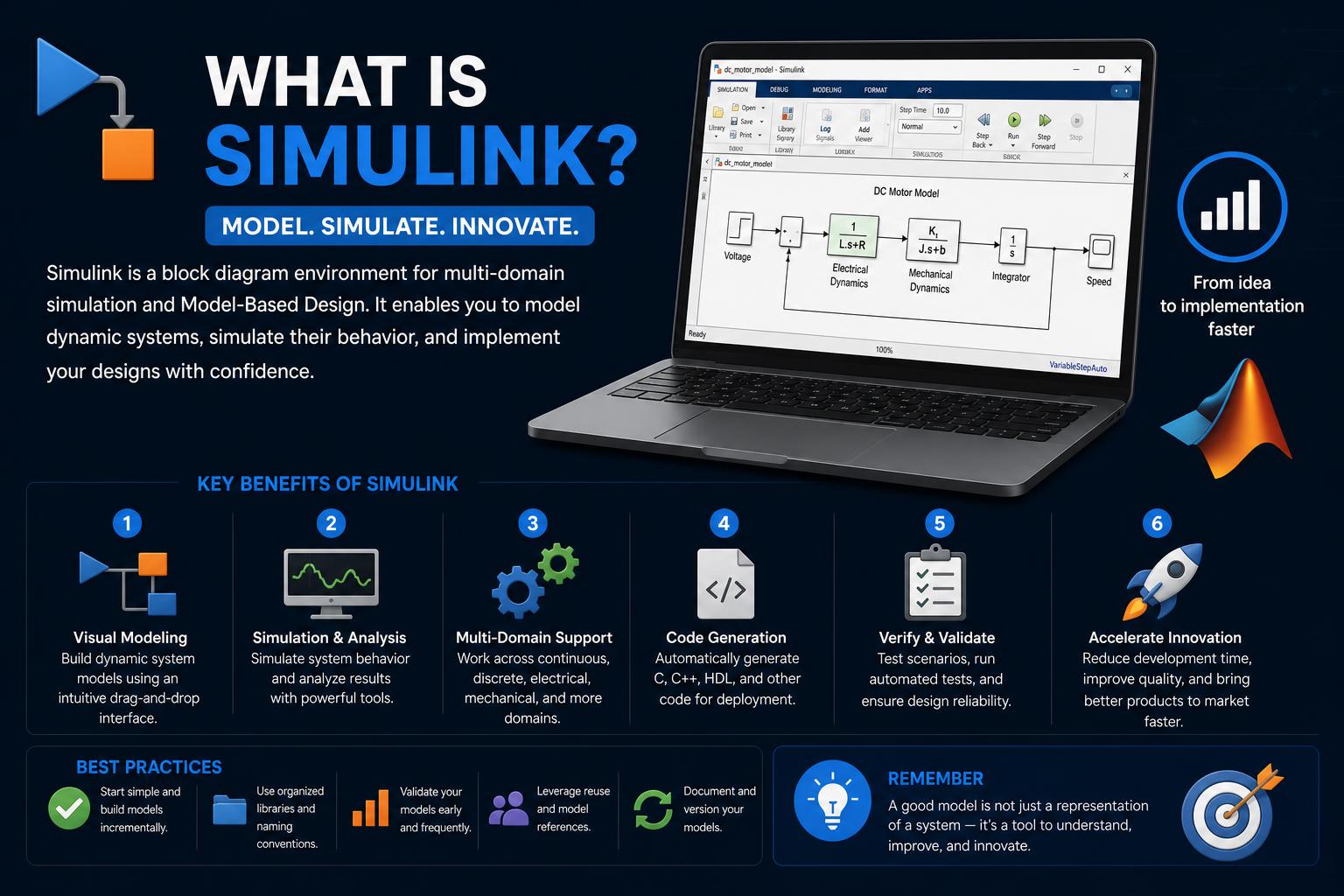
- Simulink enables graphical, block-based modeling and simulation for engineers across industries.
- The platform integrates closely with MATLAB, supporting data analysis and real-time deployment.
- Wide adoption stems from powerful add-ons, automatic code generation, and real-world validation capabilities.
Every day, engineers and researchers across the globe tackle complex systems—from electric vehicles to advanced robotics—using innovative tools to virtually design, test, and iterate their ideas. Simulink stands as one of those indispensable tools, especially in an era where modeling and simulation aren’t the exception but the rule.
But what exactly is Simulink? Why is it a household name in both academia and industry? Let’s explore the origins, unique features, and impact of this robust platform, unraveling its close relationship with MATLAB and the broader engineering ecosystem.
Understanding Simulink: More Than Just a Tool
Simulink is a graphical simulation and model-based design environment created by MathWorks. Released first in 1984, it has evolved into one of the most widely used platforms for simulating dynamic systems and control logic in industries such as aerospace, automotive, robotics, and more. The innovation behind Simulink is its intuitive approach—users create models visually with block diagrams instead of writing lines and lines of code. This visual aspect is where much of its power and accessibility comes from.
While Simulink is closely tied to MATLAB (another product by MathWorks), the two are distinct. Simulink specializes in time-based and event-driven simulations using connected blocks, while MATLAB focuses on numerical computations, data analysis, and coding algorithms in a text-driven environment. Together, they provide a holistic solution for modeling, simulation, analysis, and real-time deployment.
The Origins and Evolution of Simulink
Developed and maintained by MathWorks, a recognized name in the field of mathematical computing, Simulink has continuously adapted to industry needs over the decades. The first version was released in 1984 for systems running Linux, macOS, and Microsoft Windows, making it cross-platform from early on. Its continual integration and support with MATLAB have not only fueled its growth but also enriched its capabilities for generations of engineers.
Simulink’s block diagram modeling environment allows you to interconnect functional blocks visually, reducing the learning curve and making even complex models more manageable. Behind those blocks, you’ll find sophisticated mathematical functions, logic gates, physical system components, control algorithm elements, and much more—all organized in extensive libraries you can drag and drop onto your workspace.
Key Features That Set Simulink Apart
Simulink’s biggest draw is its graphical interface. Instead of coding from scratch, engineers use configurable blocks to represent everything from motors and controllers to signal processing filters and mathematical operators. Among Simulink’s standout capabilities, you’ll find:
- Block libraries: Extensive collections for control systems, signal processing, logic, mathematical functions, and physical modeling.
- Tight MATLAB integration: Simulink models can be driven from MATLAB scripts, and data can flow freely between the two environments.
- Multidomain modeling: Simulink can simulate systems that span electronics, mechanics, hydraulics, and beyond, especially when combined with add-ons like Simscape.
- Auto code generation: Models can be directly converted to C, VHDL, or Verilog code using tools like Embedded Coder, streamlining deployment to embedded hardware.
- Real-time simulation: With Simulink Real-Time and compatible hardware, engineers can run high-fidelity, real-world scenarios before building any physical prototypes.
Its versatility is what has made Simulink so enduring. Whether you’re orchestrating a hybrid vehicle’s powertrain, tuning a PID controller, or modeling signal paths in communication systems, Simulink adapts to your needs with remarkable depth.
Differences and Synergy Between Simulink and MATLAB
Newcomers often confuse Simulink with MATLAB, given their close connection. The distinction boils down to the way you build and interact with models:
- MATLAB: A text-based programming environment—great for data analysis, numerical calculation, algorithm development, and visualization. Users write scripts and functions that manipulate matrices and data sets.
- Simulink: A graphical, block diagram-based modeling tool—excellent for visualizing and simulating how interconnected systems change over time. Engineers build systems by connecting functional blocks instead of writing code line by line.
While each can be used independently, their real power is unleashed when used together. Engineers often process and analyze test data in MATLAB, then model, simulate, and optimize system behavior in Simulink—creating a seamless workflow from concept to prototype and beyond.
What Can You Build with Simulink?
The list of Simulink applications is long and diverse, but you’ll most often find it at the heart of:
- Control system design: From basic PID loops to advanced vehicle stability controls.
- Embedded software development: Creating algorithms that can run on microcontrollers and other hardware.
- Physical modeling: Simulating physical systems—mechanical, electrical, hydraulic, thermal—using add-ons like Simscape.
- Signal processing: Designing and validating filters, modulators, and communication signal paths.
- Vehicle and powertrain simulation: Modeling complete electric drivetrains, battery management, or energy flow systems.
- Real-time HIL (Hardware-in-the-Loop) testing: Deploying and validating models in cyber-physical test rigs before investing in actual prototype hardware.
Basically, if there’s a system that changes over time, chances are excellent that Simulink can help visualize, test, and refine it.
How Does Simulink Work? Let’s Get Visual
Simulink makes engineering accessible by breaking down models into visual components. Here’s what you can expect as you build with Simulink:
- Drag-and-drop workspace: You select blocks from libraries and place them on your canvas.
- Connect with lines: Blocks are joined to show how information or energy flows between components.
- Custom parameter tuning: Each block can be configured with specific, real-world properties.
- Simulation controls: You can run, pause, step through, and analyze how your system behaves in real time or as a fast-forwarded sequence.
This block-by-block construction closely mimics how engineers conceptualize real systems, making it easier to debug, adjust, and iterate as a design comes together—without the risk or cost associated with physical prototypes.
Essential Add-Ons for Advanced Modeling
Simulink is designed with expandability in mind. Some popular MathWorks and third-party add-ons expand Simulink’s core functionality:
- Stateflow: Allows you to model complex logic, state machines, and event-driven systems within the Simulink environment.
- Simscape: Lets you simulate physical and multi-domain systems by integrating electrical, mechanical, hydraulic, and thermal domains into one unified model.
- SimEvents: Adds queuing and event-based simulation blocks for modeling systems like communications networks or logistics operations.
- Embedded Coder, HDL Coder: For automatic, efficient generation of C, C++, VHDL, and Verilog code, helping you transition designs from simulation to deployable embedded systems quickly.
- Simulink Real-Time: Seamlessly test and run your models directly on dedicated real-time systems for HIL and rapid prototyping scenarios.
Estas extensiones amplían aún más las capacidades de Simulink, permitiendo la integración en sistemas de control críticos, como los que se usan en microcontroladores STM32, vinculando la simulación y el desarrollo embebido.
Real-World Use Cases: Why Engineers Love Simulink
Simulink’s value shines brightest when put to practical use. Aquí tienes algunos ejemplos concretos, extraídos tanto de fuentes líderes como de proyectos típicos de ingeniería:
- An automotive engineer can quickly model and simulate an electric motor, inverter, and controller for a new vehicle concept. They’re able to tune control parameters in virtual, simulated driving conditions and iron out system behavior before a single part is manufactured.
- A research team in academia might develop new battery management algorithms. With Simulink, they can model the battery’s electrical and thermal behavior, analyze how their algorithms perform under different loads, and then test those same models in a real-time lab setup usando Simulink approach.
- In advanced manufacturing, plant control systems can be modeled to optimize process flow and identify bottlenecks. All control logic, from sensors to actuators, is designed and verified in Simulink before any on-site implementation.
This ability to reuse models at each stage of development—from conceptualization through validation and testing—significantly improves product quality and reliability.
Learning and Mastering Simulink
So, how does someone learn Simulink? Thanks to its wide adoption in both industry and academia, learning resources are everywhere:
- University courses: Engineering programs worldwide offer curricula centered around MATLAB and Simulink modeling.
- On-the-job training: Companies and OEMs often provide active project-based learning to help new engineers get up to speed.
- MathWorks online resources: Comprehensive , tutorials, and video walkthroughs are freely available to all users.
- Hands-on experimentation: The best way to understand Simulink is to build your own models, experiment, and run real or simulated hardware-in-the-loop scenarios.
Mastering Simulink and MATLAB opens doors to a vast range of fields—from vehicle electrification and energy systems to industrial automation and cutting-edge robotics.
FAQs: Addressing Common Questions
There are several frequent questions about Simulink and its ecosystem. Let’s quickly address the most popular:
- Are MATLAB and Simulink the same? No—MATLAB is a text-based environment for computation; Simulink is graphical and specialized for system modeling and simulation. Used together, they amplify each other’s power.
- Is Simulink only for control engineers? Not at all. While it’s hugely popular in control systems, Simulink’s domain spans automotive, aerospace, energy, robotics, and even biomedicine.
- Do you need strong programming skills to use Simulink? Not necessarily. Its graphical interface helps reduce the reliance on code, making advanced modeling accessible even to those not fluent in traditional programming languages.
- Can models be reused across development lifecycles? Absolutely. Engineers often create baseline models that are used from simulation and algorithm development all the way through to validation, testing, and HIL deployment.
- Are Simulink skills transferable? Without a doubt! Because most engineering programs and industrial companies use it, learning Simulink will always be valuable for career development.
Release History: Simulink Through the Ages
Simulink’s evolution over the decades is a testament to its flexibility and staying power. Version history highlights include:
- Initial release in 1984, originally named Simulab, with major upgrades and interface improvements almost every year since.
- Adoption of support for Windows, macOS, and Linux, ensuring broad accessibility.
- The addition of extensive toolboxes and support for real-time and hardware-in-the-loop testing in later releases.
- Integration of modern block libraries for advanced modeling and simulation needs—including Simscape for multidomain physical systems.
Wikipedia and the maintain comprehensive lists of features and version changes, reflecting the platform’s ongoing improvement and expansion.
Simulink in Industry and Academia
From major automakers and aerospace giants to universities and research labs, Simulink is everywhere. It’s a primary choice for:
- Enabling model-based design to speed up development cycles while reducing hardware costs.
- Supporting real-time and embedded system simulation, which are critical in safety and mission-driven applications such as self-driving cars and aircraft avionics.
- Providing a bridge between virtual simulation environments and real-world test cells, especially through HIL (Hardware-in-the-Loop) and simulation platforms.
Companies such as A&D Technology build on top of Simulink by integrating it into testing and automation platforms, enhancing the platform’s reach and usability even further in commercial and industrial settings.
Validation, Verification, and the Importance of Testing
With engineering projects becoming ever more complex, the process of validation and verification cannot be overstated. Simulink offers robust built-in tools and add-ons for ensuring system correctness and compliance, including:
- Simulink Verification and Validation: Assists with requirements traceability, model coverage analysis, and adherence to modeling standards.
- Simulink Design Verifier: Uses formal methods to find design errors such as integer overflow and dead logic, and to automatically generate test scenarios.
These capabilities empower teams to identify early errors, comply with rigorous standards, and optimize testing processes—crucial in sectors such as automotive, aerospace, and healthcare, where errors can be costly or dangerous.