
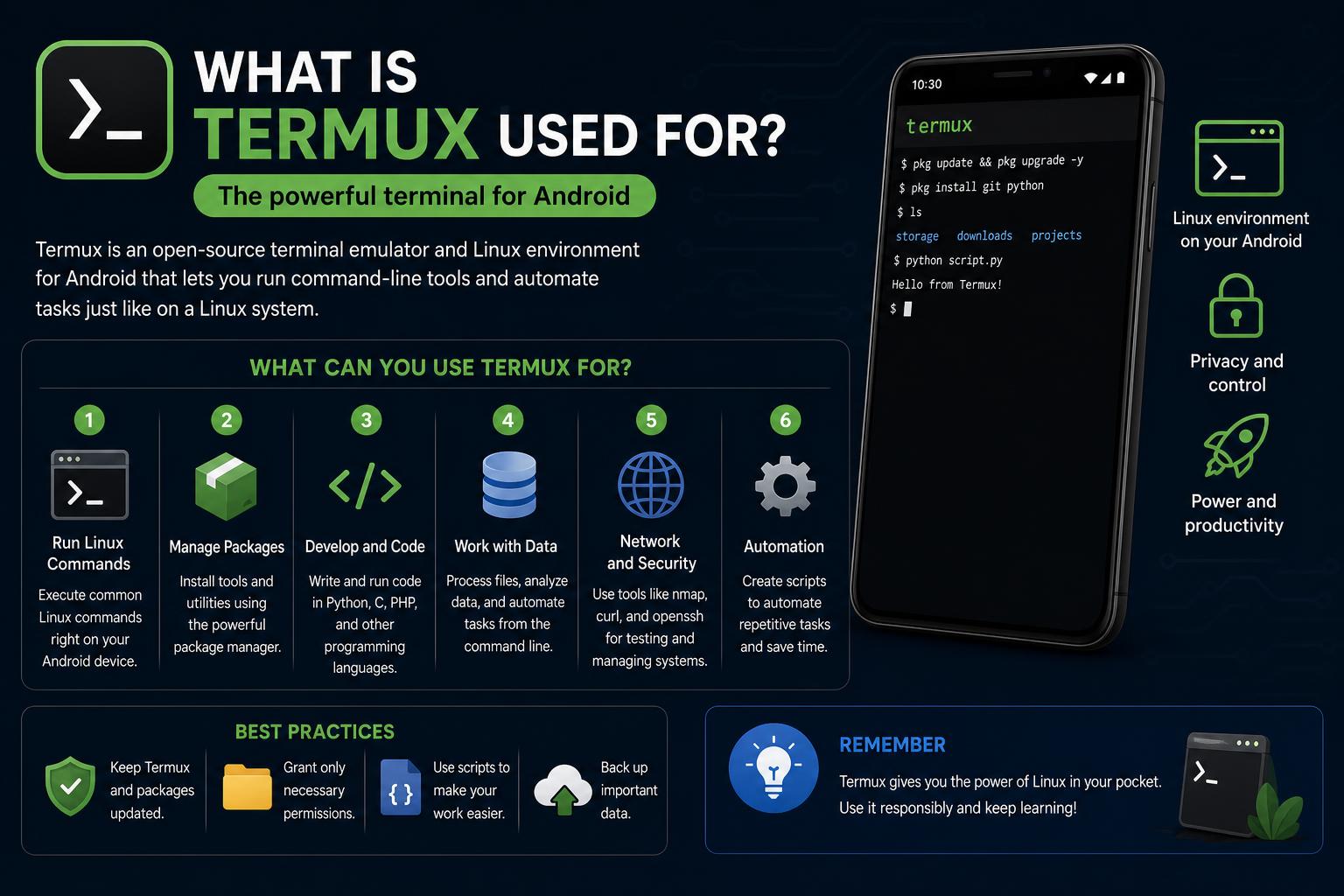
- Termux transforms Android devices into portable Linux workstations with powerful terminal access.
- You can code, manage files, and run thousands of open-source tools—all without rooting.
- Add-ons enhance functionality, offering system automation, GUI apps, and access to device resources.
- It's ideal for developers, system administrators, and tech enthusiasts eager to push Android capabilities.
If you’ve ever wondered what tech enthusiasts really do with their Android devices, you’re not alone. The world of mobile computing is much broader than just apps and games—it’s a playground for tinkerers, developers, and anyone looking to push their smartphone to its limits. Termux is at the heart of this ecosystem, bringing the power of a Linux environment straight to your Android device. But how deep does this rabbit hole go? Dive with us as we explore everything Termux is used for, from the basics to some downright advanced magic you probably didn’t expect on a phone.
Imagine having a pocket-sized Linux terminal that fits neatly in your palm. That’s essentially what Termux provides for Android users. With its combination of a terminal emulator and a robust package system reminiscent of desktop Linux, Termux has become the go-to solution for coders, sysadmins, and experimenters keen on getting more out of their mobile devices. In this guide, we’ll unpack not just what Termux is, but also how it’s transforming what you can do on Android.
What Exactly Is Termux?
At its core, Termux is a free, open-source terminal emulator and Linux environment for Android. You install it like any other app, but once it’s running, you gain access to the command-line interface—including Bash, Zsh, and other familiar shells. This means you can run thousands of Linux packages right on your phone or tablet, no need for root access or complicated setups.
The package manager is based on Debian’s famous apt and dpkg tools, making it super easy to fetch or update the tools you need. Most of the standard Linux commands, editors, and utilities are all available in the Termux environment, optimized to run natively within the Android sandbox.
Major Features Packed Into Termux
What sets Termux apart isn’t just its core terminal—it’s the whole ecosystem you get access to. Here are some of its standout features:
- Multi-shell support: Not just Bash; you can install and use Zsh, fish, and more, complete with your favorite customizations.
- Popular editors and tools: Termux supports nano, Vim, Emacs (for editing files), and countless utilities such as grep, curl, and git—right on Android.
- Programming environments: Want to develop in Python, Ruby, Node.js, C, Rust, or Go on your phone? Termux makes this possible with robust compilers and interpreters available.
- Remote access: Connect securely to other machines using the built-in OpenSSH client, or turn your device into a mini server.
- Customizability: Through the familiar APT package management system, you can install precisely what you need—no unnecessary bloat.
- Extensibility: Special add-ons let you interact with Android features, tweak appearance, execute scripts on boot, and much more.
Termux in Action: Real-World Use Cases
So, what are folks actually doing with Termux? The sheer versatility of Termux means people use it for a surprisingly wide range of practical (and not-so-practical) reasons. Here are just a few:
1. Coding and Scripting on the Go
It’s not an exaggeration to say Termux is a coder’s playground. With access to popular compilers (clang, gcc, g++, rustc, go, swift) and interpreters (python, node, ruby), you can build, test, and even deploy code straight from your Android device. Got downtime on your commute? Fire up your favorite editor and get productive—no laptop required.
2. System Administration and Networking
Need quick and easy SSH access to a server? Termux comes bundled with an OpenSSH client, making it a powerful tool for remote management. Sysadmins can also use rsync for automated remote backups (including, believe it or not, your phone’s contacts or SMS inbox) or test API endpoints with curl.
3. File Management and Text Editing
Say goodbye to clunky file managers. Termux lets you use command-line file managers like nnn and edit files seamlessly with editors like nano, vim, or emacs. This is especially handy for power users who want granular control over their files.
4. Portable Linux Container Environments
It gets even nerdier: Termux can run containers for a variety of Linux distributions via PRoot, all without needing root privileges. That means you can spin up Ubuntu, Fedora, or other distros’ environments, gaining access to unique packages or testing cross-platform tools—all straight from your device.
5. Playing with Open Source Projects and Development Tools
Because Termux is open-source and easily extensible, users can install and sync dotfiles, try out new open-source CLI utilities, and even build software (with make, gdb, lldb, strace, pkg-config, etc.). There’s a thriving community maintaining over 1,000 packages, and you can even compile many from source—just like on desktop Linux.
6. Game and Fun Utilities
Sometimes, it’s not all work and no play. Termux supports text-based games through tools like Frotz, making old-school interactive fiction a delight to revisit anywhere.
Add-ons: Termux Extensions to Supercharge Your Workflow
The flexibility and depth of Termux come alive with its ecosystem of add-ons, which unlock extra features by bridging the Android system with command-line tools.
- Termux:API: Exposes device capabilities (GPS, SMS, contacts, etc.) to your CLI scripts.
- Termux:Styling: Tweak color schemes and fonts for a personal touch.
- Termux:Boot: Automatically executes scripts at device startup.
- Termux:GUI: Gives some Termux apps a graphical interface using native Android resources.
- Termux:Widget: Run scripts directly from a home screen widget.
- Termux:Float: Keep a floating terminal window over other apps for quick multitasking.
- Termux:Tasker: Integrates the automation app Tasker for advanced workflow automation.
- Termux:X11: Runs desktop-style X11 applications through a companion server app.
Diving Deeper: Under the Hood of Termux
Unlike traditional Linux distributions, Termux operates within the confines of Android’s application sandbox for security. This means everything you install lives inside its own directory—no need to root your device or risk its stability. To accommodate, all packages and binaries are cross-compiled with Android in mind, and many have compatibility patches so they “just work.”
With more than one thousand packages and frequent updates, the list grows all the time—and if there’s something missing, it’s possible to request or even contribute packages via its active GitHub repository.
GUI Applications and Remote Desktop
If command-line isn’t enough, Termux can even display graphical Linux applications. By combining with a VNC or X server and installing desktop environments (XFCE, LXQt, MATE), you can get a real Linux-like desktop—including full window managers—operating on your phone.
Customization: Make It Your Own
Termux is incredibly flexible. From customizing the special keys row or changing the font and color scheme using the Styling add-on to supporting full mouse or touch interaction, it’s all about user choice. Want to remap function keys or update the appearance? A quick edit to ~/.termux/termux.properties has you sorted. You can even add more interactive controls or tweak how the terminal responds to swipes and scrolls.
Touch and Accessibility
The interface is clean and minimalist—just a terminal buffer and optional function key row. Interaction is smooth, with touch gestures for scrolling, and mouse/touch support for apps like ‘htop’ or other ncurses-based tools.
How Termux Handles Packages and Updates
Termux uses both apt and dpkg for package management, drawing its packages from its custom repositories. However, it’s not directly compatible with mainstream Debian packages (since Termux isn’t FHS-compliant), so only curated and adapted apps are available by default. The default repositories include:
- Main: For broadly-used CLI tools, compilers, and interpreters.
- X11-repo: Contains packages relying on X11 for graphical interfaces.
- Root-repo: Tailored for devices with root access (though some items work without it, with limitations).
Want even more? Advanced users can build and submit their own packages—the community is always expanding what’s on offer.
Installation and Updates: Where to Get Termux
While Termux is listed on the Google Play Store, active development and updates only continue on F-Droid and the official GitHub releases page. Google Play stopped supporting Termux updates due to Android system policy changes that break binary execution from private app directories. As a result, new users are recommended to download it from open-source-friendly sources to ensure they get timely updates and all the latest features.
The installation itself is straightforward: an APK extracts its base system files, sets the correct folder structure, configures permissions, and you’re ready to go. No root required—just install, update, and begin exploring.
The Termux Community and Ecosystem
The Termux wiki is chock-full of detailed information, from getting started through to power-user tips. There are also active communities on Reddit and GitHub where you can ask questions, request features, or troubleshoot any issues. Development remains robust, with ongoing support, frequent package additions, and even new funding from the NLnet Foundation’s NGI Mobifree initiative to drive further improvements.
Historically, Termux has adapted to Android version requirements and package hosting changes—the switch from Bintray to other hosting, and compatibility updates as Android evolves, show just how well-supported the project continues to be.
Security and Limitations
Termux’s sandboxed approach means no need to root and risk device stability or security. However, this also imposes limits: all software has to be compiled for Termux’s specific paths, so you can’t just grab a random .deb file made for Debian or Ubuntu and expect it to work. Tools like Flatpak or Snap won’t run unless you’re rooted, and file access is governed by Android’s permissions model. Still, for most CLI tasks, Termux covers just about everything a user could want.
Another point to watch is the Play Store version: since Google imposed new API restrictions, updates no longer reach that channel. Be sure to grab future-proof versions from F-Droid or GitHub for the best experience.
Termux for Everyone—from Learners to Pros
Whether you’re an absolute beginner learning Linux commands or a developer compiling projects on the fly, Termux provides you with an almost desktop-grade command-line toolkit, right on your phone. It supports powerful workflows for automation (with Tasker integration), quick calculations (Python console as a pocket calculator, anyone?), and even home server management.
There’s even support for blind users or those requiring accessible tools, thanks to add-ons like Termux:Widget and the highly configurable interface settings.
Considering the compact size (just a little over 100 MB for the app and core packages), Termux is lightweight yet powerful, portable yet deeply customizable, and open for community contributions. If you want complete control, you can even build or fork your own version, thanks to the permissive GPLv3 license.
Termux extends the capabilities of your Android device into a powerful portable workstation—whether for learning, development, or just exploring the command line. Its versatility makes it a must-have for anyone wanting to maximize their device’s potential without the hassle of rooting or complex Linux installs.