
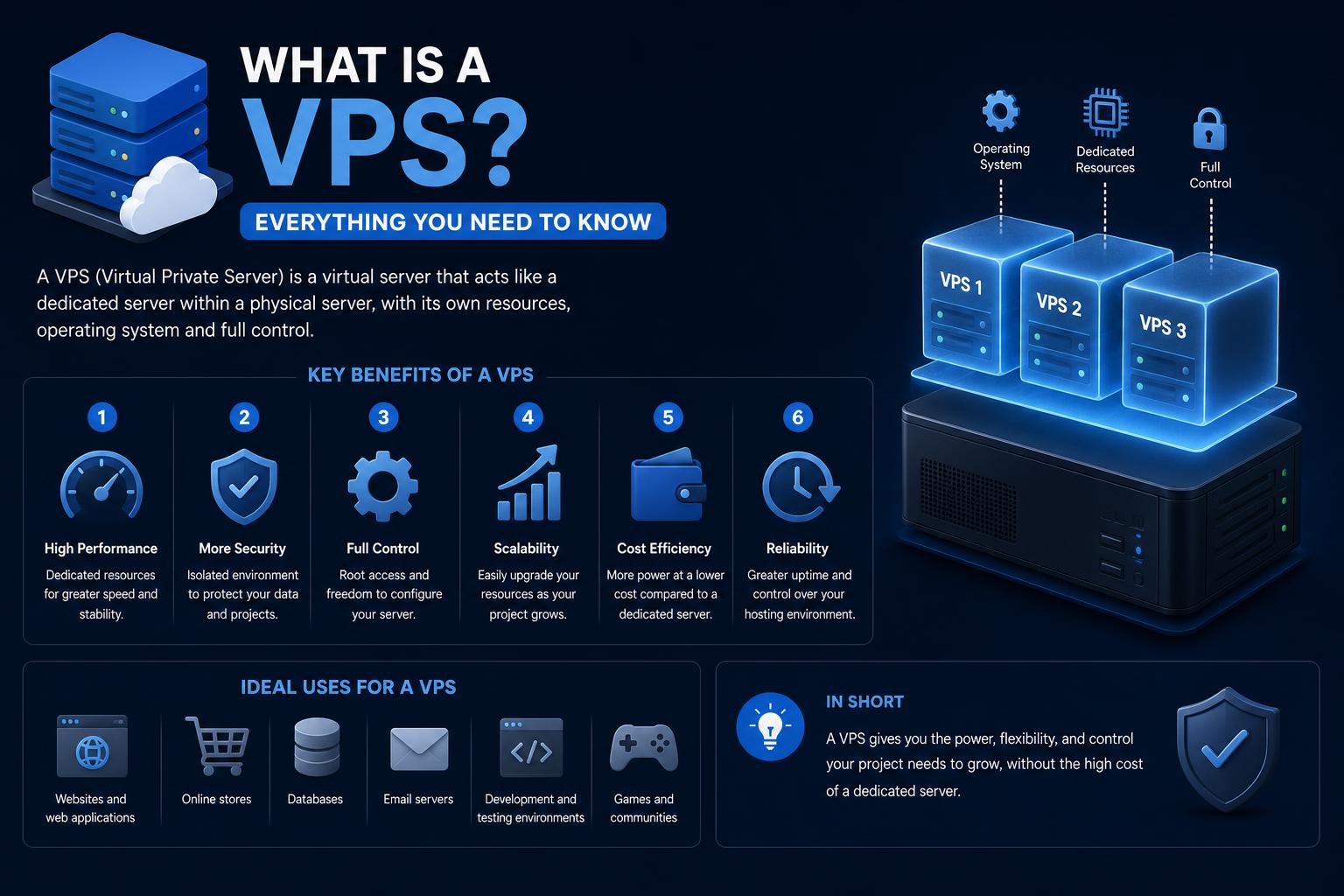
- VPS hosting offers isolated resources, flexibility, and scalability between shared and dedicated hosting.
- Server virtualization enables each VPS to run its own OS, applications, and configurations independently.
- Choosing between managed, unmanaged, and unmetered VPS comes down to technical skill and project needs.
En today’s digital landscape, launching a website or hosting applications demands an understanding of server types and how they impact performance, cost, and scalability. One term that consistently appears whether you’re a developer, business owner, or tech enthusiast is VPS (Virtual Private Server). If you’ve ever wondered what exactly a VPS is, how it works, or why so many companies and developers choose this solution, you’re in the right place.
This guide will break down the complexities of VPS hosting into simple, practical explanations. We’ll explore how VPS relates to shared and dedicated hosting, dive deep into how virtualization works, look at use cases, and compare solutions across major providers (AWS, Google Cloud, and IBM Cloud). Whether you’re new to web hosting or looking for a performance upgrade, you’ll leave understanding every essential detail.
Defining a VPS: More Than Just a Server
A Virtual Private Server (VPS) is a hosting solution where a physical server is divided into several independent virtual environments using advanced software known as a hypervisor. Each segment, or “private server,” acts almost like a standalone computer: it has its own operating system (OS), memory allocation, disk space, and computing resources. Customers are able to gain root (admin) access and can run practically any software compatible with their chosen OS. This makes a VPS functionally similar to a dedicated server, but at a fraction of the cost.
The core idea is that, instead of renting an entire physical server, you rent a well-isolated, private space inside one. This isolation means your resources—CPU, RAM, storage—are guaranteed and unaffected by what others do on the server, but the underlying hardware is still shared.
How Virtualization Makes VPS Possible
At the heart of the VPS concept is server virtualization. The physical hardware runs a piece of software called a hypervisor. Its job is to carve the hardware up into multiple “virtual machines” (VMs). Each VM behaves just as if it were a real, independent server, running its own OS and applications, with no direct knowledge of the other VMs’ existence.
Why virtualize? Virtualization enables hosting providers to use their hardware much more efficiently—rather than letting a powerful server sit mostly idle running one website, it can serve many users at once, each with their own isolated space and security perimeter. This allows for flexibility, cost savings, and scalability that bare-metal servers alone can’t offer.
There are several types of virtualization technologies:
- Hardware virtualization (like KVM): Each VM runs its own isolated kernel for maximum separation and performance.
- Container-based virtualization (like OpenVZ): Multiple containers share the host OS kernel, which improves resource efficiency but offers slightly less isolation and fewer customization options.
Both approaches have their benefits depending on whether you value maximum isolation or lightweight efficiency.
Before you choose any hosting, it’s essential to understand the major types available:
- Shared hosting: Multiple users share the same server and all its resources indiscriminately. It’s like eating at a large communal table in a busy restaurant—sometimes others’ appetites may impact what you receive.
- Dedicated hosting: You rent the whole physical server, getting full control and no resource sharing. Picture renting the entire restaurant for a private event—exclusive but pricey.
- VPS hosting: This sits between shared and dedicated hosting. You get a pre-defined slice of resources, your own operating system, and admin privileges in a virtual environment. Think of a private room at the restaurant: you have exclusive use of the space and can customize your meal, but still share some general facilities (like the building and kitchen) with others.
So, VPS strikes a balance between affordability, flexibility, and control, making it ideal for users who have outgrown shared hosting but aren’t ready for the full commitment or cost of a dedicated server.
Benefits and Limitations of VPS Hosting
Opting for a VPS brings several advantages:
- Dedicated resources: Unlike shared hosting, your CPU, RAM, and disk space are exclusively allocated to you. This prevents noisy neighbors from impacting your website’s performance.
- Root-level access: You get admin rights to install custom software, configure server settings, and optimize performance for your specific use case.
- Cost-effective scalability: Since you’re not paying for an entire server, VPS hosting is significantly more affordable than dedicated servers. Upgrading or scaling resources is easy, too.
- Enhanced security and isolation: VPS environments are isolated, so security risks are minimized compared to shared hosting. Each VPS is protected from its neighbors’ software or vulnerabilities.
- Greater flexibility: Install any OS (Windows, Linux, Ubuntu), run multiple applications, and customize your environment as needed.
Of course, there are trade-offs compared to other hosting models:
- Shared hardware: Because physical resources are divided, peak workloads on other VPS environments may marginally affect performance if not properly managed by the host.
- Management complexity: Running a VPS, especially in an unmanaged setup, requires more technical know-how than a shared server.
How Does VPS Work Behind the Scenes?
Let’s take a closer look at what happens on the back end. When you order a VPS from a provider, your account is provisioned on a server running a hypervisor (such as VMware ESXi, Microsoft Hyper-V, or Linux KVM). This hypervisor creates a virtual instance with its own allocation of RAM, CPU, and storage. You are then given the option to install the operating system of your choice (commonly Linux distributions or Windows Server).
Each VPS has its own file system, users, applications, and permissions. While several VPSs share the same motherboard, processor, and physical disks, the virtual layer ensures your instance is sufficiently isolated: what happens in one VPS rarely (if ever) affects others, thanks to strict resource limits.
As a customer, you’ll have access to management consoles and admin tools for controlling your environment—rebooting, taking snapshots, restoring backups, and scaling up or down as your requirements change.
Vibe Coding: How AI Is Reimagining Software Creation for Everyone
VPS vs. Cloud Servers and Bare Metal Servers
With the rise of cloud computing, it’s natural to wonder: what’s the difference between VPS hosting, bare metal servers, and cloud servers?
- VPS: Virtual slices carved out of one physical server, offering flexibility, a strong level of isolation, and cost efficiency.
- Bare metal: You rent a whole physical server with all hardware resources at your disposal—best for maximum performance and complete hardware control.
- Cloud servers: These are similar to VPS in concept, but are housed in highly virtualized, scalable data centers. Cloud servers can be rapidly scaled across multiple physical hardware clusters. Public clouds (like OVHCloud or ) focus on automation and elasticity, allowing for highly dynamic apps, variable workloads, and global reach.
For most users with moderate resource requirements and the need for control and security, VPS hosting offers an ideal middle ground.
Types of VPS Hosting: Managed, Unmanaged, and Unmetered
When selecting a VPS, providers may offer different management options:
- Managed VPS: The provider takes care of server setup, updates, security patches, and technical support, allowing customers to focus on their website or application.
- Unmanaged VPS: The customer is responsible for server management. This is best for developers and experts who want granular control over every aspect of their environment.
- Unmetered / Unlimited VPS: Some hosts market “unmetered” bandwidth, offering a fixed connection speed but no hard limit on data transfer. These offers come with a fair usage policy, and “unlimited” claims are generally constrained by the host’s acceptable use terms and the realities of carrier capacity.
It’s crucial to read the fine print so that your hosting choice matches your needs and expectations.
Typical Use Cases for VPS Hosting
VPS stands out for users whose projects have grown beyond basic shared hosting or who have unique needs requiring greater control and resources, but who don’t yet need a full-blown dedicated machine. Common applications include:
- Hosting busy websites and e-commerce stores that require reliable performance and uptime.
- Custom application hosting where specific configurations or software stacks are needed.
- Game server hosting for multiplayer or resource-intensive gaming environments.
- Email servers, CRMs, and productivity apps—anything that benefits from isolated resources and full customizability.
- Testing and development environments where flexibility and the ability to quickly spin up or snapshot servers are important.
Major providers such as , , , and offer robust VPS solutions to fit every scale and scenario.
VPS in the Context of the Modern Cloud
Today’s cloud providers have further evolved the VPS concept. On platforms like AWS and , you can deploy virtual servers on underlying dedicated (single-tenant) or shared (multitenant) hardware. For those with strict performance, isolation, or regulatory requirements, options such as dedicated hosts and dedicated instances exist, blending VPS flexibility with guaranteed hardware separation and compliance advantages.
In fact, virtual servers are now a critical part of modern global data centers, enabling scalable, energy efficient, and highly automated IT infrastructures. According to the International Market Analysis Research and Consulting Group (IMARC), the global virtual private server market reached $4.5 billion in 2023 and is projected to surpass $13 billion by 2032—demonstrating just how central VPS is to business and cloud infrastructure strategies worldwide.
Performance, Security, and Limitations: What to Expect
While VPS hosting is remarkably flexible and a solid step up from shared hosting, it’s important to understand the remaining limitations:
- Resource allocation: VPS delivers consistent performance as long as server providers properly manage their physical hardware and do not overcommit resources to too many clients on one machine.
- Security: Each VPS is isolated, so software vulnerabilities or misconfigurations in neighboring VMs aren’t likely to compromise your setup. Hardware virtualization offers the strongest boundaries, while container-based setups might allow for marginally more risk under extreme conditions.
- Customization limits: While far more flexible than shared hosting, some deep system tweaks may still be held back by shared infrastructure or provider policies.
Compared to dedicated servers, performance may still hinge on the provider’s network, disk I/O, or the overall quality of their virtualization implementation. Choose hosts with strong reputations, support, and clearly defined resource guarantees.
How to Choose the Right VPS for Your Project
To make the most of VPS hosting, consider these practical steps:
- Analyze your resource requirements (CPU, RAM, disk, bandwidth) based on existing and predicted traffic and application needs.
- Decide whether you need root access and full server customization. If so, opt for an unmanaged VPS only if you have experience; otherwise, managed hosting will simplify operations.
- Factor in backup, snapshot, and recovery features offered by the provider.
- Compare plans for clear information on scaling—can you easily upgrade or downgrade as business needs change?
- Consider the provider’s technical support, reputation, and transparency of terms around bandwidth, “unmetered” use, and security guarantees.
Providers like differentiate between VPS, bare metal, and public cloud offerings, while AWS and offer powerful VPS as the building blocks of their cloud platforms. Always match your provider to your use case and future growth plans.
Trends and the Future of VPS Technology
The past decade has seen VPS evolve from niche web hosting to a foundational component of global cloud and hybrid IT strategies. Modern VPS solutions are feature-rich, offering not just isolated resources but also advanced tooling for automated scaling, load balancing, security monitoring, and orchestration.
The boundaries between traditional VPS, dedicated servers, and cloud VMs continue to blur. With containerization gaining ground, and managed Kubernetes and orchestration platforms on the rise, many projects now blend virtual machines and containers for maximum flexibility and cost control.
However, VPS remains extremely relevant for traditional web hosting, game servers, custom applications, and use cases where predictable performance, admin-level control, and cost-effectiveness are priorities. As market demand grows and underlying technology advances, expect even better isolation, security, and management features in years ahead.
Choosing a VPS today opens the door to scalable, professional-grade hosting that’s within reach for startups, businesses, and developers everywhere. By understanding how VPS works and where it excels, you can confidently pick the best solution for your next online project, knowing you’ve struck the right balance between power, flexibility, and cost.
What is OER? Understanding Open Educational Resources in Depth