
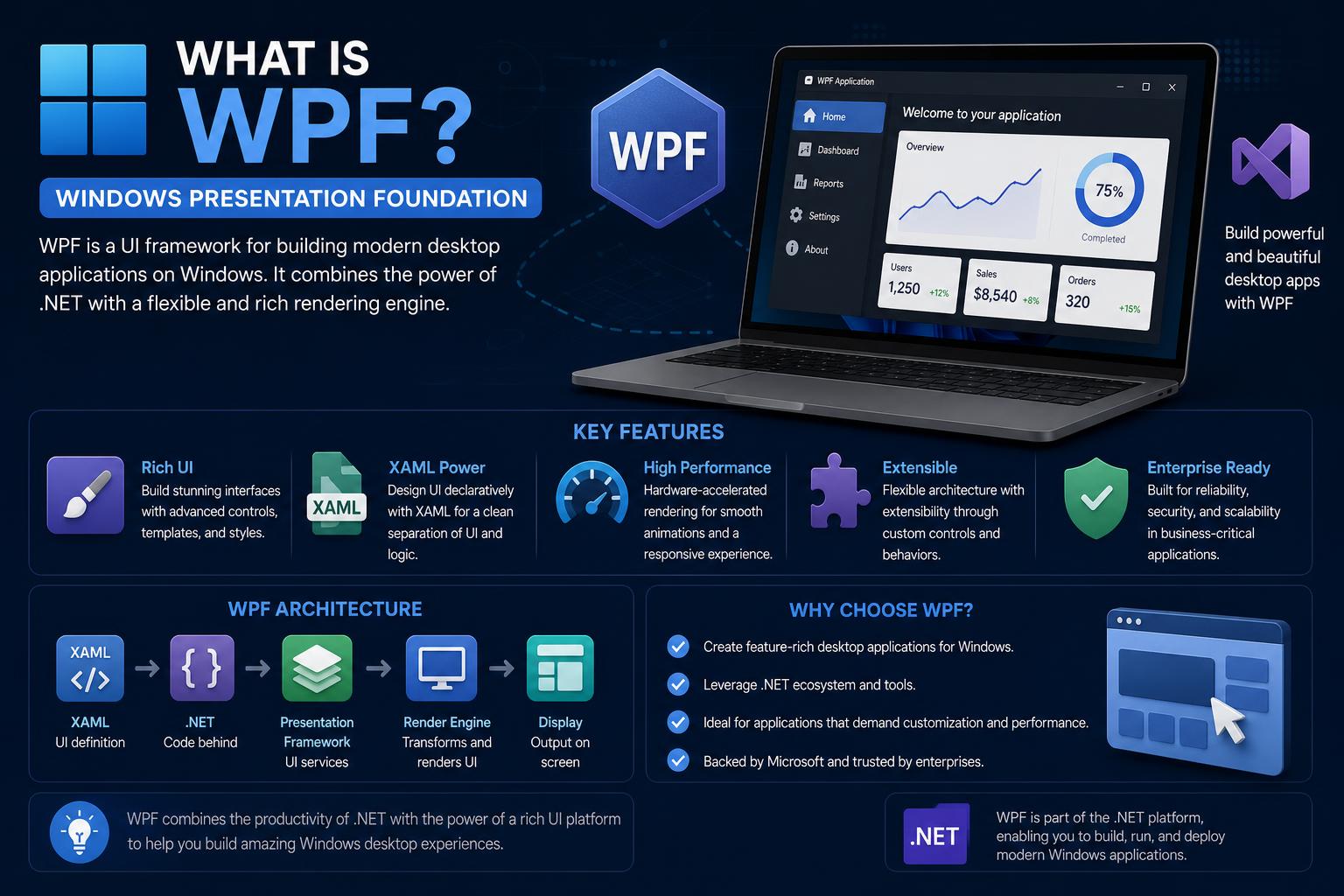
- WPF is Microsoft’s powerful UI framework for building scalable, high-performance desktop applications using .NET technologies
- The framework leverages XAML for UI markup and C# for application logic, enabling clear separation between design and behavior
- WPF introduces a vector-based rendering engine, advanced data binding, flexible styling, templating, and a deep ecosystem perfect for complex business software
- With open source support and migration paths to platforms like Avalonia, WPF remains a critical skillset for .NET professionals as desktop development evolves
If you’ve been working with desktop software development or are just exploring the best ways to create robust Windows applications, there’s a good chance you’ve heard about Windows Presentation Foundation, or WPF. Over nearly two decades, WPF has become a core technology in business-critical software, powering everything from trading floors and medical imaging to scientific instrumentation, point-of-sale terminals, and designer tools. Yet, with so many frameworks, languages, and cross-platform trends emerging, you might wonder: what exactly is WPF, how does it work, and why does it still matter in modern .NET development?
This guide dives deep into the world of Windows Presentation Foundation, unpacking its architecture, unique capabilities, real-world use cases, and cross-platform strategies including open-source options like Avalonia. Together, we’ll explore not just the technical ‘how’, but also the business and developer realities of using WPF in 2026 and beyond. Whether you’re new to desktop development or maintaining a legacy codebase, you’ll find practical information, detailed explanations, and expert insights to get the most out of WPF or make an informed migration decision.
WPF in a Nutshell: The Modern Windows UI Framework
Windows Presentation Foundation (WPF) is a free, open-source UI framework developed by Microsoft specifically for creating visually rich, interactive Windows desktop applications. Born from the desire to break free of classic Windows controls and empower designers as much as developers, WPF became part of the .NET Framework in 2006. Compared to previous era technologies like WinForms, WPF takes a distinctly modern approach:
- Declarative UI Design via XAML: WPF leverages Extensible Application Markup Language (XAML), an XML-based language, to describe the structure, layout, and appearance of user interfaces in a highly readable, flexible way. This empowers designers and developers to work in tandem, separating “what you see” (markup) from “how it works” (code-behind).
- Advanced Rendering Engine: The WPF engine is based on DirectX, enabling resolution-independent, vector-based graphics. This means that your interfaces scale smoothly across different DPI settings—a crucial advantage in the age of 4K monitors and diverse device displays.
- Rich Data Binding and MVVM Support: A powerful data binding system allows the UI to react in real time to data changes without writing tedious synchronization code. This feature was so impactful that it inspired the now-ubiquitous Model-View-ViewModel (MVVM) architectural pattern.
- Styling, Templating, and Customization: Every control in WPF can be entirely restyled and templated, enabling virtually unlimited visual flexibility without the need to subclass or hack built-in behaviors. Standardized themes, animations, 2D/3D graphics, and advanced typography are all part of the foundation.
- Integration with .NET Ecosystem: WPF is deeply woven into the .NET API surface. You can use any .NET language, and seamlessly incorporate other .NET components, libraries, and services into your application architecture.
At its heart, WPF aims to give teams the full expressive power needed for today’s business interfaces while keeping performance and maintainability front and center. Let’s break down how these building blocks actually work in practice.
The Anatomy of a WPF Application: XAML, Code-Behind, and .NET
A WPF application is fundamentally made up of two key parts: the UI markup built with XAML, and the logic implemented in a .NET programming language, most commonly C#. The division isn’t just for aesthetics—it’s a deliberate engineering choice that brings huge productivity gains.
What is XAML?
XAML (Extensible Application Markup Language) is the declarative markup technology at the core of WPF UI design. Using XAML, you define windows, dialogs, pages, controls, layouts, shapes, and everything visual about your application in a clean, hierarchical XML structure. Here’s a simple example that places a button inside a window:
<Window xmlns="http://schemas.microsoft.com/winfx/2006/xaml/presentation" Title="Sample WPF Window" Width="300" Height="150">
    <Button Name="helloButton">Say Hello!</Button>
</Window>
This structure-driven approach organizes the UI as an ‘element tree’—a logical hierarchy that the WPF engine uses to build the visual interface at runtime.
Code-Behind: Where Behavior Lives
Behavior in a WPF application is generally implemented in the code-behind: a C# (or VB.NET/F#) class ‘behind’ each window, user control, or page. This is where you handle user interactions, events, business logic, and data access. XAML and code-behind are connected via the x:Class attribute, so both sides can cooperate seamlessly.
Here’s how a simple button click handler to show a message looks in code-behind:
public partial class SampleWindow : Window
{
    public SampleWindow()
    {
        InitializeComponent(); // Wires the XAML with this class
    }

    private void helloButton_Click(object sender, RoutedEventArgs e)
    {
        MessageBox.Show("Hello from WPF!");
    }
}
This model separates appearance from behavior, boosting maintainability and allowing UI/UX designers to work independently of application developers. Localization and globalization also become easier, since UI markup can be managed apart from core logic.
Why WPF Matters: Key Capabilities and Features
Over its long lifetime, WPF has amassed a toolkit of robust features that make it suitable for almost any business application needing a polished, customizable interface and powerful integration with .NET technologies. Here are some of its top strengths:
1. Vector-Based, Resolution-Independent Rendering
WPF does all its drawing using DirectX (rather than GDI+ or Win32), meaning all visuals are vector-based and scale beautifully on monitors of any pixel density. This is vital for modern ‘retina’ and hi-DPI environments, ensuring crisp, clear interfaces whether on massive office screens or compact tablets. The unit of measurement is the ‘device-independent pixel’ (1/96th of an inch), automatically scaling according to system DPI settings. Hardware acceleration further ensures blazing fast rendering with minimal CPU load.
2. Comprehensive Application-Development Features
- Controls: A wide arsenal of built-in controls—buttons, datagrids, lists, trees, menus, toolbars, dialogs, document viewers, and even specialized input controls like ink and calendar—all extensible and fully customizable.
- Layout System: WPF’s layout is entirely relative and adaptive, using layout panels like StackPanel, Grid, DockPanel, Canvas, and WrapPanel to arrange controls dynamically and respond elegantly to window resizing and content changes.
- Data Binding: Through an advanced binding engine, UI elements reliably sync to underlying data models. Data contexts, binding paths, and value converters streamline presenting and editing complex datasets. Validation, sorting, filtering, and grouping are native abilities.
- 2D & 3D Graphics: Draw and animate lines, shapes, gradients, and bitmap effects. WPF also brings rich 3D scene composition, integration of 2D visuals onto 3D surfaces, and direct manipulation of camera and lighting.
- Animation: Animate nearly any property—position, colors, opacity, sizes, and more—using the powerful Storyboard system. Animations are time-based, ensuring smooth effects even when performance varies.
- Styling & Templating: Define reusable styles to standardize UI elements, or completely retemplate controls to overhaul visuals from the ground up. Triggers in XAML let you respond to interactions without code.
- Documents & Typography: Create fixed or flow documents, interactive readers, and enjoy OpenType, ClearType, and advanced font support—ligatures, text effects, and internationalization built in.
- Media Integration: Embed vector/raster images, audio, video, or even interactive media seamlessly inside your applications.
- Resources & Theming: Pack visual and data resources (brushes, styles, templates) for reuse and consistent theming throughout the UI.
- Accessibility: Full support for accessibility standards, screen readers, UI automation, and alternate input methods like pen and multi-touch (on Windows 7 and up).
This depth and flexibility have made WPF the framework of choice for demanding, polished enterprise applications for nearly two decades.
The Evolution and Future of WPF: From .NET Framework to Open Source and .NET Core
WPF first appeared in .NET Framework 3.0 back in 2006, under the codename Avalon. At its launch alongside Windows Vista, it aimed to reshape Windows application development—giving engineers and designers the kind of graphics and layout power previously reserved for web and multimedia platforms.
Here’s how its development journey has evolved:
- 2006: Public launch as part of .NET Framework 3.0. Quickly became the standard for professional, line-of-business Windows applications.
- 2010-onwards: Major Microsoft products—including Visual Studio itself—migrated their interfaces to WPF, demonstrating confidence in its capabilities.
- 2018: Microsoft open-sourced WPF, publishing its code on GitHub under the MIT License (WPF GitHub Repository). Now, the community and enterprise customers can directly contribute to or inspect WPF’s evolution.
- 2019: Since .NET Core 3.0, WPF runs on the new, fast-evolving .NET runtime, bringing improved performance, language features, and modern developer tooling.
However, one thing hasn’t changed: WPF remains tightly coupled to Windows. Its rendering pipeline is built on DirectX, windowing depends on Win32 APIs, and media integration uses Windows-specific tech. That’s why, even as .NET has become cross-platform, WPF itself is not natively portable to macOS or Linux—though third-party solutions are now emerging for those needs, which we’ll cover later.
Deep Dive: Core WPF Concepts for Modern Developers
Let’s explore some of the defining capabilities that separate WPF from both its predecessors and modern UI competitors. If you’re building or maintaining large, critical applications, these are the features that really move the needle.
The Magic of Data Binding and MVVM
Data binding in WPF is a game changer, eliminating boilerplate code and enabling a truly reactive UI that responds immediately to changes in your C# models. It supports all types—primitive values, objects, collections—and offers configuration for binding direction (one-way, two-way, etc.) as well as value conversion and validation.
The close relationship between binding and dependency properties drove the rise of the Model-View-ViewModel (MVVM) architectural pattern. In MVVM:
- Model: Business and data logic (C# classes, database entities, service calls)
- View: The XAML markup (windows, controls, layouts)
- ViewModel: Glue code that exposes model properties and events for consumption by the View, and handles commands triggered by UI actions
MVVM promotes testability, modularity, and reusability, and is a foundational design approach in modern WPF, WinUI, .NET MAUI, and XAML-based projects like Avalonia.
Advanced Layout and Adaptive UI
WPF’s layout engine is highly adaptive, letting you build complex, responsive UIs that look good and work well at any window size. Instead of fixed coordinates, most layouts use relative sizing, auto-stretching, alignment, and padding so everything adapts gracefully as users resize or reposition windows.
Common layout containers include:
- Grid: Arranges content in rows and columns
- StackPanel: Stacks child controls vertically or horizontally
- DockPanel: Docks elements to specified edges (top, bottom, left, right)
- WrapPanel: Places controls left-to-right, wrapping to a new row as needed
- Canvas: Allows absolute positioning for total layout control
Most properties related to layout—like margins, alignments, and minimum/maximum sizes—can also be styled or data-bound for runtime flexibility.
Comprehensive Control Set with Unmatched Customization
WPF includes a full suite of standard controls, covering everything from the simplest button to rich document viewers. These controls break down into functional groups:
- Buttons: Button, RepeatButton
- Data Display: DataGrid, ListView, TreeView
- Selection: ComboBox, ListBox, Slider, CheckBox, RadioButton
- Input: TextBox, PasswordBox, RichTextBox
- Layout: Grid, StackPanel, DockPanel
- Navigation: Frame, TabControl, NavigationWindow
- Media: Image, MediaElement
- Dialogs: OpenFileDialog, PrintDialog, SaveFileDialog
- User Information: Label, StatusBar, ToolTip, ProgressBar
Every WPF control can be fully templated—meaning you can completely alter its visuals and interactive structure from XAML without writing custom code. Want to turn a standard button into an animated hexagon, or display workflow states as part of a list view item’s appearance? Templates and styles make this routine instead of arduous.
State-of-the-Art Graphics, Animation, and Effects
WPF gives you a full spectrum of drawing and effects capabilities:
- 2D & 3D Drawing: Draw basic shapes and paths, apply gradients, image brushes, and complex geometries; lay out UI on 3D objects, integrate 2D and 3D seamlessly, and control the camera with precision.
- Animation: Animate virtually anything—colors, positions, rotations, text, and more—using the time-based Storyboard system. This allows for slick transitions, effects, and data-driven visualizations.
- Visual Effects: Apply built-in effects like blur and drop shadow, or use custom HLSL shaders for advanced graphics scenarios.
This is why industries like design, media, and healthcare so often choose WPF for applications that need both forms processing and rich, interactive visuals.
Typography and Localization
Text rendering in WPF is superb. The framework supports:
- OpenType and TrueType fonts, ligature support, swashes, superscript/subscript, and more
- ClearType anti-aliasing for razor-sharp text
- Unicode support and locale-independent rendering
- Spell checking, advanced line spacing, hyphenation, and justification
Internationalization (building interfaces for multiple languages and cultures) is simplified through the separation of appearance and behavior, and through XAML’s structure-driven approach.
Custom Controls and Extensibility
If you outgrow the built-in control set, WPF provides three models for extension:
- User Control: Compose new controls from existing ones (ideal for grouping familiar layouts and behaviors)
- Control Model: Derive from Control for maximum flexibility in separating behavior from visuals via templates
- Framework Element: Derive from FrameworkElement and use custom rendering for entirely new visual paradigms
This extensibility is one reason why vendors like DevExpress, Telerik, Syncfusion, and others have ecosystems of professionally crafted WPF controls developers can drop into their solutions.
WPF’s Place in the .NET Ecosystem and the Cross-Platform Challenge
One of the most important things to understand about WPF is its strong connection to Windows and the implications for cross-platform development.
When Microsoft revived .NET as a truly cross-platform technology (with .NET Core and now .NET 8+), WPF also moved ‘forward’—but only in terms of language and runtime support. The framework itself still relies on DirectX, Win32 APIs, and Windows OS components, so running WPF natively on macOS or Linux isn’t feasible under Microsoft’s official support.
What If You Need Cross-Platform?
This growing demand has opened the door to alternative open-source projects and portability layers:
- Avalonia: Avalonia UI is a MIT-licensed, open-source framework inspired by WPF. It brings familiar XAML/RX-like patterns and MVVM architecture to Windows, macOS, Linux, iOS, Android, and the browser via WebAssembly. For teams seeking a true cross-platform future, Avalonia is the most ‘WPF-like’ alternative available today.
- Avalonia XPF: A component developed to run existing WPF APIs (and even third-party control libraries) atop the Avalonia renderer, enabling large codebases to deploy natively on non-Windows desktop OSs without a full rewrite. It’s ideal for mission-critical, long-lived enterprise software facing new platform requirements.
- Porting/Modernization Guidance: Microsoft and the Avalonia community offer step-by-step advice and tooling for porting WPF codebases, especially those using standard patterns and .NET APIs.
- Web Migration: For some scenarios, a complete rewrite as a browser-based web application may be worth considering, particularly when hardware integration and offline operation aren’t key requirements.
Ultimately, if Windows-only is appropriate for your audience—WPF remains a gold standard. If you need cross-platform reach, Avalonia and similar frameworks provide a clear, skill-transferable path.
Ongoing Support and Maintenance
WPF is supported, open source, and receives regular updates, including significant accessibility and theming improvements. While the pace of features is modest compared to newer frameworks, Microsoft has reaffirmed its commitment to stability for WPF projects—especially in industries demanding decades-long software lifespans.
WPF Architecture: A Peek Under the Hood
WPF is designed with performance, scalability, and extensibility in mind. Here’s an overview of its layered architecture:
- PresentationFramework: Exposes high-level controls, resources, styling, templating, and the overall application model.
- PresentationCore: Supplies lower-level services—drawing, rendering, media integration, and core types like UIElement and Visual.
- Milcore: Written in unmanaged code, this layer ties the engine directly to DirectX for fast graphics and composition.
- CLR (Common Language Runtime): Underpins all .NET assemblies, provides memory management, threading, and exception handling.
- User32 and Kernel: Fundamental Windows APIs for low-level windowing and OS services.
This means WPF can handle both the flexibility modern interfaces demand and the performance sensitivity large enterprise applications require. For advanced cases, you can even embed WinForms in WPF and vice versa using special interoperability classes.
Getting Started: From Visual Studio to Your First Application
Building with WPF is streamlined by integration with Microsoft’s Visual Studio IDE. The Visual Studio suite offers:
- XAML Designer: A drag-and-drop surface for laying out controls and windows with immediate preview
- Properties & Solution Explorer: Easy navigation and adjustment of control properties, visual resources, and references
- Compiler Output Window: Real-time feedback, warnings, and errors as you work
- Integrated Debugging Tools: Set breakpoints anywhere (including event handlers and business logic), and leverage advanced UI debugging and timeline analysis features introduced in Visual Studio 2015 and later
- Live XAML Editing: Update XAML and see design changes instantly
You can also build WPF projects via command-line (using MSBuild) or alternative code editors if you prefer a lightweight workflow.
Real-World Use Cases and Impact: Why WPF Remains Relevant
WPF’s maturity, stability, and adaptability make it a framework of choice for demanding, high-investment projects. Examples include:
- Healthcare and Scientific: Medical imaging, laboratory automation, and diagnostic platforms benefit from advanced graphics and data binding.
- Financial Services: Trading desks, portfolio management, and high-frequency analytics require responsive UIs and stable codebases that evolve over decades.
- Engineering/Design: CAD tools and creative applications emphasize customized controls, 3D interfaces, and rich document management.
- Retail: Point of sale systems, kiosk apps, and custom workflows leverage the theme-ability and device-independent rendering of WPF to deliver strong brand experiences.
- Line-of-Business Apps: From ERP to CRM and everything in between, businesses rely on WPF for significant internal and client-facing software.
Major products—like Microsoft’s own Visual Studio, Blend, and historical development tools—are themselves built with WPF.
The Ecosystem: Libraries, Tools, and Learning Resources
Because WPF has been at the heart of enterprise .NET development for years, its ecosystem is vast and well-supported. There are:
- Third-party Component Vendors: (e.g., DevExpress, Telerik, Syncfusion, Actipro) offering robust enterprise controls like charts, grids, ribbons, rich editors, and more.
- Open Source Libraries: NuGet is full of community-made controls, layouts, animations, MVVM helper libraries, and testing frameworks.
- Support and Community: WPF’s longevity means nearly every problem is addressed on forums, Stack Overflow, documentation, and blogs.
- Books and Tutorials: From ‘Windows Presentation Foundation Unleashed’ to comprehensive online guides, learning resources are abundant and up to date.
Comparing WPF to Other Frameworks: Making the Right Choice
Wondering how WPF stacks up against WinForms, UWP, WinUI, .NET MAUI, or cross-platform options like Avalonia? Here are key distinctions:
- WinForms: Simpler, wraps Windows controls (Win32). Quick for CRUD apps, but harder to scale visually and less flexible for modern animations or high-DPI.
- UWP/WinUI 3: Microsoft’s latest Windows interface layers, designed for Store/UWP apps and now repackaged with WinUI 3 for modern desktop development. WinUI shares concepts with WPF, but ecosystem maturity and wide third-party tooling may lag.
- .NET MAUI: The successor to Xamarin.Forms, .NET MAUI is focused on true cross-platform (Windows, Android, iOS, macOS) UI. Draws from MVVM and XAML principles, but not a drop-in replacement if you want to port WPF codebases.
- Avalonia: Aimed squarely at ex-WPF teams wanting cross-platform support without giving up advanced XAML, MVVM, and templating concepts.
- Web Apps: For scenarios where desktop integration is less vital, Blazor and other web frameworks provide a route to maximum access and ease of deployment.
The upshot: if you need the deepest possible customization, access to mature components, and long-term stability on Windows, WPF is hard to beat. For cross-platform GUIs, Avalonia is your closest conceptual match.
What’s New and What’s Next for WPF in 2026?
Microsoft’s current stance is clear: WPF is a maintained, stable, and open platform. It regularly receives bug fixes, accessibility enhancements, theming upgrades (including adoption of Fluent Design principles), and favorable servicing commitments for the foreseeable future. What it doesn’t get are huge, breaking changes—or a move away from its Windows foundations.
This means your investment in WPF is safe, and your core skills remain relevant (especially as XAML/MVVM patterns carry over to WinUI, Avalonia, and .NET MAUI). Both seasoned professionals and those new to desktop development can count on ongoing support, as well as vibrant community and industry contributions.
FAQ: WPF Questions Answered
Is WPF still used and supported?
Absolutely. WPF remains one of the most widely deployed UI frameworks for business applications on Windows. New enterprise projects begin on WPF every day, as long as Windows-only is acceptable. Microsoft’s continued investment means migration is not urgent for existing projects.
Is WPF dead or deprecated?
No—quite the contrary. The framework is maintained, open source, and officially supported by Microsoft. While it may not receive major new features, there’s no sign of end-of-life or deprecation in the roadmap.
Should new developers learn WPF?
Yes, especially for those working in the .NET ecosystem. The core ideas of XAML, data binding, and MVVM transfer directly to modern frameworks like WinUI, Avalonia, and .NET MAUI. WPF offers an in-depth grounding in ‘real’ desktop user interface development.
Can WPF run on Linux or macOS?
Natively, no—but alternatives exist. As discussed above, technologies like Avalonia and Avalonia XPF enable migration or compatibility for cross-platform scenarios. While they’re not complete drop-ins, their similarity makes transition feasible, especially for codebases following well-trodden architecture patterns.
Are skills and code portable to newer frameworks?
For the most part, yes. XAML-based skills, MVVM design, and data binding knowledge carry over directly to Avalonia and modern Microsoft UI stacks. Some code and patterns will require adjustment, but the learning curve is modest for experienced WPF teams.
Windows Presentation Foundation continues to be a cornerstone of modern desktop application development on Windows, combining technical flexibility, deep customization, and long-term stability for serious business software. By leveraging XAML for UI design, embracing powerful data binding and MVVM patterns, and taking advantage of its extensible control and graphics systems, WPF allows teams to deliver applications with polish, performance, and longevity.
The open-source evolution and cross-platform developments like Avalonia ensure the ecosystem remains vibrant, opening new options for the future of business-critical desktop software. For developers, organizations, and teams vested in complex, beautiful, and powerful UIs—there’s never been a better time to harness WPF’s capabilities or plot your next step in the .NET world.