
- FreeCAD and LibreCAD are leading open-source tools for 3D and 2D design.
- Sustainable community-driven development ensures ongoing updates and support.
- Free CAD software now rivals paid solutions in functionality for personal and professional use.
Finding free CAD software can feel like navigating a maze, especially with so many choices and opinions floating around. Whether you’re building your first project, looking to save money, or just curious about design tools, you probably want reliable information without all the noise. There’s a world of free solutions out there that are used by hobbyists, professionals, and everyone in between. Luckily, we’ve sorted through the details to highlight today’s best options and what makes them stand apart.
In this guide, we’ll cover everything you need to know about free CAD software—from top open-source projects to robust freeware you can install and use today. Whether you’re after parametric modeling, 2D drawing for laser cutters, or just want to sketch your next invention, it’s all here, clearly explained. Dive in for a seriously comprehensive rundown, gathered from current user recommendations, official project documentation, and expert experience with the leading contenders.
What is CAD Software?
First things first: CAD stands for Computer-Aided Design. These programs let you create, edit, and visualize objects digitally—think blueprints, 3D models, mechanical parts, buildings, or even furniture. CAD tools are vital for architects, engineers, product designers, makers, and educators. Traditionally, these solutions came with steep price tags and were locked behind paywalls, but over the years, a wave of powerful free and open-source CAD tools has made digital design accessible to everyone.
Why Choose Free CAD Software?
There are plenty of reasons to seek out free CAD applications. Maybe you’re learning the basics and don’t want to invest hundreds—or thousands—of dollars. Perhaps you’re working on a passion project and need professional-grade features without the professional budget. Or, you believe in the philosophy of open-source software, where communities create something together and everyone benefits. The right free CAD program can offer you high-quality tools, passionate support communities, and software that’s continuously evolving.
Top Free CAD Software Options (2024)
Let’s break down the most recommended and reliable solutions currently available. This list covers the most authoritative and respected projects and platforms discussed in today’s top search results and by real users in active forums.
FreeCAD: Powerful 3D Parametric Modeling
FreeCAD consistently tops the list as a robust open-source 3D parametric modeler. It’s designed for a wide range of uses—including prototyping, 3D printing, mechanical engineering, architecture, product design, and educational environments. With FreeCAD, you’re able to build models by defining parameters and constraints, making it perfect for projects where accuracy, revision, and reproducibility matter.
No paywalls, sign-ups, or gotchas—FreeCAD is genuinely free and open-source, which means you can use it, modify it, and extend it as you like. It’s known for a strong, global user community and extensive online documentation, making it approachable for newcomers and flexible for experts.
The software’s ecosystem is also impressive. Add-ons and modules are easily integrated through an Addon Manager, letting you customize your setup for architectural sketches, mechanical drawings, or advanced simulation. From basic sketches to complex assemblies, FreeCAD is a one-stop platform for serious digital design—whether you’re designing a piece of furniture or building an engine.
How to Get FreeCAD
Getting started with FreeCAD is straightforward. Just visit the official download page and choose your operating system—Windows, macOS, or Linux. All downloads are for 64-bit systems. Advanced users can also experiment with nightly or weekly development builds, which offer bleeding-edge features and bugfixes, though you should back up your work as these can be less stable. If you want extra functionality, browse the Addon Manager for scripts, macros, and modules contributed by the community.
LibreCAD: Free and Open Source 2D CAD
If you’re searching primarily for 2D drafting (for example, schematics, floor plans, or laser cutting), LibreCAD is a top open-source choice. Unlike many modern CAD programs that emphasize 3D modeling, LibreCAD specializes in 2D design and stands out for its lightweight, user-friendly interface. It’s perfect for students, hobbyists, or professionals who don’t need complex 3D features but require a capable and flexible drawing tool.
The heart of LibreCAD is its active community. Developers, testers, translators, and writers collaborate to keep the project evolving. Contribution is easy—there’s no long-term commitment required, and even small improvements are welcomed. If you’d like to give back, there are lots of ways to help, from coding and documenting to helping users in the forums or translating documentation.
No login, no contracts, and a zero-cost download make LibreCAD an accessible choice for individuals and organizations alike. You’ll find a comprehensive wiki, lively forums, and frequent updates. Whether you’re designing a hobby project or need blueprints for professional work, LibreCAD has you covered.
nanoCAD Free: Professional 2D/3D CAD at No Cost
nanoCAD Free is another well-known option, offering both 2D and 3D capabilities with a user interface that feels familiar to anyone who’s used professional CAD packages like AutoCAD. While more feature-rich versions come at a cost, their free version remains a robust solution for general CAD needs. Notably, nanoCAD is especially popular for drafting, engineering plans, and as an AutoCAD alternative for budget-conscious users.
If you encounter any technical issues (such as errors related to date and time discrepancies caused by your operating system), the nanoCAD website provides troubleshooting tips—mostly focused on correcting system clocks, reinstalling the OS, or addressing BIOS battery failures. Importantly, these technical issues are not caused by nanoCAD itself but often relate to environmental problems in Windows.
For best results, follow their setup instructions and check the help section for updates. The free version is continually maintained but, as with any software, check your system compatibility and keep your OS in good working order.
The Role of Community Support and Open Source Philosophy
One of the true strengths of open-source and free CAD software is the power of collective knowledge and community-driven development. FreeCAD and LibreCAD both thrive thanks to active groups of developers, testers, writers, and translators. This means regular updates, fast bug fixes, and new features driven by real user needs—not just by what benefits paying customers. As these platforms evolve, they remain accessible to all.
Whether you want to get involved by contributing code, translating documentation, writing tutorials, or simply asking questions in the forums, you’re more than welcome. Participation can be as simple as helping a new user get started or as involved as shaping new modules and features. Open source is about sharing, learning, and growing together.
What Are Real Users Saying?
In today’s top discussion forums, real-world recommendations help paint a more honest picture than marketing blurbs ever could. Across platforms such as Reddit and Q&A sites, users consistently suggest FreeCAD and Tinkercad for beginners, with LibreCAD rising for 2D drafting. Enthusiasts often mention the learning curve for advanced tools, but appreciate the capability and freedom that comes with these free offerings.
Some common threads you’ll see:
- If you’re coming from professional tools like Autodesk Inventor or AutoCAD, expect a transition period. Open-source tools have their own quirks and workflows, but they’re well-documented and supported by engaged communities.
- You don’t always need 3D modeling. If your workflow is 2D-centric, don’t get distracted by tools focused on 3D when something simpler (like LibreCAD) can do the job more elegantly.
- The ecosystems are continuously growing. FreeCAD’s add-ons and LibreCAD’s contributor network mean fresh features and ongoing maintenance.
- User troubleshooting and peer support are invaluable. From official forums to Reddit threads, you’re rarely alone in overcoming challenges.
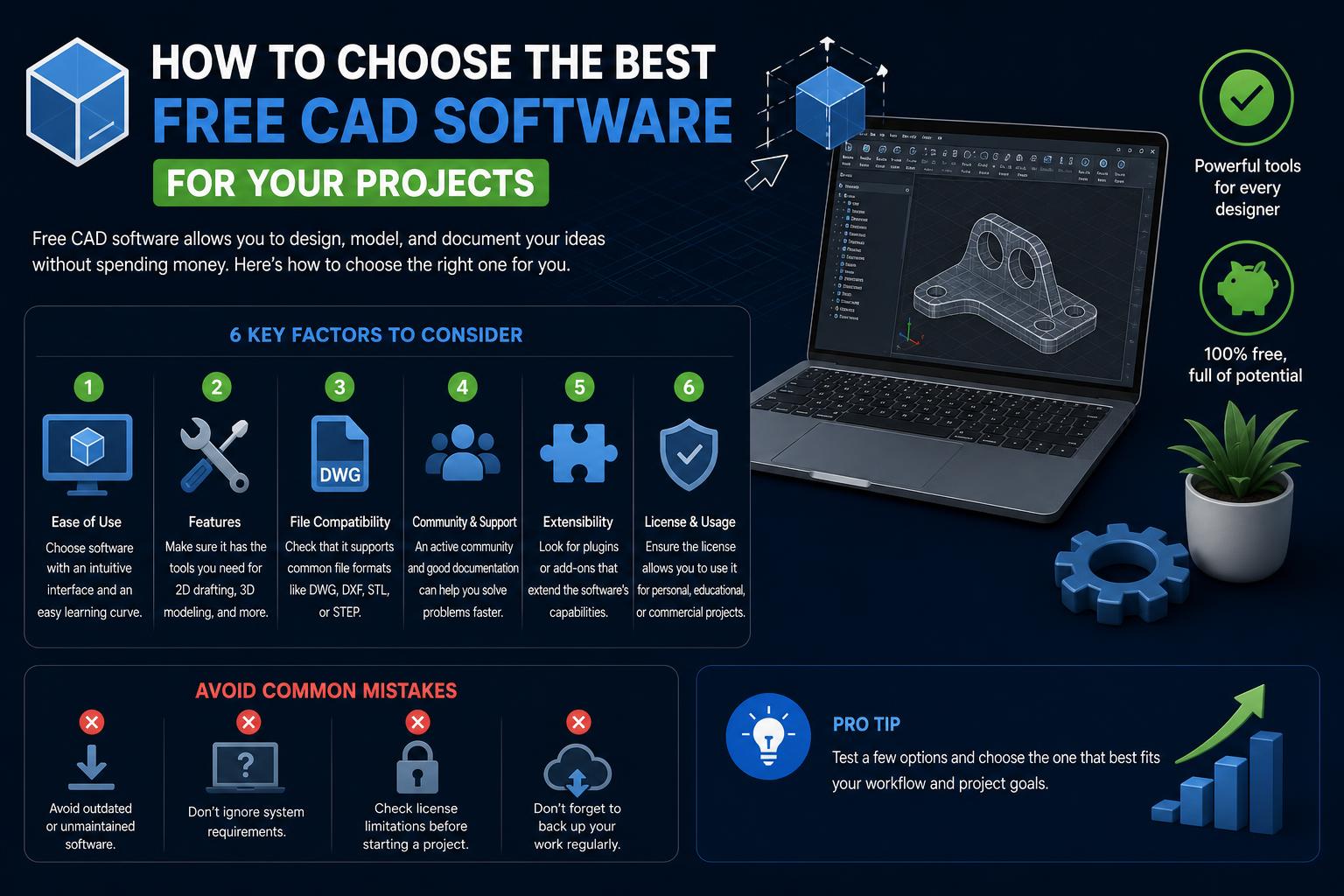
How to Choose the Right Free CAD Software for You
Here’s the thing: ‘best’ is personal. The top free CAD solution for you depends on your workflow, goals, and familiarity with design programs. So, how do you decide?
- Assess your needs. Do you require 3D modeling or is 2D drafting enough? FreeCAD is versatile for both, while LibreCAD shines for 2D tasks.
- Consider your operating system. FreeCAD and LibreCAD offer versions for Windows, Mac, and Linux. NanoCAD Free primarily targets Windows users.
- Think about your experience level. Beginners might prefer solutions with extensive documentation (like FreeCAD) and supportive forums. Those coming from commercial suites may favor nanoCAD for its familiar feel.
- Value community-driven innovation. If staying on the cutting edge with new tools and updates matters to you, FreeCAD’s nightly builds and LibreCAD’s active development might be just what you need.
- Look for customization and extensibility. FreeCAD’s modular structure and easy add-on management mean you can adapt the software as your skills and projects grow.
Installation and Getting Started Tips
Download official releases from the developers’ websites to avoid malware and ensure you’re getting the latest stable (or development) builds. Don’t forget system requirements: most modern free CAD tools are for 64-bit operating systems, and advanced builds can be memory-intensive.
Use the forums or wikis if you run into problems. Both FreeCAD and LibreCAD offer comprehensive documentation, and you’ll find a supportive user base ready to help troubleshoot issues or guide you as you learn.
Common Issues and Troubleshooting
With any free software, especially open-source projects, you may occasionally run into hardware compatibility or system-specific hiccups. As noted on the nanoCAD site, if you’re seeing odd errors linked to operating system date and time inconsistencies, these are likely due to OS glitches, not the CAD software itself. Take standard steps such as making sure your BIOS battery is functional, checking Windows event logs, or, in rare cases, reinstalling the OS. The forums are your friend here—search before you post, and you’ll often find your question already answered.
The Future of Free CAD: Add-Ons, Modules, and Community Evolution
The landscape of free CAD software is more vibrant than ever. FreeCAD stands out for its expanding Addon Manager, enabling direct installation of community-crafted modules and macros without leaving the program. Whether you need a niche feature or want to experiment with boundary-pushing tools, you’ll find the FreeCAD ecosystem especially welcoming to tinkerers and contributors. Likewise, LibreCAD’s team is always open to fresh ideas and new contributors. Feature requests, bug patches, translations, and documentation are all handled openly, ensuring the tools keep pace with what real users demand.
Participating in Open Source CAD Projects
If the idea of improving the very tools you use every day appeals to you, open-source CAD projects are always looking for new hands and fresh perspectives. Whether you want to contribute as a developer, tester, translator, or forum helper, your input can shape the next generation of tools. Most projects encourage casual involvement—you don’t need to sign up for anything long-term. Every bug fix, translation, or tip shared in the forums helps strengthen the tools at everyone’s disposal. It’s one of the powerful aspects that set free and open-source software apart from closed commercial suites.
For anyone looking to dip their toes into digital design, today’s free CAD options offer everything from simple 2D drawing to advanced 3D parametric modeling—all without breaking the bank. Vivid community ecosystems, regular updates, diverse add-ons, and accessible documentation make digital design possible for everyone. By choosing FreeCAD, LibreCAD, or nanoCAD (among a growing list), you’re not just getting top-notch tools; you’re joining a global movement of passionate makers and creative minds, designing the future together.