
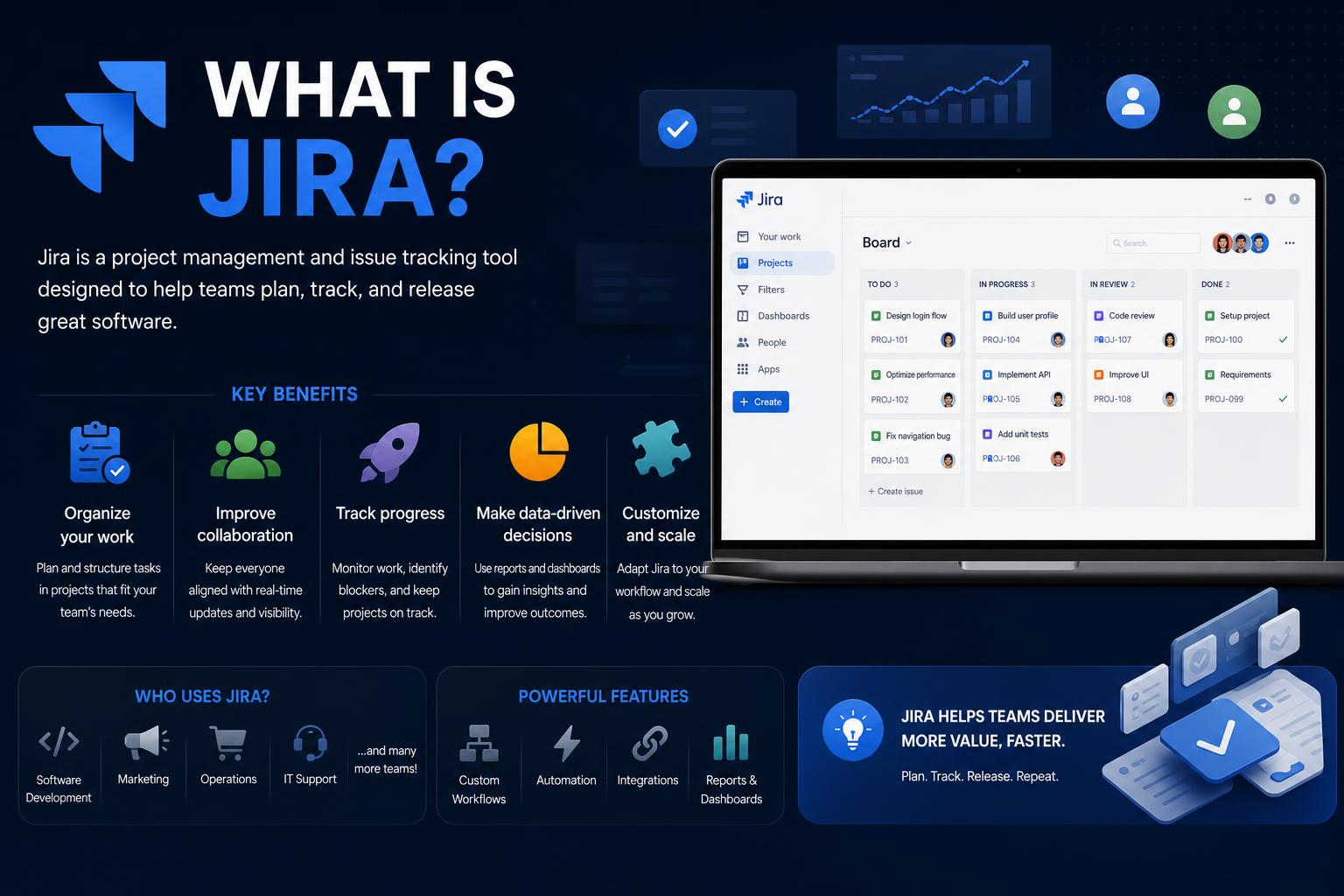
- Jira is a robust, customizable project management tool supporting agile and traditional workflows across industries.
- It offers specialized products for software, business teams, ITSM, and enterprise planning, each integrated within the Atlassian ecosystem.
- Jira stands out for advanced workflow automation, broad integration capabilities, and rich reporting features for teams of any size.
- Getting the most from Jira requires thoughtful setup, consistent team conventions, and leveraging its wide array of customization options.
Project management in the digital era is a landscape defined by technology, collaboration, and efficiency. If you’ve ever worked in IT, development, business operations, or any team-oriented environment, chances are you’ve stumbled across tools made for organizing chaos. Among these, Jira stands out as one of the most powerful and versatile platforms for tracking work, driving teamwork, and empowering organizations to deliver results.
Yet, with its origins rooted in software development and agile methodologies, Jira has evolved into much more than a basic issue tracker. It now serves as the backbone for countless project types across various industries, extending from quick bug fixes to enterprise-wide transformation initiatives. What exactly is Jira, and what makes it so indispensable for teams around the world?
Understanding Jira: Origins, Purpose, and Evolution
Jira is a web-based project management and issue-tracking application developed by Atlassian, launched in 2002. It began as an internal bug-tracking system for software projects, and its name, curiously, comes from “Gojira” (the Japanese word for Godzilla)—a nod to its power and the joke that Atlassian developers named Bugzilla, their previous tracker, after it. What started as a tool for programmers quickly became an essential asset for those who need to keep their work under control and teams on track.
From its humble beginnings, Jira’s growth has been rapid and significant:
- 2002: Jira debuted as an internal Atlassian tool, rapidly expanding its reach to external customers.
- 2011: The arrival of Jira OnDemand marked a cloud-based future for the platform, improving accessibility and scalability.
- 2012: Scrum boards were introduced, supporting agile teams worldwide.
- 2015: Jira was split into Jira Core and Jira Software, broadening its reach for both technical and business teams.
- 2020 and beyond: Jira Service Desk evolved into Jira Service Management, incorporating advanced incident and change management features.
Today, Jira is not just a bug tracker, but a comprehensive solution for managing projects and supporting teams across IT, human resources, marketing, legal, and any field where task management is essential.
What Makes Jira Different?
At its core, Jira is about organizing, prioritizing, and collaborating on work—whether on software issues, business processes, or creative campaigns. Unlike simple lists or lightweight tools like Trello or Monday.com, Jira stands out for its depth, customization, and adaptability to complex, multi-stage projects. Its robust set of features, advanced automation, and integration ecosystem empower organizations to optimize operations and boost productivity.
Jira particularly excels in scenarios where:
- Task tracking with detailed metrics is required
- Multiple teams collaborate across different locations and disciplines
- Custom workflows, permissions, and automation rules need to be defined
- Agile methodologies (Scrum, Kanban) are used, though they are not mandatory
Core Features: The Building Blocks of Jira
Jira outperforms many competitors thanks to its comprehensive range of features. Here is what you can expect:
- Task and Issue Management: At the heart of Jira is the ability to record, assign, and track issue statuses. Whether feature requests, bugs, improvements, or administrative tasks, each element is an “issue” that can be customized with fields, priorities, and statuses according to the team’s needs.
- Agile Boards and Methodologies: Jira supports Scrum and Kanban boards to manage sprints, backlogs, and story points. It allows you to plan, execute, and monitor project cycles directly within the platform.
- Workflow Customization: One of its major advantages is its highly configurable workflow engine. You can design processes that reflect your team’s way of working, with stages like “To Do,” “In Progress,” or “Done,” and expand them with transitions, triggers, and conditions for complex projects.
- Reporting and Analytics: Reporting tools allow you to create custom dashboards, featuring burn-down charts, velocity charts, and other key indicators to evaluate performance and project progress.
- Automation: Simplify repetitive tasks, assignments, and status changes using Jira’s automation engine, increasing efficiency and reducing manual work.
- Custom Dashboards: Design dashboards with widgets to monitor metrics, progress, bottlenecks, or relevant data.
- Permissions and Access Control: Manage who can view, create, or modify issues and projects, ensuring security and confidentiality.
- Integration Ecosystem: With over a thousand integrations through the Atlassian Marketplace, connect with platforms like Slack, GitHub, ServiceNow, Salesforce, and many more.
- Multilingual and Multinational Support: Jira supports translations into multiple languages, facilitating global use.
How Does Jira Work? Organizing Tasks, Teams, and Projects
Work in Jira revolves around “projects”—containers for issues related to specific goals or deliverables.
- Each project can contain different types of issues, such as user stories, bugs, tasks, epics, or custom items.
- Tasks can be grouped into sprints, managed in a Kanban workflow, or categorized by function (design, QA, marketing, etc.).
- Statuses and workflows are fully configurable depending on the team: for example, a marketing team might use “Draft,” “In Review,” “Published,” while a software team might use “Backlog,” “Ready for Development,” “Testing,” “Released.”
- Automation rules simplify repetitive tasks, such as automatically moving issues to “In Review” when integrated with other systems or notifying assignees when issues are resolved.
Being an online platform, the team can collaborate from anywhere with an internet connection. Comments, mentions, and updates are seen instantly, keeping everyone aligned and reducing unnecessary emails.
Agile and Jira: An Essential Combination
Jira’s roots lie in agile development, and it remains one of the most widely used platforms among agile teams around the world. According to surveys, over two-thirds of organizations working in agile environments use Jira as their primary platform.
- Scrum Capabilities: Plan, execute, and monitor development sprints with complete visibility—task tracking, point assignment, and retrospectives within the same environment.
- Kanban Support: Visualize continuous workflows with Kanban boards, ideal for DevOps, support, and marketing teams, where flexibility trumps rigid cycles.
- Metrics to Improve: Access velocity charts, burndown charts, cumulative flow diagrams, and custom dashboards to detect bottlenecks and refine the process.
But you don’t need to be an expert in agile methodologies—Jira is flexible enough to support waterfall or hybrid processes. You don’t need to be a certified Scrum Master, though having that certification offers advanced tools to maximize the team’s agile maturity.
Who Uses Jira?
Originally popular among software developers, Jira has now expanded its user base thanks to its flexibility and configurability. Various types of teams use Jira to manage projects, including:
- Software engineering and DevOps: Sprint tracking, backlog management, and bug resolution.
- IT service management: Incidents, changes, and infrastructure updates, especially via Jira Service Management.
- Human resources and operations: Onboarding automation, employee requests, and recruitment process tracking.
- Marketing and creative teams: Campaign planning, deliverable tracking, and content collaboration.
- Legal, Finance, and Administration: Contract organization, approvals, budget tasks, and documentation.
- Startups and large enterprises: Thanks to its scalability, Jira fits everything from small teams to complex organizations with thousands of users.
The variety of pre-built templates and the possibility of unlimited customization allow practically any team to adapt Jira to their needs.
Jira Products: The Four Main Versions
Jira is not a monolithic product; instead, it now exists in specialized packages for different types of organizations and use cases:
- Jira Software: The flagship solution for software teams. It includes everything needed for agile management, issue tracking, and development workflow automation. Built on Jira Work Management, it adds boards, roadmaps, and agile-specific features.
- Jira Work Management: Formerly Jira Core, focused on business teams like human resources, marketing, legal, and operations, featuring simple management and basic automation.
- Jira Service Management: Special for IT support and enterprise service teams, featuring service desks, SLAs, a knowledge base, and change management. ITIL-compatible.
- Jira Align: A platform for managing large organizations, aligning multi-departmental strategy and execution for a unified vision and metric-driven decisions.
Each Jira product is designed for a specific audience and can be expanded and integrated according to the organization’s needs.
Jira Integrations: Atlassian Ecosystem and Third Parties
One of Jira’s greatest advantages is its integration capability. The platform connects with tools like Confluence, Bitbucket, Slack, Salesforce, Zendesk, GitHub, ServiceNow, Azure DevOps, Asana, Trello, Miro, Gliffy, and many more.
- Marketplace: Access to thousands of plugins and add-ons for time tracking, advanced automations, reporting, and more.
- Connection with development tools: Links commits, pull requests, branches, and deployments, ensuring complete traceability from code to customer.
- Cross-team collaboration: Platforms like Getin.io make it easy to synchronize Jira with other collaboration or helpdesk systems, centralizing all management in one place.
Best Practices to Maximize Jira
To get the most out of Jira, simply configuring it isn’t enough; it requires careful planning and continuous teamwork. Some useful tips are:
- Start simple: Begin with basic workflows and add customizations only when essential.
- Design logical workflows: Map out current processes or optimize them, with clear stages and efficient transitions.
- Roles and permissions: Establish appropriate access for each user, avoiding overloading or restricting information.
- Naming and conventions: Define a standard scheme for naming and prioritizing issues, reviewing it periodically.
- Shared dashboard: Use visual dashboards to keep everyone informed and facilitate decision-making.
- Integration with other tools: Connect Jira with complementary platforms for an uninterrupted flow of information.
Limitations, Advantages, and Things to Consider
No tool is perfect, and Jira has its pros and cons worth considering:
- Advantages: Advanced features, almost infinite customization, and scalability for any team size.
- Disadvantages: Steep learning curve, costs for plugins and premium features, and potential over-configuration if customization is exaggerated.
Being aware of these characteristics helps extract maximum benefit and avoid frustrations.
Getting Started with Jira
Ready to begin? Here is a quick guide:
- Create an account: Visit the website, register, and choose the product that best fits your needs.
- Select a template: From Scrum boards for software to enterprise templates, choose the one that best represents your processes.
- Define workflows: Establish how issues will progress in your flow, starting with simple states and increasing complexity if necessary.
- Create and organize issues: Add tasks, bugs, or stories and distribute them into sprints, backlogs, or epics, assigning them to the responsible parties.
- Automate tasks: Implement rules for repetitive tasks and keep your lists updated without manual effort.
- Customize dashboards: Configure custom views to facilitate work and keep everyone focused on what matters.
Advanced Features and Notable Ecosystem
Jira’s capabilities go far beyond simple task tracking:
- JQL: Query language to search and filter issues, create automation rules, and build complex reports.
- Marketplace: Plugins for advanced visualization, planning, regulatory compliance, etc.
- APIs: Integrate Jira with DevOps systems, reporting, or SaaS applications.
- Security and compliance: Authentication options, advanced permissions, and tracking to meet security and audit standards.
Depending on your sector or specific requirements, Atlassian offers cloud, on-premises, or hybrid hosting options. In addition, non-profit organizations and open source projects can access Jira for free if they meet certain requirements.
Jira Service Management: Beyond IT Support
Originally known as Jira Service Desk, this product line is tailored for corporate support and customer service teams. It offers:
- Multichannel service portals and integrated requests.
- Automation and SLA tracking to ensure timely responses.
- Knowledge base and self-service for end users.
- Specific tools for incidents, changes, and configuration management (CMDB).
Jira Service Management is ITIL 4 certified and integrates with other Atlassian products, making it a solid option for large-scale support, human resources, and legal tasks.
Jira’s Impact on Modern Work
With millions of users worldwide, Jira has established itself as a key pillar for productivity across technical, business, creative, and support domains. Studies and market analyses highlight its leadership in collaboration and issue tracking, emphasizing its features, user satisfaction, and reliability even in complex global organizations.
Its constant evolution, incorporating AI, new integrations, and greater customization, ensures that Jira remains an innovative platform for those who value performance, transparency, and business adaptability.
For those looking to boost their project management skills, certifications such as the IBM IT Project Manager Professional Certificate often include Jira in their training programs, providing practical skills and industry-recognized credentials.
If you are looking to optimize your agile cycles, provide more efficient customer support, align business strategies, or improve cross-departmental collaboration, Jira provides the tools, flexibility, and ecosystem needed to achieve it. In an increasingly digital and distributed environment, platforms like Jira stop being merely useful and become a true competitive advantage for teams that want to do more, in less time, and smarter.