
- Claude Cowork streamlines desktop workflows with AI-driven automation for file management, research, and data processing.
- It supports batch operations, advanced customizations, recurring task scheduling, and seamless plugin integrations.
- The platform prioritizes security and flexible permissions, making it suitable for both individuals and teams handling sensitive data.
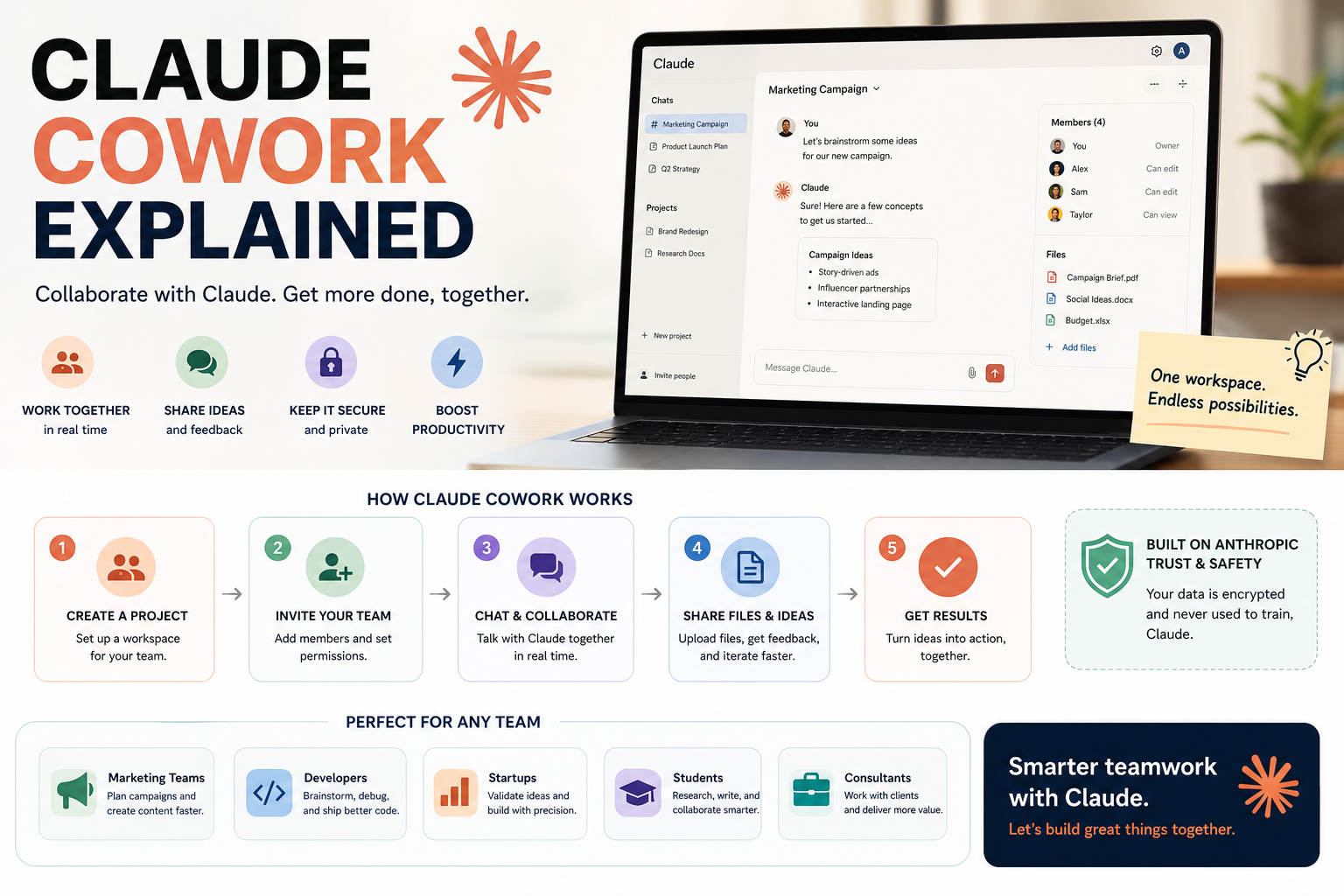
If you’ve been hearing about Claude Cowork but aren’t sure what it actually does, or why people in the productivity and AI communities are buzzing about it, you’re in the right place. The AI landscape evolves rapidly—but some tools, like Claude Cowork, are worth a deeper look, especially for anyone juggling files, research, meetings, and more on a daily basis.
Let’s be honest: we all want to work smarter, not harder. Whether you’re drowning in chaotic download folders, wrestling with research projects, or looking for smarter ways to manage team workflows, Claude Cowork promises to be an AI assistant designed for real-world desktop productivity. So, how does it deliver on that promise, what makes it unique, and what are its strengths and limitations? Let’s dive in and take a detailed tour of everything you need to know about Claude Cowork.
What Is Claude Cowork?
Claude Cowork is a desktop-based AI assistant built to help users with a wide range of tasks related to file management, data extraction, research, meeting notes, and more. Created as part of Anthropic’s Claude ecosystem, Cowork acts as a virtual co-pilot that automates repetitive workflows, organises disorganised digital spaces, and even collaborates on writing or analysis. It’s designed to bridge the gap between raw desktop environments and the potential of AI-driven productivity, all without requiring advanced coding knowledge or a complex setup.
The heart of Cowork lies in its ability to integrate seamlessly into your everyday work routines, offering both specialised automation and flexible assistance—whether you’re processing massive datasets, compiling research, or dealing with digital clutter.
Claude Science: The Ultimate AI Workbench for Modern Scientific Research and Labs
Key Capabilities and Features
- Advanced File and Document Management: Organise, rename, and clean up large batches of files or folders. For instance, it can automatically sort your downloads folder by content type or rename hundreds of files using consistent naming conventions.
- Bulk Operations: Batch processes such as folder cleanup, bulk renaming, and asset management help clear up digital chaos quickly.
- Research and Summarisation: Compile insights from multiple sources, summarise meeting highlights, and draft professional reports with accurate citations—saving a significant amount of manual work for students, researchers, and professionals alike.
- Data Extraction and Analytics: Extract structured data from PDFs or images using OCR, transform spreadsheets, clean up messy datasets, and organise data into analysis-ready formats.
- Image and Asset Operations: Quickly resize images in bulk, organise design assets, prepare files for external handoff, and automate routine design processes.
- Expense and Receipt Tracking: Extract purchase data from screenshots or emails, organise receipts for accounting, and track expenses across different projects and sources.
- Meeting and Team Collaboration: Transcribe meeting recordings, extract to-do items and action points, and synchronise notes across distributed teams working in multiple time zones.
These features are designed with a focus on user-friendly workflows and security, even allowing users to schedule recurring tasks and add integrations through plugins to expand its capabilities.
How Claude Cowork Runs Your Tasks
Cowork operates by setting up an AI-powered workspace on your device. You configure what needs to be accomplished—such as organising files, extracting data, or summarising documents—and Cowork guides you through the process, either by automating every step or confirming details with you along the way. You have control over how and when it checks in with you, making it suitable for both hands-off automation and interactive working sessions.
The system keeps a record of your preferences, task structure, and any instructions you provide at a global or folder-specific level. This allows Cowork’s behaviour to be adjusted to suit your digital habits or compliance requirements.
Availability and Getting Started
Claude Cowork is available as part of the broader Claude ecosystem. Access may depend on your region, subscription plan, or device compatibility. To get started, you will typically need:
- A compatible Windows or Mac desktop computer, and in some cases web or mobile access for certain features
- An active Claude account, as registration is required because the service is managed through Anthropic’s secure platform
- Basic usage requirements, such as minimum system specifications and an internet connection for cloud-based processing
The onboarding process is straightforward—once you install or access Cowork, you can begin immediately and configure your task preferences.
Starting a Cowork Session
When starting a Cowork session, you define the scope of your work—whether that involves processing documents, organising files, compiling research, or completing another task. The interface asks you for your requirements, and you can add specific instructions for every task at a global level or for particular projects and folders. You can also choose how you want Cowork to interact with you: allow it to handle everything automatically, or configure it to check in with you at key points, giving you the final say over important changes.
This flexibility is ideal for team environments, as it allows you to maintain good practices and prevent accidental changes while keeping critical approvals under your control.
Customising Instructions: Global and Folder-Level Control
Cowork allows users to configure global instructions, which apply across every session regardless of the folder or document, as well as folder-specific instructions for more targeted control in particular contexts. This is especially useful for users who want to automate repetitive actions while retaining a personal touch or ensuring compliance with internal policies. For example, you could configure Cowork to automatically rename every client file according to the project name in one folder, while applying different rules to your personal image files.
Integrations: Cowork Plugins
Beyond its core features, Cowork can be extended through plugins. These integrations maximise its usefulness in more specific scenarios, such as connecting research tools, project management software, or cloud storage services. The plugin ecosystem is continually evolving, so it is worth keeping an eye out for new releases.
Recurring Tasks: Automating Routine Work
One of Cowork’s most powerful capabilities is the option to schedule recurring tasks. Configure a workflow once, such as monthly expense classification or a weekly meeting summary, and allow Cowork to run these tasks automatically according to a schedule. This can save a significant amount of time for both individuals and teams by reducing the burden of routine manual work.
Permissions and Security
Security is a fundamental part of Cowork’s architecture. Because it interacts directly with sensitive files and confidential data, it requires explicit permission to access folders and documents. This helps reduce the risk of accidental exposure. Its processing is designed to meet enterprise privacy standards, making it a potentially reliable option even in regulated environments or organisations with compliance requirements.
Usage Limits and Current Limitations
Depending on your account tier, there may be usage limits on Cowork features, particularly for bulk operations or high-volume data processing. These limits are intended to ensure fair access and maintain system stability. Some users may reach them quickly when working with very large document collections, which means tasks may need to be divided into smaller batches or the subscription plan may need to be upgraded.
Cowork currently has several limitations:
- Not every file type or software environment receives the same level of support—the best results are usually achieved with standard formats such as PDFs, images, and common spreadsheet files
- Advanced OCR and data extraction performance may vary depending on the quality or language of the document
- Some real-time collaboration capabilities are still under development
- System messages such as “Setting up your Claude workspace” may occasionally delay the start of a task, and unexpected behaviour can occur if files are not located where the system expects them to be
Common Troubleshooting Questions
Here are some of the most common questions from early users, along with straightforward solutions:
- “The Claude workspace setup message does not disappear”: This usually means the workspace is still being initialised. If it appears to be stuck, try restarting Cowork or checking your system permissions.
- You cannot see Cowork on the web or mobile: Check your device compatibility and confirm that you are using the correct login credentials. Some features may initially be available only on desktop or may still be in an early mobile rollout.
- The AI stopped working during a task: This could be caused by a temporary connection problem or a usage limit. Check your file sizes and review any recent service announcements.
- Files do not appear as expected: Check the relevant folder permissions and verify that the files have not been filtered out by rules or unexpected naming conventions.
Example Use Cases for Claude Cowork
- File and Document Management: Large teams and individual users can benefit from renaming files and cleaning up disorganised folders, such as transforming a chaotic downloads directory into a clearly organised and labelled workspace.
- Research and Analysis: Academics, students, and professionals can save hours by automating data collection, summarising findings, and creating reports with accurate citations.
- Document Creation: Cowork can simplify the creation of summaries, follow-up reports, and even professional emails. Its ability to understand structure and purpose helps streamline document creation.
- Data Extraction and Analytics: It offers powerful support for extracting tables or cleaning spreadsheets, preparing information for technical analysis and reducing the amount of manual work required.
- Image and Asset Handling: Designers may appreciate its bulk resizing and asset organisation tools, which reduce the preparation time required for new projects.
- Expense Tracking: Organising receipts and purchase records can simplify accounting and compliance tasks, all with just a few clicks.
- Meeting Transcriptions and Follow-Ups: Automatic transcription and task tracking help keep distributed teams aligned across different time zones.
How Is Cowork Different From Other Tools?
Unlike traditional desktop automation platforms or other AI assistants, Cowork is designed for non-coders and power users alike. If you are familiar with command-line tools, you may notice that Cowork can achieve many of the same outcomes—such as file manipulation or content summarisation—without requiring you to open a terminal or copy and paste code. It is focused on desktop workflows and tangible file operations, which distinguishes it from browser-based chatbots or voice assistants.
Its flexibility through plugins, customised instructions, and interactive session management makes it suitable for both simple tasks and enterprise-level processes.
What Users Are Saying
Feedback from early users has been mostly positive regarding its productivity benefits and ease of use. However, some advanced users argue that “the difference between Cowork and using Claude’s standard features is smaller than it first appears—unless you rely heavily on its bulk automation capabilities.” There is also some confusion about terminal access. Although command-line access is not a technical requirement for most users, Cowork aims to bring similar capabilities into a simple and secure interface, with certain limitations introduced for security and reliability reasons.
The Future of Claude Cowork
Cowork is under continuous development, with frequent updates and new plugins expanding its usefulness. As AI assistants become more common in the workplace, tools such as Claude Cowork could play an important role in managing repetitive digital tasks and freeing up time for creative or strategic work. Keep an eye on future updates and the CoworkerAI community for the latest features and use cases.
Desktop environments provide us with powerful tools, but they can also become overwhelming because of digital clutter, tedious data cleaning, and endless documentation. Claude Cowork stands out as a solution for users who want to automate, organise, and optimise their working days with the help of advanced and secure AI. Its flexibility, security, and expanding list of features make it a valuable assistant for anyone seeking to simplify digital tasks without sacrificing control or privacy.