
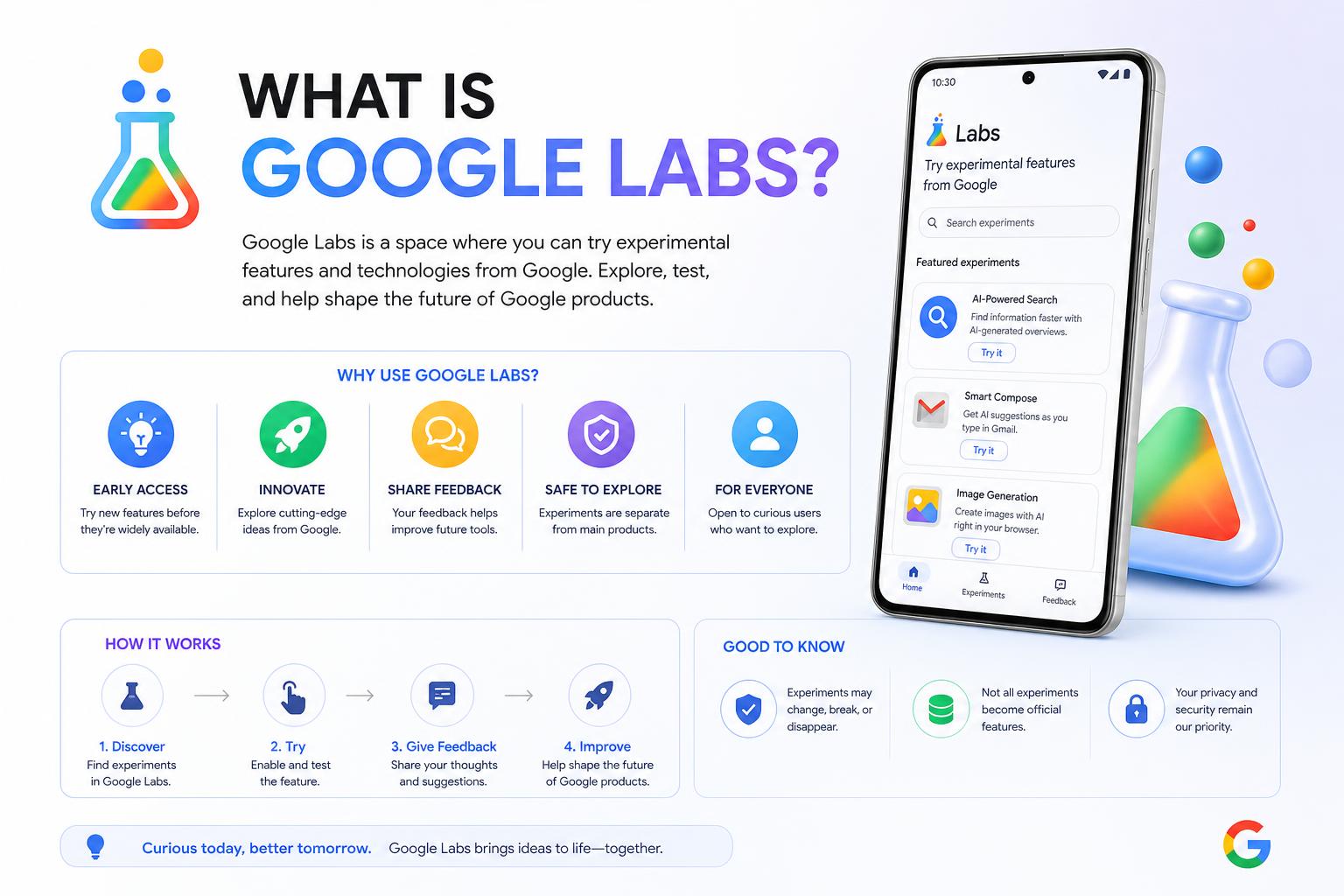
- Google Labs is Google’s public home for testing next-gen AI tools before mainstream release.
- Experiments in Labs shape the future of core Google products, like Workspace and Search.
- Marketers and creators use Labs for content prototyping, AI video, images, and building no-code apps.
- Participation, feedback, and awareness of Labs offer a competitive edge in adopting future tech.
Google Labs often feels like Silicon Valley’s best-kept secret: a crossroads where experimental tech and AI breakthroughs quietly make their debut before changing the way millions work, create, and interact online. While most users only encounter new Google features once they’ve been fully polished, those in-the-know have discovered that Google Labs is where the true magic (and sometimes chaos) of early innovation happens.
For marketers, creatives, developers, and tech enthusiasts, understanding Google Labs isn’t just tech trivia—it’s a strategic advantage. Labs is where you get a front-row seat to Google’s evolving artificial intelligence landscape, hands-on access to tools that could soon be industry standards, and a chance to shape them with real feedback. Let’s dive headfirst into the world of Google Labs, decode its origins, explore the standout experiments, uncover practical uses, and see how savvy users are leveraging it for insight and innovation years ahead of the curve.
What Exactly Is Google Labs?
Think of Google Labs as Google’s official “public sandbox”—a place to experiment, break things, and get feedback before launching to the wider world. Labs is designed as an open hub for AI-powered tools, creative playgrounds, and early features that could become tomorrow’s must-have products—or quietly disappear if they don’t measure up.
Labs operates on three main pillars:
- Experiments: These are hands-on, often cutting-edge prototypes ranging from AI chatbots to video-making tools. Anyone can try them out, give feedback, and help shape their future.
- Sessions: Collaborations with artists, educators, and domain experts. These limited-edition projects let users explore new interfaces and workflows, often around creative disciplines like film or music.
- Community: Early users, testers, and creators come together, share ideas, get involved through newsletters, events, and feedback channels—and sometimes influence what features go mainstream.
Officially, Labs is marketed as the “home for Google’s latest AI experiments.” From generative text and image tools to AI-powered music and mini-app builds, Google Labs is like a crystal ball into the future of Search, Workspace, Chrome, Android, and beyond.
A Brief History: The Evolution of Google Labs
Labs isn’t new—Google first introduced the concept in 2002, using the platform as its digital playground for experimental products and features. It became an expressive symbol of Google’s “test fast, learn fast” engineering approach, especially in the 2000s and early 2010s.
Back then, legendary Google products like Gmail, Google Calendar, and Google Wave were first released as Labs projects. Many of these services began as invitation-only or opt-in experiments, available through a “Labs” tab inside Google products. Some made the leap to full products, while others became learning experiences—sometimes vanishing or being folded into bigger projects as priorities shifted.
In 2011, Google officially discontinued the original Google Labs to focus on fewer products. But the “Labs” concept was never fully erased from Google’s innovation DNA. Instead, it resurfaced over the years under new names—like Search Labs and Workspace Labs—focused on testing new features directly within flagship apps and services.
How Projects Land in Google Labs (And What Happens Next)
There’s a clear, but dynamic, process driving how experiments end up in Google Labs. Here’s how the cycle works:
- Internal Innovation: Google’s AI, research, and product teams brainstorm and prototype new tools or features. Once they reach a stage where user feedback is crucial, they get pushed out to Labs as public experiments.
- Cross-Pollination with Other “Labs” Programs: Features from Search Labs and Workspace Labs (and vice versa) often swap places, get refined, or combined before landing in, or graduating from, the central Labs directory.
- Migration from “Experiments with Google”: Google previously ran a platform called Experiments with Google, but most activity and updates have shifted to Labs, with the old site now serving as an archive. Users are directed to labs.google for ongoing action.
Once an experiment is live in Labs:
- It may graduate to a standalone product (as NotebookLM did).
- It could be integrated into core Google services: Sometimes, an experiment is so useful it becomes part of Search, Workspace, or Gemini’s default offering.
- Or, it might be retired/discontinued if adoption lags, risks emerge, or other products cover similar ground.
This “rapid evolution” model means today’s Labs tools are tomorrow’s must-haves—if you’re ahead of the curve, you’re already learning what will soon be business as usual.
Why Should Marketers, Creators, and Agencies Care About Google Labs?
For digital marketers—especially those on agency teams—tracking Google Labs offers much more than curiosity; it’s a direct look at the bleeding edge of what your clients might demand next year.
- Prototype content, campaigns, and tools: With Labs, agencies and brands can build and test AI-generated copy, imagery, video, and apps before investing resources, pitching to clients, or deploying at scale.
- Develop unique campaign assets and visuals quickly: Creative agencies use AI image, video, and music tools within Labs for rapid ideation and to spark new directions.
- Spot the next features before competitors: By experimenting now, marketers can anticipate new Google Workspace or Search features—and shape their strategies months in advance.
- Shape product direction: User feedback in Labs can impact what features become mainstream. Early engagement is a chance to help designers “get it right.”
- Stay aware of evolving AI ethics, risks, and user expectations: Labs regularly updates its terms, usage guidelines, and feedback channels in response to emerging real-world issues.
Key Google Labs Experiments and What They Offer
Let’s break down the most game-changing Labs experiments, each offering unique potential for marketers, creatives, researchers, and hands-on innovators.
Pomelli – Brand-first AI Content Creator
Pomelli is designed for efficient, on-brand marketing collateral generation. It helps businesses, especially small-medium companies and agencies, create social media content that reflects their unique brand tone, style, and messaging.
- Analyzes your website to learn your brand voice
- Produces campaign ideas, copy, and assets that maintain consistency across channels
- Enables rapid content prototyping—ideal for showing clients early concepts without heavy design/dev investment
- Acts as a “bridge” between basic AI tools and full-service agency workflows
Mixboard – Mood Boards Created by AI
Mixboard offers a visual solution for campaign brainstorming and brand refresh initiatives. This AI-powered board builder lets anyone input prompts (text or image) and explore creative directions without needing a designer.
- Quickly visualize seasonal, event-based, or thematic campaign possibilities
- Ideal for workshops, client sessions, and agency mood board development
- Saves hours of searching for reference imagery manually
- Export and share boards as a springboard for brand strategy presentations
Flow – Video Creation with Google’s Next-Gen AI
Flow is Google Labs’ cinematic video generator. Unlike basic GIF or clip makers, Flow is built specifically for ad prototyping, storyboarding, and creative campaign videos using cutting-edge Veo models.
- Allows realistic video editing—control lighting, shadows, and sequences
- Start from text or reference images, then build scenes/shot progressions
- Helps move creative team concepts from idea to pitch without filming
- Accelerates internal explainers, proof-of-concept demos, and pitch materials
Labs FX: ImageFX & MusicFX – Creative AI for Images and Audio
ImageFX: Text-to-Image Generation
ImageFX lets you take a simple text prompt and turn it into a wide range of images, instantly. This is invaluable for generating quick concepts for ads, blog illustrations, and marketing collateral.
- Break out of creative block by generating multiple styles right away
- Experiment with different art directions before briefing designers
- Use images internally for pitches, reference boards, or campaign previews
MusicFX: AI-Generated Soundtracks
MusicFX lets you compose musical backgrounds or audio branding from text descriptions.
- Create background music for video content, demo reels, social ads, or event trailers
- Explore various moods and genres to refine a brand’s audio identity before hiring a composer
- Draft multiple soundtrack variations quickly for review or internal use (subject to licensing usage and platform policies)
All creative tools can be found together under Google Labs FX.
Opal – No-Code AI Mini-App Builder
Opal takes the pain out of building campaign-specific tools or workflow assistants. It’s perfect for marketers and creatives frustrated by long developer lead times or overcomplicated internal software requests.
- Design, chain, and deploy AI-based “Opal” mini-apps with zero coding required
- Create custom lead magnets, internal QA checkers, tone-of-voice analyzers, or campaign generators
- Quickly spin up working tools for client interactions, team processes, or marketing ops—without waiting for IT
- Proof-of-concept projects can be published, shared, and iterated by non-developers
Google Labs: Essential Information for Access, Use, and How Experiments Work
Labs is designed to balance easy access with responsible experimentation. Here’s what new users need to know:
How to Join and Explore Google Labs Experiments
- Eligibility: Most experiments are public, but some (especially those using early-stage AI or sensitive data) may require sign-up, a waitlist, or certain account types.
- Access Points: Head directly to labs.google.com; look for the Labs flask icon in supported Google apps; or browse the Labs directory for an evolving list of available projects.
- Feedback Loops: Each experiment offers easy feedback tools. Google actively encourages suggestions, bug reports, and use case ideas.
- Waitlists and Availability: For some high-demand experiments, users may need to join a waitlist. Notifications are sent to opted-in users when access is granted.
Managing Experiments, Onboarding, and Turning Off Features
- Turning Experiments On/Off: Within the Labs dashboard or experiment page, find the project card, check eligibility, and hit enable. Users can typically disable experiments at any time.
- Participation Controls: For features in Search Labs or Workspace, toggling Labs access may require being signed into a Google account (personal or organizational) with incognito mode disabled.
- Geographic Availability: Labs is expanding globally, but some experiments may be restricted to users in the US or select regions while in early-phase rollout.
Labs Experiments: Quality, Terms, and Educational Use
- TOS and Rights: Users may be prompted to accept special terms for specific experiments, especially when generative models (image, video, or code) are involved. Read carefully if using Labs for business or with sensitive data.
- For Education Accounts: Most generative AI experiments are not yet available for Google Workspace for Education/student accounts, especially where users are under 18, while Google fine-tunes administrative controls.
- Experiment Duration: Each experiment typically lists its expected end date or current availability on its card in Labs. These timelines may change as projects evolve.
Example: Managing Search Labs Experiments
For search-related experiments:
- Open any browser on your computer and sign in to your Google Account (with Incognito disabled).
- Open a new tab and find the Labs icon or visit Labs directly.
- Select the experiment of interest, view its card, and enable it (some may ask you to join a waitlist first).
- To disable, revisit the Labs menu and toggle off the feature or leave the waitlist if you’ve changed your mind.
How Experiments Influence Search, Workspace, and AI Features
The impact of Google Labs experiments stretches far beyond their initial user base. Feedback and actual usage in Labs play a central role in driving development across all major Google products.
- AI Overview in Search: Early experiments with features like “AI Overviews” now define new search layouts and responses, seamlessly integrating generative AI into standard search experiences.
- From Code Tips to Mainstream Tools: Discontinued experiments such as Code Tips have evolved into foundational blocks for tools within Workspace and standard search, directly based on learnings from Labs.
- Advanced Collaboration: Experiments often become core features in Google Docs, Sheets, and Gmail—or are retired, depending on real-world value and safety insights.
Staying active on Labs isn’t just for hobbyists—agencies and businesses gain a window into potential product roadmaps, while shaping Google’s user experience at the same time.
Beyond Content Testing: Labs for No-Code Development and Automation
Opal and similar tools are a major leap for marketers, SMBs, and non-developers looking to quickly iterate on interactive apps, lead generation tools, or workflow assistants—without waiting for IT.
- Use mini-apps created in Opal to prototype campaign tools, client lead forms, auto-summarizers, or even internal content QA bots
- Quickly adapt apps to evolving messaging or campaign requirements, as Labs experiments often allow on-the-fly iteration
- Supercharge proposals for clients: demonstrate not just strategy, but real AI-driven product samples before competitors even know what’s possible
The Process of Experimentation: From Hands-On Labs to Cloud Skills
Learning Google’s experimental products isn’t just about playing with fun tools—labs are structured to support real skill development, especially in cloud computing, AI, and even coding for business users.
Platforms like Google Skills offer hands-on labs for Google Cloud that reinforce:
- Practical navigation of Google Cloud Console
- Understanding roles, permissions, and project scoping
- Enabling APIs, services, and managing resources dynamically
- Testing real workflows, from IAM access to API integration and Pub/Sub resource setup
- Activity tracking, so progress and milestones are easily shared, making it ideal for certifying team skills
This cloud-focused approach blends seamlessly with Labs’ goal of enabling rapid, hands-on experimentation even for non-technical users, making it essential for anyone serious about adopting new Google technologies ahead of the curve.
Notable Success Stories: From Lab Projects to Core Products
Some of today’s most important AI-driven productivity tools started as niche experiments in Google Labs.
Example: NotebookLM
- Initially conceived as Project Tailwind, a specialized AI-first notebook for research and accelerated learning
- Launched in Labs, rapidly rebranded and enhanced based on user feedback
- Evolved to become a flagship research assistant capable of parsing, summarizing, and generating insights from user documents
- Now positioned as a full-fledged Google AI product—official documentation and guides recommend it for everything from student learning to serious business research
This journey—from prototype to mainstream—demonstrates how playing in the Labs “sandbox” can directly impact what features die, morph, or succeed in official Google services.
How Agencies and Businesses Can Make the Most of Google Labs
Adopting a structured approach to experimenting with Google Labs can institutionalize future-readiness in any organization. Here are proven tactics for agencies, businesses, and freelancers:
- Routine Check-Ins: Assign a team member or rotate responsibility for monitoring Labs’ homepage, Google blog updates, or subscribing to Labs’ newsletter
- Bookmark and Organize Experiments: Use tools like NotebookLM or a shared agency workspace to document which experiments provide value, share learnings, and connect usage metrics to actual campaign outcomes
- Try Prototypes in Client Work: Use Labs-generated assets or tools in low-risk client presentations, internal mocks, or as the backbone for proof-of-concept campaign pitch decks
- Provide Direct Feedback: Encourage your team to report bugs, suggestions, or potential improvements—early user input can shape final product releases in your favor
- Track What Sticks: Over time, build your own playbook of which Labs tools have the highest impact for your unique verticals, then develop internal standard operating procedures as those features become mainstream
Key Points: AI, Experimentation, and Future-Proofing Your Strategy
At its core, Google Labs is about more than just shiny tech demos or quirky prototypes—it’s about preparing for, and sometimes steering, the direction of digital communication, automation, creativity, and search itself.
- Labs is a safe space for trial and error: Marketers and agencies can explore tools before they’re officially part of Google’s business suite, iterate on ideas, and fail fast without reputational risk.
- The feedback loop is real: Active testers hold sway in what becomes tomorrow’s default workspace tool, AI generator, or search interface.
- Labs experiments are treated as working prototypes—solid enough for real business use, fluid enough to pivot rapidly (or be retired) as user needs and risks are clarified.
On a practical note, agencies and businesses on the cutting edge can leverage Labs as a kind of “insider advantage,” showing clients—through proof, not just promises—that they’re not waiting for change, but helping define it.
Getting Involved: Steps to Embrace the Google Labs Mindset
If you’re ready to become a Labs power user—whether as a marketer, independent creator, or forward-thinking enterprise—here’s how to get hands-on:
- Sign up for access or join any necessary waitlists on the .
- Choose a handful of experiments each quarter to trial with your internal team—document what delivers value, what breaks, and what clients respond to.
- Build Labs-related knowledge sharing into weekly team meetings, client strategy calls, or as dedicated R&D time on the agency calendar.
- Use Labs projects—not just as ideas, but as live “beta” tools in campaign concepting, mock-ups, or brand development sessions.
- Always provide feedback, not just for altruism but because it increases your influence on what features and fixes go live for the entire Google ecosystem.
Everything You Need to Know About NotebookLM by Google