
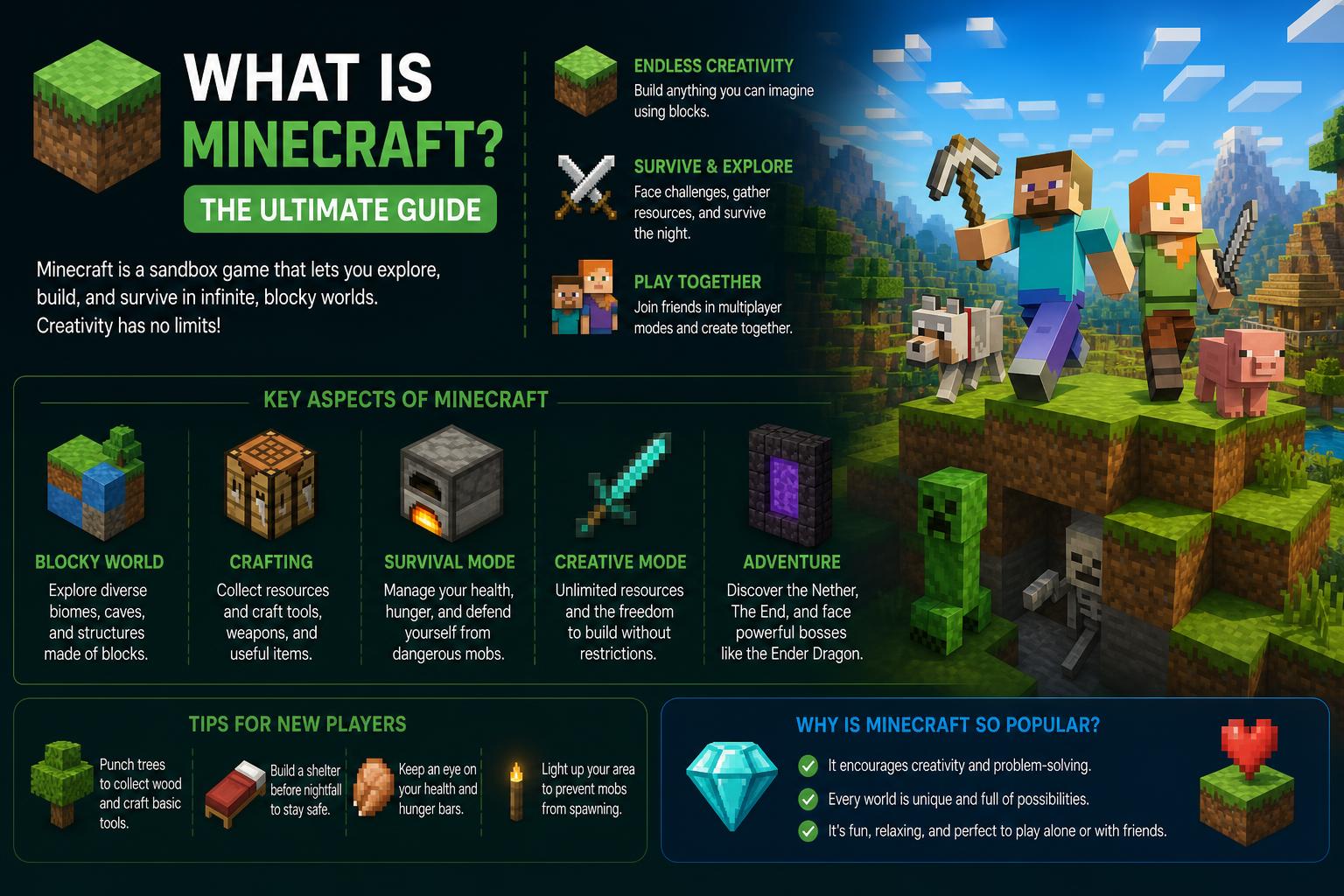
- Minecraft is a versatile sandbox game available on most platforms with creative and survival modes.
- Robust parental controls and private servers allow safe play for children and families.
- The game supports community-generated content and educational editions for learning.
- Differences between Java and Bedrock Editions impact gameplay, cross-play, and modding options.
If you’ve spent any time around kids, gaming enthusiasts, or even casual internet users, you’ve probably heard about Minecraft. Its simple blocky style may look modest, but this sandbox game has taken the world by storm, attracting players of all ages. Whether you’re a curious parent or just want to know what makes this game so intriguing, understanding what Minecraft is and why it’s so beloved can be a bit overwhelming. Let’s break it all down—what it is, how it works, why it’s appropriate for different ages, and what you should know as a potential player or parent.
Minecraft began over 15 years ago and has since evolved into a cultural phenomenon. Millions play it worldwide, and it’s responsible for jumpstarting countless streaming careers, creative engineering projects, and educational initiatives. The heart of Minecraft is creativity and community, but when you first load up the game, you might find yourself thinking, “What am I supposed to do here?” Exploring all its ins and outs reveals an endlessly creative sandbox environment.
What Exactly Is Minecraft?
At first glance, Minecraft appears to be a simple block-building game, but it’s much more than that. Imagine a massive, randomly generated world that looks like a digital LEGO set. Within this world, players can dig, build, fight monsters, explore cave systems, and craft items—all using some pretty intuitive (yet deep) game mechanics. The freedom Minecraft offers means the only real limit is your imagination! Some players work together to create entire cities, while others set off on solitary adventures battling monsters and searching for rare treasures.
Platforms and Versions
One of Minecraft’s standout features is its cross-platform accessibility. Originally available only on PC, it’s now playable on almost every major device. Here’s a breakdown of where you can play Minecraft:
- Windows PC (Java Edition & Bedrock Edition)
- Mac & Linux (Java Edition)
- Xbox One, Xbox Series S|X
- PlayStation 4 & 5
- Nintendo Switch
- Android & iOS
- Fire OS/TV, Windows Mobile
- Samsung Gear VR
There are two main flavors: Minecraft: Java Edition (for PC, Mac, Linux) and Bedrock Edition (for consoles and mobile). Java Edition is favored by the longstanding PC community and offers extensive modding possibilities. Bedrock Edition is optimized for smoother performance and cross-play across many devices, although it limits mods to curated downloads via the Marketplace.
Game Modes and How They Affect Play
Minecraft isn’t just a one-size-fits-all game. It features two main modes:
- Creative Mode: The ultimate sandbox environment. You have unlimited blocks, the ability to fly, and no health or hunger concerns. It’s perfect for designing and building anything—tiny cottages, complex machines, or pixel art murals. Blocks can be removed or placed instantly. The safe environment makes it ideal for young children or those seeking a relaxed experience.
- Survival Mode: Focused on action and adventure. Players must manage health and hunger, defend against monsters, mine resources, and craft tools to survive. Exploring caves, surviving nights, and gathering supplies are daily tasks. For a higher stake experience, players can choose “Hardcore Mode” (Java Edition only), where death means the world is permanently lost.
Each mode offers four difficulty levels: Peaceful, Easy, Normal, and Hard. Creative mode isn’t affected much by these settings, but in Survival, they influence how dangerous monsters are, how quickly hunger sets in, and how fast health regenerates.
This open-world structure allows players to create their own goals—whether that’s battling bosses like the Ender Dragon or designing intricate builds—highlighting the game’s emphasis on creativity, experimentation, and exploration.
Content Created by the Community
The ongoing appeal of Minecraft is partly due to its vast ecosystem of user-generated content. Players share:
- Adventure maps: Custom story-driven quests
- Mini-games: From hide-and-seek to competitive parkour
- Mash-up packs: Themed visual and audio collections
- Mods: Add-ons that significantly change gameplay, introduce new features, textures, or mechanics (popular especially in Java Edition)
In Bedrock Edition, most of this content is available via the Marketplace, an official store where in-game currency called “Minecoins” can be used. Mods in this version are curated for quality and safety. Java Edition players access mods through trusted external sites, allowing almost limitless customization and complex additions, from fantasy RPGs to futuristic worlds.
Minecraft for Kids: Is It Safe and Appropriate?
Parents often ask about Minecraft’s suitability for their children. The core game is rated E10+ for “Everyone 10+,” mainly due to cartoonish fantasy violence. Defeated creatures disappear without gore, and players respawn after death, making it accessible for younger audiences.
However, the community interaction can introduce risks. Public servers may contain user-generated content or chat that’s not age-appropriate. Fortunately, Microsoft offers robust parental controls to manage access to multiplayer, chat, and in-game purchases. Setting up a child account is highly recommended for oversight and controlling interactions.
Additionally, creating a private Minecraft Realm allows safe multiplayer experiences with friends, limiting access to approved players. Resources like ParentalTools.org provide comprehensive guidance on managing these controls effectively.
Communicating in Minecraft: Chat, Voice, and Servers
Player communication depends on the platform and server type. In PC versions, voice chat isn’t built-in, so players often use third-party apps such as Discord. Consoles like Xbox and PlayStation include integrated voice chat. Parental controls can restrict or mute these tools if needed.
Minecraft worlds are hosted on servers. Mojang maintains an official list of trusted servers, but countless third-party options exist. Parents should be aware of where their children are playing to ensure safety.
Players can block or report problematic behavior. To enhance safety, creating a private Realm or limiting play to known friends is strongly advised for younger players.
Understanding the Difference Between Java and Bedrock Editions
Two main versions are available:
- Java Edition: The original. Superior modding capabilities and extensive downloadable mods are accessible. Multiplayer is limited to PC only; cross-platform play isn’t supported.
- Bedrock Edition: Designed for performance, stability, and cross-platform play across devices, including consoles and mobiles. Contains curated mods through the Marketplace, with safer and more consistent options.
If your child’s friends use multiple devices, Bedrock Edition facilitates online multiplayer. For those interested in detailed mods and custom content, Java Edition on PC remains the best choice.
How Much Does Minecraft Cost?
Cost varies by platform, but generally ranges from $6.99 to $19.99 for a standard copy. Occasionally, discounts are available. Additional optional in-game purchases include cosmetics, skins, and content via the Marketplace. You can manage or block these in-app purchases using parental controls to prevent unwanted spending.
Parental Controls and Safety
All major consoles and devices offer parental control options for managing screen time, spending, and online interactions. Minecraft supports layered safety features via child accounts, enabling restrictions on multiplayer, chat functions, friend requests, and in-game purchases. Consult guides from ParentalTools.org or ESRB for detailed setup instructions.
Education and Learning with Minecraft
More than entertainment, Minecraft is a valuable educational tool. Minecraft: Education Edition provides hundreds of lessons covering topics like STEM, problem-solving, digital safety, and environmental awareness.
Some notable modules include:
- CyberSafe: Teaches safe online habits and privacy protection
- CyberSafe AI: Dig Deeper: Focuses on responsible AI use
- GameCode: Introduces coding and game design principles
- Planet Earth III: In partnership with BBC Earth, allowing children to explore wildlife habitats interactively
With over 500 free lessons for Office 365 Education users, it’s an excellent resource for interactive learning and collaboration. A free Hour of Code trial is also available, making it accessible even without full access.
In-game Economy: Minecoins and Tokens
Minecraft uses virtual currencies in the Marketplace: Minecoins, which can be used to purchase skins, worlds, and mini-games. On PlayStation, the currency is called “Minecraft Tokens.” All essential gameplay remains free of charge. Device parental controls help restrict or monitor in-game spending and purchases.
Why Do People Love Minecraft?
At its core, creativity and freedom of expression drive Minecraft’s popularity. Players enjoy building, exploring, and inventing either solo or with friends. The game’s charming blocky art style is simple yet engaging, making it accessible for newcomers.
The social aspect is also vital. From streaming on Twitch and YouTube (which boasts over 1 trillion views of Minecraft content) to sharing custom builds, Minecraft fosters a thriving community. These factors contribute to its enduring appeal across generations.
Who Is Minecraft Suitable For?
Minecraft truly caters to everyone—from preschoolers in Creative mode to adults experimenting with engineering designs. Parents can tailor the experience to be age-appropriate by:
- Establishing child accounts with appropriate restrictions
- Hosting private Realms for safe multiplayer experiences
- Monitoring playtime and in-game purchases through device controls
- Using educational tools within Minecraft: Education Edition
Players interested in social interactions can join multiplayer servers (public or private), while others may prefer a quiet time creating alone or in small groups.
Minecraft in Real Life: Streaming, Careers, and Community
Minecraft extends beyond the screen. The game has launched numerous careers in streaming and content creation, with creators on platforms like YouTube and Twitch sharing their builds and gameplay. This community-driven culture inspires ongoing creativity and collaboration, offering skills and entertainment for audiences worldwide.
From making friends to fostering STEM interests, Minecraft provides a safe space for engagement, especially with proper oversight. Its influence is visible across digital media, education, and even professional eSports circuits.
With its blend of adventure, challenge, safety tools, and endless creativity, Minecraft continues to capture imaginations. Its customizable settings, educational value, and community support make it a versatile digital sandbox suitable for all ages. Jump in and discover what you can build, explore, and create in these iconic blocky worlds!