
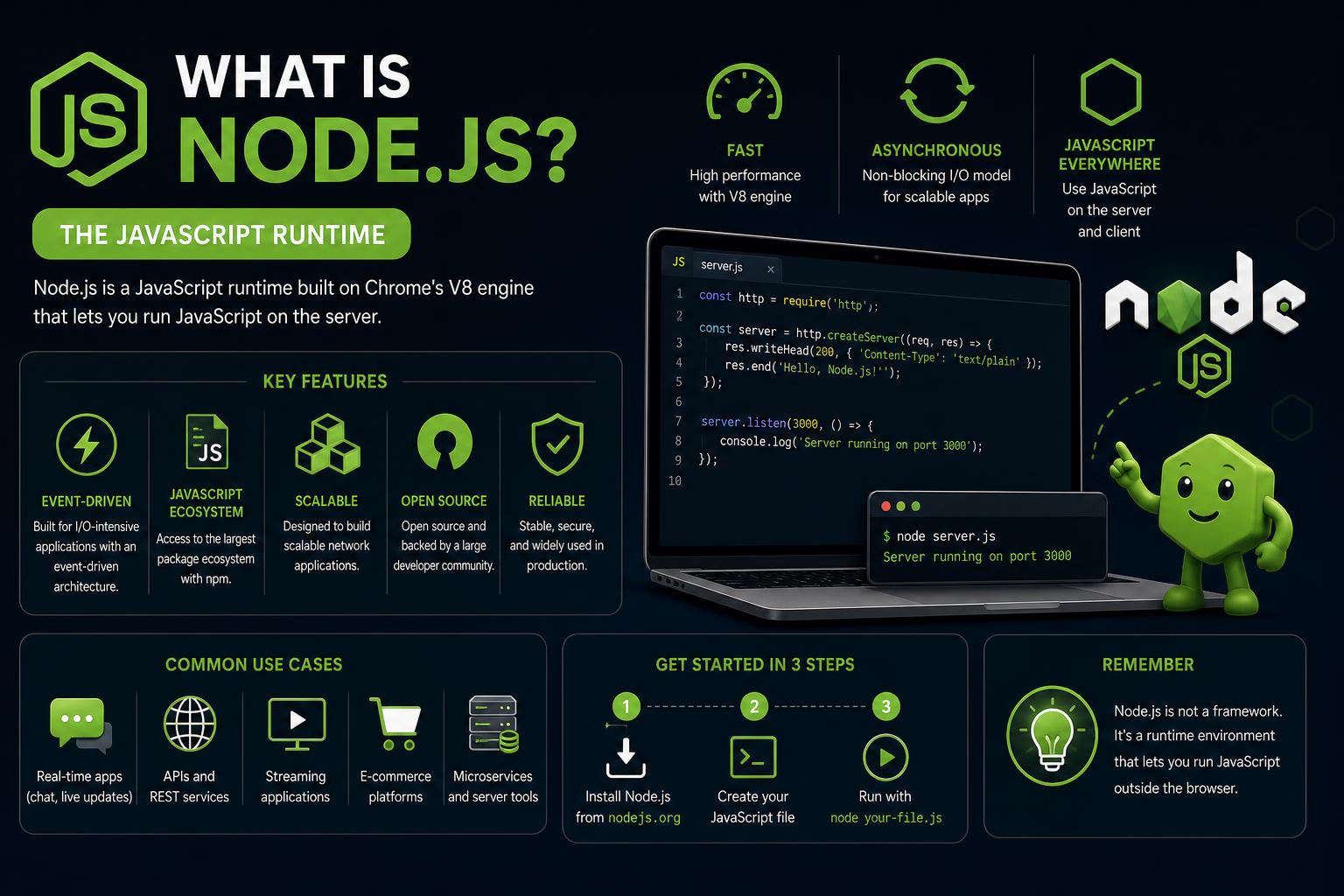
- Node.js allows JavaScript to run server-side, revolutionizing backend and full-stack development.
- Its non-blocking, event-driven architecture delivers outstanding scalability and performance, especially for I/O-heavy and real-time applications.
- Built on the cutting-edge V8 engine and powered by npm, Node.js has a massive open-source ecosystem and is backed by a global developer community.
Ever wondered how websites like Netflix, LinkedIn, or PayPal handle millions of users without missing a beat? The answer often lies in a powerful technology called Node.js. Even if you’re just starting your coding adventure or you’ve been on a JavaScript journey for a while, chances are you’ve heard Node.js mentioned as a game-changer for building modern apps.
In the following in-depth guide, we’ll explore what Node.js is, how it works under the hood, why it’s different from other server frameworks, and why developers can’t stop talking about it. Whether you’re looking to build lightning-fast APIs, real-time chat apps, streaming services, or want to understand how JavaScript literally “runs everywhere” these days—this article will break it all down in plain English, referencing everything the leading sources online have covered and more.
Understanding Node.js: What Exactly Is It?
Node.js isn’t a new programming language or a framework—it’s a runtime environment that lets you run JavaScript code outside the browser. Imagine taking the language that powers dynamic web pages and putting it to work on your server, your computer, or in the cloud. That’s the magic of Node.js: JavaScript is no longer just for browsers.
Node.js is open-source and cross-platform, running smoothly on Windows, macOS, Linux, and many other operating systems. Its foundation is Google’s V8 engine, the same engine that Chrome uses to make websites zippy. But unlike a web browser, Node.js provides unique modules—think of them as special toolkits—that let you read files, serve web pages, interact with databases, handle HTTP requests, and so much more, none of which would be possible with JavaScript alone in the browser.
Why Node.js Matters
JavaScript originally was designed for web browsers—to manipulate elements on a page. But as web applications grew more complex, developers wanted to use the same language and skill set on both the client (browser) and the server. This is where Node.js turned the industry upside down.
- Full-stack JavaScript: Now you can build both the frontend and backend using a single language, making it easier to share code and skills between teams and projects.
- Faster development cycles: Developers can reuse logic, data models, and tooling across the stack, helping teams deliver features faster and maintain applications more efficiently.
- The npm Advantage: With npm (Node Package Manager)—the world’s largest registry of reusable code—integrating new features is often a matter of ‘npm install’.
Core Architecture: The Secret Sauce Behind Node.js Performance
The heart of Node.js’s magic lies in its unique event-driven, non-blocking architecture. Unlike classic server technologies (think Apache, PHP), where each incoming request can tie up a server thread, Node.js uses a single-threaded event loop to juggle thousands of connections simultaneously—without creating a new thread for every client.
Let’s break down how it works so efficiently:
The Event Loop Explained
The event loop in Node.js is the feature that manages all asynchronous operations. When a request comes in—for example, reading a file or receiving an HTTP request—Node.js places the task in a queue and keeps processing other tasks while the first one waits in the background. It never “blocks” the main thread, so the server keeps processing new requests rather than waiting for one to finish before starting the next.
Once the background operation is done (like a file finally being read from disk), Node.js picks up its callback and continues the work. This design makes Node.js ideal for apps with lots of “waiting” tasks like network requests, APIs, and real-time messaging.
libuv and the Thread Pool
Node.js uses a C++ library called libuv to handle low-level operations like networking, file I/O, and abstract the event-driven architecture across platforms. For compute-heavy or blocking operations (like image processing or encryption), Node.js offloads the task to a thread pool—keeping the main event loop fast for I/O tasks and small callback functions.
If you think about Node.js as a busy chef, the chef never stops working: when a slow task appears (like waiting for dough to rise), the chef delegates it to someone else and keeps working on the rest of the menu instead of standing around waiting. That’s Node’s approach to high-traffic, I/O-intensive workloads.
Node.js in Real Life: What Can You Build With It?
Node.js is everywhere. Some of the world’s biggest companies rely on it. But what does it do best?
- Web Servers and APIs: With powerful frameworks like Express, Node.js is a go-to solution for building RESTful APIs or high-performance web servers.
- Real-Time Applications: Think chat apps, collaborative document editors, or live gaming platforms. Thanks to libraries like Socket.io, Node excels at low-latency, persistent connections.
- Streaming Services: Audio and video platforms (like Netflix or Spotify) benefit from Node’s data stream capabilities, which handle large chunks of data in real-time.
- Microservices: Node.js is lightweight and modular, allowing teams to split big systems into small, independent services that are easy to deploy and maintain.
- IoT and Hardware: Using libraries such as johnny-five, developers can control hardware and build IoT solutions.
- Command Line Tools: Node’s access to your system’s file system lets you create CLIs that automate tasks or support developer workflows.
- Single-Page Apps (SPAs): Server-side rendering and backend logic for frontend frameworks like React or Vue often runs on Node.js for optimal performance.
Non-Blocking I/O vs. Traditional Concurrency: Why Does Node.js Feel So Fast?
In “classic” servers, each request could tie up a separate thread. Blocking I/O meant the CPU sat idle anytime it waited on a slow database or external server, hurting scalability and racking up memory usage. Node.js flips this script.
With Node.js, almost all I/O tasks—like network requests or file access—are non-blocking. Instead of making the user wait for each operation to finish, Node.js continues working on other things, circling back to the original task as soon as it’s ready. This makes Node a rockstar for servers juggling heavy network traffic or applications where many users interact at the same time.
Installing Node.js and npm: Getting Started
Setting up Node.js on your computer is easy. Simply head to the Node.js website and choose the recommended LTS (Long-Term Support) version for maximum stability. The installer includes both Node.js and npm, so you’ll be ready to code and install packages straight away.
After installation, just run node -v and npm -v in your terminal or command prompt to verify success. At this point, you can run JavaScript files on your system, spin up a server, or experiment in the REPL (Read-Eval-Print Loop) by simply typing node and pressing Enter.
First Steps: Your Very First Node.js Script
Unlike browser JavaScript, Node.js scripts can interact with the operating system directly. Here’s how you’d greet a user with their name and the current time:
const userName = process.argv[2] || 'stranger';
console.log(`Hello, ${userName}! It's ${new Date().toLocaleTimeString()}`);
Save it as main.js, then run it in the terminal with node main.js Anna and see the greeting appear—with your system’s actual time.
REPL: Interactive Coding with Node.js
The REPL lets you run JavaScript interactively, line by line, right from your terminal. Enter node on the command line and you’re in! Want to try a calculation? Type 2 + 2 and hit Enter. To exit, hit Ctrl + C twice or type .exit.
Node.js Modules: Core Features and the CommonJS Legacy
Node.js introduced a module system from the start, allowing developers to organize code into reusable files (modules). Its original standard, CommonJS, lets you use require('module') to load built-in resources (like fs for file system operations), external libraries, or your own code.
Example – reading a file asynchronously in Node.js using the core fs module:
const fs = require('fs');
fs.readFile('example.txt', 'utf8', (err, data) => {
  if (err) {
    console.error(err);
    return;
  }
  console.log(data);
});
This approach ensures your code only continues once the file’s contents are ready, but other operations are never blocked. You can also install and require vast numbers of third-party modules from the npm registry, like this:
const express = require('express');
const app = express();
app.get('/', (req, res) => res.send('Hello, World!'));
app.listen(3000);
Node now also supports modern ECMAScript modules (import/export syntax), making it compatible with the latest JavaScript standards.
Under the Hood: V8 Engine and Performance Features
At the core of Node.js is Google’s V8 engine. This is a lightning-fast JavaScript engine developed in C++ that compiles JavaScript code directly into native machine code. Why is that important? Native code means JavaScript on the server can be as fast as software written in strongly-typed, compiled languages—without sacrificing developer friendliness.
V8 also features Just-In-Time (JIT) compilation, garbage collection, hidden classes, and inline caching for high-speed property access. All this adds up to quick execution and low memory usage for your applications.
The Node.js Ecosystem: npm and Beyond
npm (Node Package Manager) is the lifeblood of modern Node.js development. It gives you instant access to over a million open-source libraries and tools. Want to connect to a database, parse CSV files, or run unit tests? There’s probably an npm package (or fifty) for each task!
npm also manages dependencies in your package.json file, so your app’s environment is reproducible and easy to share or deploy. To install a package, just run npm install package-name, and to start a project, use npm init. For tasks you don’t want to install permanently, npx lets you run commands from packages once and toss them away—super handy for developer workflows.
Popular npm Packages Every Node.js Developer Should Know
- Express: Web applications and APIs.
- Mongoose: MongoDB modeling and schemas.
- Dotenv: Load environment variables from a file for secrets management.
- Lodash: Utility functions for arrays, objects, and more.
- Jest: Testing framework for easy, powerful test suites.
- ws: WebSocket server for real-time communication.
Node.js in Action: Practical Examples and Use Cases
Building a Web Server
Node.js makes it a breeze to write HTTP servers. Here’s a minimal example that responds to requests with a ‘Hello, World!’ message:
const http = require('http');
const server = http.createServer((req, res) => {
  res.writeHead(200,  {'Content-Type': 'text/plain'});
  res.end('Hello, World!');
});
server.listen(3000, () => {
  console.log('Server running at http://localhost:3000/');
});
Non-Blocking HTTP Operations
Want to simulate a long-running operation and stay responsive? Try setTimeout and see Node.js handle other requests while “waiting”:
http.createServer((req, res) => {
  setTimeout(() => {
    res.end('Response after 2 seconds');
  }, 2000);
}).listen(3000);
Other users won’t be delayed—Node is free to keep serving new requests instantly.
Real-Time Chat using WebSockets
const WebSocket = require('ws');
const server = new WebSocket.Server({ port: 8080 });
server.on('connection', (ws) => {
  ws.on('message', (message) => console.log(`Received: ${message}`));
  ws.send('Welcome to the chat!');
});
This snippet demonstrates easy creation of a basic chat server where clients can send and receive messages in real-time—ideal for collaborative applications, online games, or live support.
Node.js Asynchronous Programming: Handling Callback Hell and Promises
Because Node.js relies heavily on asynchronous code, you’ll frequently use callbacks—functions that execute when an operation finishes. While powerful, callbacks can get messy if nested too deeply (dubbed “callback hell”). Fortunately, new language features like Promises and async/await in modern JavaScript have made it considerably simpler:
const fs = require('fs').promises;
(async () => {
  try {
    const data = await fs.readFile('file.txt', 'utf8');
    console.log(data);
  } catch (err) {
    console.error(err);
  }
})();
console.log('This will log first');
Async/await syntax, supported natively in Node.js, makes asynchronous code as readable as regular “synchronous” code, greatly improving maintainability.
Phases of the Node.js Event Loop
The event loop cycles through multiple phases behind the scenes to handle all the tasks Node.js needs to execute efficiently:
- Timers Phase: Runs callbacks scheduled by
setTimeoutandsetInterval. - Pending Callbacks: Processes I/O events that were deferred.
- Idle/Prepare: Mostly internal Node.js use.
- Poll Phase: Retrieves new I/O events and their callbacks.
- Check Phase: Runs
setImmediate()callbacks. - Close Callbacks: Executes resource closure events, like ‘socket closed’.
Here’s a playful code sample to observe timing:
console.log('Start');
setTimeout(() => {
  console.log('Timeout callback executed');
}, 0);
setImmediate(() => {
  console.log('Immediate callback executed');
});
console.log('End');
Surprisingly, you’ll see ‘Immediate callback executed’ before ’Timeout callback executed’, even with a zero delay. That’s Node.js’s event loop mechanics at work!
Advanced Features: Performance Monitoring and Scaling Node.js
As your apps grow, being able to monitor and scale is crucial. Node.js and its ecosystem offer powerful tools:
- Event Loop Delay Monitoring: Tools like Node.js Trace Events (
--trace-event-categories) and advanced platforms like N|Solid make it easy to watch for bottlenecks or performance hiccups. - Heap Snapshot and CPU Profiling: Debug memory leaks and performance issues using built-in Node.js diagnostics or N|Solid’s dashboards.
- Clustering and Child Processes: Node.js may be single-threaded at its core, but you can use the cluster module or
child_process.fork()to run code across multiple CPU cores and balance incoming server requests.
Official Governance, Releases, and Community Support
Node.js is stewarded by the OpenJS Foundation, a collaborative group ensuring open-source governance. Node.js releases a major new version annually; stable LTS (Long-Term Support) versions are recommended for most production deployments and are supported for approximately 30 months. The community is active and vibrant, with regional events, conferences, and a huge ecosystem of contributors worldwide.
Challenges and Limitations: What Are Node.js’s Weak Spots?
No technology is perfect, and Node.js is no exception. Here’s what you should watch out for:
- Single-Threaded Limitations: Node.js isn’t the best option for heavy, CPU-bound computations (like video rendering or big data crunching)—you can risk freezing the event loop. For these workloads, offloading to worker threads or splitting tasks across microservices is recommended.
- Callback Hell: Although much improved through Promises and async/await, convoluted nesting of callbacks can still make complex code hard to debug.
- Lack of Strong Typing: Node.js itself is written in JavaScript, which by default doesn’t enforce types. Teams can address this with TypeScript, which Node.js (since v22.6.0) now supports natively.
- Rapid Ecosystem Changes: The speed of evolution in node-based libraries and front-end tooling can make it challenging to keep projects up to date. Following recommended practices and monitoring dependency changes is important.
Emerging Trends: Competition and New Runtimes
Node.js remains the top choice for full-stack JavaScript, but there’s exciting competition:
- Deno: Created by Node.js’s original author, Deno offers a secure TypeScript-first runtime and is shaking up best practices for server-side development.
- Bun: The fresh-faced Bun runtime is focused on performance, fast package installs, and improved JavaScript APIs. Its uptake is growing, but for now, Node.js still dominates professional deployments due to maturity and ecosystem scale.
While these alternatives are promising, vast npm compatibility and unparalleled community support ensure Node.js is still the default for most production applications.
Security and Official Resources
Always download Node.js from official sources, such as nodejs.org, and be sure you’re using official npm packages or ones from trusted maintainers. The Node.js team maintains high standards for its core and npm-scoped packages, ensuring your applications are secure. For questions or community support, the Node.js and OpenJS Foundation maintain forums, Slack channels, mailing lists, and full documentation online.
Versioning, LTS, and Best Practices
Node.js adopts a disciplined release schedule, with a major release every year and accompanying LTS cycles. Using an LTS version in production is best practice for long-term stability. Check your Node.js version regularly and review changelogs when updating dependencies or Node itself, especially if you rely on cutting-edge modules.
Dev Tools and IDE Support
All major code editors—including VS Code, JetBrains WebStorm, Atom, and online platforms like Replit or Codeanywhere—offer robust editing, debugging, and linting support for Node.js projects. Many integrate directly with npm, letting you manage dependencies and run scripts from within your workflow. Powerful runtime monitoring, event loop diagnostics, and debugging tools are available out-of-the-box, or you can use advanced observability suites like N|Solid for enterprise monitoring and security.
Industry Adoption and Community Power
The Node.js open-source community is enormous and welcoming, with tens of thousands of ready-to-use packages and global meetups happening year-round. Companies as diverse as Uber, Netflix, PayPal, LinkedIn, Walmart, NASA, and medium-sized businesses choose Node.js to power scalable, tested, and high-performance applications. Community tools, best practice guides, and active contribution channels make Node.js an ecosystem anyone can quickly plug into and excel.
Mastering Node.js opens doors to building fast, reliable, and modern backends with JavaScript—a language you likely already know. Its event-driven architecture, rich npm ecosystem, and global popularity make it a leading choice for shaping the future of web development and powering many of today’s technological innovations.