
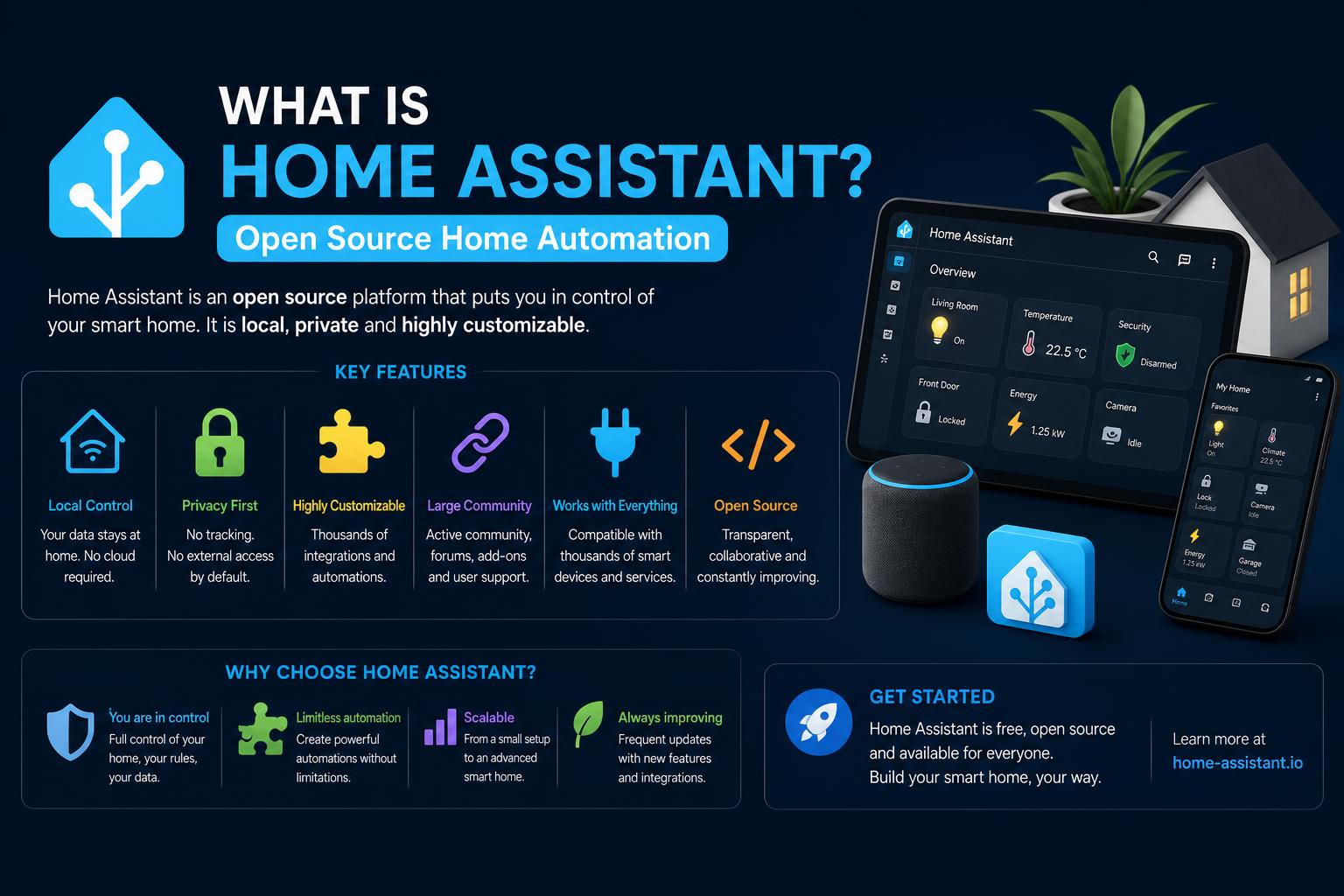
- Home Assistant provides local, privacy-focused control for smart homes
- It supports thousands of integrations across diverse devices and protocols
- The software is highly customizable, with powerful automation and dashboards
Home automation is transforming the way we live, and Home Assistant stands at the forefront of this revolution. If you’ve ever imagined your home responding seamlessly to your lifestyle—lights adjusting automatically, security systems collaborating, energy being tracked in real time—then Home Assistant is a name you need to know. But what exactly is Home Assistant, and what makes it such a game-changer in the world of smart homes?
This article dives deeper than any search result to answer the big question: ‘What is Home Assistant?’ You’ll learn not just the basics, but the advanced details that make this open source platform the heart of the modern automated home. Whether you’re a tech hobbyist, DIY enthusiast, or simply someone considering a step towards an intelligent living space, buckle up—because Home Assistant may just be the last smart home hub you’ll ever need.
The Core Philosophy: Local Control and Open Source Foundations
At its core, Home Assistant is all about putting you in charge of your connected devices, keeping your data private, and allowing for as much—or as little—tinkering as you want. It is free and open-source software designed specifically for home automation, serving as both a control center and an integration hub. Unlike many mainstream smart home systems that lean heavily on proprietary cloud services, Home Assistant rejects recurring fees, centralized data collection, and vendor lock-in. Your automations run locally; your data stays at home.
Home Assistant’s backend is written in Python, with a TypeScript-powered frontend providing a sleek, web-based user interface. This architecture enables high levels of customization and a rapidly evolving ecosystem, thanks to thousands of global contributors. Since its public launch in 2013 by Paulus Schoutsen, the project has exploded in popularity, consistently ranking among the most active open-source initiatives worldwide.
Home Assistant in Action: What Can It Do?
Think of Home Assistant as the single brain for all your smart home tech—no matter who made it. Whether it’s blending smart bulbs with voice commands or connecting niche IoT sensors to monitor your energy usage, the platform excels at uniting disjointed devices and services. Here are some standout features:
- Device Interoperability: Control lighting, climate systems, cameras, alarms, speakers, and much more—all on the same dashboard.
- Automation Engine: Build complex routines using almost any trigger, condition, and action, thanks to its powerful automation scripting.
- Custom Dashboards: Design beautiful and functional dashboards that reflect your lifestyle, with support for themes, custom cards, and more.
- Voice Assistant Integration: Native compatibility with Google Assistant, Amazon Alexa, Apple Siri, and its own local Assist voice assistant.
- Privacy First: Local device communication is prioritized; cloud fallback is optional and only used when necessary.
Automation is where Home Assistant truly shines. Want your porch lights to turn on at sundown, the heating to drop when everyone leaves, or a notification when the washing machine finishes? These scenarios are not just feasible—they’re often one-click away or defined through beginner-friendly blueprints.
How It Works: Under the Hood of Home Assistant
Home Assistant is highly modular, organized around an architecture that combines core software, add-ons, and integrations. At a basic level, the platform operates as a ‘hub’—sometimes called a smart home gateway or controller—digitally linking everything from major-brand devices to hobbyist sensors.
Installation Methods and Hardware Options
Getting started with Home Assistant usually means choosing where to run it. The platform offers remarkable flexibility:
- Ready-to-use appliances: Devices like Home Assistant Green, Blue, and Yellow are pre-installed and optimized for a plug-and-play experience.
- Single-board computers: Installation on Raspberry Pi, Intel NUC, Hardkernel ODROID, and other small form-factor computers is straightforward, with downloadable OS images.
- Virtual Machines and DIY Servers: Home Assistant also runs on virtual machines, NAS devices, or old PCs for greater horsepower or large integrations.
- Containers: Advanced users might opt for the Home Assistant Core container, installed via Docker or directly in a Python virtual environment.
Whatever method you choose, Home Assistant is designed to run full-time, acting as an always-on command center for your home.
Core Components, Integrations, and Add-ons
Home Assistant supports well over a thousand integrations—both open and proprietary standards. Out-of-the-box, it can connect with devices using:
- Bluetooth, Zigbee, Z-Wave, Thread, and EnOcean for low-power wireless communication.
- Wi-Fi and Ethernet for internet-enabled gadgets and LAN-controlled tech.
The platform can bridge your existing ecosystems (Apple HomeKit, Google Home, Amazon Alexa, Samsung SmartThings, Philips Hue, Heiman, and more). This is especially useful for users wanting to gradually shift from cloud-dependent setups to complete local control. Many hardware installation scenarios require just a USB dongle for protocols like Zigbee/Thread (Home Assistant SkyConnect). The community further expands compatibility by producing custom integrations for lesser-known products or regional brands.
The application’s add-on system—with its own supervisor manager—lets users quickly enable advanced features: from Node-RED for visual programming, to media servers, to cloud backup, all installable from the UI with a single click.
Home Assistant Operating System, Supervised Install, and Nomenclature Explained
For newcomers, Home Assistant’s terminology can be confusing due to its evolving project names. Here’s a quick breakdown (current as of 2024):
- Home Assistant Core: The core Python application that runs the main automation engine, dashboard, and integrations.
- Home Assistant OS: A minimal Linux distribution (previously called HassOS) specifically designed to boot straight into Home Assistant with no unnecessary packages.
- Home Assistant (Supervised): The managed software suite, usually what people mean when they say ‘Home Assistant,’ combining Core with an OS Supervisor and an add-on ecosystem. Previously known as Hass.io.
- Hassbian: Legacy method using Raspbian with Home Assistant pre-installed. No longer maintained.
- Appliance Bundles: Turnkey hardware bundles (Green, Blue, Yellow) intended for non-technical users wanting an out-of-the-box setup.
Current best practice for beginners is to use Home Assistant OS, either on dedicated hardware or in a virtual machine, for the best balance of power and ease of updates.
Home Assistant’s Cloud: Optional, Not Required
Privacy remains a core value for Home Assistant, with data processing happening locally by default. That said, a managed cloud subscription—Nabu Casa—is available for those who want to simplify remote access or add seamless integrations with Amazon Alexa and Google Assistant. A subscription isn’t necessary for basic control or even advanced automations; it’s simply a convenience for users who don’t want to deal with the technical aspects of secure network exposure.
The Nabu Casa cloud also financially supports continued open source development, helping pay full-time developers and fund infrastructure for both Home Assistant and related projects like ESPHome.
Security and Privacy: Keeping Your Data Home
Security is built into the DNA of Home Assistant’s architecture. Local-first design means no data is stored on third-party servers—only on the user’s device. Outbound connections to cloud services occur solely at the user’s discretion. Remote access is never enabled by default.
User accounts require secure passwords and support two-factor authentication to help guard against unauthorized use. Each add-on or integration receives a visible security rating, so users can make informed choices about what extra features or plug-ins to install.
The project is proactive in addressing vulnerabilities. Notably, a directory traversal bug was publicly disclosed and patched in early 2021; a major authentication bypass vulnerability affecting remote access was likewise fixed after discovery in 2023. While open source software can be scrutinized for issues, the transparent community and rapid update cadence help ensure that security gaps are addressed quickly.
Community and Ecosystem: A Platform Powered by People
Home Assistant benefits from one of the largest, most enthusiastic community ecosystems in the open source world. The user base is global, ranging from hobbyists to IT professionals to non-technical homeowners. This collaborative atmosphere fosters:
- Extensive Community Support: Active forums, huge numbers of shared guides, and troubleshooting topics on the official community portal.
- Rapid Integration Growth: Community developers continually create and update integrations for emerging smart home products, meaning that new gadgets are often quickly made compatible.
- Automation Blueprints: The ability to import ready-made automation templates (“blueprints”) for common (or complex) tasks directly from the community—not unlike recipes for your home.
The project’s open, wiki-style documentation and collaborative ethos have made it possible for even those with minimal programming skills to get involved, contribute guides, translations, or bug fixes.
Automation: The Soul of Home Assistant
Automations in Home Assistant are built using a rule-based system—think “if this, then that,” but with greater depth and power. Triggers (events), conditions, and actions can all be defined through the web UI, with YAML-like scripting available for advanced power users. From turning on the lights when someone enters a room to adjusting HVAC in response to weather conditions or device states, the possibilities for creative automation are nearly unlimited.
Blueprints, introduced in late 2020, allow even beginners to set up sophisticated workflows by importing community-made templates. And with the integration of Node-RED as an add-on, more technically minded users can create highly visual, logical flows that handle complicated sequences or conditions.
Comparison with Other Automation Platforms
Home Assistant is often compared to platforms like Node-RED (for automation) and openHAB or Mozilla WebThings (for general home automation). Home Assistant distinguishes itself through:
- Vast Number of Integrations: Enabling more device and ecosystem connections than almost any competitor.
- Powerful and Evolving UI: An intuitive browser-based dashboard, with continuing improvements to make configuration user-friendly.
- Customizable Logic: Straightforward automations for basic use, and the option to use Node-RED or scripts for advanced branching logic.
- Local and Open Source Focus: Complete control and privacy—no forced reliance on vendor clouds.
Installation Experience: Beginner to Power User
Times have changed: Home Assistant used to be perceived as a tool strictly for tinkerers or IT geeks, but no more. The installation process has been vastly simplified, especially with ready-made hardware like Home Assistant Green, or the straightforward process of flashing Home Assistant OS onto an SD card for a Raspberry Pi.
Modern Home Assistant supports automatic network discovery of compatible Wi-Fi devices, easy pairing of Z-Wave or Zigbee devices with USB sticks, and increasingly, voice-based automation creation. In many cases, getting a basic system up and running now takes less than an hour—even for complete novices.
Hardware Considerations: What Should You Run Home Assistant On?
Though many start with a Raspberry Pi, there are real-world trade-offs to consider. Raspberry Pi’s main downside is SD card longevity—heavy logging and database writes can wear out cards prematurely. Recent advances offer improved reliability, but for more demanding setups or larger homes, many users move to hardware like Intel NUC, mini PCs, old laptops, or network-attached storage (NAS) devices.
Appliance bundles like Home Assistant Green or Yellow provide the easiest experience for non-technical users, with support for plug-in USB radio adapters (such as Home Assistant SkyConnect) when native Zigbee or Thread support is required.
Software Structure and Architecture
Home Assistant’s modular design makes it flexible and future-proof. The main components include:
- Core Engine: Handles device integration, state tracking, and automation processing.
- Frontend (Dashboard): Material-Design-inspired UI that’s browser-based, themeable, and strongly customizable.
- Supervisor (if using HA OS): Manages add-ons, updates, and backups for a true appliance feel.
Updates arrive frequently, with active release notes and documentation helping users stay safe and current.
Maintaining and Updating Home Assistant
Home Assistant is continuously improved, with scheduled snapshots (backups), an easy upgrade process, and strong community support for troubleshooting.
Best practices for reliability include:
- Hosting the database on SSD storage (if using hardware prone to SD card corruption)
- Distributing load via virtualization (using Proxmox, for example), for greater flexibility and security.
- Maintaining regular cloud or local backups, so you can recover swiftly if hardware fails or configurations break.
Expanding Possibilities: Projects and Community Innovations
The Home Assistant ecosystem is not just large, it’s vibrant. Projects like ESPHome (for configuring custom IoT hardware based on ESP microcontrollers), Music Assistant, and the ever-expanding add-on library enable endless possibilities. The recent transfer of project stewardship to the Open Home Foundation guarantees further enhancements and a secure, community-driven future.
Official and community-developed hardware, comprehensive documentation, and real-life project showcases make Home Assistant accessible and endlessly versatile. Whether you want to automate your energy usage, integrate AI-powered voice assistants, or build unique DIY sensors, the community has likely already paved the way.
Should You Use Home Assistant? Pros, Challenges, and Use Cases
For users seeking control, privacy, and power, Home Assistant is hard to beat. Its advantages include unmatched device compatibility, local-first operation, and a passionate community. It’s enjoyed success stories, awards, and sustained recognition—not just as a hobbyist tool, but as a serious contender against major commercial smart home systems.
It’s important to note: Home Assistant’s learning curve can still be steep for those seeking an out-of-the-box, ultra-simple setup. The sheer depth and breadth of options may overwhelm absolute beginners, but for anyone willing to spend a weekend learning the ropes, the rewards are significant—especially for unique or advanced automation scenarios.
Home Assistant works beautifully alongside other tools, such as Node-RED for more advanced automation logic, and even plays well with parallel smart home hubs or closed appliances when needed (as a state machine and integration layer).
Honest Challenges and the Road Ahead
The rapid pace of development, complex integrations, and occasional breaking changes do mean that Home Assistant is best suited for those willing to self-educate or seek help from the vast community. The documentation is extensive and ever-improving, with a dedicated website, active forums, and countless guides. In exchange for some effort, you gain an open, extensible, and private system unmatched in flexibility or power.
Whether you’re migrating from Google Home, Apple HomeKit, Samsung SmartThings, or another ecosystem, Home Assistant offers the ability to phase in your devices at a comfortable pace—making it suitable for both cautious experimenters and full-on smart home enthusiasts.
From hands-free automation to detailed energy monitoring, secure home security management, and multi-platform dashboard access, Home Assistant delivers a truly integrated experience.
Ultimately, Home Assistant puts you, not the vendor, in the driver’s seat of your home’s intelligence. Whether you prefer total DIY control, leveraging pre-built community automations, or simply want to stop relying on distant servers and fragile cloud connections, Home Assistant is designed to grow with your ambitions. From humble beginnings as a Python script to the world’s leading open-source smart home platform, Home Assistant is proof that when technology is built for users—not for selling your data—the result is not just smarter homes, but happier ones too.