
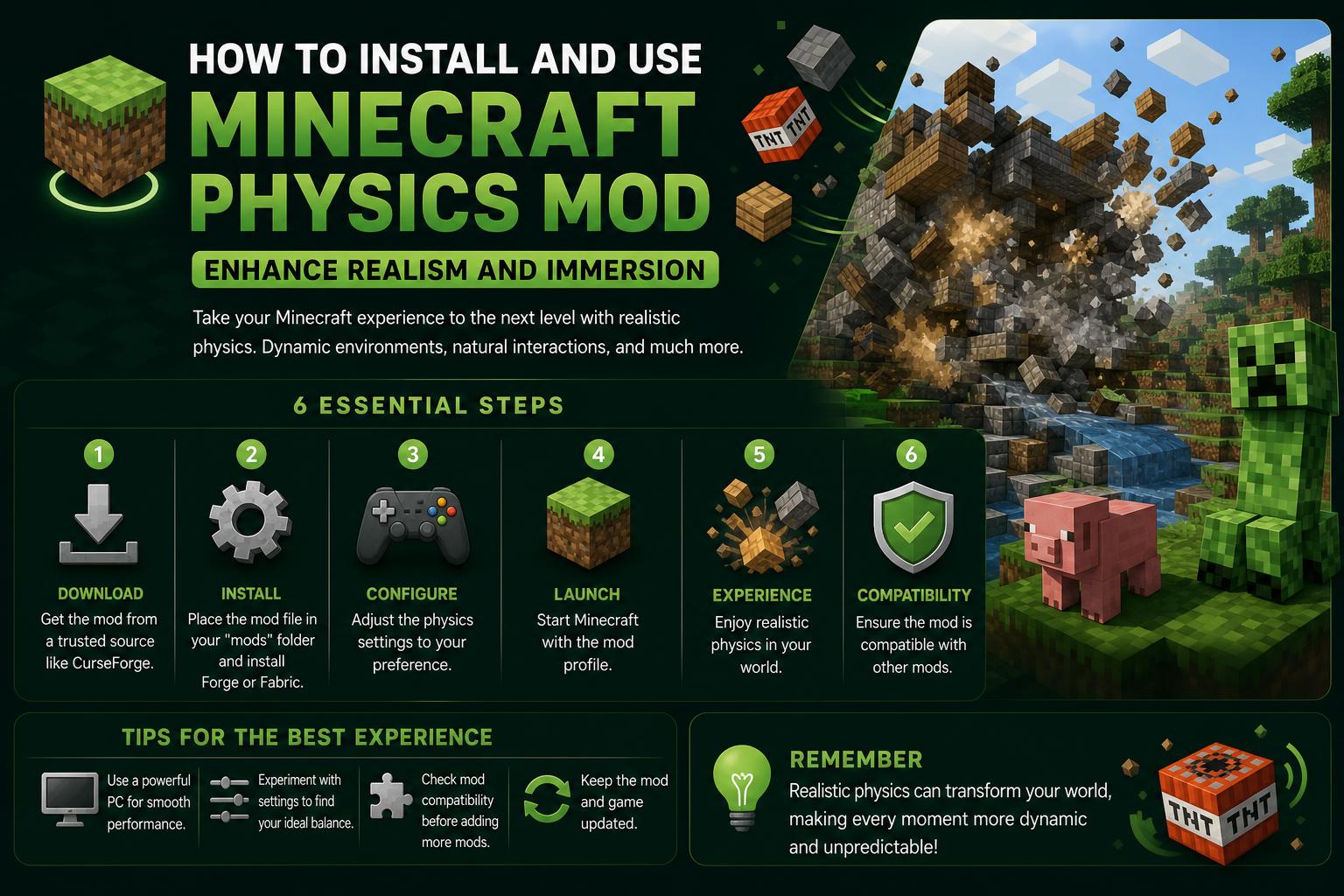
- The Minecraft Physics Mod adds realistic physics to the game, changing blocks, items, and environment behavior.
- Available on multiple platforms, with frequent updates and robust community support through sites like CurseForge and Modrinth.
- The mod increases immersion by introducing lifelike item drops, explosions, water and lava dynamics, and destruction physics.
Minecraft fans are always searching for new ways to refresh their gameplay, and the Minecraft Physics Mod has emerged as a community favorite for those looking to bring their worlds to life with more realistic physics. While the core mechanics of Minecraft are famously ‘blocky,’ this innovative mod introduces a host of changes that inject fresh dynamics and visual excitement into every build and break. From crumbling towers to flowing water, the Physics Mod transforms static interactions into visually compelling and immersive scenes.
With the ecosystem of Minecraft mods already vast, the Minecraft Physics Mod distinguishes itself with its commitment to realism and active community development. In this article, we’ll take you through a detailed exploration of what the Physics Mod is, where to download it safely, its standout features for both Java and Bedrock (PE) editions, and why it’s capturing the attention of players worldwide. Whether you’re a seasoned modder or a curious newcomer, this guide covers everything you should know—including tips and extra content—so you can decide if this mod belongs in your personal mod collection.
What Exactly is the Minecraft Physics Mod?
The Minecraft Physics Mod is a game-changing add-on designed to make the world of Minecraft act and feel more natural. Instead of the usual block-breaking effect, this mod introduces realistic physics for blocks and other game items, giving your world more depth and immersion. You’ll notice that when you mine or destroy blocks, they break apart and tumble much like real-world debris, making every explosion or accidental cave-in look far more spectacular.
Created by the developer Haubna, this mod has become a standout in the community because it doesn’t just focus on aesthetics—it actively enhances gameplay by changing how the Minecraft universe reacts to player actions. Players can experience crumbling structures, rolling logs, floating leaf particles, and dynamic water flows that all behave in ways the base game simply can’t match.
Key Features of the Minecraft Physics Mod
So, what makes this mod so special? Let’s break it down:
- Realistic Block Physics: When you break a block, it does not just disappear. Instead, it shatters or falls apart into fragments, imitating real-world destruction. This small detail adds a visual flair that’s hard to ignore.
- Improved Item Drops: Items pop out of their blocky forms and tumble to the ground with physics-based motion, spinning and bouncing as if they have actual weight.
- Dynamic Water and Lava: With the right add-ons, water and lava don’t just stick to their blocky confines anymore—they splash, flow, and even create waves in ways that look incredibly lifelike. Lava destruction effects have never looked this good.
- Explosion Physics: Every time TNT or any explosive goes off, you’ll see debris and dust scatter with force, making demolition efforts more visually rewarding (and potentially more dangerous!).
- Destruction Add-ons & Customization: The mod is highly customizable. Users can change the fragmentation level, visual effects, and even enable or disable certain physics effects for performance or style preferences.
- Large Open Environments: Thanks to efficient rendering, even maps with sprawling builds or open spaces benefit from these physics without major slowdowns.
- Competitive and Single-Player Use: The mod is tested in both solo worlds and multiplayer settings, adding dramatic visual feedback whether you’re playing alone or with friends.
Where and How to Download the Minecraft Physics Mod
Because user safety is paramount, always download mods from their official sources. For the Minecraft Physics Mod, there are several reputable platforms you’ll want to bookmark:
- minecraftphysicsmod.com – The official homepage, which provides links to downloads, updates, and information from the creator.
- Patreon page for Haubna – Supporting the developer here can grant access to early releases, beta features, and help sustain mod development.
- CurseForge – Popular for its automated downloads, update tracking, and community feedback.
- Modrinth – Another trustworthy mod platform offering easy downloads and a clear version history.
Installations are straightforward, but double-check version compatibility with your Minecraft build. The Physics Mod typically supports the latest versions of Minecraft Java Edition, and there’s increasing support for other builds. Always back up your save files before installing mods!
Exploring the Mod’s Compatibility: Java vs. Bedrock/PE
Minecraft’s two main editions—Java and Bedrock (including Pocket Edition)—have different technical limitations, affecting which mods can run on each. The Physics Mod primarily shines on Java Edition, where Minecraft’s open-source modding community has allowed it to reach impressive heights of realism and flexibility. For fans of Bedrock or Pocket Edition, there are separate adaptations, such as add-ons and texture packs that simulate similar effects.
On the Google Play Store, for Pocket Edition users, there is the Realistic Physics Mod for PE. According to its listing, this addon introduces destructive physics, updated environments, enhanced water and lava effects, and expanded map compatibility. Features include:
- Super realistic explosions and destruction
- Improved item drop mechanics
- Open environments with advanced environmental effects
- Updated physics graphics and story-driven maps
Note: Many Bedrock/PE mods, including those found on Play Store, are unofficial add-ons and may have compatibility or stability differences. Users are encouraged to review feedback and always check for the latest updates to avoid issues.
Getting the Most Out of Your Minecraft Physics Mod Experience
Once you’ve installed the Physics Mod, tweaking the settings can make a big difference—both visually and in terms of performance. Within the in-game mod menu, you’ll find sliders and toggles to control:
- Block Fragmentation: Control just how many pieces a single block will break into. Lower settings can improve framerate on lower-end PCs, while higher settings provide a debris-rich spectacle.
- Particle Effects: Adjust how dust, smoke, and other visual extras appear after destruction. Toning these down can help laptops and older desktops keep pace with the chaos.
- Item and Entity Physics: Decide if every item and dropped loot behaves with physics, or if only blocks get the special treatment.
- Water and Lava Behavior: Enable or disable advanced liquid simulation depending on your system’s capabilities.
Performance tip: If your game starts to lag, try dialing back the block and particle physics. Most users find a sweet spot between realism and smooth gameplay after a bit of experimentation.
How the Minecraft Physics Mod Changes Your Gameplay
The most immediate difference is sheer immersion. Mining, building, and blowing things up become far more visually engaging, leaving you with the constant feeling that the Minecraft world is reacting authentically to your actions. Dramatic moments include:
- Watching a tall tower collapse, sending bricks and planks flying in all directions
- Experiencing an underwater explosion that sends a cloud of debris swirling with the current
- Dropping a handful of diamonds and seeing them bounce and roll across uneven terrain
- Observing lava pour down a hillside, engulfing loose debris and creating mesmerizing flow patterns
For multiplayer servers, testers have reported improved feedback during competitive matches, as players can exploit debris and effects for tactical advantage, or just to show off the latest build destruction.
Story-driven maps and adventure experiences gain extra weight when item physics and destructible environments force players to rethink how they solve puzzles and overcome obstacles. Suddenly, ‘parkour’ levels feel more intense when platform collapses and dangerous chain reactions are possible!
Regular Updates and Community Support
The Minecraft Physics Mod isn’t a static project—ongoing development is a major reason for its popularity. Updates frequently add new effects, fix compatibility issues with the latest Minecraft releases, and respond to user feedback. Active support on platforms like CurseForge and Modrinth ensures that bugs get squashed fast, and that new features roll out on a reliable schedule.
Supporting the creator on Patreon not only speeds up development, but can unlock bonus features, early access, and input into future updates. The community here is vibrant, sharing feedback, fan-made scenarios, and helpful guides to get the most out of the mod’s sophisticated options.
Compatibility Tips and Troubleshooting
Most issues with the Physics Mod are quickly resolved with a few troubleshooting steps:
- Ensure you are running the correct version of Minecraft for the download. Mismatched versions are the top source of crashes.
- Disable or update any conflicting mods. Advanced Minecraft setups with multiple mods sometimes require load-order adjustments or minor config changes.
- Keep video drivers and Java installations up to date for best graphical performance.
- Check in with the mod’s official website and community boards if you run into persistent issues—user-generated solutions appear quickly and are often upvoted by fellow players.
Is the Minecraft Physics Mod Safe?
When downloaded from the official mod page or reputable sites like CurseForge and Modrinth, this mod is considered very safe. Always steer clear of random download links, especially those promising ‘cracked’ versions, as these often harbor malware or unwanted ads. The official mod page lists all current, tested versions and offers clear installation instructions.
Expanding Your Physics Experience: Add-ons and Texture Packs
For players who crave even more depth, there are several add-ons and complementary texture packs that boost the visuals and expand the ‘realistic’ feel even further. Examples include ultra-realistic tree physics, water shaders, and additional particle effect mods. Search for these on CurseForge and Modrinth, checking user ratings and compatibility notes before combining with the base Physics Mod.
For Bedrock Edition and Pocket Edition players, check out the Realistic Physics Mod for PE on the Play Store. Features here include new destruction scenes, dynamic water and lava effects, and expansive world updates designed for mobile gameplay, though installation can differ from the Java mod.
Watching Minecraft Physics Mod in Action
If you’d like to see firsthand what the mod offers, head to YouTube, where popular videos such as this showcase and others provide playthroughs, before-and-after comparisons, and installation tutorials. These visuals can really help in understanding the dramatic differences that the Physics Mod brings to Minecraft, so it’s a great resource for those who like hands-on learning or want to see community feedback in real time.
All things considered, the Minecraft Physics Mod stands out as one of the most visually impressive and interactive mods available today. It injects a sense of unpredictability and realism into every session, transforming not just how your world looks, but how you engage with it. With continual updates, robust support, and tons of customization, it’s well worth a try for any player eager to break the boundaries of the usual blocky universe.