
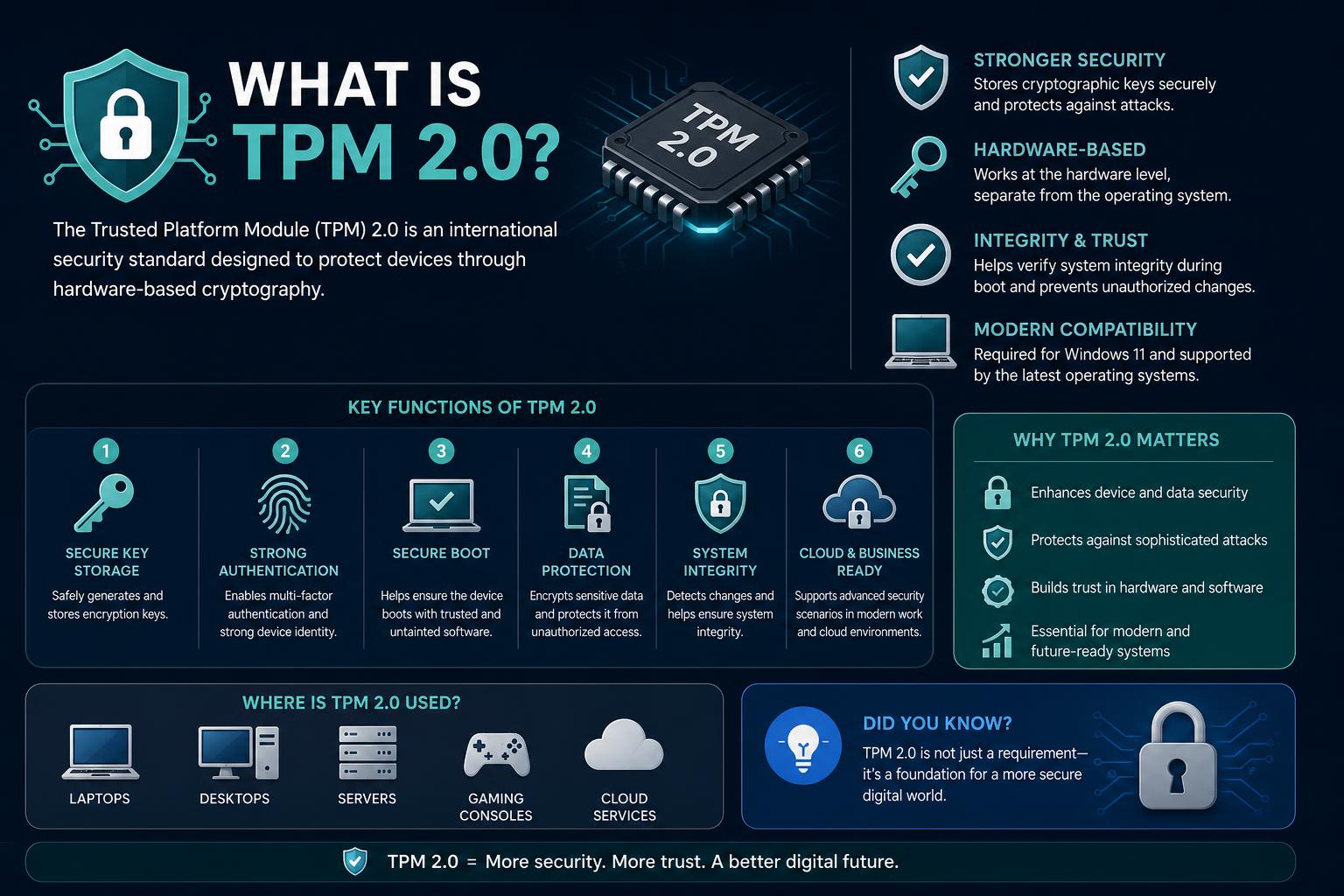
- TPM 2.0 is a hardware-based cryptoprocessor that secures encryption keys and helps ensure platform integrity at boot.
- Required for Windows 11, TPM 2.0 provides advanced security features like BitLocker, Secure Boot, and Windows Hello.
- TPM 2.0 is used in both hardware and cloud platforms, with broad OS and developer support through multiple open-source libraries.
Understanding computer security can feel like deciphering a new language. When Windows 11 hit the scene and started talking about TPM 2.0, many people were left wondering, “What exactly is TPM 2.0 and why does it matter?” Whether you’re a tech enthusiast, a PC builder, an IT professional, or just someone curious about upgrading their device, getting to grips with TPM 2.0 is more crucial than ever. TPM 2.0 is one of those buzzwords that has migrated from obscure tech documentation straight into mainstream conversation—largely thanks to the requirements of modern operating systems like Windows 11. But behind the acronym lies a world of innovative security features, hardware-backed protection, and intricate technology choices. Here, we’ll break down everything you need to know about TPM 2.0, how it works, what makes it so important, and how it fits into the broader landscape of digital security. If you want to feel confident about your computer’s security—or you’re prepping for the upgrade to Windows 11—you’re in the right place.
What is TPM 2.0? The Tech Behind the Acronym
TPM stands for Trusted Platform Module. It’s a dedicated chip—sometimes integrated into other hardware, sometimes discrete on the motherboard—that plays a critical role in protecting sensitive data on your computer. The current standard is TPM 2.0, recognized internationally under ISO/IEC 11889:2015 and managed by the Trusted Computing Group (TCG). While TPM has been around since the early 2000s making its initial appearance as version 1.1b, the big leap has been from TPM 1.2 to 2.0, which isn’t backwards compatible but offers greater flexibility, newer algorithms, and improved security. At its core, TPM 2.0 acts as a secure cryptoprocessor—essentially, a vault for cryptographic keys and a hardware root of trust for computer platforms. It helps verify system integrity during boot, secures device identity, and enables advanced data protection using encrypted keys, PINs, or biometrics.
Why Did TPM 2.0 Become So Important?
For years, TPM chips hid behind the scenes—used mainly in enterprise laptops, certain desktops, or specialty hardware. Things changed dramatically when Microsoft made TPM 2.0 a hardware requirement for running Windows 11. Suddenly, millions asked: does my device have TPM 2.0, and if not, how can I get it? TPM 2.0 is vital for modern security features like BitLocker drive encryption, Windows Hello biometric authentication, and Secure Boot. These features are no longer “nice-to-haves” but essentials in a world filled with ransomware, phishing, and physical device theft. Without TPM 2.0, you’re left out of many contemporary security practices and unable to upgrade to the newest major version of Windows.
How TPM 2.0 Works: The Hardware You Rely On
Unlike software-based security, TPM 2.0 delivers protection by integrating cryptographic functions directly into the device hardware. The TPM module is either present as its own discrete chip (dTPM), as part of a larger integrated circuit (iTPM), embedded in firmware (fTPM), or emulated in software/virtualized (vTPM/Software TPM). The most secure versions are the discrete chips, which even have tamper-resistance mechanisms—making it tough for attackers to access sensitive secrets, even with physical access to the PC.
- Discrete TPM (dTPM): A separate chip soldered onto the motherboard. Highest level of physical security.
- Integrated TPM (iTPM): Built as part of another chip, such as a system-on-chip (SoC) for laptops or motherboards.
- Firmware TPM (fTPM): Implemented in the system firmware, like your BIOS or UEFI environment. Used by both Intel (PTT), AMD (fTPM), and others.
- Virtual TPM (vTPM): Exists within a hypervisor or cloud infrastructure—used for VMs or remote systems. Maintains security isolation virtually.
- Software TPM: Used for development or testing; lacks true physical security but is useful for experimenting with TPM features.
Inside the TPM, critical information and secrets—passwords, PINs, certificates, encryption keys, and biometric identities—are stored and processed. Hardware-based random number generators and attestation mechanisms ensure that only trusted code can run at boot, and critical operations can’t be spoofed by attackers or compromised by malicious software.
The Security Capabilities of TPM 2.0
TPM 2.0 is a security Swiss Army knife. It enables a wide range of features that together uplift your device’s defenses:
- Boot integrity verification: Ensures the PC starts up in a known trusted state by monitoring the boot process from firmware (UEFI/BIOS) to OS launch.
- Platform attestation: Creates proof for remote systems or users that your hardware and software setup hasn’t been tampered with—useful for enterprise fleets or cloud.
- Key management and storage: Holds cryptographic keys in its isolated memory, preventing them from being accessed by malware or through system RAM scraping techniques.
- Binding and Sealing: Allows applications to lock encrypted data so it only gets decrypted in particular system states (e.g., when specific firmware, boot environment, or user credentials are present).
- User authentication: Underpins systems like Windows Hello or BitLocker by integrating with PINs, biometrics, or physical presence measures.
- Hardware-based random number generation: Critical for cryptographic operations.
The benefits are not just theoretical. For example, BitLocker relies on TPM 2.0 to protect encryption keys, making it nearly impossible for thieves to decrypt stolen data without the right credentials or breaking the hardware tamper protections.
TPM 2.0 vs TPM 1.2: What’s New?
If you’ve poked around in BIOS or motherboard specs, you may have seen older versions like TPM 1.2. However, TPM 2.0 introduced several key improvements:
- Algorithm support: TPM 2.0 supports more modern cryptographic algorithms, including SHA-256, RSA, and ECC, whereas TPM 1.2 was limited mainly to SHA-1 and RSA.
- Flexible hierarchies: Allows for multiple isolated key hierarchies for platform, storage, and endorsement—making key management more granular and robust.
- Policy authorization: Adds complex, customizable authorization policies based on multi-factor checks, policy chaining, time-limited access, and more.
- Improved NVRAM: TPM 2.0 provides richer forms of persistent storage (counters, bitmaps, PIN pass/fail), helpful for advanced applications.
- Backward compatibility: There is none. TPM 2.0 is a significant upgrade and is not compatible with TPM 1.2 at the firmware or driver level; this is one reason Windows 11 requires 2.0.
Simply put—TPM 2.0 is more versatile, secure, and ready for the demands of today’s interconnected world.
Common Uses of TPM 2.0
So how is TPM 2.0 used in day-to-day computing? Here are some major areas:
- Disk Encryption: Tools like BitLocker and Linux’s dm-crypt use TPM to lock encryption keys within hardware. Even if someone removes your drive, they can’t decrypt your data without the device’s TPM (and required credentials).
- Secure Boot: Checks each layer of the boot chain, making sure there’s no hidden malware or rootkits hijacking your operating system on startup.
- Remote Attestation: Verifies remotely that a computer is running trusted software and firmware before allowing access to sensitive systems or networks. Enterprise setups, cloud services, and virtual machines often rely on this capability.
- Authentication: By enabling PIN-based or passwordless sign-ins, TPM can store biometric data or PINs securely, backing up Windows Hello and similar platforms in other operating systems.
- Digital Rights Management (DRM): Less common these days due to privacy concerns, but possible with TPM for tightly controlled environments.
With TPM 2.0, you get a foundational security layer that supports everything from home computer use to enterprise-level safeguards.
How to Check If Your PC Supports TPM 2.0
With strict hardware requirements for new operating systems like Windows 11, confirming TPM 2.0 support on your device is essential. There are a couple of ways to do this in Windows: Option 1: Through the Windows Security App
- Open Settings and navigate to Update & Security, then head to Windows Security > Device Security.
- Look for a Security processor or Security processor details section. Select it—if available—and find the Specification version. It should read 2.0 for Windows 11 compatibility.
- If there’s no Security processor section, your PC either doesn’t have a TPM or it is disabled in firmware/BIOS. Consult your manufacturer or check the next method below.
Option 2: Using the Microsoft Management Console
- Press Windows Key + R or open the Start menu and select Run.
- Type tpm.msc and hit Enter.
- Check the window for information about the TPM. “TPM is ready for use” is positive. Confirm Specification Version is 2.0 under TPM Manufacturer Information. If you see a message about a compatible TPM not being found, you may need to enable it in your UEFI/BIOS.
How to Enable TPM 2.0 in BIOS/UEFI
If your device meets the hardware requirements but TPM 2.0 is disabled, you can usually enable it through the system firmware settings:
- Navigate to Settings > Update & Security > Recovery and select Restart Now under Advanced startup.
- In the menu, choose Troubleshoot > Advanced Options > UEFI Firmware Settings to restart into BIOS/UEFI.
- Once inside your firmware settings, look for menus labeled Security, Advanced, Trusted Computing, or similar. The TPM setting may appear as Security Device, Security Device Support, TPM State, AMD fTPM/PSP fTPM, Intel PTT, etc.
- Enable the relevant setting, save, and allow your PC to reboot. Double-check the Windows menu as described above to confirm activation.
Tip: Each manufacturer has different menu labels and structures. If you’re unsure, look up your device’s support site or reach out to customer support for step-by-step guides.
The TPM 2.0 Supply Chain and Vendors
As of 2025, most new PCs and laptops are shipped with some form of TPM 2.0 support by default. Major vendors of TPM chips and solutions include Infineon, Microchip (formerly Atmel), Nuvoton, and STMicroelectronics. The TPM functionality is supplied either as dedicated silicon, integrated into controllers, or delivered as part of firmware in modern CPUs and SoCs. Some motherboards—especially those for DIY PC builders—ship with TPM functionality disabled out of the box, so users must enable it manually when installing a new OS or looking for advanced security features. For embedded systems and IoT devices, TPM 2.0 chips are offered in various formats (ATX, Mini-ITX, Micro-ATX, etc.), and the chips are often included in industrial PCs and servers by default to satisfy both security standards and industry regulations.
TPM 2.0 in Cloud Platforms and Virtualization
Security in the cloud and virtualized environments is a fast-evolving field, and TPM 2.0 has adapted to this world:
- Google Compute Engine was the first major cloud platform to offer virtual TPMs (vTPMs) as part of Shielded VMs. Amazon Web Services now offers Nitro TPM for VMs.
- Many hypervisors now support virtualized TPM, including VMWare ESXi, KVM+QEMU, Xen, and VirtualBox (from version 7.0 onwards).
- Software TPM solutions, like libtpms, are available for testing, development, or virtual machine use where physical hardware is not available.
This extension to virtualization means enterprise and individual customers can benefit from TPM-backed features like Secure Boot, disk encryption, and attestation even in the cloud or for containers and virtual devices.
TPM 2.0 and Operating System Compatibility
Support for TPM has matured greatly across operating systems:
- Windows 11: Requires active TPM 2.0 hardware as a minimum requirement for installation. On many systems the TPM chip is present but needs to be enabled.
- Windows 8 and 10: Support TPM 2.0 (with some caveats for older hardware).
- Windows 7: Can be updated via official Microsoft patches for basic TPM 2.0 support—but full feature use may be limited.
- Linux: Kernel support for TPM (specifically TPM 2.0) has existed since kernel 4.0 (2015). Popular Linux distributions like Ubuntu, Fedora, and SUSE ship with utilities and libraries to enable advanced TPM-backed security.
- Chrome OS: Includes TPMs for security purposes in Chromebooks as standard practice.
- MacOS: Apple briefly shipped TPM-enabled hardware in 2006 but has since developed its own Secure Enclave system. Secure Enclave is not compatible with the TPM specification.
Industry Applications and Real-World TPM 2.0 Deployment
TPM 2.0 isn’t just for laptops and desktops. It’s ubiquitous in:
- Enterprise servers and managed fleets (e.g., Oracle X- and T-Series with TPM baked in, or industrial PC/server offerings from specialty vendors).
- Embedded and IoT devices, with support for various interfaces (SPI, LPC, I2C, etc.) and compliance with industrial standards.
- Networking hardware, with chips sometimes integrated into Ethernet controllers or other security modules.
- Cloud and multi-tenant environments, where TPM-backed features make it safer to run sensitive applications or store confidential data in virtualized instances.
Manufacturers now frequently maintain repositories for their TPM root and intermediate certificates online, so that users can verify the authenticity of a TPM chip and its issuance. Examples include AMD, Intel, Infineon, Nuvoton, and ST Microelectronics.
Software Libraries and TPM Stacks: Making TPM 2.0 Accessible
To make full use of TPM 2.0, operating systems and developers rely on open-source and proprietary TPM software stacks (TPM libraries) that provide easy-to-use APIs over the low-level TPM interfaces. These libraries are essential for application development, security tools, and integrating TPM features into other software. Key projects and libraries include:
- tpm2-tss: Widely adopted in the Linux world, implements System API (SAPI), Enhanced System API (ESAPI), and Feature API (FAPI) as described by TCG specification. High-level operations and remote attestation projects (like CHARRA) extend its reach.
- ibmtss: IBM’s open-source TPM 2.0 software stack, offering direct mapping to TPM commands and a few richer APIs. IBM also provides a Remote Attestation Server (IBM ACS).
- go-tpm: Google’s Go-based TPM library used for cloud and cross-platform systems; includes an attestation project for advanced features.
- wolfTPM: A C-based stack with well documented usage and sample code, portable across platforms.
- TSS.MSR: Microsoft’s TPM stack, easy integration with both Windows and (with dependencies) Linux systems.
Developers using these stacks can build applications that take advantage of TPM-backed secure storage, cryptographic operations, attestation services, and more—all while abstracting away much of the device- and OS-specific complexity.
Security Benefits and Risks: The Complete Picture
While TPM 2.0 provides major security advantages, it isn’t completely immune to attacks. Here’s an honest view:
- Physical attacks: Highly sophisticated attackers with physical access—labs, special probes, or decoding hardware—may someday breach TPM chips, but this requires extreme resources and expertise.
- Firmware vulnerabilities: If flaws exist in a vendor’s implementation of TPM firmware, attackers may exploit them. Notably, the infamous ROCA vulnerability allowed weak RSA keys on some Infineon TPMs—now patched in modern firmware.
- Communications & bus attacks: Even with a solid TPM chip, attackers might try to tap data as it travels across the motherboard—meaning every part of the system needs to be considered.
- Cold boot attacks: On older systems, RAM data residues could be siphoned off during or after sleep/hibernation, exposing secrets. TPM 2.0’s architecture mitigates these risks—but system design still matters.
- Software emulation & virtualization: Software and vTPM implementations, while useful, depend on the isolation guarantees of the host or hypervisor. They don’t offer the robust physical protections of hardware TPMs.
It’s important to keep firmware, operating systems, and drivers updated. Major manufacturers regularly provide field upgrades to fix vulnerabilities or improve cryptographic operations. Windows and Linux systems offer command-line tools (tpmtool, tpmvscmgr, tpm2-tools, etc.) to inspect, reset, or manage your TPM—check your OS documentation for details.
Criticism, Privacy Concerns, and Open Debates
The rollout of TPMs has not come without controversy. Privacy advocates, including figures like Richard Stallman, have worried about the potential for “treacherous computing”—machines that ultimately serve vendor or third-party interests over those of the user. Some argue that TPM could be misused for enforcing DRM, remotely attesting or denying software, or enabling surveillance—though the TPM 2.0 specification itself neither mandates nor prohibits such uses. Popular disk encryption tools like VeraCrypt and the older TrueCrypt have deliberately avoided direct support for TPM, arguing that physical attackers or administrators can bypass TPM protections by other means. The debate continues—but TPM 2.0 remains crucial for most out-of-the-box enterprise and consumer security use cases. Be aware: TPMs are not designed to stop a determined attacker who already has full admin or physical control over the system. They’re specifically designed to make such attacks much harder, more expensive, and detectable, but no system is entirely immune under those circumstances.
TPM 2.0 Endorsement Keys and Certificate Management
Each TPM 2.0 module is provisioned during manufacturing with unique asymmetric keys—mainly RSA and ECC—which are stored in non-volatile TPM memory. These are called Endorsement Keys (EKs). The manufacturer supplies a certificate for the EK, often in X.509 DER format. Modern systems rely on these certificates to verify authenticity and authorize access to critical resources. If you’re using cloud or enterprise tools, make sure you download and trust the proper vendor certificate authorities (AMD, Intel, Infineon, Nuvoton, NationZ, ST Micro, etc.).
Firmware Upgrades and Transitioning Between TPM Versions
Field upgrade is the TCG’s term for updating TPM firmware. The move from TPM 1.2 to 2.0 is handled by some vendors as a one-way process with limited rollbacks. While TPM 1.2 parts were usually discrete chips, TPM 2.0 is supplied as discrete hardware, integrated silicon, or firmware depending on the platform and use case. Stay up to date with your OEM’s latest tools and manuals for firmware upgrades and migration guidance.
TPM 2.0 in Virtualization, Containers, and the Cloud
The cloud boom has led to new use-cases and implementations of TPMs. vTPMs—virtual TPMs—allow cloud providers and hypervisors to simulate the properties of a physical TPM for each virtual machine. For instance:
- Google Cloud offers vTPM as part of Shielded VMs. ()
- AWS Nitro TPM brings TPM-backed features to Amazon Web Services infrastructure.
- QEMU and KVM support both pass-through of physical chips and emulated TPMs for guests.
- VirtualBox enables virtual TPM support from version 7.0.
- Xen provides unique emulated software TPMs for each guest system.
The Future of TPM and Trusted Computing
TPM’s role only grows as the world leans further into remote work, cloud computing, and hybrid architectures. With standards under continuous revision and broad industry backing, TPM 2.0 (and its successors) are set to remain part of the backbone of hardware-based trust and cybersecurity infrastructure. Periodic firmware and software updates keep the standard resilient against new attacks and use-cases. Next-generation security platforms are also being introduced—like Microsoft Pluton, ARM TrustZone, and Apple’s Secure Enclave—each leveraging similar isolated cryptographic environments. Still, the TPM’s flexibility and broad OS/hardware support make it uniquely impactful across ecosystems. TPM 2.0 may seem complex at first, but it’s a powerful safeguard for your computer’s digital life. Whether you’re looking to upgrade your OS, secure enterprise networks, or simply protect sensitive information, understanding how TPM 2.0 works puts you a step ahead. And with security threats ever-evolving, having such robust, hardware-backed tools on your side isn’t just a luxury—it’s a necessity in the modern world.