
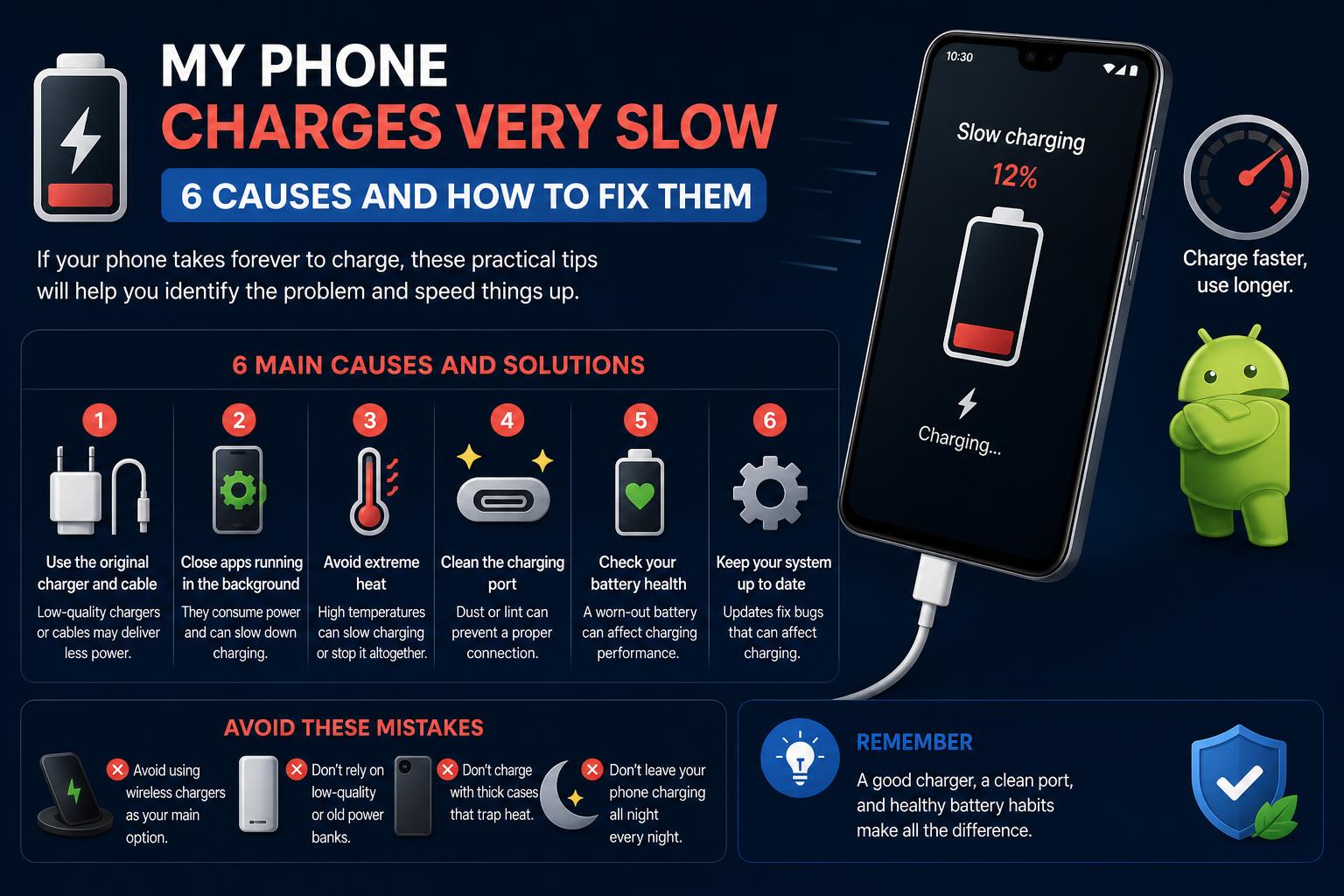
- Charging speed is affected by cables, adapters, battery health, and environmental factors.
- Background apps and using the phone while charging noticeably slow down recharging.
- Regular maintenance and using certified accessories significantly boosts charge speed and battery longevity.
If your smartphone seems to take an eternity to reach full battery, you’re definitely not alone—this is one of the most common tech annoyances today. We all rely on our mobile devices for everything from work to entertainment, and when charging slows to a crawl, it can throw off your whole day. Many people notice sluggish charging at the worst moment—right before leaving the house, or when they really need to stay connected—leaving them searching for answers and quick fixes.
The reasons behind slow charging can be surprisingly complex, involving everything from hardware quality and usage habits to software hiccups and environmental conditions. This in-depth guide will walk you through every possible culprit, smart troubleshooting steps, and insider tips to speed up your charging, boost your battery health, and help you choose the right equipment for faster, safer recharges.
Why Is My Phone Charging Slowly?
Your phone may take longer to charge for several interconnected reasons—the solution depends on accurate diagnosis. Let’s break down the most critical factors that influence charging speed so you can target the real problem:
1. Charging Cable or Adapter Issues
The most common (and most underestimated) culprit for slow charging is usually the charger itself. Frayed cables, worn connectors, or a cheap adapter can all cause sluggish charging by delivering less power than your phone expects. Even if your charger appears intact, micro-damage or low-quality components inside can reduce amperage and voltage. Don’t overlook bent USB connectors or third-party chargers that aren’t designed for your specific phone—they’re often at the root of the problem.
2. Too Many Apps or Processes Running
If your phone is working hard in the background, charging will naturally slow down. Apps running in the background—be it social media, games, or even syncing services—consume power even as you plug in your device. This means a portion of the electricity from your charger is being used to keep things running, not just topping up your battery. The more demanding the apps or services, the less efficient your charging.
3. Degraded or Aging Battery
Over time, all lithium-ion batteries suffer from wear and tear. As batteries age, their internal resistance rises, causing them to charge more slowly and lose charge more rapidly. If you’ve noticed not just slow charging but also faster drain than usual, your battery’s health may be significantly diminished. For example, Apple recommends battery replacement when health drops to about 80% maximum capacity. Most Android phones offer similar diagnostics.
4. Environmental Factors: Temperature
Did you know charging your phone in a hot car or chilly room can impact performance? Both extreme heat and cold will hinder charging. Overheating is especially problematic: when a device gets too warm, its built-in protections slow the charging rate (sometimes down to a trickle) to avoid battery damage. Cold can decrease the battery’s ability to accept a charge, meaning longer charging times as well. Keeping your device at “room temperature” is always ideal for faster charging.
5. Wrong or Incompatible Charger
Using a charger or cable not specifically designed for your device can drastically reduce charging speed. Every phone model is optimized for a certain voltage and amperage—if your charger can’t deliver that combination, your device will charge more slowly. Many older chargers or generic cables don’t support features like USB Power Delivery (PD), PPS (Programmable Power Supply, used by recent Samsung and Pixel devices), or proprietary fast-charging tech. Always check your device specs before purchasing new charging gear.
6. Using Your Phone While Charging
It’s tempting to scroll, text, or game while your phone is plugged in, but using your phone during charging diverts energy away from the battery and into powering the screen and CPU, leading to much slower recharges. For the fastest charge, set your phone aside and leave it idle (even better: power it off or use Airplane Mode).
7. Dirty or Blocked Charging Port
Dirt, lint, or debris in the charging port is a sneaky cause of slow or unreliable charging. Over time, particles can accumulate in the port, preventing full contact between the connector and your device. This not only slows down charging, but adds wear and tear each time you plug or unplug. Regularly inspect and carefully clean the port to maintain optimal charging performance.
8. Low-Power Charging Sources
If you’re charging from a laptop USB port, an old wall adapter, or even some power strips, the maximum power output might be far below what your phone requires for optimal charging speed. Many USB-A ports (especially in cars, laptops, old hubs) can only deliver a trickle, compared to the 18W, 30W, or even 66W that modern “fast chargers” provide.
9. Software Glitches or Updates
An outdated operating system or recent buggy update can sometimes disrupt charging speeds or the way your phone manages power. Certain apps or hidden processes may hog resources, or changes in the OS may interfere with how quickly your battery fills up. Some manufacturers even include smart charging features that slow down charging deliberately to protect long-term battery health.
10. Battery Optimization Features
Many phones now include settings like ‘Optimized Charging’, ‘Battery Protection’ or ‘Charge Limit’ that deliberately slow or pause charging past a certain point to avoid aging the battery due to heat and high capacity. While these features are great for longevity, they can be frustrating if you need a full, fast recharge.
Common Questions About Slow Charging
What exactly qualifies as ‘slow charging’?
‘Slow charging’ refers to situations where your device is receiving less power than it’s capable of handling. For example, many Androids and iPhones display ‘Slow Charging’ notices if the power supply or cable isn’t up to spec, often when using USB-A chargers or low-quality cables. Switching to a modern USB-C Power Delivery charger is a common fix.
Why is my phone slow to charge and also losing power quickly?
This combination usually signals a degraded battery—a double whammy: your phone is slow to accept charge and loses it rapidly due to increased internal resistance and lower total battery capacity. It’s time to check your battery health and plan for a replacement if needed.
Is wireless charging always slower than wired?
Yes, wireless charging is typically slower due to energy lost as heat between the device and the charging pad. Early Qi pads capped out around 5W–10W, but modern Qi2 and MagSafe options can deliver up to 25W (if paired with a fast 30W adapter). While this approaches wired charging for some models, you’ll rarely beat a high-wattage cable and adapter combo.
Is slow charging bad for my battery?
Slow charging is not harmful for your battery; in fact, it produces less heat and can be gentler on battery cells over the long term. The problem arises only if slow charging is due to poor connectivity, bad cables, or other defects—then it’s a sign something could be wrong that might affect overall battery or device reliability.
Does charging overnight damage batteries or slow down charging?
Most modern phones charge only until they’re full, then cut back to ‘drip’ charging. However, keeping a battery at 100% and at warm temps (like under a pillow or inside a case) for hours can age cells faster. That’s why features like Optimized Charging and Battery Protection keep batteries at 80% overnight and top them up before your morning alarm.
How to Fix a Slow Charging Phone
Now that we’ve identified the potential problems, let’s look at the best steps to boost your charging speeds. Try these solutions in logical order, and combine several for the best results:
- Upgrade or Replace Your Charger and Cable: Always use original, high-quality, or manufacturer-certified accessories. For example, Anker, Belkin, and Honor all offer reliable, fast-charging adapters and compatible cables. Make sure your device supports the fast-charging standard in use (PD, PPS, Huawei SuperCharge, etc.).
- Plug Into a Wall Socket, Not a Laptop: Charging via a wall outlet provides a stable, higher current compared to USB on computers, monitors, or cars. Weak sources (2.5W to 5W) can leave you waiting hours, while a proper wall adapter (18W, 30W, 65W+) will turbo-charge most modern phones.
- Use Airplane Mode or Turn Off the Phone: Switching to Airplane Mode cuts all wireless services, minimizing ongoing power drain and allowing your phone to absorb more current during charging for a noticeable speed boost.
- Close All Background Apps: Manually close unused apps, especially energy-hogs (games, streaming, heavy browsers) to lighten the load on your processor and battery. This is especially vital if your phone gets warm while charging.
- Keep the Device Cool: Charge your phone on a flat, cool surface, away from direct sunlight, radiators, or bedding. Overheating is a major factor in slow charging and can also degrade your battery over time.
- Clean the Charging Port Carefully: If you spot any dirt, lint, or visible obstruction, gently clear it with a wooden toothpick, soft brush, or compressed air. Never use metal objects, which could damage connectors.
- Avoid Using the Phone While Charging: Resist watching videos, playing demanding games, or video calling while recharging. For the fastest top-up, leave your phone idle or powered off.
- Replace the Battery if Needed: If your phone is old and battery health is poor (below 80%), a new battery can restore both rapid charging and battery life, making your device feel new again.
- Update Device Software: Install official OS updates, which may include optimizations for both charging and background app management. But be wary: some updates can introduce bugs that slow charging, so check online forums if you notice reduced performance right after an update.
- Check and Adjust Smart Charging Features: Depending on your phone, you may find options like ‘Optimized Charging’, ‘Battery Protection’, or ‘Charge Limit’ in settings. Toggle these off (briefly) if you’re in a hurry and need a 100% charge, but turn them on again for daily use and maximum battery longevity.
Why is Windows 11 so slow? Complete guide to speed up your PC instantly
Bonus Tips for Healthy & Efficient Charging
- Keep Charge Levels Between 20%-80%: For best long-term battery life, avoid letting your phone fully drain or constantly sit at 100%.
- Choose Fast-Charging Devices: Newer phones support rapid charging standards—check specs before you buy. For example, the HONOR Magic V3 boasts 66W SuperCharge, while recent Samsung and Apple models support their own fast-charging tech. Always pair with the recommended charger.
- Certified Accessories Only: Avoid knockoff or uncertified cables and adapters. Only use products tested and certified by your phone’s manufacturer or trusted third parties for best (and safest) results.
- Regularly Check for Wear: Inspect your cables and ports often for signs of damage, fraying, or tarnished connectors. Replace as necessary to protect both your phone and your peace of mind.
Frequently Asked Questions (FAQs)
Can a phone case slow down charging?
Yes, certain phone cases (especially thick, poorly ventilated, or metallic ones) can trap heat or obstruct the charging port during wired or wireless charging. Excess heat is the enemy of fast, safe charging—remove the case if your phone feels unusually warm.
Why does fast charging sometimes turn off?
Some phones automatically suspend fast charging if temperatures rise or if a non-approved charger is detected. Always use tested accessories and charge on cool surfaces to maximize fast-charging benefits.
Why is my phone charging slowly all of a sudden?
If charging suddenly slows, check for a faulty cable, adapter, dirty port, or recent software update. Battery aging or extreme temperature spikes can also provoke sudden slowdowns.
Staying connected shouldn’t mean waiting around. By recognizing the full spectrum of factors influencing your phone’s charge speed—from hardware and cables, to habits, software quirks, and environmental conditions—you can troubleshoot effectively and make smart upgrades as needed. Choose certified fast-charging accessories, keep your battery cared for, and make the most of your device’s built-in features for the quickest, safest recharges possible. For deeper dives and more official recommendations, check out brands like Belkin, Anker, and Honor, or consult your device manufacturer’s official troubleshooting guides.