
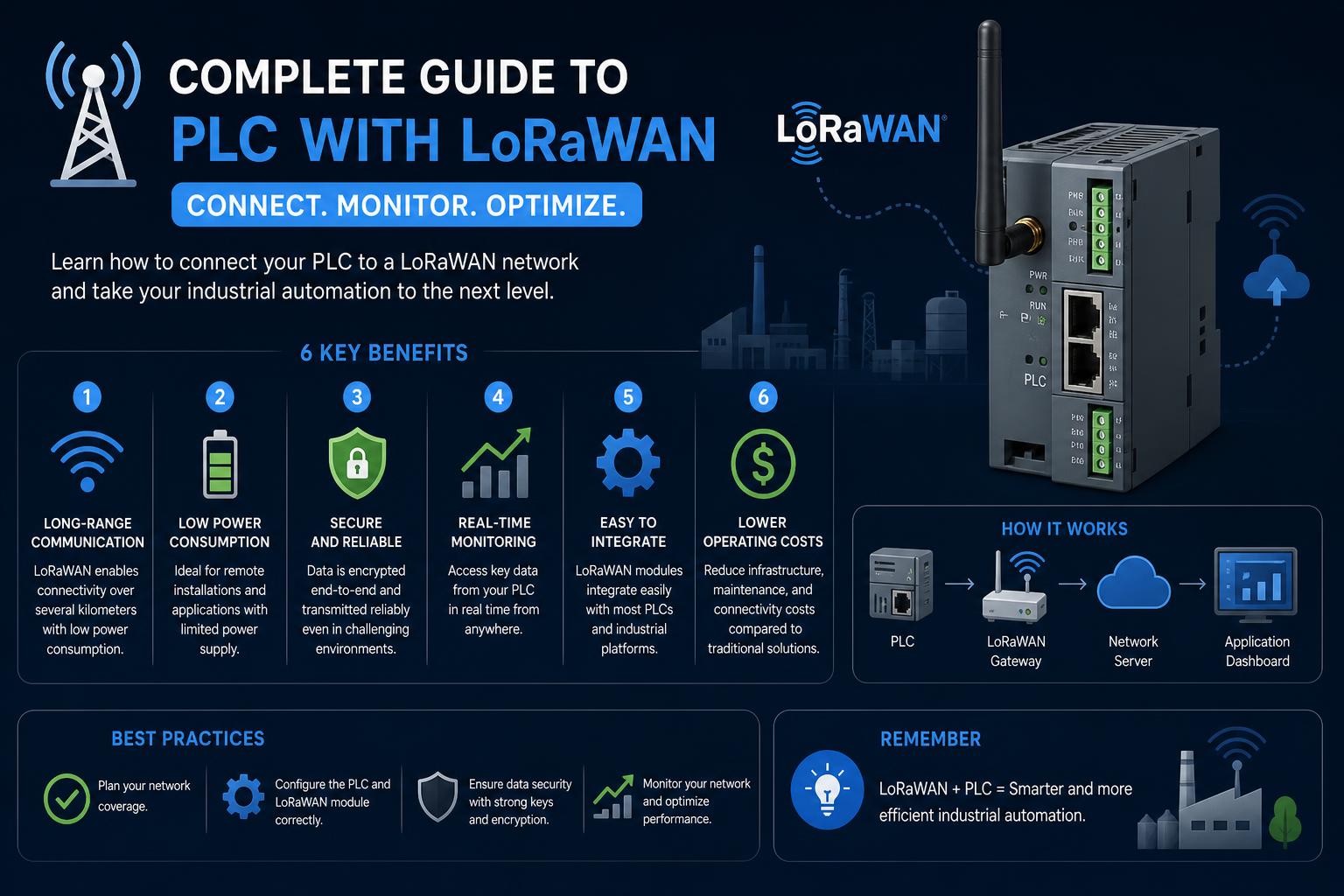
- LoRaWAN allows remote, low-power communication with PLCs for industrial automation and monitoring.
- Choosing between OTAA and ABP activation methods affects security, scalability, and ease of deployment in LoRaWAN-connected PLC systems.
- Proper key management, device registration, and understanding of LoRaWAN constraints are crucial for reliable PLC integration.
Programmable Logic Controllers (PLCs) are at the heart of countless industrial automation systems, managing everything from process controls to remote monitoring. With industries increasingly demanding reliable long-range connectivity in harsh or remote environments, LoRaWAN—a powerful Low Power Wide Area Network protocol—has become a compelling solution for enabling communications where traditional wired or cellular options are costly, impractical, or impossible.
But how exactly do you connect a PLC to a LoRaWAN network? This comprehensive guide dives into the intersection of PLC technology and LoRaWAN, unveiling not only the protocols and hardware options involved but also sharing relevant real-world integration challenges, methods for device authentication, sample programming approaches, and best practices. If you’ve ever wondered how to efficiently transmit control signals or sensor data across vast distances, with minimal power, this article will serve as your ultimate roadmap.
Understanding LoRaWAN and PLC Integration
LoRaWAN is a long-range, low-power protocol that allows devices (nodes) to wirelessly exchange small data packets over distances of up to 20 kilometers. This range, paired with open protocol standards and growing ecosystem support, makes LoRaWAN an attractive method for connecting PLCs to centralized SCADA systems, remote interfaces, or even cloud-based dashboards.
PLCs, typically designed for robustness and real-time determinism, have historically relied on local wired protocols such as Modbus TCP/IP or serial connections. Bridging these PLCs to the wireless world of LoRaWAN opens new possibilities for distributed monitoring, predictive maintenance, and scalable IoT implementations in industries from water management to agriculture and manufacturing.
Why LoRaWAN for PLC Communication?
The primary advantages of using LoRaWAN with PLCs include:
- Long-range communication: Send control data or receive status updates from remote assets without laying expensive cabling.
- Low-power operation: Ideal for sites with limited power budgets or for battery/solar-powered installations.
- Flexible network topologies: Nodes can join public or private LoRaWAN networks, adapting to various industrial scenarios.
- Cost savings and scalability: Once a gateway is deployed, adding more PLC nodes involves mainly device and setup costs, not recurring telecom fees.
Authenticating & Registering Devices: LoRaWAN Security Essentials
Security and authentication are central to any industrial network. LoRaWAN ensures secure communication between PLCs and control systems using two main authentication methods: OTAA (Over-The-Air Activation) and ABP (Activation By Personalization). Choosing between these affects how you deploy and manage devices over the network.
OTAA (Over-The-Air Activation)
OTAA is considered the gold standard for LoRaWAN device activation. Each time a device (like a PLC) connects to the network, it initiates a join request. The network and the device negotiate and generate both a network session key and an application session key, unique for that connection. This approach means:
- Keys are automatically generated and securely deleted when the session ends, limiting the risk of key interception.
- Easy transferability—devices can seamlessly move between different LoRaWAN networks without manual key assignment.
- Strong security, but with a slightly longer join process and dependency on network availability during join attempts.
ABP (Activation By Personalization)
ABP offers a streamlined connection by preprogramming network session and application session keys into each PLC node. No join request is needed; the device is “always ready” to communicate. However:
- Keys must be handled extremely carefully, as they are static and could be compromised if not unique or kept secure.
- Faster startup, but lower security compared to OTAA—devices using ABP cannot easily switch networks and risk interception.
Planning the Hardware Setup: Gateways, PLCs, and Connectivity
Deploying a PLC with LoRaWAN requires a combination of compatible hardware:
- Industrial PLC with LoRa or LoRaWAN module support (such as those from Industrial Shields or equivalents), or an external LoRaWAN modem that interfaces over standard PLC protocols (e.g., Modbus RTU/TCP).
- A LoRaWAN gateway reachable from both the PLC (node) and the upstream control application — this could be a commercial LoRaWAN gateway or a DIY build registered on public networks like The Things Network.
- A cloud server, SCADA system, or IoT application to collect, process, and visualize the data transmitted via LoRaWAN.
For example, M-Duino series PLCs by Industrial Shields offer built-in LoRaWAN capability, which facilitates rapid deployment. Third-party options are also available, including LoRaWAN-serial/Ethernet bridges and specialized modules (like those offered at RAKWireless).
Sample Project: Connecting an Arduino-Based PLC to LoRaWAN
This hands-on example, inspired by Industrial Shields and Logicbus, illustrates how to establish LoRaWAN communication from an Arduino-compatible PLC.
What You’ll Need
- The Arduino IDE installed on your computer.
- An Industrial Shields M-Duino PLC, or a compatible Arduino PLC with a LoRa module.
- Access to a LoRaWAN gateway (which may be your own, or on The Things Network).
- Application and gateway registered on your chosen LoRaWAN network.
- The MCCI LoRaWAN LMIC library for Arduino.
Before you code, ensure you have both network and application session keys (from your LoRaWAN network dashboard). For OTAA, you’ll use the AppEUI, DevEUI, and AppKey; for ABP, you’ll need DevAddr, NetwKey, and AppKey.
Sample Configuration Steps
- Install and set up the Arduino IDE. Add the board support for your specific PLC controller (for instance, the M-Duino LoRa 21+).
- Download the MCCI LoRaWAN LMIC library through the IDE’s library manager.
- Choose an example matching your activation method (either `ttn-otaa` or `ttn-abp`).
- Carefully insert your unique keys into the source code. OTAA keys must respect endianness requirements: AppEUI and DevEUI as little-endian, AppKey as big-endian. For ABP: NetwKey and AppKey in big-endian format.
- Flash the code onto your PLC controller. Confirm that status LEDs or serial console output indicate a successful connection.
- Test data transfer. Send sensor readings or control signals every 60 seconds to verify reliable LoRaWAN connectivity.
Be sure to consult your PLC’s documentation for specific pin mappings and hardware compatibility. Misconfiguration at the hardware level (wrong digital outputs, incompatible voltage logic) may prevent successful LoRaWAN initialization or communication.
Dealing with Technical Constraints: Bandwidth, Latency, and Downlink/Uplink Considerations
While LoRaWAN is powerful, it comes with distinct technical constraints that may dictate how you design your PLC-based system:
- Message size is limited—typically, you can send only a few bytes per message (like status, alarms, or sensor values), making LoRaWAN suited more for telemetry than for heavy or real-time control.
- Duty cycle regulations—Radio transmissions are subject to compliance rules (e.g., percentage of time spent transmitting), limiting how often you can send data and precluding continuous data streams.
- Downlink capacity is far more restricted than uplink. If your application requires frequent acknowledgments or control signals sent to hundreds of distributed PLCs, you could hit network bottlenecks.
- Network reliability and latency—While LoRaWAN can achieve long ranges, signal interference, distance from gateways, and environmental conditions may affect reliability. Applications must tolerate some degree of message loss or delay.
For practical deployments, it’s best to:
- Send periodic data (e.g., every few minutes/hours) instead of continuous streams.
- Design your PLC firmware to handle lost or delayed messages gracefully.
- If you need to handle many nodes, consider scaling by using more radio modems with fewer nodes per modem, as suggested on the TTN forum.
Forum Experiences: Challenges and Community Insights
Real-world deployments discussed on forums such as The Things Network indicate that:
- Direct plug-and-play LoRaWAN-PLCs with standard RJ-45 Ethernet interfaces are rare.
- Custom solutions are generally required, often involving firmware changes and dedicated interfacing code to package sensor/PLC data for LoRaWAN transmission.
- Scalability concerns arise when attempting to support hundreds of PLCs across a single LoRaWAN gateway—mainly due to limited spectrum and strict duty cycle rules.
- While multiple gateways can coexist in one area, they all share the same finite radio spectrum, so simply adding more is not a silver bullet for scaling up your network.
If your project depends on reliable back-and-forth (uplink and downlink) communication, or time-critical PLC control, LoRaWAN’s inherent limitations must be considered very carefully. Consult the Modbus-Slave project (mentioned in the Reddit discussion) for firmware examples, and always check hardware compatibility before committing to a particular setup.
Practical Tips for Successful PLC & LoRaWAN Deployments
- Do not reuse keys across devices; generate strong, unique session keys for each PLC endpoint to reduce the threat of interception or unauthorized access.
- Use Over-The-Air Activation (OTAA) whenever possible for the best mix of flexibility and security.
- Document your hardware mappings. With industrial PLCs, the right physical pinout and software definitions are crucial for correct operation.
- Monitor network status (using network dashboards, logs, or diagnostic messages) to detect and address outages or environmental issues proactively.
By integrating LoRaWAN with PLCs, industries gain a reliable bridge to extend automation and monitoring beyond the reach of conventional wired and cellular infrastructure. With careful planning—selecting the right hardware, methodically managing cryptographic keys, following protocol constraints, and anticipating network limits—you can empower your automation systems with resilient, long-distance wireless communication. Leveraging community resources and continuously monitoring deployments will ensure robust, secure, and scalable industrial IoT solutions.