
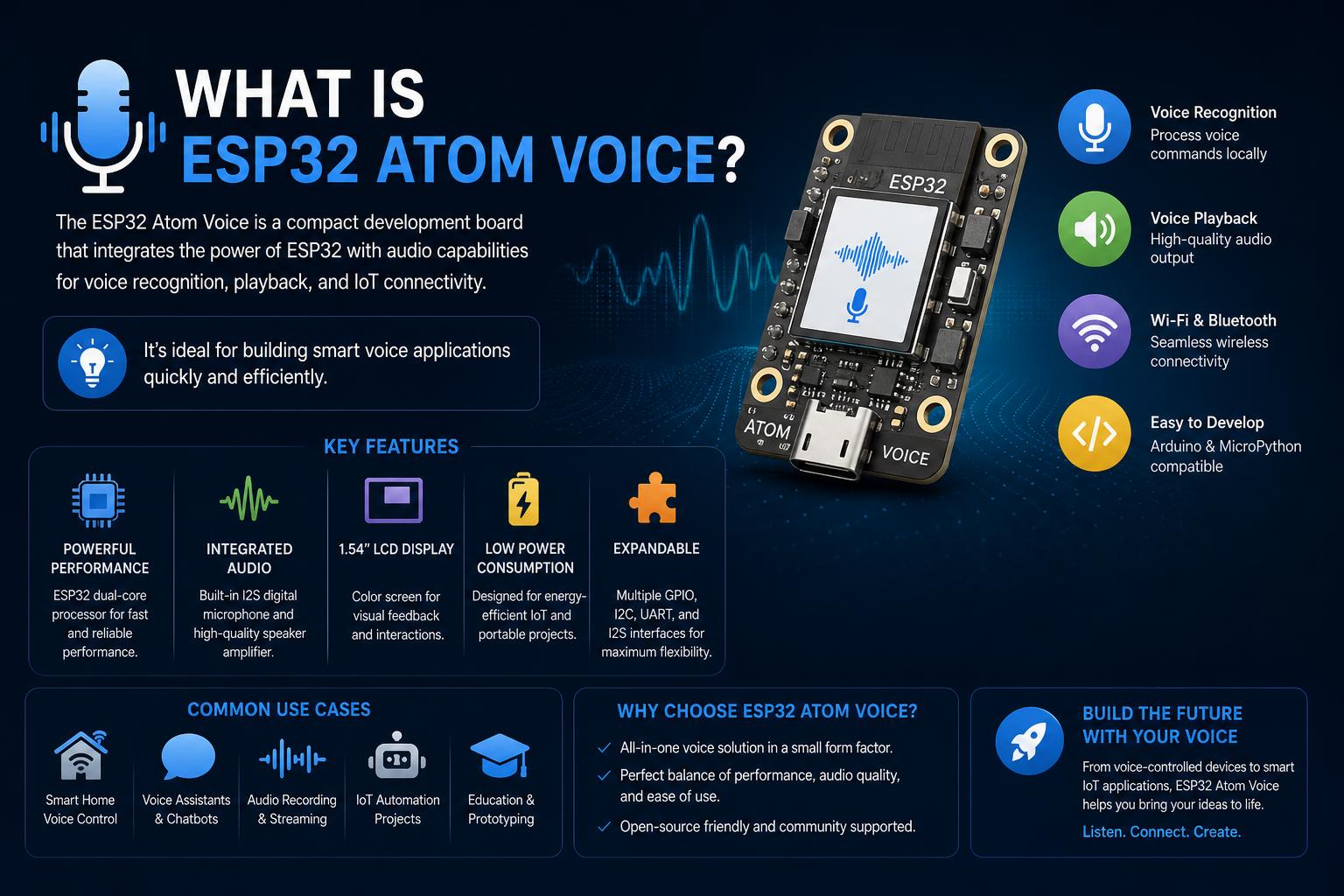
- The ESP32 Atom Voice (M5Stack Atom Echo) is a compact, programmable smart speaker ideal for DIY voice and audio projects.
- It offers powerful wireless capabilities, onboard mic and speaker, and easy extensibility with a GROVE port, supporting Arduino, ESP-IDF, ESP-ADF, and ESPHome.
- While perfect for close-range notifications or assistants, its speaker is best upgraded for music or loud environments, as many users have successfully done.
The ESP32 Atom Voice (commonly known as the M5Stack Atom Echo) has rapidly become one of the most intriguing tiny smart speaker development kits for makers, hobbyists, and anyone interested in hands-on IoT audio projects. This compact, voice-ready device not only fits in the palm of your hand but also packs a range of wireless, programmable features, making it a favorite for experimental smart home setups, voice assistants, and DIY automation scenarios.
Despite its unassuming size, it offers a rare mix of programmability, real-world usability, and integration potential that’s hard to find at this price point. If you’ve been thinking of adding voice or audio interaction to your next project—or just want to tinker with a truly versatile microcontroller board—this detailed breakdown will show you exactly what the Atom Echo (ESP32 Atom Voice) brings to the table, from tech specs and development workflow, to practical advice drawn straight from those who’ve used it extensively.
Let’s dive beyond the spec sheet: What exactly is the ESP32 Atom Voice? Who is it for? Where does it shine? And what should you genuinely expect if you’re planning to build something creative or useful with this nifty device? We’ll also cover its real-world strengths and weaknesses, how it compares with alternatives, the best ways to develop on it, and how the community has hacked and customized the tiny Echo for everything from basic voice feedback to creative sound-based games and smart notifications.
What is the ESP32 Atom Voice (M5Stack Atom Echo)?
The Atom Echo is a miniature, ESP32-powered smart speaker dev kit. Manufactured by M5Stack, it is also called the Atom Echo Smart Speaker Dev Kit. Its form factor is nearly matchbox-sized—just 24 x 24 x 17 mm—yet it combines a dual-core microcontroller, onboard microphone and 0.5 W speaker, Wi-Fi, Bluetooth (with A2DP streaming), an RGB status LED, and a GROVE expansion port.
All of this is packed in a durable, plastic enclosure ready for real-world voice, audio, or notification use cases. Whether you want a voice assistant satellite for Home Assistant, a pocket intercom, a no-screen game module, or a quick sensor-based notifier, Atom Echo provides a plug-and-play foundation.
Key Technical Features and Hardware Specs
| Feature | Specification |
|---|---|
| Processor (SoC) | ESP-PICO-D4 (ESP32), dual-core, 240 MHz |
| Memory | 4 MB flash |
| Wireless | 2.4 GHz Wi-Fi (802.11 b/g/n), BLE, Bluetooth A2DP streaming |
| Audio | SPM1423 microphone (PDM), NS4168 amplifier (I2S), 0.5 W onboard speaker |
| I/O | Programmable RGB LED (SK6812), IR transmitter, GROVE expansion port, function and reset buttons |
| GPIO Pins | G21, G25, 5V, GND, 3V3, G22, G19, G23, G33 |
| Development Platforms | Arduino IDE, ESP-IDF, ESP-ADF |
| Size / Weight | 24 x 24 x 17 mm; approx 5g |
Despite its small chassis, Atom Echo provides a fully capable, all-in-one development module suitable for sophisticated voice or audio projects without the need for external add-ons.
Who is Atom Echo / ESP32 Atom Voice For?
This tiny powerhouse is perfect for makers, engineers, teachers, and hobbyists exploring:
- Voice-enabled smart home nodes that fit anywhere
- Room-level sensors and announcement devices
- DIY notification speakers and intercoms for workshops, offices, or classrooms
- Hands-on learning with audio processing and simple programmable hardware
- Plug-and-play IoT experiments, especially where space is tight
Its form factor and native GROVE port also make it ideal for rapid prototyping, letting you connect sensors (temperature, humidity, IMUs, etc), mini-displays, or other peripherals without soldering.
The Programming Experience: Software and Workflow
What makes the Atom Echo unique isn’t just hardware—it’s how approachable and flexible development is:
- Arduino IDE: For quick prototyping and beginners, install the ESP32 board package, connect the Atom Echo, and upload example code. You can trigger the onboard speaker or LED, process microphone input, and control hardware with simple sketches.
- ESP-IDF: Experienced developers can use the official Espressif IoT Development Framework (IDF) for fine-grained control, complex peripheral management, and performance optimizations—all in C/C++.
- ESP-ADF: The Audio Development Framework is provided for intensive audio routing, Bluetooth playback, voice processing, and integration with structured audio pipelines. It unlocks powerful TTS (text-to-speech), Bluetooth audio streaming, and advanced effects.
- ESPHome / Home Assistant: Automation enthusiasts will love that Atom Echo can run ESPHome and integrate seamlessly as a voice satellite or feedback node within Home Assistant. This makes it trivial to announce reminders, play alerts, or automate basic room-level voice commands.
Pairing and streaming audio via Bluetooth A2DP is straightforward—just turn on the Atom Echo, look for “M5_SPEAKER_T1” on your phone or tablet, connect, and you’re set to stream music, prompts, or alerts wirelessly.
Bringing the Hardware to Life: Projects and Use Cases
1. Room-Scale Voice Assistant Node
Atom Echo excels as a low-cost, minimalist smart assistant satellite. Place it on a desk, in a hallway, or even a garage and use it for:
- Short, spoken reminders (“Garage door is open”)
- Simple command confirmation (“Lights off”)
- Pushing text-to-speech alerts from sensors or automations via Home Assistant or ESPHome
Users report that the built-in speaker is tiny—best for low-background-noise spaces and not suited for music or whole-house announcements unless you add an external amplifier or speaker. For desktop or single-room cues, it’s more than capable.
2. Audio-First Games and Learning Tools
With its mic, speaker, and bright RGB LED, Atom Echo is ideal for screenless games and audio-based learning modules. Developers have created voice-enabled quizzes, pronunciation trainers, and interactive audio challenges with real-time LED feedback and online multiplayer (using Wi-Fi for state sync between devices).
3. Notification Speaker, Doorbell, and Intercom
The device is also suited as a smart notification hub or doorbell. Use TTS for spoken status updates (“Package arrived”), set chimes for events, or enable push-to-talk between rooms. Control is straightforward via automation rules, and you can easily toggle between voice alerts and silent LED status at night.
4. Plug-and-Play IoT Expansion via GROVE
With the GROVE port, adding modules is as simple as plugging in and coding—no soldering required. Build an air quality notifier, temperature annoucer, or an IMU-driven gesture device. For example, combine an ENV sensor with ESPHome rules to announce “Air quality good” and dynamically change the LED color when thresholds are passed.
Real-World Community Experiences & Candid Feedback
Insights from longtime makers and power users highlight its strengths and some shortcomings you might encounter:
- Sound output: The built-in speaker is very compact. For most announcement and status use cases, it’s adequate, but users find it underwhelming for music, anything with bass, or coverage beyond one room.
- Several users modded their Atom Echo by soldering a USB-powered speaker in place of the stock driver, resulting in much better volume and clarity, easily filling a 12×12 room. You can even cannibalize old desktop speaker sets.
- If you’re after background music or high volume, plan on using external amplification. As one user put it bluntly: “Without external amplification and a speaker you will be VERY disappointed.”
- Microphone performance: The built-in mic is great for voice triggers in quiet rooms but will struggle amid high background noise compared to pricier smart speakers or advanced voice hardware. For complex tasks, some have repurposed tablets or used higher-end solutions.
- Automation integration: Many users successfully connect Atom Echo to Home Assistant via ESPHome for local, cloud-free voice interactions across dozens of rooms inexpensively. If you want to deploy 10+ nodes around a house for automation feedback, Atom Echo is perfect on a budget.
- Hacking and customization: Community projects include custom 3D-printed enclosures, upgraded speakers, and even placing the Atom Echo’s circuit board inside other devices or hiding it for unobtrusive room assistants. The possibilities are extensive for anyone comfortable with basic soldering or digital fabrication.
- Alternatives and competition: More advanced solutions like VPE boards and even repurposed Android tablets offer better microphones and sound output, but at noticeably higher cost. The Atom Echo provides a great entry-level option, and if you later upgrade, its ESP32 core is always reusable.
Connectivity and Extension Options
Wi-Fi and Bluetooth make Atom Echo a versatile bridge for IoT environments. You can stream audio from a phone or tablet, relay voice commands to a smart home hub, or send notifications via local network automations. The solder-free GROVE port means expanding its features is only a module away—common extensions include:
- IMUs for gesture or tilt detection
- Environmental sensors (temperature, humidity, air quality)
- OLED or LCD displays for feedback, status, or menus
Many get started by simply flashing ESPHome, plugging in a module, and seeing results within minutes. There’s no need for external hats, shields, or breadboarding for your first working prototype.
FAQs and Important Practical Tips
Is it easy to pair Atom Echo for Bluetooth audio?
Absolutely: turn the device on, search “M5_SPEAKER_T1” on your mobile device, and pair it. The status LED goes green when successfully connected. Streaming audio can begin immediately via A2DP.
Can Atom Echo run as a voice assistant satellite in Home Assistant?
Yes! It’s officially supported by ESPHome and integrates as a feedback or voice node in Home Assistant setups. You can automate text-to-speech feedback, trigger announcements, or create custom voice-based workflows without needing cloud services.
Which development environments are supported?
Arduino IDE, ESP-IDF, and ESP-ADF are all supported. Beginners can start quickly via Arduino; power users can reach for ESP-IDF for total control or ESP-ADF for serious audio work.
Can I upgrade the speaker or add a bigger one?
Yes—many in the community have replaced the onboard speaker with external or USB-powered options for much better sound. The process requires careful desoldering and wiring, with special attention to polarity for clean audio.
How powerful is the CPU for real-time audio?
The dual-core ESP32 (ESP-PICO-D4) can separate time-critical audio tasks from background work, minimizing latency and jitter for voice and audio processing, even with network or sensor updates running in parallel.
Why Makers and Developers Choose Atom Echo
Atom Echo’s greatest asset is flexibility mixed with simplicity. For those with a new idea or project, it offers:
- Quick start for beginners (Arduino, ESPHome integration)
- Growth for advanced users (IDF/ADF, custom hardware mods)
- All-in-one prototyping—immediate, solder-free builds via GROVE port and tiny onboard mic/speaker
- Affordability that scales—deploy 5–10 units across a home or classroom for less than the cost of one high-end smart speaker
- Strong community support—from in-depth build logs, to Home Assistant forum discussions, to official documentation
The only major caution: if you expect big-room audio, music performance, or shouting across the house, you’ll need to budget for add-ons. For focused, practical, close-range voice or sound feedback, Atom Echo’s built-in hardware is more than enough.
Supplementary Notes: Cost, Availability & Practical Guidance
Price: At the time of writing, Atom Echo is available for just $13–$15 USD on multiple online stores, including M5Stack’s official store, Amazon, Tinytronics, and PiHut. Its affordability makes it practical for mass deployment.
Setup advice: The device is plug-and-play for Bluetooth audio and quick to flash for ESPHome or Arduino projects. For hardware modifications—like replacing the speaker—basic soldering skills and careful attention to details (especially polarity) will ensure the best results.
Platform support and documentation: For comprehensive technical details, pinout, and firmware guides, visit the official M5Stack Atom Echo documentation.
Atom Echo (ESP32 Atom Voice) is a genuine game-changer for small-scale voice and audio prototyping. With clever design, approachable software, and a passionate community, it allows almost anyone to bring interactive sound, speech, or notifications into DIY projects or smart home setups for a fraction of the cost and effort usually required. While the built-in hardware is best for focused, quiet environments, the device’s hackability and extension options mean its usefulness grows as you experiment. Whether you’re looking for a low-cost way to try local voice feedback, build playful sound gadgets, or automate room status in your home or classroom, Atom Echo is now arguably the easiest place to start.