
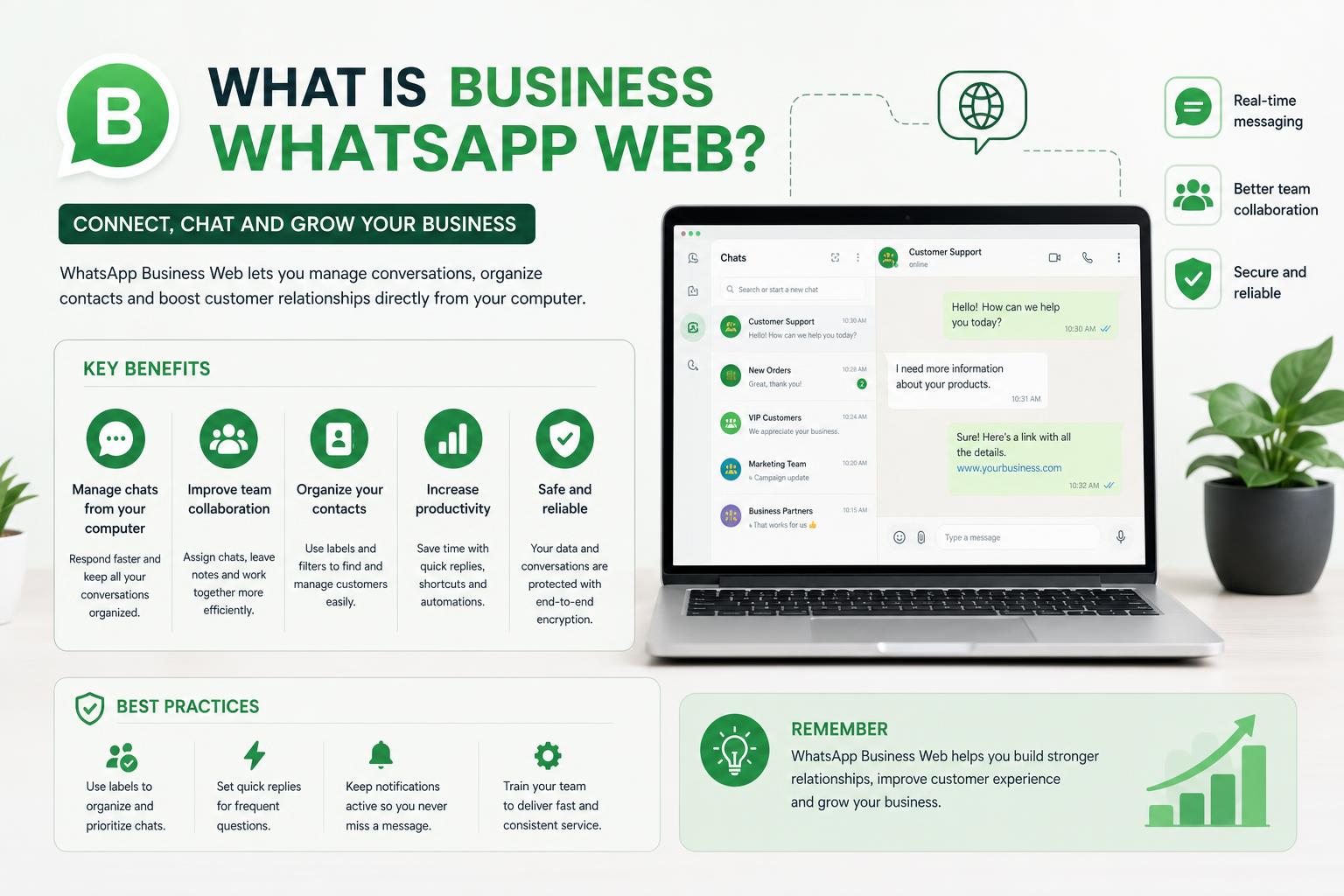
- WhatsApp Business Web brings the full suite of business messaging features to your desktop, including labels, quick replies, and product catalogs.
- Multi-device support enables up to four additional computers to be linked per account, synchronizing chats for smoother collaboration.
- Limitations include single-number assignment, the lack of advanced automation for large teams, and no native CRM integration—pushing scaling companies toward API-based solutions.
- Transitioning to API-powered platforms like Kanal or Charles unlocks automation, analytics, team assignment, and unified inbox capabilities for growing businesses.
If you’ve ever wondered how you can engage customers, run a small business, or provide support more efficiently through WhatsApp without being glued to your phone, you’ve come to the right place. In today’s digital-first world, companies of every size are turning to WhatsApp Business Web as their go-to tool for handling conversations, sending files, sharing updates, and much more—all from the comfort of their desktop or laptop.
The web version of WhatsApp Business has evolved rapidly, making customer interaction faster, easier, and infinitely more convenient. Whether you’re a solo entrepreneur trying to keep business and personal chats separate, a growing support team dealing with hundreds of daily requests, or an ecommerce company searching for new ways to scale conversations and sales, WhatsApp Business Web may be your next essential business tool. Let’s explore in detail how it works, the features that set it apart, its pros and cons, limitations, alternatives, and when upgrading to a more robust solution might make sense.
Understanding WhatsApp Business Web: What Is It?
WhatsApp Business Web is essentially an extension of the WhatsApp Business app that’s specifically designed for browser-based access. It mirrors your business account so you can manage messages, contacts, and business tools using your computer instead of your phone. Just like with the standard WhatsApp Web, you access WhatsApp Business Web by navigating to web.whatsapp.com and linking it to your WhatsApp Business app using a QR code.
This web-based offering bridges the gap between your smartphone and your business operations on a desktop or laptop, giving you a larger workspace, a full keyboard, and seamless sync between devices. Whether you want to coordinate sales, provide customer support, manage orders, or even just keep thumbs from getting sore, WhatsApp Business Web makes business communication more comfortable and efficient.
An Overview of WhatsApp’s Product Portfolio
To clear up the confusion, it’s important to understand that WhatsApp offers three distinct solutions under similar names:
- WhatsApp (personal): The original version, primarily for private, non-commercial communication.
- WhatsApp Business App: Made for small businesses or entrepreneurial ventures, with features like business profiles, labels, and quick replies. This is what WhatsApp Business Web reflects into your browser.
- WhatsApp Business Platform (API): The enterprise-grade, API-powered edition that allows for automation, integrations, team inboxes, chatbots, detailed analytics, and more. No app, but can be accessed through official solution providers.
This article focuses primarily on WhatsApp Business Web, the browser-based extension of the small business app—while also examining when the API might be needed as your operations grow.
Advantages of Using WhatsApp Business Web
The perks of shifting your business conversations to the desktop are numerous, especially when workflows demand multitasking and collaborating with your team.
- Unified Messaging: Automatically syncs all chats and contacts with your phone, providing uninterrupted communication no matter what device you use.
- Full-Size Keyboard and Larger Screen: Typing with speed and accuracy becomes a breeze, and you’re less likely to make embarrassing autocorrect mistakes.
- Effortless File Sharing: Quickly send product files, presentations, images, videos, and documents—directly from your desktop. Great for marketing, campaigns, customer support, and order fulfillment.
- Collaboration Capabilities: With multi-device support, up to four linked devices can access the same WhatsApp Business account, allowing for basic team collaboration (though with some caveats, discussed further down).
- Seamless Experience: Familiar interface and full synchronization with mobile mean you won’t miss a beat switching between devices.
- Free to Use: WhatsApp Business Web comes at zero cost—expenses start only if you graduate to the Business Platform/API tier.
- Security: Your conversations stay end-to-end encrypted, matching the privacy standards of the mobile app. Keeping messages and files protected is a priority, even as you move to desktop.
Key Features of WhatsApp Business Web
WhatsApp Business Web goes beyond personal messaging by offering specific features built for companies, brands, and teams.
1. Messaging and Chat Management Improvements
You get all the core messaging capabilities of WhatsApp Business—send and receive text, images, documents, audio messages, and more. Group creation, archived chats, and basic business settings are fully supported. Chats are synced instantly between the phone and browser, keeping you up to date everywhere.
2. Labels and Filters for Better Organization
Categorizing and segmenting conversations becomes straightforward with labels—color-coded tags like “New Leads,” “Pending Payment,” or “VIP Client.” These simple organization tools help prioritize support tickets, sales inquiries, or follow-ups. Filters enable you to find chats by unread status, starred messages, or media type for an uncluttered inbox.
3. Quick Replies and Automated Messages
Save time by creating and using quick replies for frequently asked questions or common responses—just type “/” to access them in any chat. WhatsApp Business Web also supports basic automation like greeting or away messages, ensuring customers receive instant responses even if you aren’t online.
4. Business Profile Customization
Establish trust and present your business professionally—add your company’s description, location, business hours, and website so customers always know who they’re talking to. This profile information is visible in every chat, enhancing legitimacy and brand recognition.
5. Product Catalogs
Showcase your products and services by adding a catalog to your business profile. Customers can browse offerings, ask questions, and initiate purchases or inquiries within WhatsApp itself. This feature integrates neatly, especially for ecommerce brands seeking an additional sales channel.
6. Broadcast Lists (with Limitations)
Broadcasts let you reach up to 256 contacts at once from the mobile app. Although this specific broadcast function isn’t available directly on the web version, you can set up and manage these lists from your phone and continue conversations within the browser.
7. Multi-Device Support
Now you can log in to WhatsApp Business Web from up to four devices simultaneously—plus your phone. No more dependence on your mobile to be constantly online. You can keep working from your computer even if your phone is disconnected (with a 14-day inactivity timeout).
8. Enhanced Security and Privacy Controls
Messages are end-to-end encrypted, and linked devices can be managed and revoked anytime from your phone. Regularly check for unknown devices, and use password or biometric authentication for extra peace of mind—especially on shared computers.
How to Set Up WhatsApp Business Web: Step-by-Step Guide
Getting started with WhatsApp Business Web is quick, straightforward, and doesn’t require any downloads or extra registrations. Just follow these steps:
- Open on your desktop browser (Google Chrome, Firefox, Edge, or Safari).
- Launch WhatsApp Business on your smartphone.
- Go to Menu (three-dots or settings) > Linked Devices.
- Select Link a Device and scan the QR code displayed on the browser’s page.
- If prompted, authenticate using your phone password or biometrics.
Once linked, your entire business chat history, contacts, labels, and quick replies are instantly available in your desktop browser. The session remains active even after you close your browser, so there’s no need to re-scan regularly—unless 14 days of inactivity pass.
Desktop App vs. Web Version: What’s the Difference?
WhatsApp Business is also accessible through a standalone desktop app for Windows or Mac, which you can download from the official site, Microsoft Store, or Mac App Store. The core features are nearly identical between the web browser version and the desktop app, but there are some subtle distinctions:
- Desktop Notifications: The app allows you to enable desktop notifications for new messages, calls, and other updates, streamlining your workflow and making sure you’re always in the loop.
- Keyboard Shortcuts and Optimized UI: The installed app offers keyboard shortcuts for switching between chats, muting notifications, or quickly sending sticker packs.
- Voice & Video Calls: While voice calls are supported in modern browsers, video calls currently require the desktop app. This could be a deciding factor if video communication is frequent for your business.
- Integration and Settings: The app can tap into more system-level settings for notifications, ringtones, and integration with your operating system.
- Storage Considerations: The desktop app occupies disk space, while the browser version runs without installations—but both can be used to access either the personal or business account, depending on which app you use for initial QR scan.
Device Limits and Account Management
WhatsApp Business Web permits a maximum of four devices (plus your phone) to be linked to a single account at a time. You’re able to stay logged in as long as you maintain activity. However, you can’t have both the standard WhatsApp and WhatsApp Business account logged in on the same device simultaneously via WhatsApp Web—they’re linked at the client level. Also, if your device is inactive for 14 days, you’ll automatically get logged out and need to scan the QR code again.
To give your team access, link each member’s computer as a new device, ensuring smoother collaboration. Still, be mindful of overlapping replies; WhatsApp Web isn’t fully multi-agent aware like dedicated customer support platforms.
Limitations of WhatsApp Business Web
While WhatsApp Business Web is a game-changer for many, it does have notable constraints:
- One Phone Number, One Account: You’re tied to a single mobile number per account. Multi-user access is possible for up to four devices, but it’s not purpose-built for large teams or intricate collaboration.
- Limited Automation and Integration: Workflow automation, advanced chatbots, CRM integration, assignment, and analytics require the API version—not feasible with just the browser or app.
- Broadcast Limitation: Bulk messaging is restricted. You can’t create new broadcast lists from the web, only from the mobile app, and there’s a 256-recipient cap.
- No Call/Message to Older App Versions: In some instances, you may not be able to message users running very outdated WhatsApp clients.
- Certain Features Are Phone-Only: Creating or editing your catalog, viewing live location, or changing some account-level settings must be done on mobile.
- No Multi-Agent Assignment: With multiple devices linked, there is no visibility into who is answering a given message or basic assignment or reporting. As soon as two or more people try to handle the same inbox, things get confusing.
- Limited Advanced Analytics: While you get some insights (like message delivery/read), you won’t find dashboards for team analytics, performance, or customer segmentation unless you upgrade to the API through a platform like Kanal or Charles.
- Broadcasts Not in Web/App: The main broadcast feature is still only supported in the mobile app, not through the web.
For many small businesses and solo operators, these limitations won’t matter—but for teams handling high volumes or complex support/sales, a shared inbox tool layered on the official API is often necessary.
How to Install WhatsApp on Huawei: The Complete Guide for All Models
Security and Privacy on WhatsApp Business Web
Privacy is serious business on WhatsApp. Your conversations enjoy end-to-end encryption, and each device synced through WhatsApp Business Web is covered under this security model. Neither WhatsApp nor Meta staff can read your messages; they remain private from sender to recipient. You can manage and revoke access for any linked device from the mobile app.
However, businesses with industry mandates (HIPAA, GDPR, FINRA, etc.) should know that, although communication is encrypted in transit, WhatsApp does not offer compliance certifications and some metadata is still handled by Meta’s servers. For regulatory needs, consider alternatives like Threema Work or Chanty, which focus on data sovereignty and compliance options.
Common Issues and Troubleshooting
WhatsApp Business Web is reliable, but like any technology, glitches can arise. Here’s what you might face and how to fix it:
- Phone Not Connected Error: Multi-device support means you’re not technically tied to a constantly-online phone, but WhatsApp still requires the primary device to connect at least once every 14 days. If something goes wrong, simply open WhatsApp Business on your phone to reactivate the link.
- QR Code Issues: If your phone won’t scan the code, try cleaning your camera lens, increasing screen brightness, reloading the QR code, or clearing browser cache.
- Messages Not Syncing: Double-check internet connections on both phone and computer. If issues persist, log out and re-link your device, or update to the latest WhatsApp Business app version.
- WhatsApp Web Not Loading: Use a supported browser (Chrome is most reliable), disable aggressive extensions, and clear cookies, especially if you’re running into compatibility troubles.
When to Move Beyond WhatsApp Business Web
If your team is outgrowing the basic app and web setup, you’ll run into some predictable pain points. As the number of agents climbs and the volume of messages increases, tracking assignments, managing follow-ups, and segmenting customers can become overwhelming. At this stage, you’ll want features like multi-agent assignment, detailed reporting, internal notes, advanced automation, and integration with your CRM or other business systems. Más información en configuración y personalización de tu nuevo teléfono.
Platforms like and make it easy to migrate to the WhatsApp Business API, even for non-technical teams. You get tools like conversation assignments, visual flow builders, shared team inboxes, analytics dashboards, and AI-powered chatbots—features not available in the free WhatsApp Business app or Web version.
WhatsApp Business API: Who It’s For and What You Get
- For Teams Needing Full Collaboration: Multi-agent use, proper assignment, reporting, and workflow automation become possible.
- Bigger Broadcasts: Send newsletters, abandoned cart reminders, or promotions to more than 256 users at once, with data-driven segmentation.
- Integrations Galore: Connect WhatsApp with customer databases, order management systems, email, and your favorite support tools, streamlining every touchpoint.
- Automated Messaging: Leverage chatbots, interactive buttons, and scheduled campaigns to boost customer satisfaction and sales.
- Omnichannel Support: Platforms like Kanal offer unified inboxes—so your team can handle WhatsApp, email, and other channels in one central hub.
The WhatsApp Business API is priced by message volume and usage, so assess costs based on your communication flow and team size. For smaller operations, the free Business app and Web provide excellent value; for rapid growth or multi-agent teams, API-based solutions are a logical next step.
WhatsApp Business Web Versus Other Messaging Solutions
As you explore WhatsApp Business Web, you may wonder whether alternative platforms could better suit your needs, especially as your team expands.
- : Not just for chat—offers Kanban boards, tasks, audio/video calls, and deep integration with productivity tools. Designed for company-wide collaboration beyond customer messaging.
- Slack: Built for robust project and channel-based communication with integrations to thousands of business tools, deep search, and admin controls. Ideal for organized, cross-functional teams.
- Microsoft Teams: Leverages full Microsoft 365 integration, offering powerful video conferencing, file management, calendar, and persistent chat for larger businesses.
- : Prioritizes security and privacy without requiring phone numbers; includes group chats and comprehensive encryption—especially attractive for privacy-conscious organizations or regulated industries.
- Telegram: Cloud-driven, allowing access from any device, huge group limits, broadcast channels, and automation—but does not enable end-to-end encryption by default in group/chat channels.
- Viber: Combining personal and business styles—offers verified profiles, built-in chatbots, promotional tools, and end-to-end encryption.
- Signal: Best for encrypted, privacy-first communication between consultants, specialists, and sensitive projects, but lacking deeper business integration features.
Each alternative has unique business features and security models, but for most small and medium businesses already entrenched in the WhatsApp ecosystem, the convenience and familiarity of WhatsApp Business Web are hard to beat—until demands outgrow its structure.
Best Practices and Tips to Maximize WhatsApp Business Web
To truly leverage WhatsApp Business Web as part of your business communications, consider these practical methods:
- Optimize Your Business Profile: Ensure all company details, business hours, and contact methods are visible and accurate. A robust profile reinforces professionalism.
- Embrace Labels and Quick Replies: Regularly create new labels for hot leads, ongoing orders, or urgent follow-ups, and update quick replies as FAQs change. This can save hours each month.
- Monitor Security: Frequently check the list of linked devices in your phone app; immediately revoke access for unfamiliar or old machines to prevent unauthorized access.
- Train Your Team: If multiple people use the account, clarify internal communication protocols to avoid crossed wires or missed opportunities. Document best practices for assigning replies, using notes, and timing responses.
- Upgrade When Necessary: If you notice frequent collisions (multiple agents responding to customers at once, missed follow-ups, or a lack of analytics), it’s time to consider a shared inbox solution through WhatsApp Business API.
- Enable Desktop Notifications: Especially when handling critical inquiries or sales, turning on browser/desktop alerts helps ensure timely responses and higher customer satisfaction.
How to Fully Disable Gemini AI in Google Chrome: The Complete Guide
Frequently Asked Questions about WhatsApp Business Web
Let’s clarify some of the most common questions that business owners, entrepreneurs, and support teams often have:
Can I use WhatsApp Business Web if my phone is offline?
Yes, thanks to the recent multi-device update, WhatsApp Business Web keeps working with your phone offline for up to 14 days. However, after the two-week window, WhatsApp will require you to re-link your device by scanning the QR code again when your phone is next online.
What’s the difference between WhatsApp Business Web and personal WhatsApp Web?
The core website is the same at web.whatsapp.com, but the features you see depend on which app scanned the QR code. If you log in using the WhatsApp Business app, you’ll have access to your business profile, labels, quick replies, and catalog; the regular version lacks these enhancements.
How many staff members can use one WhatsApp Business account at a time?
Up to four additional devices can be linked per account (plus your main phone), but true team collaboration (with chat assignment, notes, and analytics) requires WhatsApp Business API through a partner service. For larger departments or growing businesses, switching to such a platform can prevent chaos and improve efficiency.
Is WhatsApp Business Web really free?
Absolutely. Both the WhatsApp Business app and its web interface carry no extra charges. Only when you transition to the WhatsApp Business API do costs arise, and those are based on per-message pricing set by Meta, plus any service fees charged by your chosen platform provider.
Can I make voice or video calls from WhatsApp Business Web?
Voice calls are supported in modern browsers and in the desktop app, but video calling requires the installed desktop app at this time. If calls are vital, download the desktop application for the broadest calling functionality.
How secure is WhatsApp Business Web?
End-to-end encryption protects all your communication, matching the standards of the mobile app. Only the sender and recipient can read messages—not even Meta has access. Still, it’s critical to log out of public computers and monitor your list of connected devices, since physical access is a bigger practical risk than encryption failures.
What are the alternatives if I need more features?
If you reach the functional limits of WhatsApp Business Web, consider platforms like Kanal, Charles, or TimelinesAI for advanced collaboration, automation, AI chatbots, analytics, and true multi-agent support. Other popular choices for SMB collaboration, like Chanty, Slack, Microsoft Teams, and Threema Work, also offer different combinations of chat, task management, analytics, compliance, and security tailored to business needs.
How External Platforms Can Supercharge Your WhatsApp Business Experience
While WhatsApp Business Web serves most small business needs, some organizations require more sophisticated solutions—shared inboxes, AI chatbots, streamlined workflows, and full CRM integration. That’s where business solution providers come into play.
Platforms like and other tools offer plug-and-play WhatsApp Business API experiences that unlock multi-agent collaboration, detailed reporting, automated campaigns, and integration with ecommerce ecosystems such as Shopify. With visual builders, automated flows, and built-in analytics, you can manage conversations at scale, recover abandoned carts, and deliver targeted marketing in ways simply not possible through the out-of-the-box Business Web interface.
TimelinesAI and similar tools go a step further by allowing teams to manage messages from multiple WhatsApp Business accounts in a single shared inbox, assign agents, automate responses, and integrate with popular CRM tools—all from a single cloud platform.
WhatsApp Business Web for Scaling, Omnichannel, and Beyond
Solo entrepreneurs, startups, and small businesses will find WhatsApp Business Web more than sufficient for daily sales, support, and customer outreach. As companies grow, however, there comes a tipping point where the basic app’s limitations hinder efficiency—especially for organizations with high ticket volumes, multi-agent teams, or advanced marketing ambitions.
Upgrading to the API-based solutions enables a world of features:
- Unlimited bulk messaging (with segmentation and analytics)
- Multi-agent assignment with shared team inboxes and performance metrics
- Chatbots for automated replies, order updates, and support 24/7
- Shopify, CRM, and platform integrations to streamline operations and reporting
- Advanced user management with permissions, assignment rules, and audit trails
Service providers handle all the heavy lifting—no need to code, maintain servers, or navigate WhatsApp’s complex API docs.
Maximize Impact: Practical Tips for WhatsApp Business Web Success
To truly leverage WhatsApp Business Web as part of your business communications, consider these practical methods:
- Master File Organization: Keep folders on your computer dedicated to documents frequently shared via WhatsApp (price lists, product catalogs, guides, contracts) for quick drag-and-drop sending.
- Refresh Quick Replies Quarterly: As customer inquiries change with seasons, sales, and new products, update your quick replies to keep responses accurate and relevant.
- Label for Lifecycle Stages: Use labels like “Prospect,” “Active Order,” “Overdue,” and “Feedback” to organize customer journeys and minimize manual sorting.
- Security-First Approach: Encourage all team members to habitually log out when using public or shared computers, and review active device lists weekly to sweep out old or unauthorized sessions.
- Integrate Offline Tools: If not using an API-based platform yet, use spreadsheets or Google Sheets linked by labels for sales tracking, order statuses, or customer history to supplement WhatsApp Web’s basic information.
WhatsApp Business Web has transformed how businesses and entrepreneurs communicate, bringing the speed and efficiency of a modern chat platform to the desktop while keeping setup dead simple and cost at zero for most users. Its blend of familiar ease, secure messaging, and just-enough business features means it’s an ideal starting point for customer engagement, sales, and daily communications. For teams scaling up, a seamless transition to more powerful, API-driven solutions is only a step away—ensuring that as demands evolve, WhatsApp grows with you rather than holding you back.