
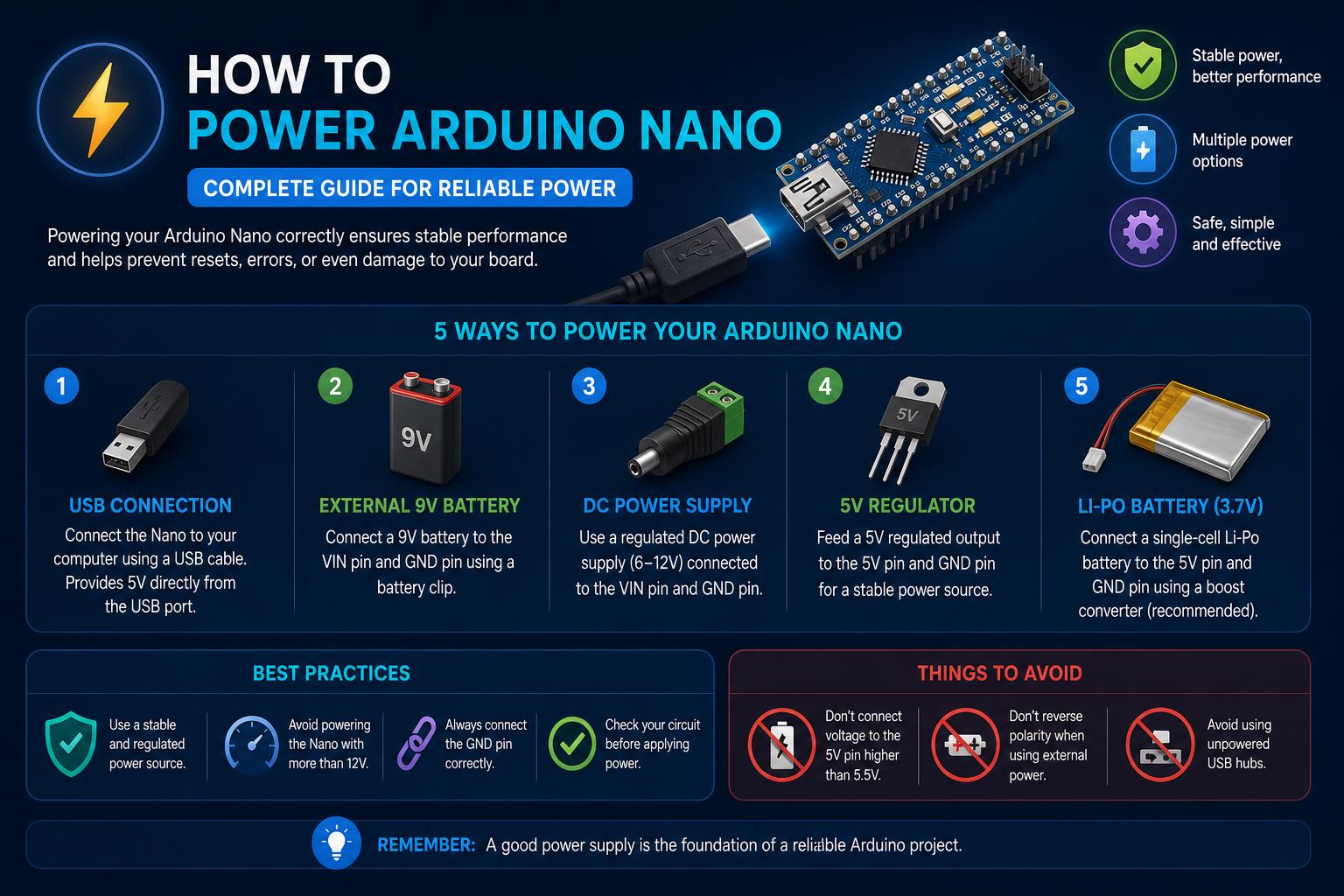
- There are three main methods to power the Arduino Nano, each suited for different scenarios.
- Battery-powered options, especially using lithium-ion cells with protection boards, are ideal for portable projects.
- Understanding voltage requirements and making secure connections ensures safe and reliable operation.
Looking to power your Arduino Nano and unsure which method suits your project best? No matter if you’re just tinkering, working on a portable device, or mounting your Nano onto a PCB, this extensive guide will cover every essential detail you need to keep your Arduino Nano running reliably. Navigating information online can be pretty confusing, especially with a mix of short videos, busy forums, or snippets. Here, you’ll find a deep dive into all possible powering methods so you can confidently choose the right one for any situation.
The Arduino Nano stands out as a compact, versatile development board loved for its portable size and low power consumption, making it perfect for projects that need to operate away from the desk. Whether you require USB convenience, stable voltage from a fixed supply, or full portability via batteries, this guide breaks down each powering option, the pros and cons, best practices for wiring, and insider tips from real-world Arduino users and communities.
Why Powering the Arduino Nano Correctly Is Crucial
While powering the Nano may seem straightforward, choosing the wrong option or making a simple wiring mistake can undermine your entire project. Supplying too little or too much voltage could damage your board or create instability. Understanding how each powering method works ensures longevity and performance, whether prototyping, building wearable tech, or making a mobile robot.
Overview of Arduino Nano Powering Methods
The Arduino Nano offers three standard ways to receive power, each suited to different use cases. Let’s break them down:
- USB power — quick and easy, mainly for programming or short-term tasks.
- Regulated power supply to the 5V pin — best for permanent setups where stable voltage is available.
- Unregulated power via VIN — perfect for battery-powered or portable projects with flexible input voltage.
Powering Arduino Nano via USB
This is the default method for most users, especially during programming or early testing. Connecting a USB cable (Mini USB for legacy models or Micro USB/USB-C on some newer variants) from your computer or USB power adapter feeds 5V directly into the Nano’s onboard voltage lines.
- The board expects exactly 5V, regulated from USB.
- No additional voltage regulation occurs onboard for USB — it’s assumed to be safe.
When to use: Ideal for development, flashing code, temporary use, or when the project will be near a USB source. For permanent installations or power-hungry projects, consider another solution for better reliability.
Directly Supplying a Regulated Power Source
The Nano’s 5V pin allows you to feed the board from a stable, regulated power supply. Simply connect your trusted 5V regulated source to the board’s 5V and GND pins — this bypasses the onboard regulator and powers the entire system. This setup is commonly used when the Nano is built into larger circuits or embedded into finished projects.
- Ensure your supply really provides a steady 5V. Overvoltage may damage the board, and undervoltage could cause malfunctions or unexpected resets.
- This is the best option for reliability and efficiency when you have access to solid-state regulators or carefully designed power rails.
How to wire: Connect the positive output of the regulated supply to the 5V pin, negative to GND.
Real-world tip: Many users power both their Nano and other peripherals (like sensors or displays) from the same regulated supply to keep everything streamlined. Just be sure your supply can handle the total current draw of the whole system to avoid brownouts.
Using an Unregulated Power Source: The VIN Pin
The Arduino Nano offers a clever feature: an onboard voltage regulator linked to its VIN pin. If you connect an unregulated voltage (e.g., from a battery pack) to VIN and GND, the Nano uses its regulator to drop the voltage to safe operating levels (5V).
Supported Voltage Range:
- VIN expects 6.2–12V (with 9V–12V being the sweet spot to allow proper regulation and avoid excess heat).
- Dropping below 6.2V can starve the regulator; exceeding 12V risks overheating and board damage.
How to use: Attach your positive battery terminal to VIN, negative to GND. The regulator handles stabilization.
Good to know: Since the standard Nano uses a linear regulator, excess voltage is converted to heat. For efficient, long-term battery projects, keeping VIN as close to 7–9V as possible helps prevent overheating.
Exploring Battery Power for True Portability
Portable Arduino Nano projects often rely on batteries for ultimate flexibility. There are several battery choices, and selecting the right type involves understanding compatibility, safety, capacity, and cost. Let’s take a closer look at the most popular options, user experiences, and wiring tips.
Lithium-Ion Batteries (18650/14500)
Widely praised across engineering communities and modern guides, lithium-ion cells—most notably the 18650—are favored for Arduino Nano power. Here’s what makes them great:
- High capacity & long life
- Affordable and easily available
- Compact and lightweight—perfect for mobile devices
- When paired with a quality protection board, safe and convenient charging/discharging is possible
What you’ll need:
- At least one 18650 or 14500 lithium-ion cell
- Battery holder (suited for your chosen cell size)
- Protection circuit board (to prevent overcharge, overcurrent, and undervoltage)
- Micro-USB charger (to safely recharge the cell)
Step-by-step Battery Power Setup
- Insert the lithium cell(s) into the holder. Always check polarity (positive/negative) carefully.
- Connect battery case to protection board (soldering is best for reliability). Double-check all attachments—mistakes can be risky with lithium cells.
- Charge using a micro-USB cable and a USB adapter, plugging directly into the protection board. Most boards have a built-in LED indicator—wait for green (or the indicator light specified by your board) before using.
- Connect Arduino Nano’s USB port to the protection board’s USB output. This lets your freshly charged battery directly power the Nano for hours, sometimes even days, depending on your project’s current draw.
Pro tip: The battery + protection board combo often doubles as a USB power bank for your phone or other gadgets. It’s a flexible, multipurpose solution—ideal for portable Arduino projects and beyond.
Alternative: Standard AA Batteries
If lithium-ion cells aren’t readily accessible, tried-and-true AA batteries are a solid fallback—either non-rechargeable alkaline or rechargeable NiMH types. Here’s what you need to know:
- Use a holder for 4 or more AA’s to reach a voltage suitable for the Nano’s VIN pin (typically 6V minimum for the onboard regulator, 7.2V–9V recommended for longer runtime).
- Add a small, inexpensive switch-mode voltage regulator (buck converter) for best efficiency, especially if using rechargeable AA’s (which deliver a slightly lower voltage per cell).
- Wire the battery pack’s positive terminal to VIN, negative to GND.
Considerations:
- Regular AA batteries are bulkier and heavier than lithium-ion, but they are widely available and safe.
- Always monitor voltage, as discharging below a safe threshold may cause project instability.
Powering the Nano from Other Battery Types
While lithium-polymer (Li-Po) cells are popular in drones and high-drain RC projects, for most Arduino Nano setups, they’re considered overkill due to their complexity, weight, and the specialized charging requirements. Learn more about battery options like the ESP32 power management if you aim for advanced power solutions.
Still want to use Li-Po? Regulate output with a proper charger/protection board and carefully monitor current. If you’re integrating more exotic battery packs (like custom lithium arrays), always triple-check voltage compatibility and build in failsafe features.
Key Wiring Diagrams and Best Practices
Regardless of method, clear, secure connections are critical for safety and long-term performance. If you’re ever unsure, refer to the official Arduino documentation for pinouts and helpful advice.
- Ensure good insulation at all solder points—loose wires are a prime cause of failure or shorts.
- When powering peripherals (motors, LEDs, sensors), always consider the total current draw. If the whole project pulls more than your supply or battery can handle, voltage drops may cause erratic resets or data corruption.
Did you know? Some user communities suggest using Polyfuse (self-resetting fuses) inline with your battery power to prevent damage from accidental shorts or overloads.
Common Mistakes and How to Avoid Them
- Supplying unregulated voltage to the 5V pin risks burning out your Nano. Only feed clean, regulated 5V here.
- Connecting higher-than-recommended voltage to VIN (above 12V) can overheat and destroy the onboard regulator.
- Using power-hungry components without upgrading the supply may lead to random resets or malfunctions. Factor in total system needs, not just the Nano itself.
Always verify voltages with a multimeter before connecting batteries or external power sources to your Nano.
When To Use Each Power Method: Typical Scenarios
- USB Power: Best for development, prototyping, firmware updates, or using in desktop or laboratory environments.
- Regulated 5V Pin: Ideal for embedded or finished products where stable supply is available (industrial, smart home panels, kiosk builds).
- VIN/Battery Pack: Chosen for portable, mobile, wearable projects or anywhere AC power isn’t practical. Great for robotics, environmental sensors, or interactive art installations in the field.
Practical Example: Portable Arduino Nano Sensor Project
Let’s say you’re building a wireless environmental monitor to collect data outdoors. You might choose the following configuration:
- Use an 18650 lithium-ion battery in a cell holder, with a protection board for safe charging.
- Solder leads from the protection board’s output to a USB cable or directly to the Nano’s VIN/GND for a robust connection.
- Include a buck converter if you want to optimize sleep mode current and maximize battery life.
- Optionally, add a solar panel and controller if you want self-sustaining capability!
This setup offers days of runtime with a single charge, makes the device compact, and ensures you can recharge quickly in the field. For real-world builds and inspiration, check out the official Arduino project hub for guides and wiring examples from other makers.
Tips from the Online Community
Forums like Arduino.cc and Regent Electronics are buzzing with advice from seasoned builders. Some shared recommendations include:
- Double-check compatibility for clone Nano boards, as regulator quality can vary between manufacturers.
- For ultra-low power, consider disabling onboard power LEDs or selecting a Nano derivative designed for sleep modes.
- If your Nano resets unexpectedly, check for brownouts or voltage instability on the 5V line—often a sign your source can’t meet peak current spikes.
- Leave open ports or use anti-static precautions when experimenting with battery packs to avoid frying your board on first launch.
¿Qué has aprendido y cómo aplicar este conocimiento?
La Arduino Nano sigue siendo una opción privilegiada para entusiastas y profesionales debido a su
flexibilidad y tamaño compacto. Dominar todas las formas de alimentación — desde el USB simple hasta la portabilidad con baterías — garantiza que tus proyectos funcionen de manera segura y fiable. Ya sea en una aplicación embebida en PCB, en dispositivos IoT desplegados en campo o en robots sin cables, elegir la fuente de energía adecuada y conectarla correctamente marcará la diferencia en el éxito de tu proyecto.
https://www.ikkaro.net/what-is-arduino-nesso-n1/