
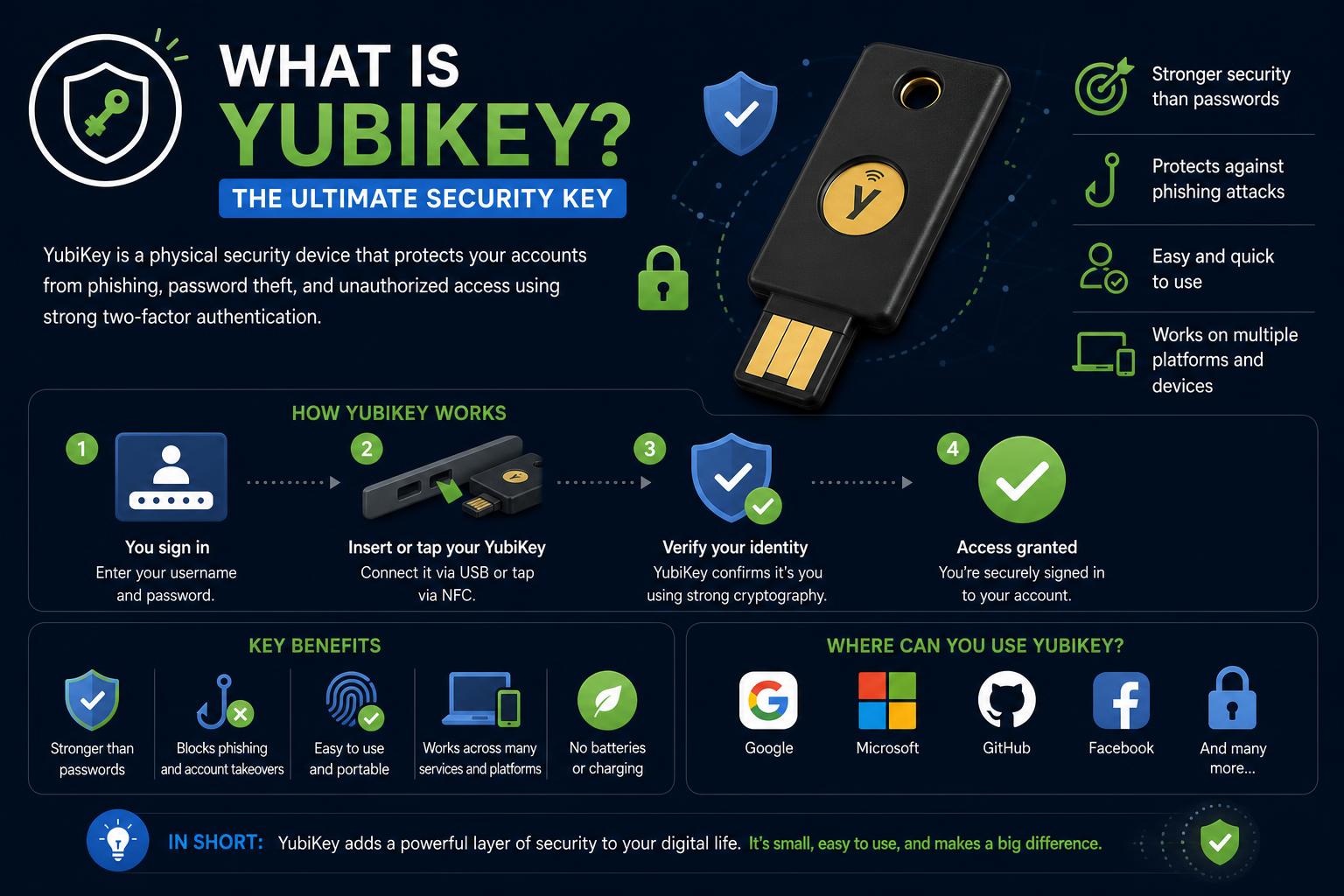
- YubiKey offers unmatched security through hardware-based authentication, blocking phishing and remote attacks.
- It supports multiple protocols like FIDO2, U2F, OTP, and integrates with top platforms and compliance standards.
- Combining YubiKeys with other MFA methods ensures robust security for high-value users while allowing scalability.
In today’s digital landscape, protecting your online identity is more essential than ever. As cyberattacks grow in sophistication and frequency, traditional password-based security methods no longer offer sufficient protection. Cybercriminals have adapted to overcome single-factor authentication, making it easy for them to gain unauthorized access through phishing, credential stuffing, and other cunning tactics. This has created an urgent need for robust, user-friendly solutions like the YubiKey. Imagine logging into your critical accounts with a simple tap, confident that even the most seasoned hacker can’t impersonate you. That’s the promise of the YubiKey – a tiny but powerful hardware authentication device that puts you back in control of your digital security. But what exactly is a YubiKey? How is it better than other two-factor authentication (2FA) options, and does it have any drawbacks? If you’re ready to get serious about protecting your data, devices, and accounts, let’s unpack everything you need to know about the YubiKey – from core technology to practical setup, real-world comparison, and expert tips to avoid common pitfalls.
What is a YubiKey?
The YubiKey is a small hardware device created by Yubico that acts as a secure access key for your online accounts and digital assets. Unlike conventional 2FA methods like SMS, email, or authenticator apps, the YubiKey is a physical tool that you connect to your computer, laptop, or mobile device. Once plugged in, you simply press its button or touch its sensor, and it transmits a unique code to the authentication server, validating your identity. This process is lightning-fast and nearly impossible for malicious actors to compromise remotely. YubiKey’s origins stem from the desire to create a ubiquitous, user-friendly security solution. Founded in 2007 by Jakob and Stina Ehrensvärd in Sweden, Yubico has become synonymous with tamper-resistant hardware authentication. The device’s name merges “your ubiquitous key” with “yubi,” the Japanese word for “finger” – highlighting both its physical nature and the user action required for security.
How Does YubiKey Work?
The YubiKey isn’t just a fancy USB stick – it’s a sophisticated cryptographic tool with layers of protective mechanisms. At its core, each YubiKey contains a secure element (a special chip) designed specifically to generate and store cryptographic secrets. These secrets never leave the device. When you log in to a site or application that supports hardware authentication, your YubiKey proves your identity by digitally signing a challenge presented by the service. This cryptographic handshake ensures that only someone in possession of your unique key can access your protected accounts. YubiKeys support multiple authentication protocols:
- FIDO2/WebAuthn: Enables passwordless logins using modern browsers and supported platforms. This is the gold standard for phishing-resistant, password-free access.
- FIDO U2F (Universal 2nd Factor): A previous-generation hardware-based protocol used as an additional layer alongside passwords. Still widely compatible with major platforms.
- One-Time Passwords (OTP): For compatibility with traditional systems, YubiKeys can generate highly secure one-time-use codes, much longer and more robust than standard 6-digit app codes.
- OATH-TOTP/HOTP: Standard time-based (TOTP) and event-based (HOTP) protocols supported by many authenticator apps, but with code generation secured in hardware.
- PIV/Smart Card and OpenPGP: Used for advanced security tasks like file encryption and digital signatures.
The act of touching or pressing the YubiKey serves as physical confirmation of your presence, blocking remote attackers from gaining access even if they manage to steal your credentials. This “human-in-the-loop” verification is a crucial difference that sets hardware keys apart from software-only options.
Why is YubiKey Considered a Superior 2FA Method?
Most people are familiar with 2FA (two-factor authentication) through methods like SMS codes or app-generated numbers. These options add an extra layer of security, but they also have limitations:
- SMS and email codes are vulnerable to interception, SIM swapping attacks, and phishing.
- Authenticator apps, while more secure, can be compromised if your phone is hacked or if the initial seed is intercepted.
- Both methods involve manual code entry, which can be inconvenient, prone to human error, and cause delays.
- No need to enter codes manually. Just connect the key (or tap with NFC if supported) and press the button.
- Cryptographic secrets never leave the device and cannot be extracted even through physical attacks or malware.
- Phishing resistance is built in. The YubiKey can recognize and reject login attempts from fake or spoofed URLs, as the authentication process is bound to the legitimate URL.
- Hardware-generated codes are much longer and more secure against brute-force or interception attacks.
- You can access multiple accounts and devices with a single key, making migration across different platforms seamless.
Types and Protocols: What Can a YubiKey Really Do?
YubiKeys are not a one-size-fits-all device; they are available in various models and support a wide range of standards. To understand their capabilities:
- YubiKey 5 Series: The flagship model, available in various form factors (USB-A, USB-C, nano, NFC, Lightning), supporting protocols like FIDO2, U2F, OTP, OATH, PIV, and OpenPGP.
- YubiKey Security Key Series: Focused on FIDO2/WebAuthn, ideal for passwordless login deployments.
- YubiKey Bio Series: Combines biometric authentication (fingerprint) with the strength of the FIDO2 protocol. Biometric data remains on the key and is not synced to the cloud.
- YubiHSM 2: A hardware security module for servers and cryptographic tasks in enterprise environments.
Supported protocols:
- FIDO2/WebAuthn: For passwordless and phishing-resistant logins on modern platforms.
- FIDO U2F: For legacy 2FA systems, supported by Google, Facebook, GitHub, and others.
- Yubico OTP: Yubico’s proprietary protocol for one-time passwords with high entropy and security.
- OATH-TOTP/HOTP: Standard secure codes for app compatibility, with hardware-based generation.
- PIV (Personal Identity Verification): Smart card standard for digital signatures and encryption.
- OpenPGP: For secure email and file operations.
Comparing YubiKey with Other MFA Options
Not all two-factor solutions offer the same level of security or ease of use. Here is how the YubiKey compares to other common options:
- VS. SMS codes: Mobile carrier databases can be breached, and SIM swapping is a well-known tactic. The YubiKey requires physical possession and cannot be compromised remotely.
- VS. Authenticator apps: Although more secure, they require quickly accessing and typing codes, which can be inconvenient and vulnerable if the phone is compromised. The YubiKey performs the action with a single tap.
- VS. Email verification: If an attacker gains access to your email, they can regain full control. The YubiKey maintains hardware-level security without relying on third parties.
- VS. Biometric methods: Biometric security cannot be changed; if compromised, that layer is lost. The YubiKey maintains protection in hardware without exposing biometric data.
- VS. Software-based MFA: The YubiKey works independently of the operating system and offers additional physical protection against malware.
[related url=”https://www.ikkaro.net/what-is-bittorrent/”]
Why YubiKey is the Choice for High-Value and High-Risk Use Cases
YubiKeys are not just for ultra-paranoid IT professionals – they’re increasingly mandated for users who control sensitive systems or significant assets. Here is how hardware protection like YubiKey becomes essential in critical environments:
- System, database, or cloud infrastructure administrators: A loss of control can cause catastrophic breaches and regulatory complications. YubiKey protection is often a compliance requirement.
- Access to financial and treasury management platforms: To move large sums or expose confidential information, only hardware keys offer the necessary security.
- Identity managers and SSO providers: Securing these accounts prevents attackers from generating new credentials.
- Code repositories and CI/CD pipelines: Protecting developer accounts helps reduce supply chain vulnerabilities.
- Industries targeted by advanced phishing attacks, such as healthcare, legal, and financial sectors.
[related url=”https://www.ikkaro.net/what-is-vibe-coding/”]
Is YubiKey Always the Best Option? When Apps Are a Viable Choice
- Mass consumer platforms (social media, e-commerce): It’s difficult to require everyone to have a physical key; free apps on mobile devices provide a solid, easy-to-implement level of security.
- Internationally distributed or temporary users: Shipping physical keys can be a logistical challenge, whereas apps allow immediate global deployment.
- Tight budgets and heavy technical support environments: Apps have no additional cost and scale easily across the entire user base.
- BYOD setups and fast onboarding: Users scan a QR code and enroll in seconds, boosting adoption and protection.
- Loss recovery: Apps allow simple backup and recovery options, whereas physical keys require additional management.
[related url=”https://www.ikkaro.net/restoring-windows-10-to-factory-settings/”]
Under the Hood: How YubiKey Technology Works
The YubiKey is more than just a fancy input device. Its security comes from a combination of clever hardware, hardened cryptography, and smart design.
Secure Element & Key Storage
Every YubiKey includes a dedicated secure element, or cryptographic chip, engineered specifically to withstand tampering, reverse engineering, and side-channel attacks. Private keys never leave this hardware boundary. Even if a hacker has physical possession of the device, extracting secrets requires advanced equipment and expertise far beyond what’s available to most attackers.
Protocol Handling
FIDO2 and U2F credentials are created through a pairing process with the server, locking a public-private key pair to a specific domain origin. This means:
- Even if you get fooled by a fake login page or phishing site, your YubiKey checks the domain origin at the protocol level and will not authenticate for the wrong site.
- Passwordless logins (passkeys) use this same architecture, with credentials never exposed outside the chip.
One-Time Passwords (Yubico or OATH) are generated only when you physically touch or press the key, and the length/complexity makes them infeasible to guess or intercept.
Physical Proof of Presence
The physical touch or button press on the YubiKey isn’t a gimmick: it proves to the server that a real human is present at the device, not malware or a remote script. The device’s sensors confirm a real touch (not just electrical contact), and authentication is time-bound to further reduce the risk that someone could hijack an initiated login request.
Storage & Flexibility
Resident credentials (discoverable) are physically stored on the device, enable true username-less login, but are limited in number based on the device model (anywhere from 25-100 resident credentials). Non-resident credentials are derived on-demand, unlimited in number but require you to provide a username at login. This technical flexibility is crucial for organizations planning passwordless migrations or supporting hundreds of services with a single key.
YubiKey Setup: How to Get Started
Getting your YubiKey set up is straightforward – and not very different from setting up app-based 2FA. The general steps are:
- Plug your YubiKey into your device’s USB port or tap with NFC (for mobile/compatible models).
- Visit the Yubico setup site: https://www.yubico.com/setup/ and choose your device.
- Select the services you want to secure. Major platforms like Google, GitHub, Dropbox, Microsoft, and Twitter all support YubiKey 2FA.
- Follow the on-screen instructions: typically, you’ll be directed to your account’s security settings, click to register a security key, then insert and tap your YubiKey.
- Optionally, give your YubiKey a memorable name – especially helpful if you’re managing multiple keys.
- Repeat as needed for all your important accounts.
Accidental Triggers & Everyday Usage
- Configure your YubiKey to require a long press to generate OTPs if you tend to trigger it accidentally.
- In case a code is leaked, it can be invalidated through Yubico services or simply by using the key again (the code is single-use and becomes invalid after use).
[related url=”https://www.ikkaro.net/how-to-play-tomodachi-life-on-pc/”]
Using a YubiKey Across Different Devices
Lost Your YubiKey? How to Manage Recovery
- Set up backup codes and store them in a secure, offline location.
- Add a backup key for each account; register a second YubiKey or a different hardware solution and keep it in a safe place.
- If you don’t have a backup, many services offer recovery processes (identity verification, support), though they tend to be slow. Planning ahead minimizes risks.
- When access is restored, remove the lost key from your account settings; the key itself contains no sensitive information that would make it easy to identify or misuse.
Detailed Comparison: YubiKey vs. Other 2FA Devices and Apps
| Attribute | YubiKey | Authenticator App |
|---|---|---|
| Code Entry | Touch key, automatic | Read and type code |
| Phishing Resistance | Blocks fake sites (origin bound) | Vulnerable to real-time relay |
| Physical Security | IP68 rated, no moving parts, tamper-resistant | Dependent on overall device health |
| Device Dependency | Works offline, needs no battery | Needs working phone/battery/app |
| Recovery | Backup key/backup codes required | Cloud sync or backup codes supported |
| Malware Resistance | Hardware isolated | Can be extracted if device is compromised |
| Usability | Plug and play, no manual typing | User must find/transcribe rapidly-changing codes |
| Cost | ~$50 per user per key | Free (app store downloads) |
[related url=”https://www.ikkaro.net/guide-to-arduino-ide/”]
Integration, Management, and Usability at Scale
Deploying YubiKeys across a large organization presents challenges, but also delivers major benefits.
Integration Options
YubiKeys integrate with virtually every modern identity and access management system, including:
- Microsoft Azure AD and Entra ID
- Google Workspace and consumer Google accounts
- Okta, Auth0, and other major SSO providers
- GitHub, GitLab, Bitbucket, and code repositories
- VPNs, firewalls, and legacy logins via OTP support
- Workstations (macOS, Windows, Linux) via smart card or FIDO2
The key is to assess which systems natively support FIDO2/WebAuthn and which will require OTP or PIV compatibility. Progressively, this procedure resembles the steps for the proper use of advanced protocols in identity and security management.
User Management & Scaling Lessons
Rolling out hardware keys to hundreds or thousands of users? Keep these best practices in mind:
- Distribute at least two keys per privileged user: one for daily use, one locked away as a backup.
- Document and automate the registration, replacement, and revocation process for lost keys.
- Plan for user training: the main confusion comes from initial setup, not day-to-day use.
- Monitor support tickets and feedback for “gotchas” in your org’s specific environment (e.g., USB port restrictions, NFC compatibility).
Most organizations opt for a hybrid system: YubiKeys for high-value/admin roles, apps for the rest, with well-implemented scalability and migration strategies to optimize security and ease of use.
Beyond 2FA: The YubiKey in Compliance and Zero Trust Security
YubiKeys aren’t just a best-practice choice, they’re often required by regulatory frameworks including FIPS, PCI DSS, HIPAA, and various zero trust security mandates.
- FIPS 140-2/140-3: U.S. government and defense sector mandates. Yubico offers certified models to comply with these standards.
- CMMC and NIST AAL3: Standards for multi-factor authentication in critical industries.
- EU eIDAS & Common Criteria certifications: For digital identity, qualified electronic signatures, and regulated markets in the EU.
Addressing Security Myths and Concerns
Is YubiKey Open Source or Proprietary?
While Yubico offers open source reference code for some supported standards (like OpenPGP and HOTP), the firmware running on retail YubiKeys is mostly closed-source; this has raised concerns within the security community. Yubico justifies this by prioritizing supply chain security and the risks associated with general-purpose hardware in high-security applications. Ultimately, users must weigh the benefits of certified commercial hardware against a completely open implementation, but YubiKey’s reliability track record is robust.
What About Past Vulnerabilities?
Yubico has responded quickly to vulnerabilities in previous generations, offering free replacements along with firmware and certification updates. Although all security hardware can have flaws, keys with hardware protection remain far more secure than any software-based solution. Current models incorporate lessons learned from previous incidents.
Advanced: Building Custom Authentication Stacks with YubiKey
- YubiKey Manager and SDKs allow developers to configure and provision devices for multiple protocols.
- SuperTokens and similar frameworks offer ready-to-use MFA solutions, including WebAuthn and TOTP, for fast integration.
- Libraries in Node.js, Python (pyotp), Go, Rust, and .NET facilitate the adoption of TOTP and FIDO2 protocols.
- Implementing progressive deployment strategies allows fallback to TOTP codes or backups in case of key loss.
Best Practices for Secure and User-Friendly MFA
- Always register backup keys: Do not allow users to skip registering a backup or recovery codes. Include this in the onboarding process.
- Implement a clear hierarchy: primary key, secondary key, backup codes, and administrative recovery.
- Keep enrollment processes simple and clear, using clear step-by-step guidance in case of failures.
- Do not display technical error messages publicly to users: Keep the user experience friendly and avoid confusion.
- Monitor and log all authentication events: Track usage, failures, backup code accesses, and geographical anomalies.
- Educate users: Provide clear instructions for setup, daily use, and what to do if a device is lost.
The Real-World Impact of YubiKey Adoption
Emerging Trends: Passwordless Authentication and the Future of Secure Access
YubiKey doesn’t just improve 2FA security—it also leads the way toward a passwordless future. Platforms like Windows Hello, iOS Passkeys, and Google Advanced Protection are expanding passwordless options, and with WebAuthn and FIDO2 support, the complete elimination of passwords is closer than ever.
- No password reset tickets for technical support.
- Faster authentication—just insert and tap.
- No risk of password reuse or easily crackable passwords.
- Significant reduction in effective phishing across organizations.
YubiKey combines strength, simplicity, and versatility, making it one of the most effective tools for protecting accounts and data in any environment.