
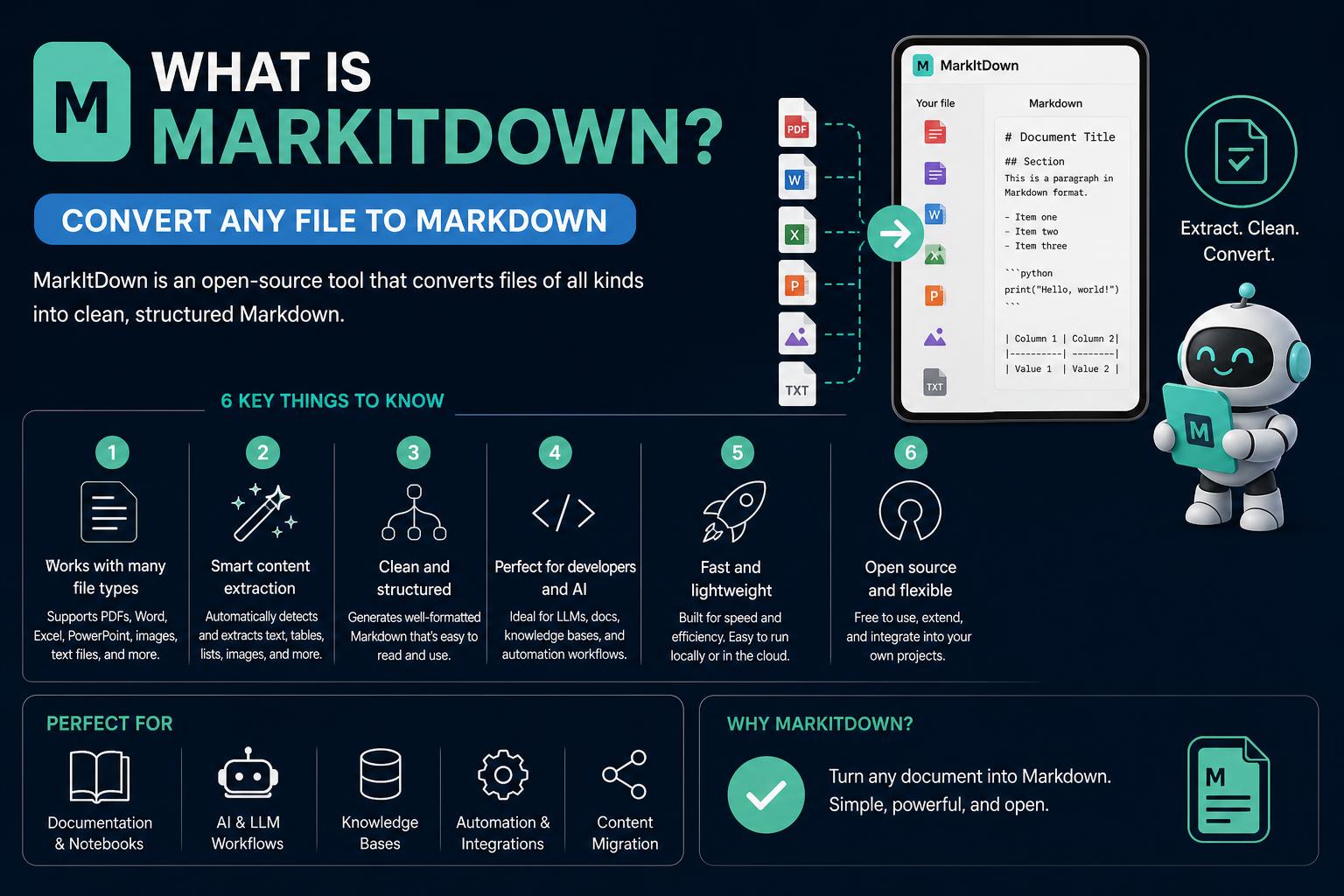
- MarkItDown is a powerful open-source tool by Microsoft for converting diverse files to Markdown.
- It supports a wide range of formats, including PDF, Office documents, images, and audio with advanced extraction.
- Its extensible architecture, plugin support, and VS Code integration make it adaptable for modern workflows and LLM training.
The digital landscape is full of documents, spreadsheets, presentations, and varied formats that rarely speak the same language. If you’ve ever needed to transform a stubborn PDF, an Excel table, or even an image into clean, structured Markdown, you’ve likely hit numerous roadblocks. Enter MarkItDown—a tool that’s rapidly emerging as a go-to solution for developers, knowledge workers, and AI enthusiasts who crave seamless file conversion.
In this in-depth guide, we’ll break down exactly what MarkItDown is, how it stands out, what makes it incredibly popular, and how you can integrate it into your daily workflows. We’ll touch on every angle, from its technical prowess to real-world use cases, tips, developer options, and beyond. Buckle up for a detailed tour through Microsoft’s impressive open-source toolkit!
What Exactly is MarkItDown?
MarkItDown is a lightweight open-source Python utility, developed and maintained by Microsoft, that gives you the ability to convert a whole range of file formats into well-structured Markdown format. While there are other conversion tools out there, MarkItDown stands out for its focus on retaining document fidelity, structure, and key data, making it invaluable not only for human readers but also for Large Language Models (LLMs), AI pipelines, and search indices that thrive on Markdown input.
This powerful platform is compatible with Python versions 3.10 through 3.14 and, though designed for technical and developer audiences, is accessible enough for power users who want to automate or streamline document workflows.
Why is MarkItDown Gaining So Much Buzz?
Since its public release, MarkItDown has exploded in popularity—amassing tens of thousands of GitHub stars in short order. The excitement largely comes from its flexibility, modular design, and the breadth of file types it can handle.
- Office documents (Word, PowerPoint, Excel): Converts everything from text to tables and lists while preserving headings and content structure.
- Images (JPEG, PNG, GIF): Extracts EXIF metadata, and can generate rich alt text or detailed descriptions if connected to an LLM.
- Audio files (MP3, WAV): Performs speech-to-text transcription for extracting meaningful content—even from voice notes or recordings.
- Web & data formats (HTML, JSON, XML, CSV): Turns complex data stacks and tables into clean Markdown equivalents.
- ZIP/Archives: Iterates through all included files, converting each one as needed.
- Video and advanced document analysis (with Azure Content Understanding): Offers multi-modal conversion, including field extraction from invoices, receipts, and multimedia content.
The core advantage lies in just how ‘token-efficient’ and compatible the output is with popular AI models. Most modern LLMs, from OpenAI’s GPT-4 to custom models, ‘speak’ Markdown natively. Microsoft even notes that such models are trained with vast quantities of Markdown-formatted text, so using MarkItDown helps feed data to both humans and machines in their most digestible form.
Supported File Formats—What Can MarkItDown Handle?
MarkItDown is especially valuable because of its broad file support. Here’s an extensive look at what it handles out of the box and with plugins:
- PDF: Text-based extraction, with optional OCR via plugins for scanned image-based documents.
- Word (.docx), PowerPoint (.pptx), Excel (.xlsx): Translates office suite files preserving text, structure, tables, slides, and headings.
- Images (PNG, JPG, JPEG, GIF): Extracts EXIF/metadata, and can use LLMs or dedicated plugins for generating descriptive alt text.
- Audio (MP3, WAV): Leverages speech recognition to convert speech to Markdown-formatted text.
- Web formats & Data (HTML, CSV, JSON, XML): Retains layout and table structures where possible, giving you Markdown tables straight from the source content.
- ZIP Archives: Recursively processes contents, making batch conversions fast and efficient.
- YouTube URLs: Fetches and transcribes video content if plugins are activated.
- eBooks (EPUB): Converts EPUB files into readable Markdown.
Optional dependencies expand functionality: You can install extra modules depending on whether you need PDF, PowerPoint, DOCX, XLSX, audio transcription, and more. The command pip install 'markitdown[all]' will grab everything, or you can customize for your use-case.
MarkItDown vs other File Conversion Tools
Whereas popular tools like textract offer multi-format extraction, MarkItDown puts its focus on Markdown output that preserves document structure. That means you’re not just getting a text dump; you receive headings, lists, tables, and links represented as true Markdown. This is a big deal if you care about readable documentation, easy migration to knowledge bases, or seamless feeding into LLMs for context-aware responses.
How Does MarkItDown Work Under the Hood?
MarkItDown’s architecture is clean, modular, and designed for extensibility. The core logic is housed in a DocumentConverter class, which all file-type-specific converters inherit from. These are dynamically registered, so support for new or niche formats can be easily added by the developer community through plugins.
For example:
- Office files: Tools like
mammothandpandasare utilized for conversion to HTML, then transformed into Markdown withBeautifulSoup. - PDF: Extraction leverages
pdfminer, with plugins available for OCR capabilities on scanned files. - Audio: Integrates
speech_recognition(using Google’s API by default) for speech-to-text conversion, though OpenAI or Azure integrations are possible for higher fidelity or specific use cases. - Image files: Can process EXIF metadata by default, and invoke an LLM to author natural language descriptions or alt tags.
MarkItDown can run entirely offline for supported file types or connect with third-party APIs and plugins for advanced extraction tasks, such as OCR or YouTube caption retrieval.
Integration with LLMs and AI Workflows
One of the killer uses for MarkItDown is its role in prepping documents for LLM training and AI-powered search. Whether you’re assembling context sources for chatbots or migrating corporate wikis, Markdown is a ‘sweet spot’—compact, easy to parse, and friendly to both humans and machines. MarkItDown’s focus on token-efficiency and structure retention means that both automated tools and human editors benefit equally from its conversion outputs.
Modern LLMs, like those offered by OpenAI, respond best to structured, Markdown-rich content. So, MarkItDown’s approach gives you an edge in any AI-adjacent workflow requiring information extraction or knowledge ingestion.
Plugin Ecosystem—Unlimited Format Expansion
If the core formats don’t cover your needs, MarkItDown supports third-party plugins to unlock even more capabilities.
- Plugins can add support for specialized file types, advanced OCR, or alternative data extraction workflows.
- Find plugins using the #markitdown-plugin hashtag on GitHub, or develop your own by referencing the
markitdown-sample-pluginrepository. - Plugins are opt-in and must be explicitly enabled—giving you security and control over your environment.
One standout is the markitdown-ocr plugin, which enables neural OCR on PDFs, DOCXs, PPTXs, and XLSXs for extracting text from embedded images using vision models—no separate libraries required!
Advanced Features: Azure Document Intelligence & Content Understanding
For users with advanced extraction needs—such as high-quality OCR, structured field extraction, or multi-modal content conversion—MarkItDown offers integrations with Azure Document Intelligence and Azure Content Understanding (CU).
- Azure Document Intelligence: Uses cloud-based layout extraction for complex PDFs and structured documents.
- Azure Content Understanding: Provides YAML front matter extraction for domain-specific fields (invoice amounts, contract clauses), supports multimodal files (audio, video, images), and lets you configure custom analyzers.
These integrations do come at a cost (per API call), but they bring enterprise-scale extraction to cloud workflows—essential when your use case demands precision or multi-format support beyond local computing capabilities.
Easy Installation and Usage
- Installation via PyPI:
pip install 'markitdown[all]'(highly recommended for all features) - Via Source: Clone the official GitHub repo and follow the installation instructions for maximum flexibility.
Command Line Tool
If you love working in the terminal, MarkItDown comes with a straightforward CLI. Just run:
markitdown <path-to-file.ext> -o <output-file.md>
This will convert your file and drop the Markdown result where you need it. You can chain commands for batch conversion or automate it in scripts.
Python API
For developers and automation pros, MarkItDown exposes a simple Python API:
from markitdown import MarkItDown
md = MarkItDown()
result = md.convert('test.xlsx')
print(result.markdown)
This makes it dead easy to plug MarkItDown into ETL pipelines, data ingestion systems, or AI model training workflows.
Virtual Environment and Dependency Handling
To avoid dependency conflicts, it’s best to install MarkItDown in a dedicated virtual environment. You can use Python’s built-in venv, uv, or Anaconda—tailor the setup to your dev stack and avoid accidentally breaking other Python projects.
Security and Input Validation
MarkItDown operates with the same privileges as your Python process. That means, just like native file I/O, you need to be mindful of what files and URLs you’re passing to it. Always sanitize and restrict untrusted inputs, especially if integrating MarkItDown into hosted applications or web services.
Use the narrowest API possible for your needs: stick to convert_local() for local files, and only use convert() for broader use-cases, controlling what the tool has access to. Don’t expose the conversion pipeline directly to user-uploaded content without upstream validation and safeguards.
Integrations: Visual Studio Code Extension & Online Platforms
If you’re a VS Code user, MarkItDown offers a seamless extension via the Visual Studio Marketplace that puts all the power of the Python tool right in your editor.
- Right-click conversion: Instantly create Markdown files from PDF, DOCX, PPTX, XLSX, and more—no terminal needed. Just pick your files in the Explorer, right-click, and choose “Convert to Markdown”.
- Batch & multi-select support: Convert multiple files at once without leaving your IDE.
- Isolated Python environment: The extension sets up its own virtual env and self-manages dependencies, leaving your system Python untouched for maximum stability.
- Output management: Prevents overwrites by creating uniquely numbered output files and can automatically open the result post-conversion.
- Supported formats: Matches the Python tool, with transparent handling for images, archives, and audio. Note: OCR for image-only PDFs requires plugin or LLM configuration.
- Configuration and troubleshooting: Modify settings for auto-open and overwrite behavior, with clear notifications for errors or empty outputs.
For those who prefer a web approach, platforms like Markitdown Online let you upload your files through the browser and instantly receive Markdown outputs, perfect for lightweight knowledge base migrations or AI training corpus creation.
Common Use Cases: Why Should You Care?
- Migrating static documentation into editable Markdown for technical wikis and corporate intranets.
- Prepping documents for ingestion into LLM-powered chatbots and knowledge retrieval systems.
- Batch extraction of content and metadata from large sets of PDFs, office files, or multimedia assets.
- Developing automated API endpoints for file conversion as part of larger automation stacks (for example with FastAPI, Zapier, or n8n).
- Transforming legacy formats for search engine indexing or archiving knowledge bases.
Tips, Limitations & Developer Opportunities
While MarkItDown is flexible, there are a few things you should know:
- PDF Limitations: Image-based PDFs require OCR and may lose formatting on extraction. You may need to run them through a preprocessing tool if you need headings and structural details.
- Audio and video: Built-in transcription is limited to simple speech recognition. For better fidelity, consider connecting to Azure or other advanced APIs.
- Customization: The modular codebase makes it easy to add support for new file formats or integrate with external services. Contributions from the community are encouraged—whether it’s bug fixes, new format plugins, or extending existing features.
For anyone interested in deploying MarkItDown as an API, hosting is possible using cloud solutions that offer pay-as-you-go endpoints. Platforms like Leapcell support seamless, event-driven API deployments—ideal for automating file conversions across distributed teams without renting an entire server.
Getting Help and Contributing
The MarkItDown community is active and welcomes contributions. If you run into any hiccups, GitHub Issues, Marketplace Q&A, and other developer channels are the first stops for troubleshooting and ideas. Do keep in mind Microsoft’s code of conduct and licensing terms, especially if contributing to or distributing modified versions.
If you want to develop a web service, desktop app, or command-line wrapper powered by MarkItDown, it’s fully allowed and even encouraged—just maintain it as a separate package referencing the main library from PyPI (see PyPI here).
MarkItDown is a versatile tool that can significantly streamline document processing workflows, thanks to its support for a wide array of formats, strong Markdown fidelity, and extensibility options. Its integration with AI workflows and plugin ecosystem makes it especially powerful for automation and large-scale data ingestion.