
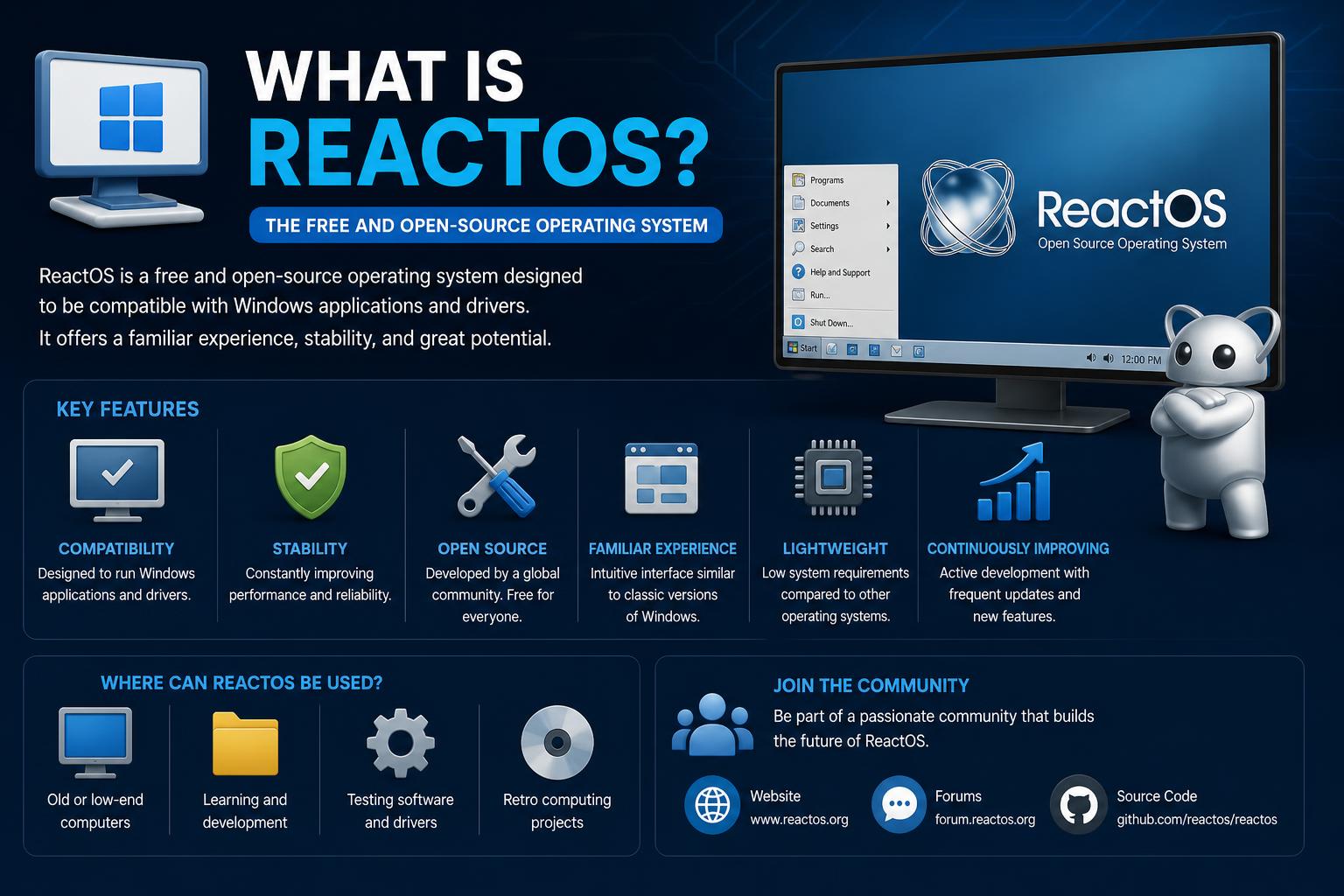
Understanding ReactOS: The Ambitious Open Source Windows Alternative
- ReactOS is a free, open source operating system built to be compatible with Windows software and drivers.
- Its active development focuses on mimicking Windows NT architecture, collaborating with projects like Wine, and ensuring user privacy and freedom.
- Although still in alpha, ReactOS supports many classic and modern Windows applications, but its stability and compatibility continue to improve gradually.
- The project is driven by a global community, regular hackfests, and a transparent development process encouraging broad participation.
ReactOS stands as a testament to what collective passion can create—a free and open source operating system designed to be highly compatible with Microsoft Windows. ReactOS is built entirely from scratch, not as a Linux distribution, but as an operating system that mimics the architecture and behavior of Windows NT family systems (NT4, Windows 2000, XP, 2003, and even looking towards Vista and Windows 7 compatibility in the future).
According to the official ReactOS FAQ and its GitHub documentation, the project’s mission is clear: deliver an operating system that looks and feels like Windows, runs Windows software and drivers, and is familiar to Windows users—all while being free and open source.
How is ReactOS Different from Windows and Linux?
While ReactOS shares the Windows “look and feel,” its codebase is uniquely its own. This makes it fundamentally different from both Windows and Linux. Unlike distributions that employ a Linux kernel and simply imitate Windows aesthetics (perhaps with the help of Wine), ReactOS alternately replicates the Windows NT kernel and system architecture. In other words, ReactOS is designed to natively support Windows applications and device drivers without needing Windows itself or a translation layer like Wine to handle core functions.
In the words of the ReactOS team:
- Free and Open Source: Download and use ReactOS for free. Anyone can view, modify, and contribute to its source code.
- Windows Driver and Software Compatibility: Built to support a wide variety of Windows applications and drivers by mirroring Windows NT’s internal workings.
- Not Linux: While Linux is open source and can run Windows software (through Wine), ReactOS is fundamentally a different OS, sharing no code with Linux.
- Privacy-Oriented: ReactOS does not engage in user data tracking, countering many concerns associated with newer versions of Windows.
Origins: From FreeWin95 to ReactOS
The genesis of ReactOS dates to the mid-1990s, out of the ashes of an earlier and ultimately stagnant project called FreeWin95. The original FreeWin95 initiative intended to create a free software clone of Windows 95, but fell victim to over-planning and lack of action—a fate not so uncommon among ambitious software efforts of that era.
As outlined in the official 30-year anniversary blog post, Jason Filby, frustrated by FreeWin95’s inertia, gathered like-minded contributors and pivoted the project to target the more modern and robust NT family of Microsoft OSes. With a fresh start and a new name—ReactOS—this reaction to Microsoft’s monopolistic position set about the painstaking process of developing an NT-like kernel, then gradually building drivers and system components on top of it.
Eric Kohl, one of ReactOS’s earliest contributors, recalls those foundational days:
“I found ReactOS while searching for example code for my work on Wine. I joined the mailing list and started working on converting FreeDOS’s command.com into a Win32 console application for ReactOS. Early ReactOS releases were no more than bootloaders and minimal kernels, with each incremental feature being a milestone worth celebrating.”
Milestones and Timeline: Charting ReactOS’s Progress
ReactOS’s journey has been one of perseverance, punctuated by both hard-earned victories and considerable roadblocks. Below is a chronological overview of the project’s most significant milestones, inspired by information from the official anniversary post and the ReactOS Wikipedia page:
- 1996: Origins in FreeWin95.
- 1998: ReactOS officially inaugurated, focusing on compatibility with Windows NT, starting to define the kernel and basic drivers.
- 2003: Release of ReactOS 0.1.0, the first version that can boot from CD (no desktop environment, only command line).
- 2006: Introduction of ReactOS 0.3.0, bringing network support and an initial package manager. Source code audit to comply with intellectual property regulations following concerns over potential exposure to Microsoft code.
- 2008: Start of the x86_64 port, marking aspirations to support more modern hardware.
- 2016: Release of ReactOS 0.4.0 featuring a new graphical shell, a more Windows-like interface, and support for standard debugging tools like WinDbg.
- 2020: Reaching the technical Alpha milestone; improvements in stability and performance.
- 2026: The latest official Alpha release is ReactOS 0.4.16, with continuous improvements and an expanding contributor base.
ReactOS Architecture: Technical Details and Compatibility Goals
The core of ReactOS aims to reproduce the Windows NT architecture in a clean, open-source environment. Most of the code is in C, with some parts in C++, such as the File Explorer and multimedia system. In terms of compatibility, the immediate focus is achieving parity with Windows Server 2003, with the future vision of supporting Windows 7 and newer versions.
Key aspects of its architecture and technical design include:
- Hybrid kernel: Designed to closely replicate the functionality and behavior of the Windows NT kernel to maximize compatibility with applications and drivers.
- API Implementation: Partially implements large blocks of the Windows API, with efforts directed at porting to architectures like AMD64.
- Collaboration with other projects: Shares and reuses code, notably collaborating with Wine (especially regarding APIs and compatibility).
- Supported platforms: Primarily IA-32 (x86), with growing support on x86-64. Efforts on ARM and PowerPC have been abandoned. Experimental support exists on platforms like NEC PC-9800 and Xbox via specific HALs.
- File system support: Default installation on FAT16/FAT32 partitions; experimental support for BtrFS since version 0.4.10, and ongoing improvements in NTFS compatibility.
Installing and Running ReactOS
It is recommended to install ReactOS in a safe and isolated environment, such as a virtual machine, rather than on production hardware, as it is still in the alpha phase. Users are warned that bugs or data loss are possible.
How to Repair Windows 11 Using Command Prompt: Advanced Techniques & Best Practices
The typical installation process involves:
- Downloading the latest ISO from the official ReactOS download page.
- Using the Applications Manager (built-in store) to install tested software.
- Testing compatibility with various Windows applications and drivers, understanding that some will work and others won’t (Adobe Reader, GIMP, and older versions of LibreOffice are cited as functional in user reports and Wikipedia).
ReactOS can boot as a live CD, install from a bootable CD, or run in virtual environments like VirtualBox, QEMU, or VMware. The installer can format partitions in FAT16/FAT32 or, experimentally, in BtrFS, although FAT remains the recommended option.
Real-World User Experiences and Community Sentiment
User opinions regarding ReactOS reflect high expectations, tempered by real limitations. Some contribute as students or beginner programmers, excited by the idea of a free Windows alternative. Others, in the /r/foss Reddit thread, express skepticism:
“It is 2025 and the project is still moving slowly… It’s been almost 20 years since it started and it’s still in an alpha state.”
While some lament the slow pace and limited use for daily tasks, others view ReactOS as a unique resource for retro gaming, learning about NT architecture, and keeping foundational Windows knowledge relevant.
A 2025 review in The New Stack concludes that ReactOS remains imperfect:
“ReactOS is unstable, slow, and doesn’t support many applications. But if you want to see what can be achieved, it is an excellent project to start with. The only reason anyone would use ReactOS would be to join the developer team and help advance the operating system.”
Major Features and Applications
ReactOS, even in its alpha phase, features a surprising set of user and administration tools—many familiar to Windows veterans.
- File Explorer (ReactOS Explorer): A basic graphical interface for navigating files, similar to Windows.
- Applications Manager (RAPPS): An integrated app store, akin to Linux package managers, for one-click installations of open-source and legacy Windows software.
- Accessories: Calculator, Notepad, Command Prompt, Paint, WordPad, media player, sound recorder, character map, clipboard viewer, and more.
- Administrative Tools: Device Manager, Event Viewer, Services Manager, MSConfig, and others.
- Classic Windows Games: Solitaire, Spider Solitaire, and Minesweeper in cloned versions for nostalgic fun.
- Compatibility-focused utilities: ReactX Diagnostic (equivalent to DxDiag), Registry Editor, Task Manager, among others that mimic their Windows counterparts.
Additionally, ReactOS supports a robust set of common Command Prompt commands (such as cd, dir, copy, del, taskkill, sc, etc.) to maintain compatibility with scripts and batch files, aimed at long-time Windows users.
Software and Hardware Compatibility: The Ongoing Challenge
ReactOS’s primary goal remains the ability to run Windows drivers and applications natively. Its design objectives include:
- Binary compatibility with programs and drivers for Windows Server 2003 and later versions.
- Serving as an open-source alternative to Windows on old or unsupported hardware.
- Sustaining retro games, legacy business applications, and devices that no longer receive official support from Windows.
However, compatibility is still limited. Many modern applications fail to install, crash upon opening, or perform poorly, as noted by users and reviewers. Reliance on older driver frameworks, incomplete APIs, and slow updates are major causes of these issues.
Successful cases include Adobe Reader 9.3, GIMP 2.6, and LibreOffice 5.4, although it is advisable to manage expectations with newer or highly demanding software.
Development Model and Project Organization
The entire ReactOS project is volunteer-driven, with hundreds of people contributing code, documentation, and translations since its inception. The source code is governed by the GPL 2.0 license, and its operations are transparent. Those wanting to participate can submit pull requests, report bugs, or join the community.
Main development takes place on GitHub, while older archives are kept in SVN. Project leadership is community-driven, with organizations like the ReactOS Foundation and ReactOS Deutschland e.V. providing funding and legal support. Hackfests, code audits, and collaborations with other projects, especially Wine, are frequently held.
Developers maintain a firm focus on security and respecting intellectual property. After a scare in 2006 regarding exposure to leaked Microsoft code, the project conducted audits and established strict policies for clean-room reverse engineering, protecting ReactOS and its contributors.
The Development Workflow: Building ReactOS and Reporting Bugs
Compiling ReactOS from source code requires experience, though entry points exist for all skill levels. One can work with the ReactOS Build Environment (RosBE), compatible with Windows and Linux, or use Microsoft’s Visual C++. Instructions are available on their website.
Testing and debugging tools are numerous, including a test suite, an issue tracking system (Jira), and documentation for running “winetests” and comparing regression results.
ReactOS’s Role in the FOSS Ecosystem: Collaboration and Dependency
ReactOS does not try to reinvent every component from scratch; instead, it collaborates with and draws momentum from the free and open-source software ecosystem. Some alliances and code reuses include:
- Wine: A compatibility layer that allows running Windows apps on Unix-like systems.
- UniATA: Provides SATA driver support for modern hardware.
- FullFAT: Used in experimental file system rewrites.
- Mesa 3D: Provides OpenGL rendering capabilities for interface graphics and applications.
- Other FOSS libraries: Uses FreeType for fonts, Tango Desktop icons, KernelEx to improve APIs, among others.
The collaboration with Wine deserves special mention. While some low-level components (NTDLL, KERNEL32, etc.) are too different to share directly, ReactOS greatly benefits from Wine’s user-mode implementations. There is even an experimental branch, Arwinss, that seeks deeper integration with Wine for UI rendering.
Security and Legal Considerations
Security becomes a priority as ReactOS matures. In addition to strengthening protection, vigilance is maintained to ensure no proprietary Microsoft code is present, to prevent potential litigation. Clean-room code audits and controlled reverse engineering policies minimize these risks.
Reception, Public Interest, and Impact
Throughout its history, ReactOS has garnered attention for its ambition and what it symbolizes: a courageous attempt to break Windows’ hegemony.
- Der Spiegel (2004) viewed it as a refuge for Windows users who want freedom without switching to Linux.
- DistroWatch defines it as a “free and open source operating system based on the best design principles found in the Windows NT architecture.”
- PC Magazine and John C. Dvorak (2008) suggested that ReactOS could be a bigger threat to Microsoft than Linux, given the almost intact structure of Windows NT across several versions.
- Other analysts express caution, highlighting the lack of corporate backing and resources.
Interest from the community and enthusiasts remains alive, with recognition in contests and as “Project of the Month” on SourceForge.
Funding and Hackfests: Fueling Ongoing Development
Funding for ReactOS is modest but significant. Crowdfunding campaigns for development events (such as Kickstarter and Indiegogo) and operational expenses have been held, raising between $25,000 and $50,000, managed primarily by ReactOS Deutschland e.V. Hackfests and developer summits are frequent events that strengthen the community and accelerate major advancements, in addition to participation in Google Summer of Code.
Release History: From 0.1.0 to Today and Beyond
ReactOS’s path is one of incremental progress, but with frequent pivots in the face of challenges. Here is a review of the most relevant versions, inspired by Wikipedia and official notes:
- 0.1.0 (2003): Command line only, basic kernel.
- 0.3.0 (2006): First network support, early package management, start of kernel rewrite.
- 0.4.0 (2016): Improved USB support, modern shell, NTFS read support.
- 0.4.13–0.4.16: Advancements in compatibility, bug fixes, improvements to the kernel and hardware support, visual themes, and release infrastructure. Work on stabilizing 64-bit support, UEFI, NTFS write, WDDM drivers, and other features.
- Upcoming versions 0.5.0 and beyond: Improvements in NTFS support, hardware compatibility, DirectX advancements, and virtualization tools.
- Total commits: 88,198
- Unique contributors: 301
- Total files: 31,025
- Lines of code: almost 15 million!
ReactOS in Comparison: Other Projects and Related Ecosystem Efforts
ReactOS is part of a broader ecosystem of alternative operating systems and compatibility layers. Similar projects include:
- Wine: A compatibility layer that allows running Windows apps on Unix-like systems.
- Haiku: A recreation of BeOS focused on usability and performance.
- FreeDOS: An MS-DOS compatible OS.
- ArcaOS / eComStation: Commercial continuations of OS/2, a pre-Windows system.
- coLinux, NDISwrapper, Longene: Projects combining Linux with Windows application and driver compatibility.
Each has its philosophy, community, and feature set, but none seek the near 1:1 compatibility pursued by ReactOS.
The Road Ahead: Future Potential and Community Appeal
ReactOS continues to captivate developers and enthusiasts with its bold proposition: a Windows not controlled by Microsoft. Current development is focused on:
- Modernizing the build environment and installer
- Expanding NTFS and UEFI support
- Improving performance on 64-bit and SMP
- Broadening GPU support (WDDM drivers)
- Collaborating with other open source initiatives on modern APIs
The pace may be slow, a reflection of the volunteer nature and the complexity of recreating over twenty years of Windows development. Nevertheless, every milestone, no matter how incremental, represents a step toward more open, user-controlled computing.
ReactOS is more than a software project: it is a living experiment in digital freedom, platform preservation, and the pursuit of technical potential. For those who value the history of computing, free software, or control over their digital environment, ReactOS offers a unique platform, worthy of following, experimenting with, or contributing to. Its progress, though gradual, continues to forge paths for those who believe there must be an open alternative to Windows.