
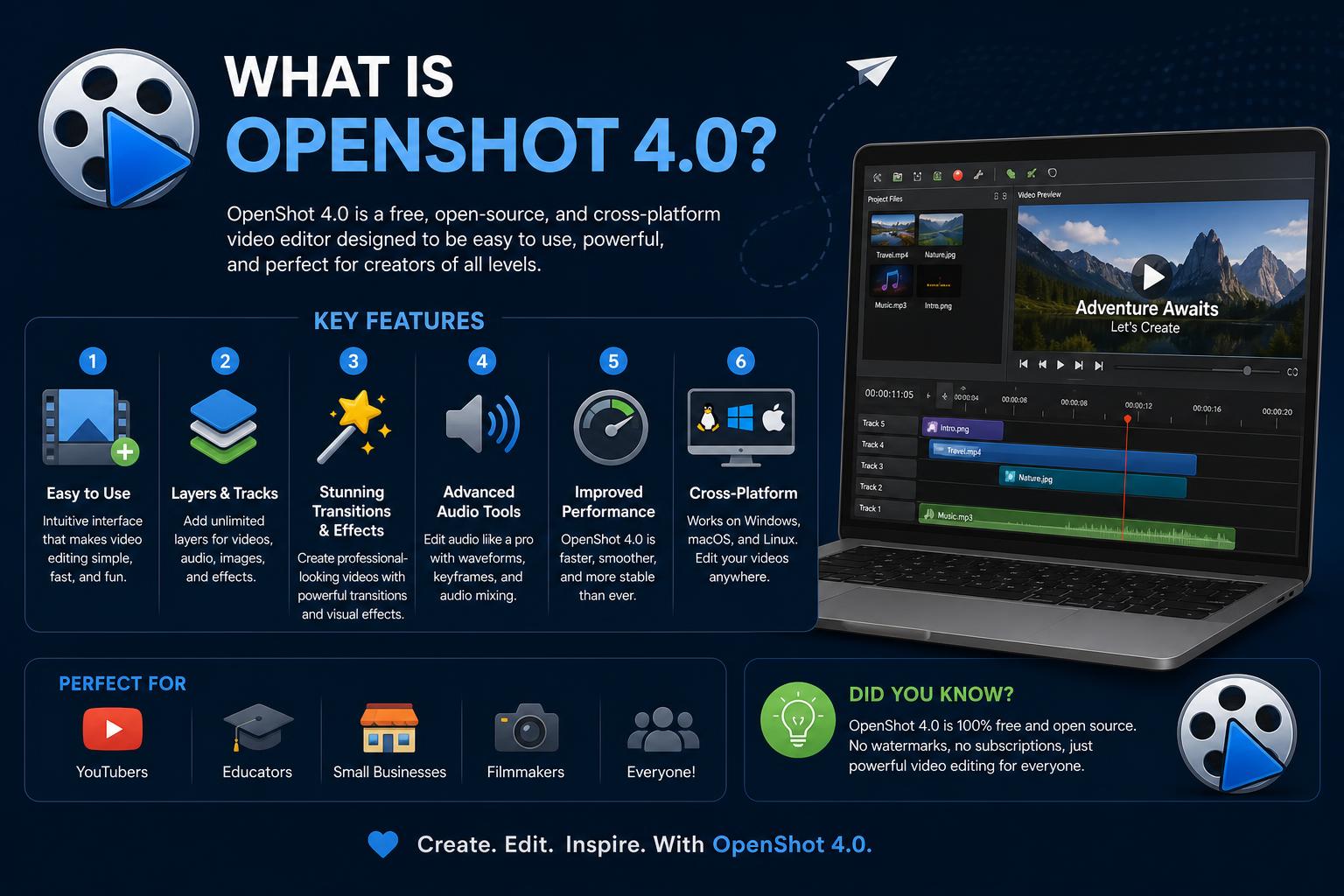
- OpenShot 4.0 ushers in professional-grade color tools and AI-powered features.
- The software is now built on Qt6, enabling enhanced user interface performance and better Linux Wayland support.
- Brand new recording, audio, and video effects expand creative possibilities for all users.
OpenShot 4.0 has just landed, shaking up the world of free and open-source video editing software with a serious batch of professional upgrades and enhanced user experience. For hobbyists, YouTubers, and semi-pros alike, this major release brings powerful new tools that make creating polished videos easier and more exciting than ever before. Fans of the project, as well as those new to OpenShot, are in for a treat: the combination of advanced color grading, integrated recording, and a slicker interface sets a new bar for what you can do with free software.
What’s the big deal about OpenShot 4.0? Not just an incremental update, this version is the culmination of years of development, community feedback, and cutting-edge tech—AI/ML included! Expect a faster, more reliable workflow with eye-catching new effects, clever automation, and the kind of customization you’d usually only find in high-end editing suites. Whether you’re editing your first vlog or a film festival submission, OpenShot 4.0 feels ready for the spotlight.
What Exactly Is OpenShot?
OpenShot Video Editor is a widely celebrated, multi-platform, open-source video editor available for Windows, macOS, Linux, and ChromeOS. Launched in August 2008 by Jonathan Thomas, the project aimed to solve a core problem: give users easy, reliable video editing tools without the need for pricey licenses or heavy system resources.
OpenShot has always proudly worn its open-source badge: it’s free, community-driven, and available in over 170 languages. Over the years, it’s grown into a highly versatile non-linear editor with a reputation for cutting-edge features, friendly interface, and stellar cross-platform support. Version 4.0 lives up to the project’s legacy—by pushing it forward in a big way.
Main Updates in OpenShot 4.0: What’s New?
OpenShot’s latest upgrade isn’t just about bug fixes—it’s about breaking new ground with features aimed at creators hungry for expressive, pro-level results.
Qt6 Toolkit: Foundation for the Future
One of the biggest technical leaps in OpenShot 4.0 is the port to the Qt6 user interface toolkit. This under-the-hood overhaul means:
- Smoother performance across operating systems. The UI is more responsive and reliable now, whether you’re on Windows, macOS, or Linux.
- Enhanced Wayland compatibility for Linux users, allowing for better scaling and display support in modern Linux environments.
- Fractional scaling support out of the box—no more blurry icons on HiDPI screens.
And since OpenShot is written in Python, C++, and PyQt, it benefits from the flexibility and power of open technologies woven together for the best user experience.
Color Grading Revamp: Professional Tools for Everyone
If you’ve ever struggled to get the right look for your footage, OpenShot 4.0’s new Color View is a real game changer.
- Dedicated color workspaces let you switch to correction mode instantly for hassle-free grading.
- Color wheels, curves, and live scopes give creators the kind of pro-level assessment and adjustment tools you’d expect in commercial editors.
- This solves a longstanding issue in previous versions: no more approximating your colors or reaching for outside software.
Your look, your way—right inside OpenShot.
Natively Integrated Video, Audio, and Screen Recording
For the first time, OpenShot now allows you to record your screen, webcam, or microphone directly into your editing project, with no clunky external apps required.
- Set up tracks for video or audio capture without leaving the timeline.
- Monitor input levels in real time, assign new clips to specific tracks, and review immediately after capture.
- This makes live tutorials, reaction videos, or blended media projects way more seamless and efficient.
Brand-New Video and Audio Effects
OpenShot 4.0 rolls out a collection of ten creative new effects, designed to take any project up a notch:
- Shadow and Glow: Add atmosphere or highlight movement in just a few clicks.
- Displacement Mapping: Warp and animate imagery for music videos, title sequences, or surreal edits.
- Film Grain, Timers, and more: All-new control over the stylistic finish of your final cut.
- Audio Visualization: Transform music or dialogue tracks into animated waveforms, frequency bars, or custom visual patterns, making podcasts or music videos stand out visually as well as sonically.
It’s all about more tools, cleaner output, and the ability to get experimental without bogging down performance.
AI/ML Integration: Smarter, Faster Video Editing
Machine learning isn’t just a buzzword—OpenShot deeply integrates both AI-powered effects and automation to save time and unlock advanced capabilities.
- Semantic Selection: The app can now identify and follow people or objects in a scene—enabling animated masks, background swaps, or privacy blurring with just a couple of actions.
- Generative and local AI models: Need to remove noise, boost audio clarity, or enhance voice recordings? OpenShot 4.0 hooks into local ML effects and even supports running ComfyUI workflows (you’ll need a separately running server for advanced tasks).
- YOLOv5 Integration: Plenty of object detection filters now ship with intuitive interfaces to pick your preferred model and quality.
Most importantly, the AI/ML panel and experience have been made much more approachable. Model management, download status, and effect previews are all surfaced in context, helping even newcomers get the results they want quickly.
Performance Improvements & Workflow Enhancements
Version 4.0 focuses as much on speed and comfort as it does on adding features. Core effects have been significantly optimized, so your timeline is smoother and faster—even when stacking multiple tracks or rendering demanding scenes.
- Timeline rendering, editing, and scrubbing are all snappier and more responsive.
- The user interface has undergone polish and quality-of-life tweaks, including a fresher Cosmic Dusk theme and reorganized menus for commonly used features.
- Obsolete or redundant options have been cleared out, making it easier for users to find and use new and advanced capabilities.
Reliability matters: Some reviews even note that OpenShot 4.0 didn’t crash during extended, real-world testing—a first for seasoned users.
Other Handy Features You Can’t Ignore
Beyond the headline features, OpenShot 4.0 continues to support a robust lineup of editing tools that make it a worthy contender alongside both free and commercial editors:
- Unlimited tracks/layers: Build rich, complex edits with as many video, audio, and image tracks as your imagination requires.
- Wide support for video, audio, and image formats via the powerful FFmpeg backend—including everything from WebM, HEVC, and AVCHD to Blu-ray, 4K, 8K, and more.
- Drag-and-drop editing: Import, trim, scale, snap, pan, zoom, and re-sequence your clips with natural keyboard or mouse controls.
- Advanced timeline navigation: Frame-accurate scrubbing for precise edits, time-mapping for reverse or accelerated playback, and keyframe-based animation for pro-level motion graphics.
- Desktop integration: Use your native file browser, take advantage of drag-and-drop support, and enjoy seamless operation across platforms.
- 3D and animated titles: Want to dazzle your viewers? Generate 3D text and motion graphics directly, using Blender integration for even more possibilities.
- Extensive export choices: Easily produce videos optimized for DVD, Blu-Ray, YouTube, TikTok, Snapchat, or custom settings—new social media export filters are now part of the toolkit.
- Digital effects suite: Intensify footage with brightness, gamma, chroma key (green/blue screen), hue, greyscale, and much more—including improved waveform visualization with peak and RMS views.
Platform Support & Installation
OpenShot has long prided itself on being a truly cross-platform solution. These days, it officially supports:
- Windows
- macOS
- Linux
- ChromeOS (via Linux Beta)
Installation is straightforward with downloadable binaries and AppImages directly from the official OpenShot Download page. For Linux users, the inclusion of both AppImages and stable packages through major repositories makes setup a breeze. ChromeOS users can leverage the Linux Beta environment for a native-like experience, provided their hardware supports x86_64 architecture.
Hermes Agent: The Self-Improving, Persistent AI Agent Explained in Depth
Editing Experience: How Does OpenShot 4.0 Really Feel?
From interface tweaks to deep workflow improvements, OpenShot 4.0 aims to deliver the smoothest user experience so far. Here are just a few highlights:
- Customizable workspaces: Save any combination of panels, windows, and views as templates; quickly switch between them to match your editing phase or style.
- Simpler navigation: New, dedicated Simple, Color, and Recording workspaces—plus keyboard shortcuts for rapid switching.
- The now-retired “Advanced” view makes room for more intuitive, customizable workspace layouts that anybody can create and reuse.
This level of polish and flexibility extends throughout the application. Menus have been refined, tooltips made clearer, and the overall aesthetic looks more professional thanks to the improved default theme and general UI clean-up.
Working with Audio: Visualization, Mixing, and Power Tools
Audio is treated as a first-class citizen in OpenShot 4.0.
- Waveforms can now be displayed with precise peak and RMS density options.
- OpenShot allows you to separate audio from video clips, manipulate channels independently, and even render moving waveforms right onto your video—ideal for educational, podcast, or music content.
- The integration of ComfyUI workflows unlocks noise reduction, audio upscaling, voice enhancement, and basic repair directly in your project.
- For more advanced control, OpenShot’s Python API enables scripting and automation of repetitive audio tasks, or batch application of effects.
The editing experience with OpenShot 4.0 has improved remarkably, offering greater fluidity, stability, and features that allow users of all levels to achieve professional results more easily.
What is Octave? Complete Guide to GNU Octave and Its Capabilities