
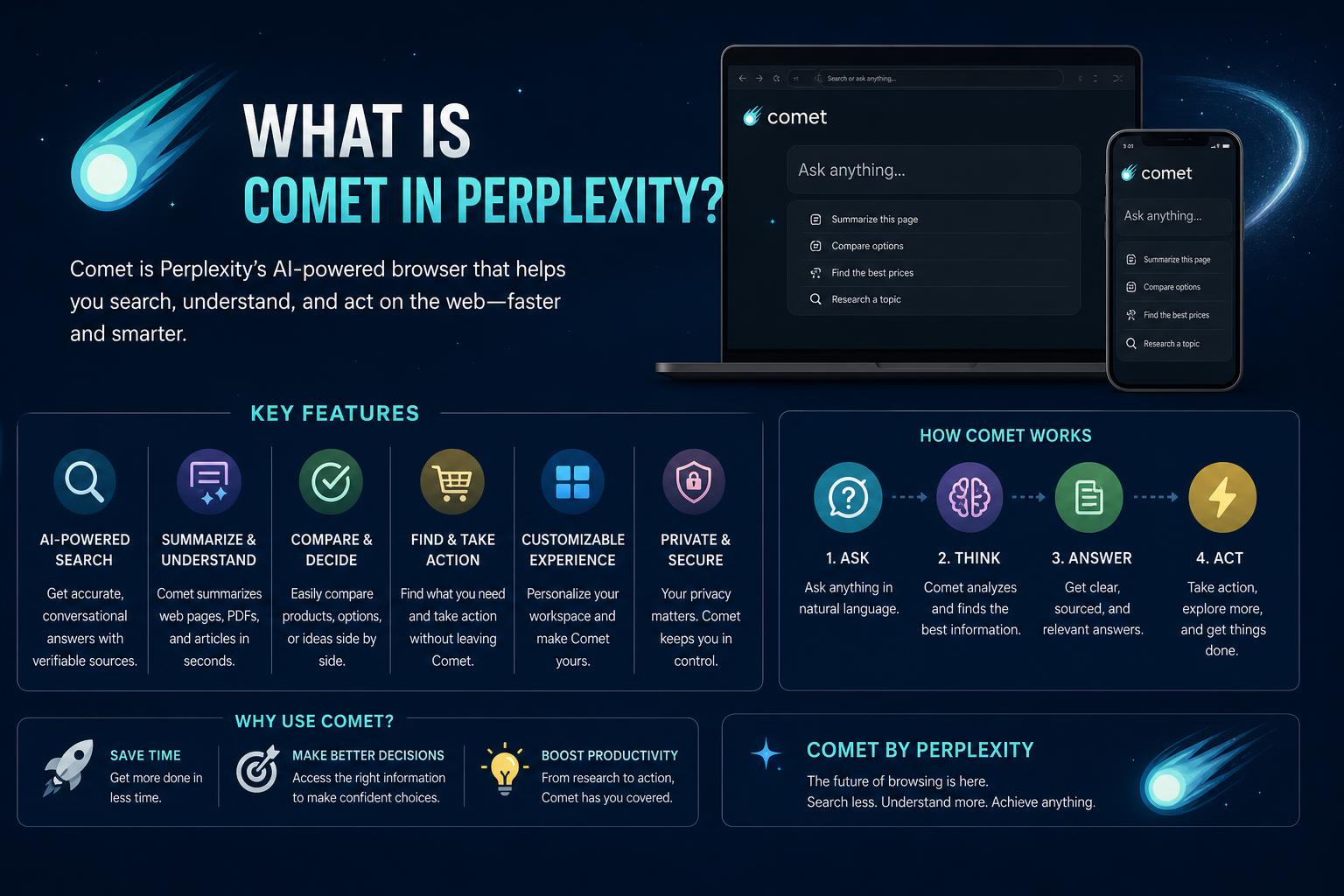
- Comet is Perplexity's Chromium-based browser, combining familiar web browsing and Chrome extension compatibility with an integrated AI assistant.
- Comet Assistant can analyze pages, compare tabs and perform supervised actions such as drafting emails, filling forms and organizing meetings.
- The browser is free to download on supported desktop and mobile platforms, but advanced agent usage and higher limits are linked to paid Perplexity plans.
- Its convenience comes with privacy and security considerations, so sensitive actions, permissions and AI-generated claims should be reviewed carefully.
Comet is an AI-powered web browser created by Perplexity AI. At first glance, it works much like Chrome, Edge or any other modern browser: you can open tabs, save bookmarks, install extensions and visit ordinary websites. Its defining feature is a built-in AI assistant that can understand the page being viewed, answer questions about it and, when permitted, perform actions on the user’s behalf.
The basic idea behind Comet is to turn browsing into an ongoing conversation rather than a sequence of disconnected searches and clicks. Instead of copying information into a separate chatbot, users can ask questions where those questions arise. The assistant can compare pages, summarize material, work across tabs and complete certain multi-step online tasks while preserving the context of the browsing session.
What exactly is Perplexity Comet?
Comet is a proprietary browser developed by Perplexity and built on the open-source Chromium project. Chromium also provides the technological foundation for Google Chrome, Microsoft Edge, Brave and several other browsers. Comet uses the Blink rendering engine, so websites generally display and behave in the same way they do in other Chromium-based applications.
The Ultimate Guide to Effectively Using Perplexity AI
Familiar browser components remain available in Comet. These include bookmarks, private browsing, page translation, password management, autofill and support for most extensions distributed through the Chrome Web Store. Extensions that replace or substantially alter the new-tab page may be an exception because Comet uses that area for its own search and AI experience.
Modern Chromium and Blink standards are supported under the hood. That includes HTML5, CSS, the Document Object Model, JavaScript, WebAssembly, local web storage, IndexedDB, WebGL and WebGPU. It also handles common internet technologies such as encrypted HTTP connections, cookies, certificate status checks, WebRTC and WebSockets. In practical terms, users should not need websites to produce a special Comet-compatible version.
Who created it and when was it released?
Perplexity AI created Comet, the San Francisco company best known for its citation-oriented answer engine. Perplexity introduced the desktop browser on July 9, 2025. Access was initially restricted to subscribers on the company’s most expensive Max tier, while people on a waiting list received invitations gradually.
The browser became a free download for the wider public on October 2, 2025. This changed Comet from an exclusive paid-tier experiment into a direct alternative to mainstream browsers. The browser itself can be downloaded without paying, although access to advanced assistant actions and the number of AI requests depend on the user’s Perplexity plan.
Mobile versions followed the desktop release. Comet arrived on Android on November 20, 2025, while wider iOS availability followed in March 2026, with March 18 commonly cited as the iOS release date. Available platform information also references visionOS support. There is no officially supported Linux or ChromeOS edition, despite Chromium itself being available on those systems.
How Comet Assistant works
Comet Assistant appears in a panel beside the active webpage, allowing users to continue browsing while the AI responds or works. On desktop, the panel can be opened with Option and A on a Mac or Alt and A on Windows. Because the assistant sits next to the content, there is less need to switch to another tab, paste a link or explain what is currently on the screen.
Questions about the visible page can be answered using its text, headings and relevant metadata. A user reading a long report could request a concise summary, ask for the principal argument, identify unfamiliar terms or request counterarguments. Highlighting a passage can also produce an immediate explanation without abandoning the original article.
Information from multiple tabs can be brought into one discussion. Users can mention another open tab with an @ reference, ask for several recently viewed pages to be summarized or compare products and claims across different websites. For example, it could compare the specifications and delivery conditions of the same bicycle across several stores while keeping the original product page open.
Browser-agent capabilities make Comet more ambitious than a tool that only generates text. With suitable access, the assistant can click interface elements, enter information, navigate through pages and complete multi-step workflows. Possible requests include filling out forms, finding a product, buying an item, arranging a meeting or drafting and sending an email. These actions should still be supervised, particularly when they involve purchases, messages, personal details or irreversible decisions.
Gmail and Google Calendar integration is available after the user connects those services. It may summarize an email conversation, prepare a proposed reply, review the calendar or create a briefing for an upcoming meeting. A morning request could ask it to review the day’s appointments and gather useful context for each participant or topic.
Natural-language history search lets users locate previously visited content. Instead of remembering the precise title or domain of a document visited weeks earlier, a user can describe its subject and ask Comet to locate it. The usefulness of this feature depends on the available history, account configuration and privacy settings.
From isolated searches to complete workflows
Perplexity positions Comet as a move from simple navigation toward context-aware computing. Traditional browsing often involves opening many tabs, moving between apps and repeatedly re-establishing context. Comet attempts to combine research, analysis and action in one continuous interaction so the user can express an objective rather than manually direct every click.
A research session can become conversational. Someone studying an unfamiliar technology could ask for a plain-English explanation, compare it with alternatives, identify weaknesses and then request additional sources. The assistant can explore related ideas while the initial page remains available, reducing the chance of losing the original thread.
Accuracy is central to how Perplexity presents the product. The company argues that reliable answers become even more important when AI systems begin making or assisting with decisions. Comparing insurance policies, evaluating an investment technology or choosing between expensive products requires more than persuasive wording; the underlying facts need to be checked. Users should nevertheless inspect sources and verify consequential claims rather than treating an AI response as infallible.
Questions that challenge assumptions are another intended use for Comet. It can be prompted to identify missing information, challenge assumptions, provide opposing views or suggest new directions for investigation. Over time, its memory and personalization features may adapt results to the user’s interests and established working patterns, depending on the account settings that have been enabled.
Practical uses for sales, marketing and everyday work
Website-based work is particularly suited to Comet. Sales representatives can ask it to examine a prospect’s site and produce a briefing for a call. Marketing teams can compare competitors’ pricing pages, summarize positioning and turn the findings into a structured set of notes.
- Prospect research: review a company’s website, extract relevant facts and create a concise preparation document.
- Meeting preparation: examine the next day’s calendar and gather background information for each appointment.
- Competitive analysis: compare features, claims or prices displayed across several open tabs.
- Email assistance: summarize long threads and draft replies based on the message and related webpage.
- Repetitive browser work: transfer information into web forms or carry out predictable sequences of clicks under supervision.
- Shopping research: locate equivalent products, compare shipping times and help move through a checkout process.
These functions extend beyond business use. Students can request explanations of difficult passages, consumers can compare policies or products and general users can condense lengthy articles. The advantage is not that each individual task is unprecedented, but that it can be performed without constantly moving information between the browser and a separate AI application.
How to download and start using Comet
The official download is available from the Comet website. After installing and opening the browser, users can sign in with a Perplexity account. Basic AI functions may be tried without an account, but signing in enables saved conversations, account synchronization and higher usage allowances where applicable.
Existing browser data can be imported to make the transition easier. Comet can transfer common items such as bookmarks, saved passwords, history and other browsing preferences from a supported browser. Users can then choose whether to make Comet the default application for web links through the browser prompt or the operating system’s default-app settings.
Automatic updates are normally installed when the browser is relaunched. A manual update check is also available through the About area in Settings or through an update control when one appears in the interface. Keeping the browser current is especially important because both Chromium vulnerabilities and AI-specific security problems may require patches.
Comet Sync can keep browsing information consistent across supported devices. Depending on configuration, bookmarks, passwords, history and open tabs can be shared between desktop and mobile installations. Anyone using synchronization should review what is being stored and decide whether the convenience is appropriate for the sensitivity of their activity.
Is Comet free, and what do paid plans add?
The browser itself is free to download, but not every AI-agent capability is unlimited or included in the free plan. Standard browsing and basic AI access do not necessarily require payment. Saved chats, synchronization, higher query allowances and agent actions are connected to the user’s Perplexity account and subscription level.
Free accounts have a smaller browser-agent allowance than paid subscribers. Pro and Education Pro plans include a monthly allocation of Comet Assistant agent requests, while Max offers the highest level of access. As of November 2026, Perplexity Pro is listed at $20 per month and Max at $200 per month, although prices and limits can change and should be confirmed on the official plan page before subscribing.
Ordinary AI questions differ from agent tasks. Asking for a summary is generally less demanding than requesting the assistant to navigate a website, type into fields and execute an entire process. The latter category is more likely to consume restricted agent usage and require a paid plan.
Supported devices and system requirements
Windows, macOS, Android and iOS are supported, with platform references also including visionOS. Desktop documentation lists Windows 10 and Windows 11 as supported. Some published sources describe macOS compatibility as Big Sur or newer, whereas more recent product guidance lists macOS 13 Ventura or later. Prospective users should check the current download page because requirements can tighten as the software evolves.
Android 12 or later is commonly listed as the minimum for the mobile release. iPhone and related Apple versions are associated with iOS 18 or later, while visionOS support is listed from version 2.0. Linux and ChromeOS users do not currently have an officially supported release.
Privacy, keychain access and security concerns
Operating-system keychain access may be requested during installation. This storage is used for website credentials, passwords, payment details needed for autofill, authentication tokens for connected services and encrypted information associated with intelligent browser features. Perplexity states that sensitive browser data is kept locally with encryption where applicable.
Agentic browsing creates additional security challenges beyond those found in a conventional browser. An assistant capable of reading pages, following instructions and interacting with authenticated services can potentially be manipulated by hostile content. Users should limit permissions, review proposed actions and avoid allowing an agent to complete sensitive transactions without confirmation.
LayerX Security reported CometJacking, an attack method, in 2025. According to the researchers, a malicious instruction could potentially cause sensitive personal information to be sent to an attacker-controlled server. LayerX said it attempted to disclose the issue to Perplexity in August 2025 and initially received a response indicating that the report was not considered to have a security impact.
Perplexity later stated that it had patched the vulnerability after independently identifying it. The episode illustrates why AI browsers need safeguards against prompt injection and malicious webpage instructions in addition to the protections expected from Chromium. It also reinforces the importance of automatic updates and careful oversight when an assistant has access to emails, calendars, credentials or browsing data.
Advantages and limitations to consider
Reduced friction between reading, asking and acting is Comet’s principal advantage. It can keep page context, work across tabs and complete selected browser tasks without requiring users to explain their situation from scratch. Compatibility with Chromium websites and most Chrome extensions also makes adoption easier than moving to an entirely unfamiliar browser ecosystem, including when comparing options for the best browser for Windows 11.
Cost, accuracy, privacy and reliability are its main limitations. Advanced agent usage may require a subscription, and even a capable assistant can misunderstand a request, overlook an important detail or interact incorrectly with a changing website. AI-generated analysis can contain errors, so legal, medical, financial and purchasing decisions still require independent checking.
How much context to share is another decision for users. Features based on history, connected email, calendars, passwords and synchronized activity are convenient precisely because they have access to valuable information. Reviewing permissions, disabling unnecessary integrations and supervising consequential actions are sensible habits.
Comet is a Chromium browser with Perplexity woven into the browsing experience rather than added as an afterthought. It offers familiar web compatibility alongside contextual questions, tab-aware research, natural-language history search and supervised agent actions. For people who regularly research, compare, email and organize information online, it can shorten complicated workflows, provided they remain conscious of plan limits, factual verification and the security implications of giving an AI assistant permission to act.